When Kylie Cosmetics launched her first Lip Kits, the brand sold out in under a minute. No crashes. No error messages. No frustrated customers staring at loading screens. This wasn't luck—it was Shopify Plus handling what would break most ecommerce platforms.
The difference between Shopify and Shopify Plus extends far beyond the ability to handle traffic spikes. While standard Shopify plans serve small to mid-size businesses beautifully, Shopify Plus was purpose-built for merchants operating at enterprise scale—typically those generating $80,000 or more per month in sales.
This guide is for you if you're:
- Approaching or exceeding $1 million in annual revenue
- Experiencing platform limitations during growth spurts
- Considering whether Plus justifies the investment
- Planning to launch wholesale/B2B alongside your DTC business
- Expanding internationally across multiple markets
- Looking to eliminate bottlenecks through advanced automation
What you'll learn in this comprehensive guide:
We'll break down the exact differences between Shopify and Shopify Plus, from pricing structures starting at $2,300 per month to exclusive features like B2B commerce, Shopify Functions, and checkout customization. You'll discover the operational and revenue indicators signaling it's time to upgrade, understand Plus-exclusive automation capabilities that can transform your operations, and see real examples from brands like MVMT, Brooklinen, and BlenderBottle that scaled successfully on Plus.
Whether you're on Shopify Basic, Shopify, or Advanced, this guide will help you determine if and when upgrading to Plus makes financial and operational sense for your business. Let's start by understanding what each platform offers and where they diverge.
TL;DR: there's a template for that
Understanding the platforms
Before diving into feature comparisons and pricing analysis, it's essential to understand what each platform offers at its core and who they're designed to serve.
What is Shopify?
Founded in 2006, Shopify began as a solution for small business owners who wanted to sell snowboarding equipment online but couldn't find an easy-to-use ecommerce platform. That founding principle—making ecommerce accessible to everyone—remains central to Shopify's standard plans today.
Shopify's core platform powers millions of businesses across 175 countries, processing billions in sales annually. The platform provides everything needed to launch and operate an online store: website hosting, payment processing, inventory management, order fulfillment tools, marketing features, and built-in analytics.
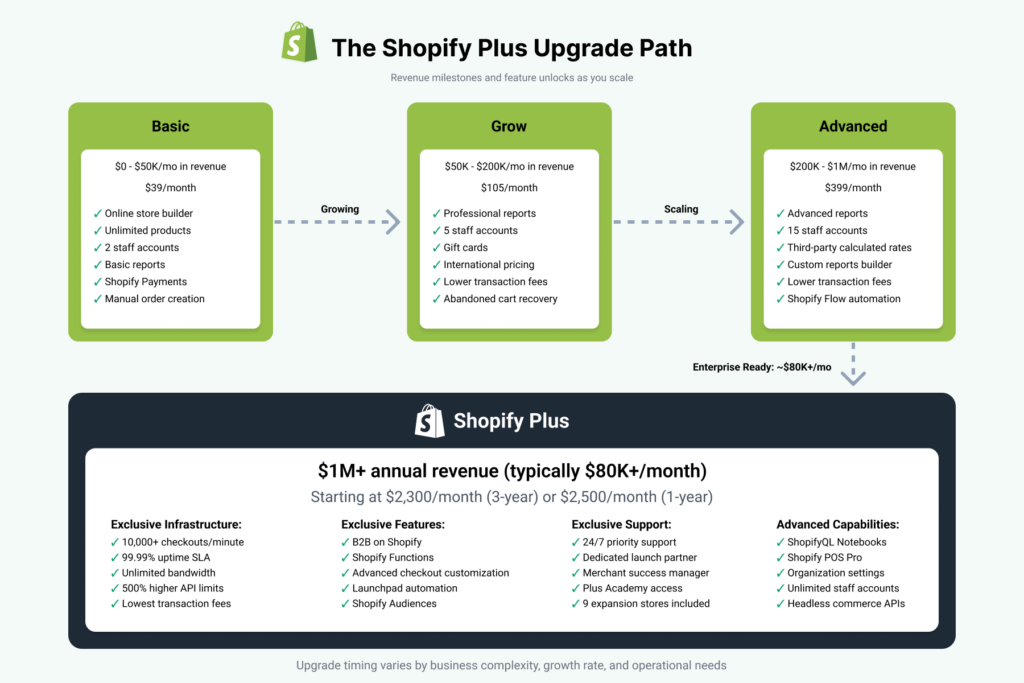
Standard Shopify pricing tiers include:
- Basic ($39/month): Essential features for new businesses
- Grow ($105/month): Core features for growing businesses
- Advanced ($399/month): Advanced reporting and third-party calculated shipping rates
Each tier offers the same fundamental capabilities—the differences lie in transaction fees, staff account limits, reporting depth, and available features. Standard plans work exceptionally well for businesses generating under $1 million in annual revenue, providing all the tools needed to build a professional online presence without technical complexity.
The platform's strength lies in its simplicity. Non-technical entrepreneurs can launch a store in hours, not months. Thousands of apps extend functionality, and customizable themes let you create a branded experience without hiring developers. For small to mid-size businesses, this balance of power and accessibility makes Shopify one of the leading ecommerce platforms globally.
What is Shopify Plus?
Shopify Plus launched in 2014 as Shopify's answer to enterprise merchants who needed industrial-strength infrastructure while maintaining the platform's famous ease of use. Think of it as Shopify's graduate program—built for businesses that have outgrown standard plans and need capabilities that match their complexity and scale.
Today, Plus powers over 10,000 high-growth merchants including household names like Heinz, Brooklinen, BlenderBottle, and Gymshark. These aren't just big brands—they're businesses managing complex operations across multiple channels, countries, and customer segments.
Key characteristics of Plus merchants:
- Generating significant revenue (typically $1M+ annually)
- Processing thousands of orders monthly
- Operating internationally with multiple storefronts
- Running both DTC and wholesale/B2B channels
- Requiring advanced customization and automation
- Managing large teams with specialized roles
Pricing structure:
Shopify Plus operates on a different pricing model than standard plans. The platform starts at $2,300 per month for a 3-year term or $2,500 per month for a 1-year term. For more complex, higher-volume businesses, Plus offers a variable platform fee based on gross merchandise volume and business structure.
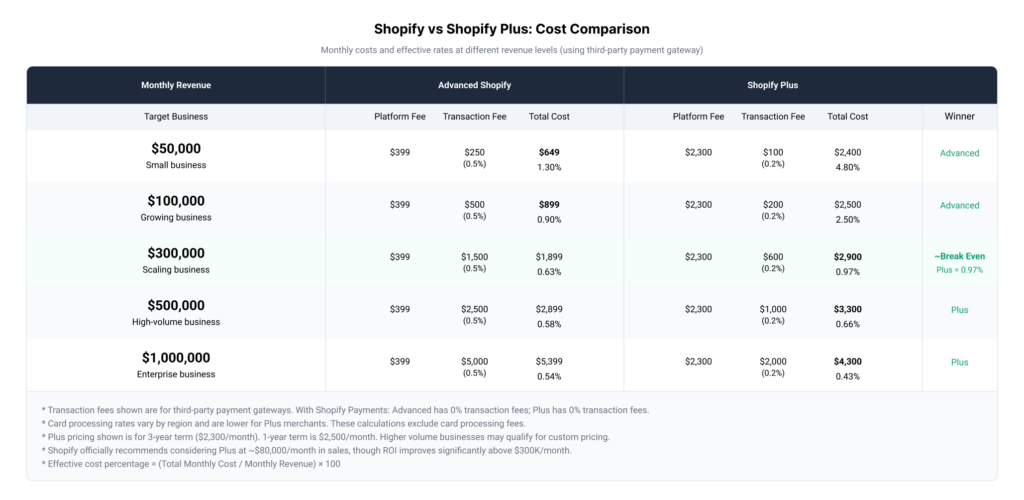
While the monthly cost is substantially higher than Advanced Shopify's $399, Plus becomes cost-effective quickly as your business scales. At $300,000 in monthly revenue, Plus represents approximately 1% of your gross sales—a fraction that decreases as you grow. Shopify officially recommends merchants consider upgrading when reaching around $80,000 in monthly sales.
What you get with Plus beyond standard Shopify:
The additional cost unlocks infrastructure designed for enterprise demands: unlimited bandwidth supporting 10,000+ checkouts per minute, 99.99% uptime guarantees during peak sales events, and API rate limits up to 500% higher than standard plans. You also gain access to exclusive tools like B2B commerce capabilities, advanced checkout customization, Shopify Functions for backend logic, and Launchpad for campaign automation.
Perhaps more valuable than the technical features is the human support. Plus merchants receive 24/7 priority support from specialists who understand high-volume operations, dedicated launch partners during migration, and ongoing merchant success managers who help optimize your setup.
The fundamental difference:
Standard Shopify plans are optimized for simplicity and getting started quickly. Shopify Plus is optimized for scale, complexity, and performance under pressure. Both run on the same core platform, ensuring you won't need to replatform as you grow—you're simply unlocking more capabilities as your needs evolve.
Understanding this distinction helps frame the upgrade decision: it's not about whether Shopify Plus is "better"—it's about whether your business has reached the point where Plus-exclusive capabilities become necessary rather than nice-to-have.
Key differences: Shopify vs Shopify Plus
The gap between standard Shopify plans and Shopify Plus extends far beyond pricing. Understanding these differences helps determine whether your business has reached the point where Plus capabilities become necessary rather than aspirational.
Infrastructure and performance
Scalability that handles viral moments
Standard Shopify plans handle typical ecommerce traffic well, but Plus was engineered for enterprise-level demands. The platform supports over 10,000 checkouts per minute with unlimited bandwidth—critical infrastructure when your product goes viral, you run flash sales, or Black Friday traffic surges unexpectedly.
This isn't theoretical capability. When Death Wish Coffee aired their Super Bowl commercial, their Shopify Plus store processed $2,083 per minute without a single moment of downtime. Standard plans would have buckled under that pressure.
Plus merchants also benefit from 99.99% uptime guarantees during peak sales events—the difference between capturing every sale and watching frustrated customers abandon carts due to performance issues.
API rate limits for complex integrations
Standard Shopify plans impose API rate limits that suffice for basic integrations. Plus increases these limits by up to 500%, essential for merchants running complex automation workflows, custom integrations with ERP systems, or high-frequency inventory syncing across multiple channels.
Plus-exclusive features
Advanced checkout customization
Perhaps the most valuable Plus feature is complete control over your checkout experience. While standard plans offer limited checkout modifications, Plus merchants can fully customize checkout pages including Shop Pay integration, shipping pages, and payment pages using the drag-and-drop checkout editor.
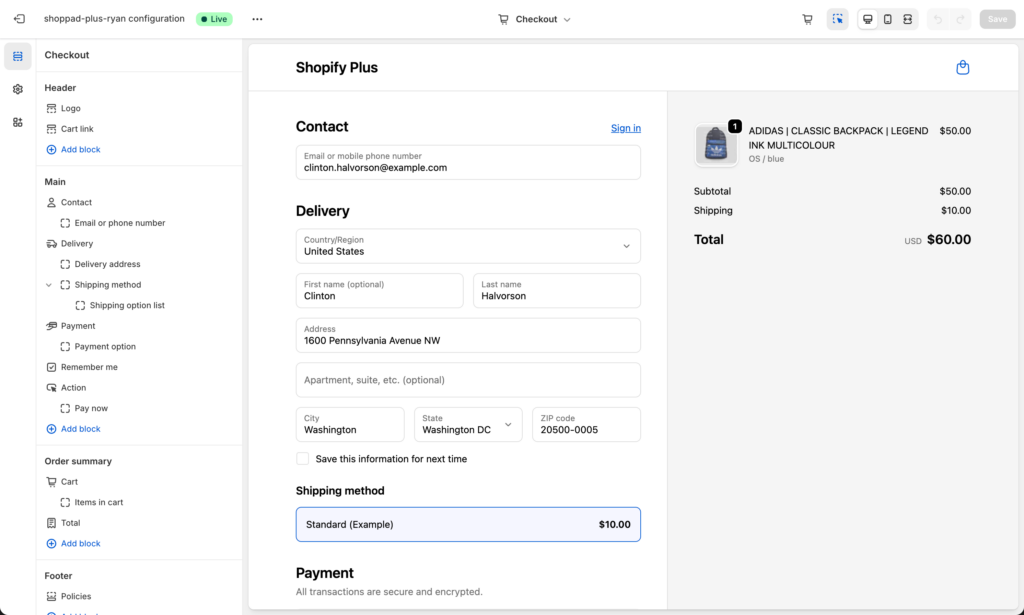
This enables A/B testing different checkout layouts, adding custom fields for gift messages or delivery instructions, implementing upsells at the payment stage, and creating branded experiences that maintain consistency throughout the customer journey. For high-converting brands, even small checkout improvements can generate millions in additional revenue.
Shopify Functions: The modern customization engine
Shopify Functions lets you customize backend logic for discounts, shipping, payments, and checkout validation through apps rather than code. This modern system replaces Script Editor, which is being removed June 30, 2026.
As a Plus merchant, you install Function-based apps from the Shopify App Store that provide ready-made customizations. Configure your business rules through simple interfaces—no coding required on your end. Common capabilities include advanced discount rules matching loyalty programs, custom shipping calculations based on product attributes, payment method visibility by customer segment, and checkout validation preventing order errors.
For unique requirements beyond available apps, developers can build custom Functions using Shopify CLI. These custom Functions deploy as private apps, offering unlimited customization while maintaining the same app-based configuration interface for your team. The result: complex business logic without technical staff needing to touch code.
B2B on Shopify
One of Plus's most significant differentiators is native B2B commerce capabilities. Run wholesale and direct-to-consumer operations from a single platform, eliminating the need for separate systems or manual wholesale management.
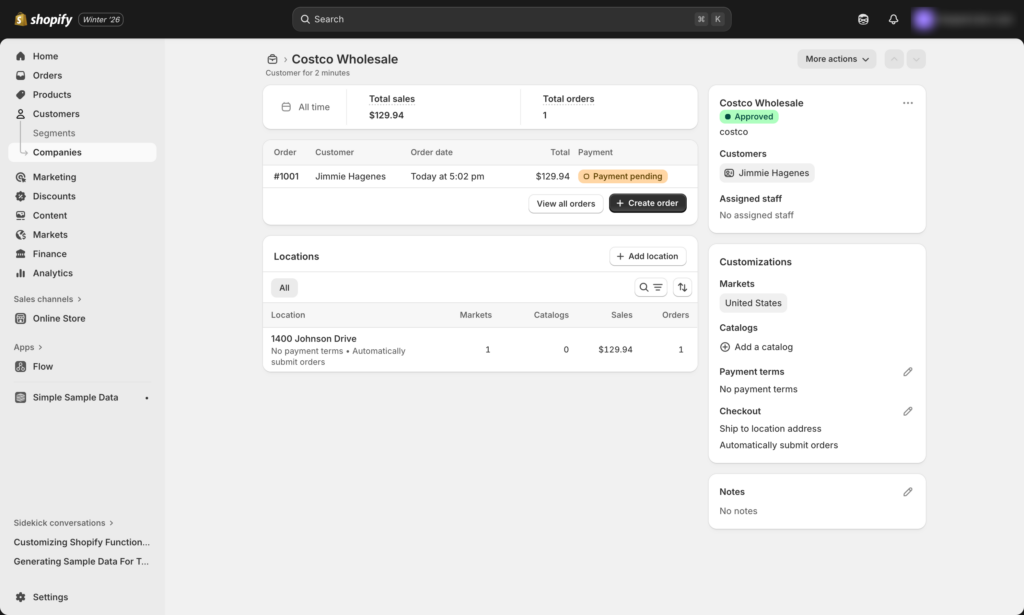
B2B features include customized pricing by customer or company, quantity rules and bulk ordering interfaces, payment terms and net payment options, separate product catalogs for wholesale buyers, and automated approval workflows for B2B customers. Brands like Brooklinen credited B2B on Shopify with eliminating their manual, time-consuming wholesale processes.
Launchpad for campaign automation
Launchpad automates time-sensitive campaigns and product launches. Schedule theme changes for seasonal campaigns, product visibility and release timing, discount activation and deactivation, and script (now Functions) deployment—all with precise scheduling down to the minute.
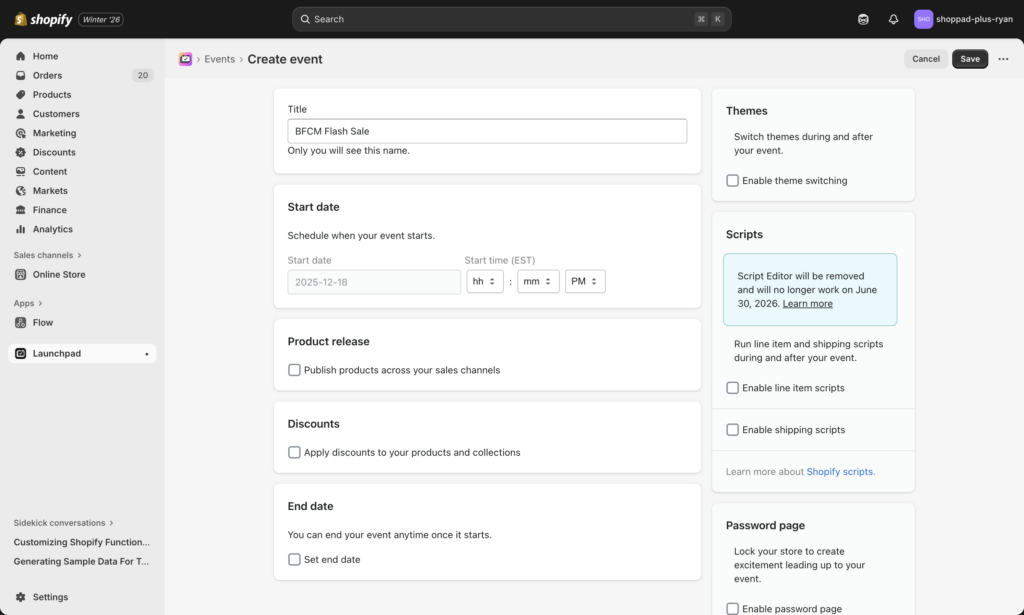
This automation prevents the 2am launches required to coordinate flash sales across time zones and eliminates human error during high-stakes promotional events.
Shopify Audiences for reduced acquisition costs
Shopify Audiences leverages Shopify's network of 150M+ Shop app buyers to create custom audience lists for advertising platforms. Merchants using Audiences have reported reducing customer acquisition costs by up to 50% on Meta, Google, TikTok, and Pinterest.
The platform uses Shopify's commerce insights to identify high-intent buyers across the entire Shopify ecosystem, providing targeting advantages unavailable to non-Plus merchants.
ShopifyQL Notebooks for data analysis
Plus merchants access ShopifyQL Notebooks, an intelligent query language for commerce data. Build custom reports without third-party tools, visualize growth trends and product performance, analyze customer segments and purchasing patterns, and export data for presentations or deeper analysis.
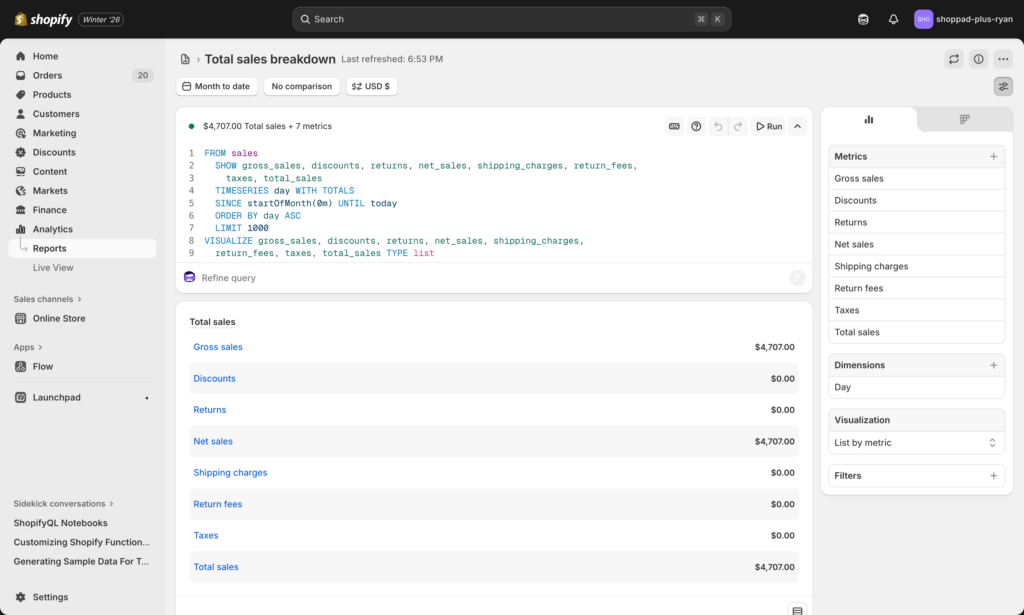
Additional Plus-exclusive capabilities
- Shopify POS Pro: Enterprise point-of-sale for omnichannel retail operations
- Organization settings: Manage multiple stores from one dashboard with unlimited staff accounts
- Expansion stores: Nine free expansion stores included for market-specific storefronts
- Headless commerce APIs: Build custom frontends while leveraging Shopify's backend infrastructure
Support and services
Standard Shopify plans offer community forums, help documentation, and email support. Plus merchants receive enterprise-grade support: 24/7 priority support from specialists understanding high-volume operations, dedicated launch partners during migration, ongoing merchant success managers for optimization, access to Shopify Plus Academy courses, and Plus Community networking with other high-growth brands.
Plus merchants also gain access to premier systems integrators including IBM, Accenture, Deloitte, and KPMG for complex implementations.
Transaction fees and costs
Transaction fees create significant cost differences as you scale. When using third-party payment gateways, Advanced Shopify charges 0.5% per transaction while Plus charges only 0.2%—a difference that compounds quickly at volume.
At $300,000 in monthly revenue, this 0.3% difference saves $900 monthly, nearly offsetting Plus's additional platform cost. With Shopify Payments, both plans eliminate transaction fees entirely, but Plus merchants receive the lowest card processing rates available on Shopify.
Integration ecosystem advantages
Plus merchants access pre-built integrations with enterprise systems often unavailable or limited on standard plans. This includes ERP systems like NetSuite, SAP, and Odoo, warehouse management systems and 3PLs, CRM platforms with deep customization, AvaTax by Avalara included at no extra cost, and Fraud Protect powered by Shopify's machine learning.
The platform's flexible APIs and higher rate limits enable custom integrations matching your exact business requirements without platform constraints forcing compromises.
The fundamental distinction
Every difference above serves one purpose: removing platform limitations as your business scales. Standard Shopify plans optimize for getting started quickly. Shopify Plus optimizes for operating at enterprise complexity without enterprise-level technical overhead. You maintain the same easy-to-use admin interface while gaining capabilities that previously required custom-built platforms costing millions to develop and maintain.
When to upgrade to Shopify Plus
The upgrade decision isn't solely about revenue—it's about the intersection of sales volume, operational complexity, and growth trajectory. Understanding when your business has reached the tipping point helps you avoid outgrowing your platform's capabilities.
Revenue and growth indicators
Shopify officially recommends merchants consider upgrading when reaching approximately $80,000 in monthly sales, though individual needs vary based on business complexity. This threshold reflects the point where Plus's capabilities typically justify the investment.
Shopify Plus Calculator:
Is Shopify Plus Right for You?
Calculate your costs and see if you're ready to upgrade
The financial math becomes compelling as you scale. At $300,000 in monthly revenue, Plus represents approximately 1% of your gross sales when accounting for the lower transaction fees.
Beyond the official recommendation, watch for these revenue patterns signaling readiness:
- Consistently exceeding $1 million in annual revenue
- Monthly sales growth trending toward six figures
- Planning initiatives expected to double or triple current volume
- Seasonal peaks that strain your current infrastructure
The cost difference narrows significantly at scale. While Plus starts at $2,300 monthly compared to Advanced Shopify's $399, the lower transaction fees (0.2% vs 0.5% with third-party gateways) create meaningful savings as transaction volume increases.
Operational indicators signaling upgrade readiness
Scale and performance challenges
If you're experiencing site slowdowns during traffic spikes, Plus's infrastructure becomes essential rather than optional. The platform handles over 10,000 checkouts per minute with unlimited bandwidth—critical when planning major marketing campaigns, product drops, or Black Friday promotions.
Ask yourself: Would a viral moment or successful campaign crash your site? If the answer is "possibly," you've outgrown standard infrastructure.
Team and workflow bottlenecks
One of the clearest indicators is when your marketing team constantly waits for IT or developers to make routine platform changes. Plus removes these bottlenecks, giving teams autonomy while maintaining necessary controls.
Common team friction points indicating readiness:
- Multiple departments needing simultaneous platform access
- Non-technical staff unable to implement business rules
- Manual processes limiting your ability to scale operations
- Dependence on developers for routine updates
Checkout and conversion needs
Standard Shopify offers limited checkout customization, which becomes restrictive as your conversion optimization needs grow. Plus unlocks complete checkout control through the drag-and-drop editor, enabling A/B testing different layouts, adding custom fields for specific use cases, implementing strategic upsells at payment, and creating branded experiences matching your customer journey.
If checkout optimization could meaningfully impact your bottom line, Plus provides the tools standard plans don't offer.
International and multi-channel expansion
Launching in multiple countries with localized currencies and languages requires Plus's expansion store capabilities. The platform includes nine free expansion stores for market-specific storefronts, all managed from a single dashboard.
Similarly, if you're adding wholesale or B2B alongside DTC, Plus's native B2B commerce eliminates the need for separate systems or complex workarounds.
Integration and automation requirements
As businesses scale, they typically need deeper integrations with enterprise systems. Plus provides pre-built connections with ERP platforms (NetSuite, SAP, Odoo), warehouse management systems, advanced CRM capabilities, and significantly higher API rate limits (up to 500% higher) enabling complex automation workflows.
If you're hitting API limits, requiring ERP integration, or finding standard automation insufficient, these technical constraints signal readiness for Plus.
Automation and customization for Plus merchants
Shopify Plus removes platform limitations that restrict automation and customization on standard plans. The combination of exclusive tools and deeper integrations transforms how high-volume merchants operate, eliminating manual bottlenecks that prevent scaling.
Shopify Functions: App-based customization
Shopify Functions lets you customize backend logic for discounts, shipping, payments, and checkout validation. Unlike the deprecated Script Editor (being removed June 30, 2026), Functions are distributed as ready-to-install apps requiring no coding on your end.
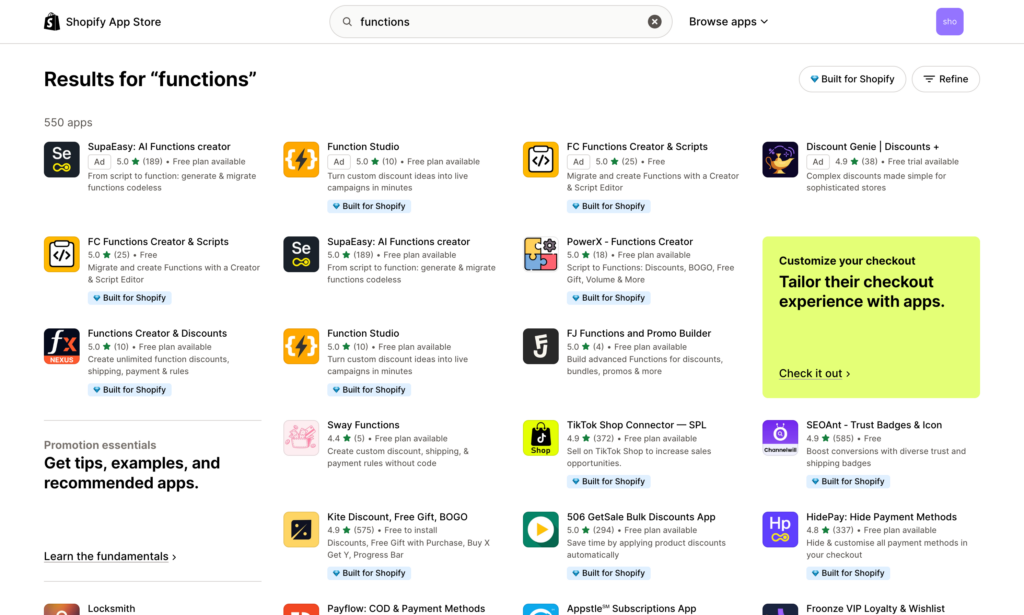
Visit the Shopify App Store and search for Function-based apps that match your business rules. Install the app, configure your requirements through simple interfaces, and the Function handles the complex logic automatically. Common capabilities include tiered pricing by customer segment, volume-based discount rules, custom shipping calculations based on product weight or destination, payment method visibility controls, and checkout validation preventing order errors.
For merchants with unique requirements unavailable in existing apps, developers can build custom Functions and deploy them as private apps—but the vast majority of use cases are covered by pre-built solutions.
Launchpad: Campaign automation
Launchpad automates time-sensitive campaigns and product launches with precision scheduling. No more setting alarms for 2am launches or manually updating your store during flash sales.
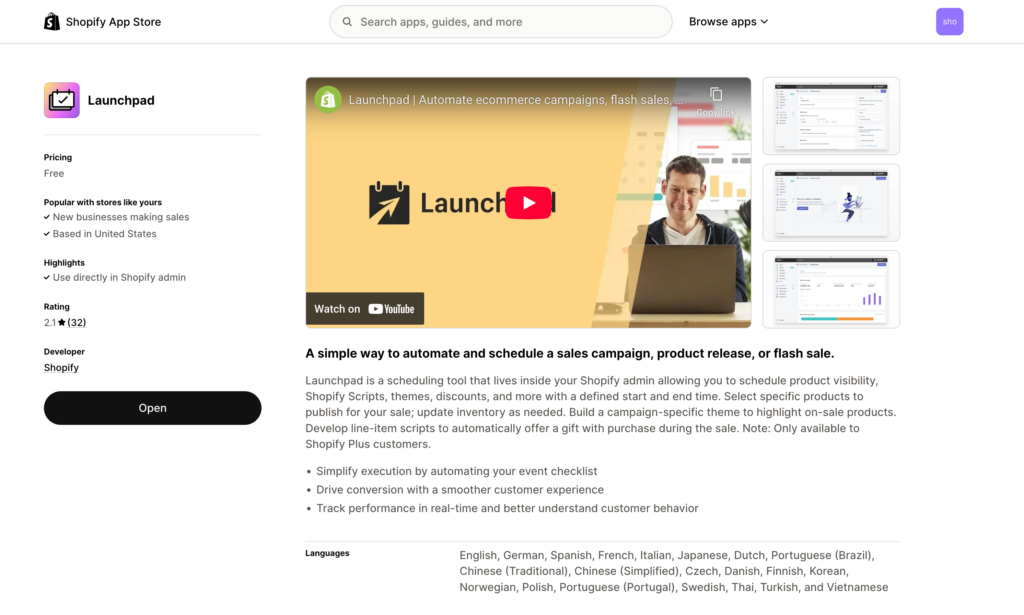
Schedule theme changes for seasonal campaigns, product visibility and release timing, discount activation and deactivation, and inventory updates coordinated with marketing—all automated down to the minute. Launchpad includes real-time analytics during launches, letting you monitor performance as campaigns unfold without refreshing reports.
This automation prevents human error during high-stakes promotional events and ensures global campaigns launch simultaneously across time zones. For brands running frequent product drops or flash sales, Launchpad transforms what previously required manual coordination into set-and-forget automation.
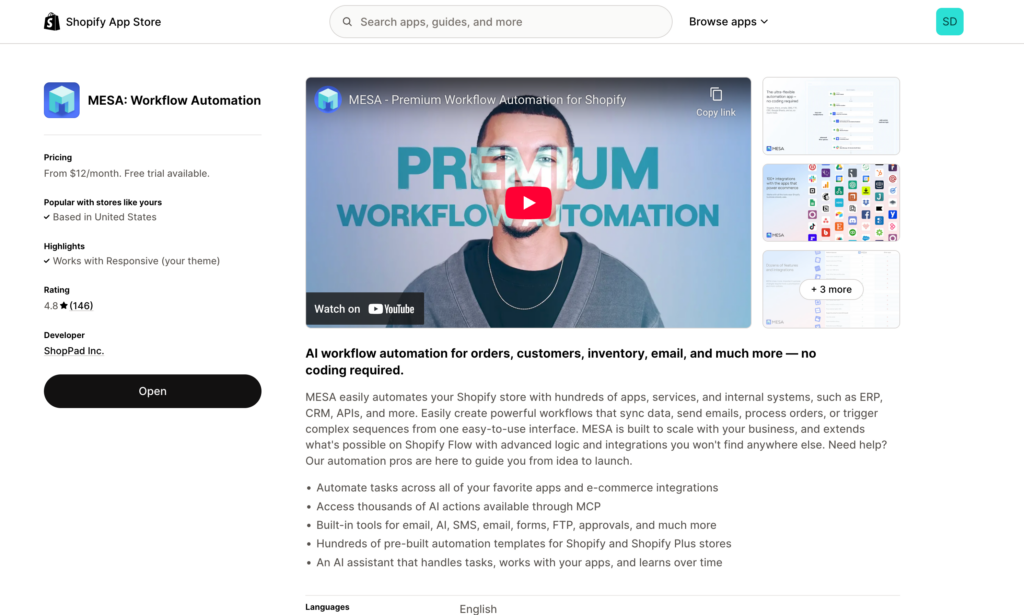
Advanced workflow automation with MESA
While Shopify Flow is now available on all plans, Plus merchants benefit from higher API limits and the ability to build more complex workflows spanning multiple systems. MESA specializes in these enterprise-level automation needs.
Order management workflows
Automate order routing based on complex business rules. Tag high-value orders for VIP processing, route wholesale orders to separate fulfillment centers, flag risky orders for manual review before processing, and send order data directly to ERP systems like Odoo, NetSuite, or SAP. When GLDN Jewelry integrated MESA with their Odoo ERP, they reduced order processing time by 85%, freeing their team to focus on customer experience during peak seasons.
Inventory intelligence
Stop stockouts before they happen with automated inventory monitoring. Send low stock alerts to Slack channels when products hit reorder points, automatically pause Facebook Ads campaigns when inventory runs low, notify vendors with automated purchase order requests, and sync inventory levels across multiple sales channels in real-time. These workflows prevent lost sales from overselling while eliminating manual inventory checks.
Customer experience automation
Build sophisticated customer engagement without additional staff. Collect post-purchase feedback automatically with MESA Forms, identify and tag VIP customers based on lifetime spending thresholds, send personalized thank you campaigns triggered by purchase milestones, and escalate negative support tickets to management channels. The goal is creating white-glove experiences at scale that would be impossible to maintain manually.
B2B and wholesale workflows
Plus's native B2B capabilities become even more powerful with automation. Route B2B orders to dedicated fulfillment systems, apply customer-specific pricing automatically, send bulk order confirmations with custom invoicing, sync wholesale orders with accounting platforms, and create approval workflows for large purchases. These automations eliminate the manual processes that traditionally made wholesale operations time-consuming to scale.
Marketing and audience segmentation
Turn customer data into automated marketing actions. Add new customers to Mailchimp lists automatically based on purchase behavior, segment customers for targeted campaigns using purchase history, track negative reviews in centralized dashboards for rapid response, create custom audiences for Facebook Ads based on specific product purchases, and export campaign performance data to Google Sheets for reporting. Marketing teams gain the ability to execute sophisticated segmentation strategies without manual data exports.
ERP system integrations
Connect financial, inventory, and order management in one system. Popular integrations include Odoo for open-source business management, NetSuite for cloud-based ERP covering financials and CRM, SAP for enterprise resource planning at scale, and Microsoft Dynamics for integrated business applications. Real-time synchronization ensures your ERP always reflects current store data without manual exports.
Warehouse and fulfillment
Automate order routing and tracking with 3PL integrations. ShipStation handles multi-carrier shipping decisions, ShipBob provides fulfillment network access, ShipMonk offers 3PL with built-in automation, and custom warehouse systems connect via flexible APIs. Orders flow automatically from checkout to fulfillment without manual intervention, and tracking updates sync back to customer accounts.
CRM and marketing platforms
Maintain unified customer data across systems. Salesforce provides enterprise CRM with deep customization options, HubSpot integrates marketing, sales, and service platforms, Klaviyo offers email marketing with advanced segmentation, and Omnisend enables omnichannel marketing automation. Customer data captured at checkout becomes immediately available for marketing campaigns and support interactions.
The automation advantage
The key isn't automating everything—it's automating the repetitive, high-volume tasks that don't require human judgment. This frees your team to focus on activities that actually grow the business: optimizing conversion rates, developing new products, building customer relationships, and expanding into new markets.
For merchants operating at scale, automation transforms from a productivity enhancement into a competitive necessity. Your competitors are automating; the question is whether you'll match their operational efficiency or fall behind while managing processes manually.
Getting started with Plus
The upgrade process from standard Shopify to Plus typically takes 2-3 months from decision to launch, though the platform transition itself happens in 24 hours.
Initial steps
Contact Shopify's Plus sales team directly through the official upgrade page or request a consultation through your Shopify admin. You'll receive a dedicated Plus representative who guides you through pricing, contract terms (1-year vs 3-year), and technical requirements specific to your store.
The onboarding process begins with Shopify's Jumpstart program—a structured setup covering migration planning, platform familiarization, and access to Plus Academy training resources. Your merchant success manager coordinates timeline expectations and connects you with launch partners if custom development is needed.
Migration essentials
Your store data, products, customers, and order history transfer automatically during the 24-hour upgrade window. The transition happens behind the scenes with minimal disruption to live operations. Schedule upgrades during low-traffic periods to minimize any potential impact.
Critical pre-migration tasks include auditing current apps for Plus compatibility (most work seamlessly, some require upgrades), documenting custom code and theme modifications for review, planning Script Editor replacement if applicable (remember the June 30, 2026 deadline), and coordinating with your development team if custom integrations exist.
Post-upgrade priorities
Once live on Plus, focus on quick wins before tackling complex customizations. Enable checkout customization for brand consistency, configure B2B settings if relevant to your business, set up Launchpad for your next campaign or product launch, and explore Shopify Functions apps addressing immediate business needs.
Most merchants begin seeing operational benefits within 30 days as they implement Plus-exclusive features incrementally rather than attempting wholesale transformation immediately. The platform grows with you—start with foundational improvements, then expand into advanced automation and customization as your team gains familiarity.
Your merchant success manager remains available throughout this process, providing guidance on feature adoption, optimization recommendations, and access to technical support resources unavailable on standard plans.
Conclusion
Shopify Plus transforms your store from a retail platform into an enterprise commerce engine. The decision ultimately reduces to three factors: revenue scale, operational complexity, and growth trajectory.
If you're consistently generating $80,000+ monthly and experiencing platform limitations—checkout restrictions, performance bottlenecks, manual processes consuming team bandwidth—Plus addresses these constraints while positioning you for continued scaling. The 99.99% uptime, unlimited bandwidth, and infrastructure handling 10,000+ checkouts per minute ensure your platform never becomes your limitation.
The premium isn't just infrastructure. B2B capabilities open wholesale channels without separate systems. Checkout customization converts more browsers into buyers. Launchpad eliminates 3am launch stress. Advanced automation through tools like MESA redirects operational hours toward strategic growth rather than manual order processing.
Calculate whether Plus represents less than 1.5% of monthly revenue. Review whether Plus-exclusive features solve current pain points or enable planned expansion. Consult with Shopify's Plus team to understand your specific upgrade path and timeline.
Your store's growth trajectory matters more than current revenue alone. If you're scaling toward eight figures, transitioning to Plus now prevents the painful mid-growth migration when you're simultaneously managing rapid expansion and platform limitations. The infrastructure you build today determines how smoothly you scale tomorrow.
Frequently asked questions
What is the difference between Shopify and Shopify Plus?
Shopify Plus is the enterprise version offering unlimited bandwidth, 99.99% uptime, 10,000+ checkouts per minute, and exclusive features unavailable on standard plans: B2B functionality, advanced checkout customization, Shopify Functions, Launchpad automation, and 9 free expansion stores. Plus costs $2,300-$2,500/month versus $39-$399/month for standard plans. You also receive dedicated merchant success managers, priority 24/7 support, and access to launch partners for custom development.
How much does Shopify Plus cost in 2026?
Shopify Plus costs $2,300/month on a 3-year contract or $2,500/month on a 1-year contract. Transaction fees are 0% with Shopify Payments or 0.2% with third-party gateways (versus 0.5% on Advanced Shopify). At $300,000 monthly revenue, Plus represents approximately 1% of revenue. The platform includes AvaTax by Avalara, Fraud Protect, and nine expansion stores at no additional cost. Custom enterprise pricing is available for brands exceeding $10 million monthly revenue.
When should I upgrade to Shopify Plus?
Upgrade to Shopify Plus when you consistently reach $80,000+ monthly revenue—Shopify's official recommendation threshold. Other indicators include experiencing performance issues during traffic spikes, needing checkout customization, requiring B2B functionality, expanding internationally across multiple stores, or spending excessive time on manual operational tasks. Calculate whether Plus represents less than 1.5% of monthly revenue. If you're on Advanced Shopify with third-party gateways, Plus may cost less due to lower transaction fees.
Is Shopify Plus worth it for small businesses?
Shopify Plus is typically not worth it for businesses under $50,000 monthly revenue. At that scale, Plus represents 4-5% of revenue—too high for most profit margins. The platform targets businesses doing $1+ million annually who need enterprise infrastructure, B2B capabilities, or advanced customization unavailable on standard plans. Small businesses benefit more from investing the $2,300+ monthly Plus cost into marketing, inventory, or team growth until reaching the recommended $80,000+ monthly threshold.
Can I try Shopify Plus before committing?
Shopify Plus does not offer a free trial period. Contact Shopify's Plus sales team through the official upgrade page for a demo and consultation with a dedicated representative. They'll review your specific requirements, provide pricing details, and demonstrate Plus-exclusive features relevant to your business. You can explore Plus features through case studies, documentation, and the Plus Academy before committing. Contracts are available in 1-year or 3-year terms.
How long does it take to migrate to Shopify Plus?
The actual platform upgrade takes 24 hours—your store data, products, customers, and orders transfer automatically. However, the complete transition process typically requires 2-3 months from decision to optimized launch. This includes onboarding with your merchant success manager, Jumpstart program training, app compatibility review, custom development if needed, and team familiarization with Plus features. Schedule the 24-hour technical migration during low-traffic periods to minimize disruption to live operations.
Do I need a developer to use Shopify Plus?
You don't need a developer for basic Shopify Plus functionality—checkout customization, B2B setup, and Launchpad use admin interfaces. However, advanced customizations benefit from developer expertise: custom Shopify Functions beyond App Store options, theme modifications, complex automation workflows, and third-party system integrations. Shopify provides launch partners (certified development agencies) through your merchant success manager if custom work is required. Many merchants operate Plus successfully without developers by leveraging pre-built apps and features.
What happens to my data when I upgrade to Plus?
All your data transfers automatically during the upgrade: products, variants, inventory levels, customer accounts, order history, blog content, pages, and redirects. Your existing theme, apps, and custom code remain intact. The upgrade occurs in approximately 24 hours with minimal store disruption. Review apps for Plus compatibility beforehand—most work seamlessly, though some may require updates. Your store URL, domain, and SEO rankings remain unchanged. Backup your data before migration as standard practice.
Can I downgrade from Shopify Plus?
You cannot downgrade from Shopify Plus to standard Shopify plans (Basic, Shopify, Advanced). Plus operates on annual contracts (1-year or 3-year terms) with no mid-contract downgrades. At contract renewal, you could choose not to renew, but this requires migrating to a different platform entirely rather than reverting to standard Shopify. Carefully evaluate whether your business justifies the Plus investment before upgrading, as it represents a forward-only commitment during your contract term.
Does Shopify Plus have transaction fees?
Shopify Plus charges 0% transaction fees when using Shopify Payments. With third-party payment gateways (Stripe, PayPal, Authorize.net), Plus charges 0.2% transaction fees—the lowest rate across all Shopify plans. Advanced Shopify charges 0.5% with third-party gateways. At high transaction volumes, this 0.3% difference significantly impacts costs. For example, $300,000 monthly revenue saves $900/month in transaction fees on Plus versus Advanced Shopify when using third-party gateways, making Plus cost-neutral or cheaper in many scenarios.
