🚀 September was about making MESA's AI assistant more hands-on and bringing the template library up to date. The MESA AI assistant can now set up and change Google Sheets for you while it builds a workflow, and the 19 most-installed Shopify templates now run on our improved Shopify connector.
Here's everything new with MESA this month:
📊 The MESA AI assistant can now work in Google Sheets
A lot of MESA workflows end in a spreadsheet, and getting that sheet ready used to be on you. Now, once you've connected a Google Sheets account, the MESA AI assistant can do that part itself while it builds the workflow. It can:
Create a new spreadsheet
Read a spreadsheet's details, like its title and the sheets inside it
Add a new sheet to an existing spreadsheet
Read the columns of a sheet
Query the rows of a sheet
Set or add columns on a sheet
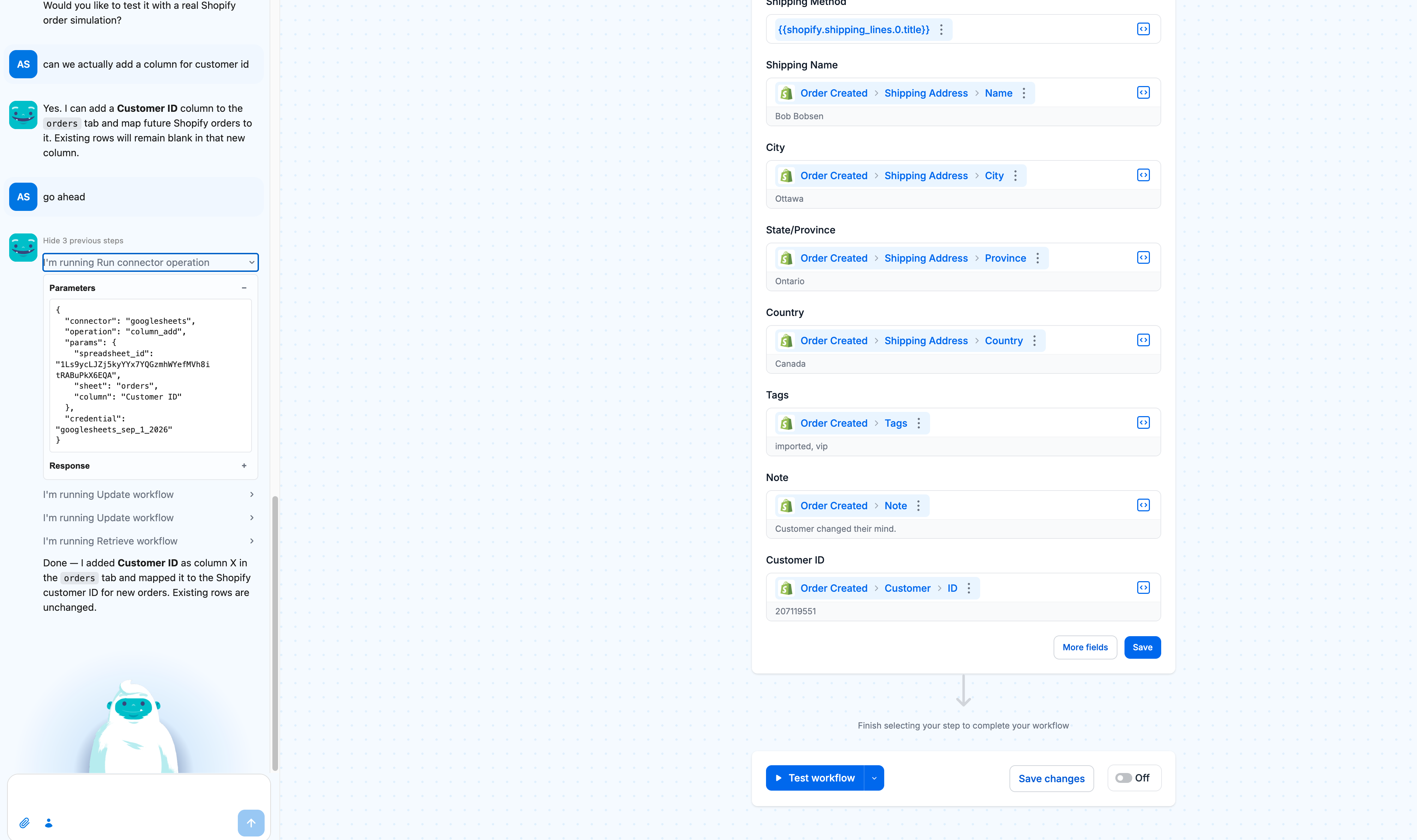
In practice, that means you can paste a spreadsheet link and ask for a change in plain words. Ask for a new Customer ID column on your orders tab, and the assistant adds the column, maps the Shopify field to it, and tells you that rows already in the sheet stay as they are. Getting started and testing a new workflow both go quicker when nobody has to switch tabs to fix a header row.
The assistant only does this on a store with a valid Google Sheets credential connected, so it works with the account you've already authorized.
💬 Live chat now runs on the MESA AI assistant
Live chat inside MESA is now handled by the MESA AI assistant, the same assistant that builds and tests your workflows. Questions and workflow building now happen in one place.
🛍️ The top 19 Shopify templates are now leaner and cheaper to run
In July we improved MESA's Shopify connector to use Shopify's GraphQL Admin API instead of its older REST API. GraphQL can fetch exactly the data a workflow needs in a single request, so the same job takes fewer steps, and fewer steps mean cheaper runs for you. This month we updated the 19 most-installed Shopify templates from the past 12 months to use it. Install any of them today and you get the leaner version from the start, and every template page has been updated to match.
Here's the full list:
Send Shopify Orders to Google Sheets Keeping up with order data shouldn't mean downloading CSVs or copying rows by hand. Every time a new Shopify order comes in, this workflow logs each product from that order into a Google Sheets spreadsheet automatically — customer info, shipping details, SKUs, prices, and a direct link back to the order in Shopify. Your records stay current without you touching a thing.
Export Shopify Product Options to Google SheetsKeeping up with custom orders means tracking a lot of moving parts — what was selected, who ordered it, and where it's going. When that happens manually, things slip through. This workflow sends every Infinite Options order straight to Google Sheets the moment it's placed, creating one row per line item with all the product, option, and shipping details you need to stay on top of production and fulfillment without the copy-paste.
Write Shopify Product Descriptions with AI Eliminate writer’s block and save time with AI-powered product descriptions for your Shopify store. This MESA workflow, driven by ChatGPT, automatically generates unique and engaging descriptions whenever new products are added. Ideal for busy store owners, it creates high-quality content that showcases product features, captures attention, and drives conversions—all without the manual effort.
Retrieve Shopify Order Line Items with Infinite Options PropertiesAutomatically retrieve Shopify Order line items that match a user's Infinite options fields properties (line item properties) when an MCP workflow is triggered. This template starts with the MCP tool and pulls Shopify Order line items that have Infinite Option fields. Creates a digestible output for each order line and its properties. Note the required parameters for this template: created_at_max.
Update Shopify Inventory from CSV Files On Your FTP ServerManually updating inventory from supplier spreadsheets is tedious and error-prone — and falling behind means overselling products you don't actually have. This workflow watches your FTP server for CSV files and automatically syncs inventory quantities to the right Shopify variants by SKU, on an hourly schedule. No copying, no pasting, no catching up. Just accurate stock counts without the manual work.
Add Product Options to Shopify Order NotesMake product options easily accessible by automatically adding them to the order notes field in Shopify. This MESA workflow copies customizations or selections directly into order notes, ensuring third-party services and team members can quickly access important details. Streamline order tracking and fulfillment by consolidating essential information in one central location.
Daily Shopify Order AnalysisGet a complete breakdown of your Shopify orders delivered to your inbox every day. This workflow analyzes yesterday's sales data and sends you key metrics like total revenue, order count, top-selling products, and customer insights. Perfect for store owners who want to start each day knowing exactly how their business performed without manually digging through reports.
Auto-Generate SEO Meta Titles & Descriptions for New Shopify ProductsEnsure SEO consistency and attract more organic traffic by automatically generating optimized Meta Title and Description metafields for new Shopify products. This MESA workflow template writes search-friendly, brand-aligned metadata for each new product, increasing visibility on search engines and eliminating the risk of incomplete listings. Improve your store’s reach effortlessly with fully optimized product metadata.
Create Shopify Products from Google Sheets RowsStreamline product creation in Shopify by adding new products directly from Google Sheets. This MESA workflow template automatically generates a new product in Shopify whenever a row is added to your Google Sheets document. Perfect for bulk product uploads or managing inventory from a spreadsheet, this automation saves time and ensures data accuracy across platforms.
Tag Shopify Products with Metafield ValuesEnhance product organization by automatically tagging Shopify products based on their metafield values. This MESA workflow template tags each product with a specified metafield value upon creation, making it easier to categorize, filter, and manage inventory. Streamline product organization and simplify inventory management with automated tagging.
Send Orders From One Shopify Store To AnotherManaging two Shopify stores means every order placed in one needs to show up in the other — and doing that manually is tedious, error-prone, and doesn't scale. This template automatically forwards new orders from your source store to a destination store the instant they're created, carrying over everything: customer info, line items, shipping details, discounts, and order notes. No copy-pasting, no missed orders, no lag.
Tag Shopify Orders with Fulfillment Status UpdatesStay on top of your fulfillment process by automatically tagging Shopify orders with the latest fulfillment status whenever it changes. This MESA workflow template ensures each order is tagged with the most current status, providing instant visibility into order progress. Streamline your operations and improve inventory management with real-time order tracking insights. Note: This workflow adds new status tags without removing previous ones.
Generate Shopify Product Tags with AIEnhance your Shopify store’s search functionality by using AI to create relevant product tags automatically. This MESA workflow template leverages ChatGPT to analyze each product’s title and description, generating accurate tags that are added directly to the product. Save time on manual tagging, improve product organization, and help customers find exactly what they’re looking for with optimized product tags.
Create Unique Discount Codes for New Shopify CustomersBuild customer loyalty and boost repeat sales with automated discount codes for new Shopify customers. This MESA workflow generates a unique 20% off code for first-time buyers and sends it via SMS, valid for 14 days. Welcoming new customers with a tailored incentive helps boost conversions and keeps them coming back to your store.
Automatically Add and Remove a “New Arrival” Tag on Shopify ProductsEfficiently manage your latest products by tagging new arrivals and removing the tag after 30 days. This MESA workflow template applies the “New Arrival” tag to newly added products, automatically removing it after a set timeframe to keep your store organized and relevant. Customize the tag or adjust the duration to suit your needs, making product management smoother and ensuring customers always see the freshest items.
Reward Customers with a $20 Gift Card for Orders Over $100Show appreciation and encourage repeat purchases by rewarding customers with a $20 gift card when they spend $100 or more. This MESA workflow template automatically issues the gift card after a one-hour delay, allowing fraud checks to be completed first. Easily adjust the gift card amount or qualifying spend threshold to align with your business goals and boost customer loyalty.
Generate Shopify Order Fulfillments from New Google Sheets RowsStreamline your order fulfillment process by using Google Sheets to trigger fulfillments in Shopify. When a team member adds tracking information to a new row in Google Sheets, this MESA workflow template automatically creates the order fulfillment in Shopify. Save time on manual updates and let your team manage shipments effortlessly, allowing you to focus on other essential business tasks.
Tag Shopify Products as “On Sale” Based on Compare-at PriceDrive sales and attract attention to discounted products by tagging them as “On Sale” whenever the Compare-at price is higher than the actual price. This MESA workflow template automatically applies the “On Sale” tag, allowing you to create smart collections that highlight value and encourage purchases. Enhance your customers’ shopping experience and stand out from competitors by showcasing promotions effectively.
Add New Shopify Customers to Mailchimp ListKeep your email marketing list up-to-date by automatically adding new Shopify customers to Mailchimp. This MESA workflow template transfers customer email addresses and details to Mailchimp as soon as they place an order, ensuring your campaigns reach the latest customers without any manual effort. Streamline your marketing efforts and enhance customer engagement with automated syncing.
What to do next…
The fastest way to automate anything is to start with a single task.