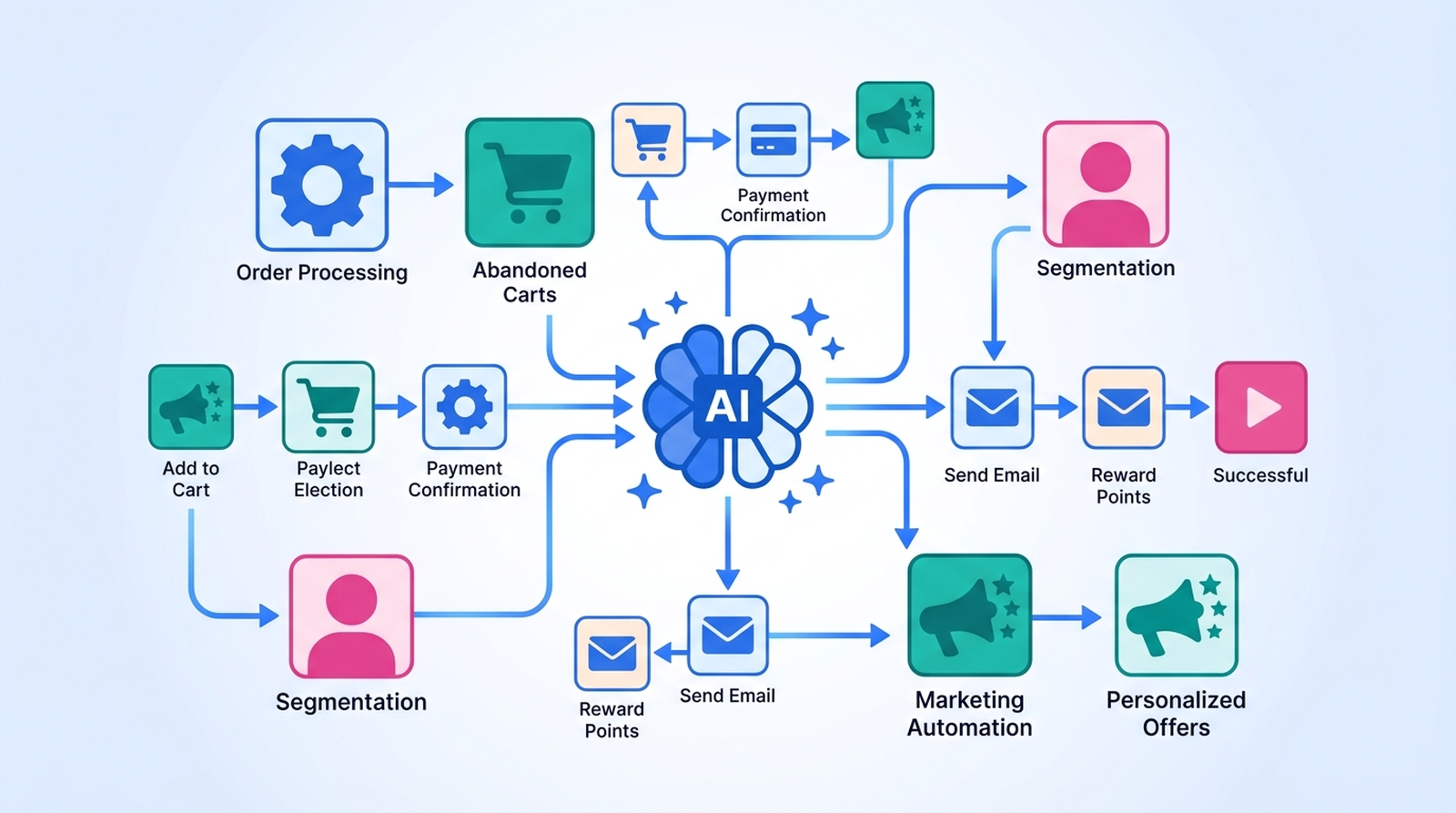
You know the automation you want. "When an order comes in over $500, tag it, tell the warehouse, and add the customer to the VIP list." You've known it for months. What you haven't done is sit down for forty-five minutes and click through trigger pickers, condition operators, and field mappings to build it.
That gap — knowing the automation versus building it — is exactly what AI workflow builders were pointed at. And they genuinely close most of it. But "most" is doing real work in that sentence, and the part they don't close is the part that decides whether your store ends up better off or quietly broken.
The short answer
Yes. You can describe a Shopify automation in one sentence and have AI assemble the whole thing — trigger, condition, action — in seconds. Two tools do this today: Shopify Sidekick, which builds workflows inside Shopify Flow, and MESA, which builds workflows that reach across every app your store runs on.
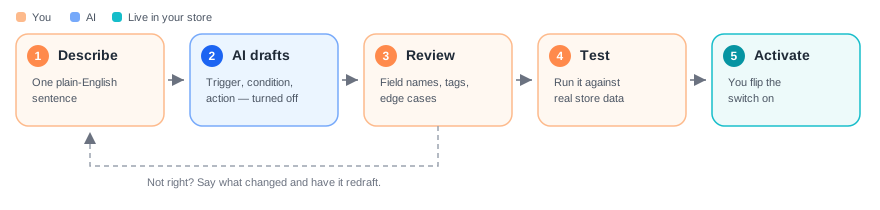
What neither one does is turn it on. Both hand you a draft that's switched off, and both expect you to read it before you trust it. That isn't a missing feature — it's the correct design. An automation that fires on every order is a machine with your storefront's hands, and no model should get to start that machine on its own say-so.
So the honest version of the answer: AI does one step of the five. It's the step that used to take the longest, which is why it feels like magic. The other four are still yours.
Three different things people mean by "AI builds it"
This question gets muddled because three separate capabilities share the same words. Sorting them out first saves a lot of disappointment later.
1. AI writes the automation
You describe what you want; the AI produces the workflow's structure. This is the one this article is mostly about, and it's real and available now. The AI is doing authoring work, not runtime work — once the workflow exists, it runs on ordinary deterministic rules, with no model in the loop.
2. AI is a step inside the automation
The workflow itself is normal, but one step calls a model: read this order note and decide if it's a gift, summarize this support ticket, generate tags from this product description. Here the AI runs on every execution, doing the judgment a rule can't express. If you want the longer version of that distinction, we wrote a whole piece on where rule-based automation ends and AI automation starts.
3. AI decides what to do on its own
No fixed workflow at all — an agent looks at your store, picks its own actions, and executes them. This is the one that's genuinely early. It's worth understanding where it's heading, and we've mapped that out in our guide to agentic AI automation for Shopify, but it is not what "build me a workflow" does today.
Almost everyone asking "can AI build my workflow automatically?" wants #1, expects a bit of #2, and is quietly worried about #3.
Path 1: Sidekick builds it inside Shopify Flow
If the automation lives entirely inside Shopify, this is the shortest route, and it costs nothing extra. Shopify Flow is a free app available on the Basic, Grow, Advanced, and Plus plans — not a Plus-only feature, despite how often you'll read otherwise. Sidekick is bundled too: "Sidekick is included with your Shopify plan. Features and usage limits vary by plan."
Install Flow, open it, and tell Sidekick what you want in a sentence. Shopify's own documentation uses this as the example prompt:
"I want to create a workflow that tags orders with fewer than 3 line items as 'small'."Shopify Help Center, Creating workflows
Sidekick builds the workflow and drops you into the Flow editor with the steps laid out. Three things worth knowing before you try it:
- Desktop only. Shopify is explicit: "You must be using a desktop device to generate workflows using Sidekick." Chatting with Sidekick on your phone works; having it build a workflow there doesn't.
- It arrives switched off. Generated workflows are tagged
sidekickand left inactive until you turn them on yourself. - It stays inside Shopify's walls. Sidekick can only assemble triggers and actions Flow already has — Shopify's native set, plus whatever Flow connectors your installed apps contribute. It can't invent a step for a tool that doesn't have one.
Shopify is refreshingly blunt about the failure mode, too:
"Sidekick might omit business-specific logic in complex workflows."Shopify Help Center, Creating workflows
Read that as: it nails the shape and guesses at the specifics. If your store's VIP tag is actually vip-2026 and not VIP, or the $500 threshold is really $500 excluding shipping, that's the part you're fixing by hand. (If Sidekick itself is new to you, our step-by-step Sidekick tutorial covers the rest of what it can do.)
Path 2: describe it to MESA when the workflow leaves Shopify
Most of the automations merchants actually describe out loud don't stay inside Shopify. They end in a Google Sheet, a Klaviyo flow, a Slack channel, an Etsy listing, a 3PL's API, a spreadsheet someone in ops maintains by hand. Flow's editor stops at Shopify's boundary, so an AI building inside it stops there too.
That's the gap MESA AI covers — same interaction, wider reach. Describe the workflow you need and MESA assembles it across the apps your store already runs on, handling the triggers, conditions, actions, and error handling rather than just the Shopify-native slice. It's the same idea the app is built around: just describe what you need, and MESA builds it.
The plain-language description does double duty. Beyond the initial build, MESA uses it as context while you're editing — when you add a step, the suggestions are shaped by what you said you were trying to do, instead of an alphabetical list of 100+ connectors. It's a small thing that removes a surprising amount of the guesswork mid-build. For the wider picture of where this fits, our guide to AI automation platforms for ecommerce walks through what to look for.
The pattern is identical either way, though: describe, review, test, turn on. The tool changes how far the workflow can reach, not who's responsible for it.
How to describe a workflow so the AI gets it right
The quality of what comes back tracks almost perfectly with how specific you were. Shopify's own guidance is to be specific rather than general, and that holds for every one of these tools. A description that produces a good draft has four parts:
- The exact event. Not "when someone orders" — order created versus order paid versus order fulfilled are three different workflows with three different failure modes. Say which one.
- The condition, with real values. "High-value orders" gets you a placeholder. "Orders where the subtotal is over $500" gets you a condition you can actually leave alone.
- The action and its destination. Which tag, which Slack channel, which sheet, which list. Name them the way they're named in your store.
- The exceptions. This is the one everyone skips, and it's the one that saves you. "Skip wholesale orders." "Don't run for test orders." "Only the first time for a given customer." The AI won't infer any of these — it has no way to know they exist.
Compare "tag my VIP customers" against "when an order is paid and the customer's lifetime spend is over $2,000, add the tag vip-2026 to the customer and post the order number in #sales — skip orders tagged wholesale." The first gets you a sketch. The second gets you something close to shippable.
Specificity also predicts whether a workflow keeps running once it is built. MESA's Q1 2026 data showed narrowly scoped workflows activating at nearly three times the rate of broad requests. More on what separates Shopify automations that ship from ones that stall.
The four things AI still won't do for you
None of these are temporary gaps in the tooling. They're the parts of the job that require knowing your store.
Connect and authorize your accounts
Someone with the right credentials has to authorize each app the workflow touches. No AI is going to log into your Klaviyo account for you, and you wouldn't want one that could.
Know your store's actual vocabulary
Your metafield namespaces, your tag conventions, your collection names, the fact that "backorder" means something specific in your warehouse. A model drafting against a generic schema fills these with plausible guesses. Plausible guesses in a live automation are how a thousand products get tagged wrong at 3am.
Handle what happens when a step fails
The API times out. A required field is empty. The customer has no email. A generated draft handles the happy path — the path you described. Deciding whether a failure should retry, skip, or alert somebody is a business decision, and nobody described it to the AI because nobody thinks about it until it happens.
Test it against reality
Run the workflow against a real order before you trust it with all of them. Both platforms give you a manual run for exactly this reason, and it takes two minutes. This is where you catch the $500-including-shipping problem, and it's cheaper to catch it here than in a customer email.
Where AI does the work, not just the wiring
Having AI build the workflow saves you an afternoon, once. Putting AI inside the workflow saves you something every single day — and it's the more interesting half of this question.
MESA's built-in AI step is a step like any other: it takes free-form text and returns something structured your next step can act on. Powered by GPT-4o, it handles the four jobs rules genuinely can't — generating, classifying, extracting, and summarizing. Two practical notes from the docs: input gets truncated after about 500 words, and it counts as a premium task, so it's meant for a paragraph of order notes rather than a 40-page PDF.
A concrete one: our generate product tags with AI template fires on Product created, asks the AI for two or three short tags based on the title and description, and applies them to the product. Three steps. No rule could write those tags, because the input is prose and the output is judgment.
Merchants also seem to finish these workflows more often. When we looked at every workflow built in MESA in Q1 2026:
"Shopify merchants who added an AI step to a workflow shipped it to production 70.3% of the time in Q1 2026, compared to 45.2% for workflows without AI. The difference held across 897 built workflows and 324 Shopify stores."MESA's Q1 2026 AI workflow activation benchmark
A 25-point gap isn't proof that AI makes workflows better. The more likely reading is that AI steps get reached for on the problems worth solving — the ones someone is doing by hand right now, which is exactly why those workflows get finished.
For a real example of the summarizing job, ShopPad's Head of Product replaced hours of weekly Help Scout ticket reading with a scheduled MESA workflow that writes structured AI summaries of themes and sentiment. Read how ShopPad used AI to summarize support conversations.
So should you let AI build it?
Yes, and it's a straightforward call. The draft costs you a sentence and thirty seconds. Even a mediocre one is a better starting point than an empty canvas, because editing a wrong condition is faster than choosing the right trigger from a list of two hundred. And it's rarely just one workflow — once you see the draft, the landscape of AI automation apps for ecommerce makes it easier to judge whether MESA or another tool is the right fit for what you're building next.
Just hold onto the reframe: AI didn't automate building the automation. It automated the typing. The judgment about what should happen in your store, under which conditions, with which exceptions — that never moved. It just stopped being buried under forty-five minutes of clicking.
FAQs
Can AI build Shopify workflows automatically?
Yes. Shopify Sidekick generates Shopify Flow workflows from a plain-language description, and MESA's AI builds multi-app workflows the same way. Both produce a complete draft — trigger, conditions, actions — in seconds. Neither activates it: generated workflows arrive switched off, and you review, test, and turn them on yourself.
Does Sidekick turn on the workflows it builds?
No. Shopify's documentation states that workflows generated by Sidekick are inactive by default and must be turned on manually. They're also tagged sidekick in Flow so you can find everything it created. Review the steps and run a test before activating.
Do I need Shopify Plus to use AI-built workflows?
No. Shopify Flow is a free app available on the Basic, Grow, Advanced, and Plus plans, and Sidekick is included with your Shopify plan, with features and usage limits varying by plan. A handful of advanced Flow actions carry their own plan requirements — Send HTTP request needs Grow, Advanced, or Plus — but AI-assisted workflow building isn't gated behind Plus.
Why did the AI-generated workflow miss part of what I asked for?
Usually because the missing part was never in the description. Shopify notes that Sidekick might omit business-specific logic in complex workflows, and the same applies to any tool drafting against a generic schema: it doesn't know your tag conventions, your metafield names, or your exceptions. Name the exact event, real threshold values, the real destination, and any orders that should be skipped, then refine the draft in a follow-up message.
Can AI run my store's automations without me?
Not today, and that's deliberate. Both platforms keep a human between the generated draft and a live workflow. Fully agentic automation — where AI chooses its own actions rather than executing a workflow you approved — is still early, and running your store's operations is a poor place to be an early adopter of it.
