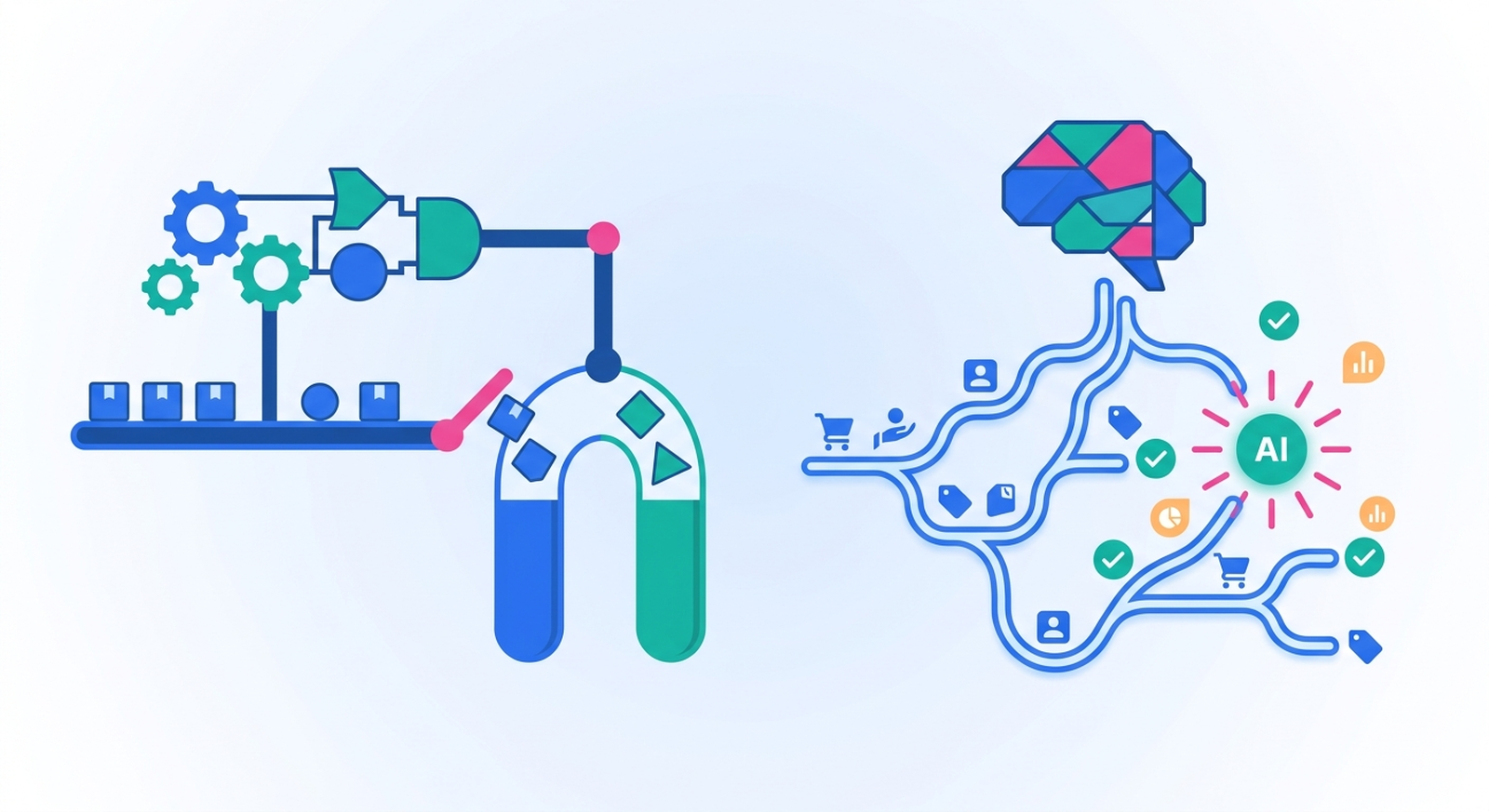
Two people can both say "we automated that" and mean completely different things. One of them wrote an if/then rule that has fired 40,000 times without a single surprise. The other pointed a language model at a messy text field and asked it to work something out. Both are automation. They fail in opposite ways, they cost different amounts, and they belong at different points in the same workflow.
Here's the real difference, the three separate things Shopify merchants call "AI automation" in 2026, and a ten-second test for deciding which one a given task actually needs.
TL;DR: there's a template for that
The short answer
Rule-based automation executes logic you wrote: the same input produces the same output every time, and anyone can read the workflow to know exactly what it will do. AI automation hands a decision to a model while the workflow is running: it can handle input nobody anticipated, and it can be wrong in ways a rule cannot be. That's the whole distinction — everything else is a consequence of it.
Shopify's own explainer puts the rule-based side bluntly:
"Rule-based automation follows rigid, predefined rules: 'If X happens, do Y.' There's no adaptability, context awareness, or decision making involved."Shopify, What Are AI Agents?
Read as marketing, "rigid" sounds like a flaw. Read as an operator, "rigid" is the feature. Rigid is why your VIP tagging rule doesn't quietly change its mind about the $200 threshold in March.
The two are not competing products you pick between. On Shopify they're steps you mix inside one workflow — and the useful question is never "rules or AI?" but "which single part of this job needs judgment?"
Three different things get called "AI automation"
Most of the confusion here isn't conceptual. It's that one phrase covers three products that behave completely differently in production.
1. AI that builds the automation
You describe what you want in a sentence and something assembles the workflow. Shopify shipped this into Flow via Sidekick, and it's a genuine change to the authoring experience:
"Tell Sidekick what you want to automate—'Tag customers as VIP when they place an order over $200'—and watch as it builds a workflow in seconds: trigger, condition, action, ready to review."Shopify, How Shopify Flow Automation Got Faster, Safer, and Smarter
Note what came out the other end: trigger, condition, action. A rule. The AI was in the authoring, not in the run — once that workflow is on, it's as deterministic as one you dragged together by hand. This is the cheapest of the three wins and the least risky, because the thing you ship is still auditable.
One practical catch worth knowing before you go looking for it: Shopify notes that "Sidekick can only build workflows when the Flow app is installed and open in your admin." MESA has the same shape of feature — describe the workflow, get the steps — and the same truth applies: what you're reviewing afterward is a normal workflow, so review it like one.
2. AI that makes a decision inside the run
This is the one that actually changes how a workflow behaves. Somewhere between the trigger and the action, a step sends data to a model and uses whatever comes back. Flow has a native version of this, and so does MESA. Every run is a live API call, the output can differ between two nearly identical orders, and your workflow is now only as good as the prompt.
When people argue about "rule-based versus AI automation," this is the only one of the three that's genuinely a different category of thing. The rest of this article is mostly about where to put it.
3. AI that acts as an assistant on your store
Sidekick as a chat assistant, Shopify Magic writing a product description, an agent you ask to pull a report. Useful, but it isn't unattended automation, and Shopify's documentation is clear about the line:
"Sidekick can't make changes to your store without your approval."Shopify Help Center, Getting started with Sidekick
A human is in the loop by design, which makes it a copilot rather than a workflow. The same page notes Sidekick can't talk to your customers or handle support conversations on your behalf either. If your mental model of "AI automation" is a chat assistant, you're evaluating a different product than the merchant next to you who means a decision step inside a running workflow. Our guide to agentic AI automation for Shopify goes deeper on where the assistant/agent line sits.
What rule-based automation is still better at
Rules keep winning in more places than the current discourse suggests, and it's worth being specific about which:
- Anything involving money, inventory, or fulfillment state. Refunds, cancellations, price changes, stock adjustments, fulfillment holds. You want these to be boring.
- Anything you need to explain later. A rule is its own audit trail. When finance asks why 14 orders got a discount in April, "here is the condition" is a complete answer.
- Anything high-volume. A rule costs the same whether it runs 100 times or 100,000. An AI step is a paid API call every single run.
- Anything where you can enumerate the cases. Payment method, order value, country, tag, SKU pattern, customer lifetime spend. Structured fields are what conditions are for.
- Anything you want to test before it touches real data. Flow's preview stops before any step that would change something — "Nothing is changed in your store," as Shopify puts it. Deterministic logic is the only kind you can meaningfully dry-run, because a dry run of a model tells you what it did once.
If the task on your list is "tag orders over $500 for review" or "email the warehouse when a variant hits zero," AI adds nothing but cost and variance. Build the rule. The Shopify Flow guide covers that end of the spectrum in detail.
What AI automation is genuinely better at
There's one shape of problem where rules simply run out of road: the input is prose a human wrote, and you can't enumerate the cases in advance. Rules read fields. AI reads sentences.
- Order notes and gift messages. "Leave at the side door, ring twice, it's a present for my mum" contains a delivery instruction and a gift flag. No condition finds that reliably; a model does.
- Product copy from sparse data. Turning a supplier's title and spec sheet into a description, tags, or meta text — the classic case, because the output is text and the input is unstructured.
- Triage on freeform customer input. Support tickets, review text, survey answers, "other (please specify)" fields. Categorizing them means understanding them.
- Summarizing. Twenty order notes into one line for a Slack alert, or a thread into a handover note.
- Messy inbound data. Supplier feeds where the same product arrives described five different ways across three vendors.
Notice that every item on that list is a classification or generation step — not the trigger, and not the action. That's the pattern that holds up in production.
The test: can you write the rule down?
Say the rule out loud as one sentence, using the names of actual fields. "When an order is created and the total is over $500 and the customer has no previous orders, add the tag review." If you can finish that sentence, you don't need AI — you need twenty minutes in a workflow builder.
If your sentence has to contain "if it seems like," "if the customer means," or "depending on what they wrote," you've just located the one step that needs a model. Usually it is one step. The trigger is still an event, the action is still an action.
Then ask the second question, which matters more than the first: what happens if it's wrong? A wrong tag is a wrong tag — ship it and fix the prompt later. A wrong refund, a wrongly cancelled order, a wrong price, or an email to 4,000 people is a different category of mistake. For those, the model proposes and a rule (or a person) disposes.
What the two look like in one workflow
Here's the pattern that survives contact with a real store — automatic product tagging, with the judgment isolated to a single step:
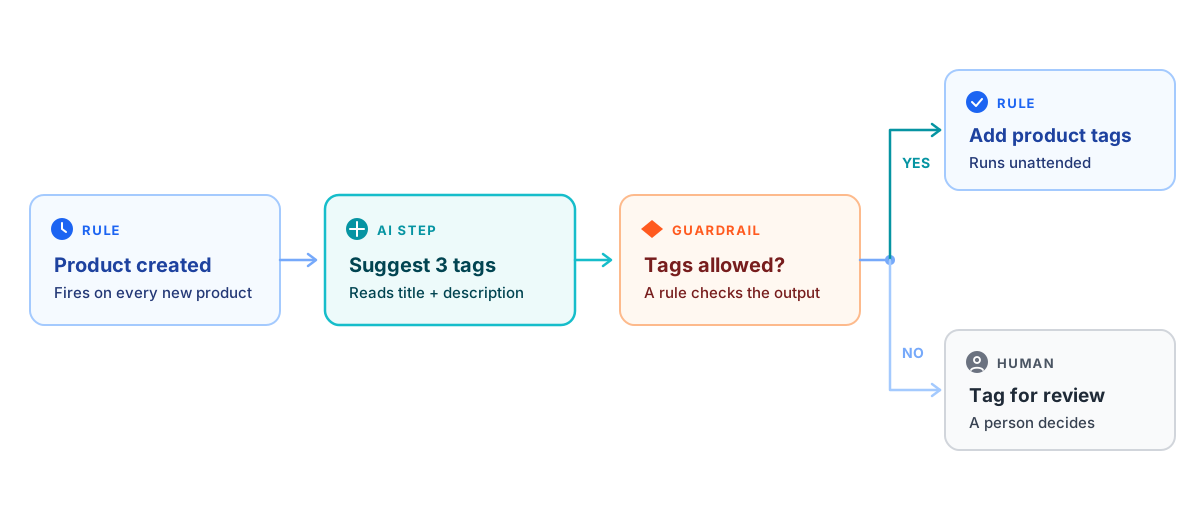
Four steps, exactly one of which is AI. The trigger is a plain Shopify event. The guardrail is a condition comparing the model's output against a list you control. The action is a normal tag update. The fallback routes anything that fails the check to a human instead of guessing twice.
That structure is why it works: the model does the part only a model can do — reading a title and a description and inferring what the product is — and rules handle everything around it, including checking its homework. MESA's Generate Shopify Product Tags with AI template is this exact shape if you want to see it running rather than described: product created, AI reads the title and description, tags get applied.
Invert it and you get the version that goes wrong. An AI step deciding whether to refund, with no rule in front of it and no human behind it, is not more automated — it's the same automation with the audit trail removed.
Where the Shopify-native options stop
Worth knowing exactly what you already have before you add a tool.
Flow is free, on every plan. Shopify's documentation states that "Shopify Flow is a free app available on the Basic, Grow, Advanced, and Plus plans." The old "Flow is Plus-only" claim you'll still find in search results is simply out of date. The real plan gates inside Flow are narrower: Send HTTP request requires Grow, Advanced, or Plus, and tasks created by custom partner apps are Plus-only.
Flow does have a native AI step — but not the one people expect. Flow's Generate text connector sends a prompt to OpenAI and returns the result in a single text field. Two things about it matter before you build on it. First, you bring your own account: "To begin using OpenAI actions, you must first connect Flow to your OpenAI account by adding an API key," which also means OpenAI bills you directly for every run. Second, and more surprising:
"Shopify Flow calls the legacy OpenAI completions API to generate text."Shopify Help Center, Generate text
The default model is gpt-3.5-turbo-instruct, and a current chat model dropped into that field returns an error saying it isn't supported on the /v1/completions endpoint. So the native option exists, it's real, and it's a generation ahead of what you'd get calling a modern model yourself. Also note where it's documented: connectors live on their own reference page, not in Flow's actions list — which is why plenty of write-ups confidently state Flow has no AI action at all.
On Basic there's no escape hatch. The usual way around a missing native step is Send HTTP request, and that's the action with the plan gate. On Basic you can't call a model's API from Flow yourself.
Shopify Magic is free but it's authoring-time help. "Shopify Magic tools and experiences are available for free, regardless of your subscription plan" — and it works where you're already typing, not inside a workflow that runs at 3am.
Four rules for shipping an AI step
The merchants getting real value out of AI steps aren't the ones using more AI. They're the ones who wrapped it properly:
- Constrain the output, then validate it. Ask for one of five tags, not "appropriate tags." Then add a condition that checks what came back against that list, exactly like the guardrail in the diagram above.
- Keep it away from irreversible actions. Refunds, cancellations, price changes, customer-facing sends. Let the model annotate, flag, or draft; let a rule or a person execute.
- Log the raw output, not just the result. When a tag looks wrong three weeks later, you need to know whether the model said something odd or a condition mis-fired. Write the response to a sheet or a metafield.
- Gate it behind a condition. Put the cheap rule first and the AI step second, so you're not paying for a model call on all 900 orders when only the 40 with notes need reading.
The upside is real when it's aimed at the right step. In PwC's May 2025 AI Agent Survey of 300 senior executives, 66% of companies adopting AI agents reported increased productivity, 57% cost savings, 55% quicker decisions, and 54% improved customer experience — with the caveat, in PwC's own reading, that most of that gain came from speeding up routine tasks rather than transforming anything.
How to decide this week
Take the five manual tasks currently eating your team's afternoons and sort them with the test above. In most stores four are rule-shaped and one involves reading something a customer wrote. Build the four as rules, because they're cheap, testable, and will still behave the same in a year. Put the model on the fifth, wrap it in a guardrail, and give it somewhere to fail safely.
That's also the practical case for running both in one place rather than one tool per philosophy: MESA uses the same Shopify triggers Flow does, will build the rule-based scaffolding from a plain-language description, and lets an AI step sit mid-workflow with normal conditions on either side of it — which is where it belongs. If you're weighing platforms on that axis, our breakdown of what an AI automation platform should actually include is the longer version of this argument.
FAQs
What's the difference between rule-based automation and AI automation for Shopify?
Rule-based automation runs if/then logic you configured: the same input always produces the same output, it costs nothing per run, and the workflow itself explains what happened. AI automation sends data to a model during the run and uses what comes back, so it can interpret input you never anticipated — order notes, review text, product copy — but its output varies and can be wrong. In practice they aren't alternatives: a production workflow usually has a rule-based trigger, one AI step for the part that needs judgment, and rule-based conditions and actions around it.
Does Shopify Flow have AI?
Two kinds, and it's worth separating them. Sidekick can build a Flow workflow from a plain-language description, but what it produces is an ordinary rule-based workflow you review and turn on. Separately, Flow has a native Generate text connector that calls OpenAI during a run — you connect your own OpenAI API key, and Shopify's documentation notes it calls the legacy completions API with gpt-3.5-turbo-instruct as the default model, so current chat models aren't supported there. It's documented on Flow's connectors reference page rather than its actions list.
Is AI automation more expensive than rule-based automation?
Per run, yes, and the gap scales with volume. A condition or a tag update costs nothing extra no matter how often it fires; an AI step is an API call every time, billed by whoever provides the model — with Flow's Generate text connector, OpenAI bills you directly against the key you connected. That's why the practical pattern is to put a cheap rule in front of the model so it only runs on the subset of records that actually need reading.
Can AI automation replace Shopify Flow?
Not on its own, and it's the wrong goal. Flow is a rules engine, free on every Shopify plan, and rules are still the right answer for anything involving structured fields, money, or inventory state. What AI replaces is the specific step where you were reading text and making a call yourself. Stores tend to outgrow Flow for a different reason — needing triggers and apps it doesn't cover, or an AI step mid-workflow rather than a native action list — not because rules stopped working.
Which tasks should I automate with AI first?
Start where the input is prose and the output is low-risk: product tags and descriptions from titles and spec sheets, categorizing freeform survey or support text, flagging gift messages and delivery instructions in order notes, summarizing notes into an internal alert. All of those are reversible, easy to spot-check, and don't touch money. Leave refunds, cancellations, price changes, and anything customer-facing to rules with an explicit approval step, at least until you've watched the AI step behave for a few hundred runs.
