
You can get a usable Shopify product description out of any model in about four seconds. The trouble is that the description you get from "write a product description for the Aurora Merino Crew" reads exactly like a description written from nothing but the words "Aurora Merino Crew" — fluent, confident, and missing the two or three specifics that would actually move somebody to the cart.
The model is rarely the variable. The prompt is. Below are ten prompts worth running on a real catalog — what each one is for, what to swap in, and how to wire the one that fits your products into a MESA workflow so it runs on every new product instead of only the ones you remember to do by hand.
TL;DR: there's a template for that
Why "write a product description for X" produces filler
Think about what the model actually has to work with in that prompt: a product title. From "Aurora Merino Crew" it can infer knitwear, probably a sweater, probably wool. Everything else it has to invent, so it reaches for the safest averaged-out copy it has ever seen — soft, versatile, a wardrobe staple, perfect for layering. That copy is not wrong. It is just interchangeable with every other sweater on the internet, which makes it worthless for the one job a product description has.
What shoppers are actually hunting for is far more specific, and it is well documented. Baymard Institute's product-page research puts a number on how often stores fall short:
"10% of the largest e-commerce sites fail to have a consistently high level of detail for their product descriptions."Baymard Institute
The same research identifies what users go looking for and abandon the page over when it is missing: materials or ingredients, dimensions, and compatibility. Not one of those is something a model can infer from a product title. They are things you already have — in a spec sheet, a supplier PDF, a metafield, a returns log — and are not passing in. A prompt is not a rule that fires on data you gave it; it is an instruction, and it only knows what you put in front of it (worth reading up on if you are new to the distinction between rule-based and AI automation).
The five things a working prompt carries
Every prompt in the next section is some combination of five parts. If a draft comes back generic, one of these is usually missing.
- Facts. The specs, materials, dimensions, care instructions, and compatibility list — pasted in verbatim, not summarized.
- Audience. Who buys this and what they are worried about. "Home bakers buying their first stand mixer" produces different copy than "professional pastry kitchens replacing a worn-out one."
- Shape. Word count, paragraph count, and what goes in the first sentence. Left unsaid, you get three paragraphs that bury the answer.
- Voice. Best supplied as examples rather than adjectives — two of your own existing descriptions beat any amount of "friendly but professional."
- Guardrails. What it must not do: invent specs, use banned words, make sustainability or health claims, exceed a length. This is the part almost everyone skips, and it is the part that keeps you out of trouble.
10 prompts that work
Everything in square brackets is a merge field — swap in your own values, or map it to a MESA workflow field if you are running the prompt automatically. Each prompt is written to be pasted whole; the guardrail sentences at the end are doing real work, so do not trim them.
1. The spec-sheet translator
Use it when you have solid spec data and no prose at all — the most common situation for a store that imports products from a supplier feed.
You are writing a product description for [STORE NAME], which sells
[CATEGORY] to [AUDIENCE].

Product: [TITLE]
Specs:
[PASTE SPEC BULLETS]

Write 90-130 words in two short paragraphs. Lead with the outcome the
buyer gets, then work the specs in as the evidence for it. Do not invent
any spec that is not listed above. No superlatives, no "elevate", no
"game-changer", no "whether you're a ... or a ..." constructions.
The banned-phrase list at the end is the part that makes this usable. Add to it every time you catch a tic you are tired of reading.
If your specs arrive as a supplier CSV, you can run this prompt on every new row automatically. Here's how to write product descriptions from a supplier CSV feed with AI, with drafts saved for review.
2. The objection-first description
Use it when you know from support tickets or reviews exactly what people ask before buying.
Product: [TITLE]
Specs: [PASTE SPECS]

The three questions shoppers ask us most often before buying this are:
1. [QUESTION]
2. [QUESTION]
3. [QUESTION]

Write a 120-word description that answers all three inside the body copy,
without using a question-and-answer format. If the specs above do not
answer one of the questions, do not guess — instead end your response
with a line beginning "MISSING:" naming what you would need.
That last instruction turns the model into a gap detector. A "MISSING:" line is a signal that your product data is incomplete, which is more valuable than a smooth paragraph that papers over it.
3. Who it's for, and who it isn't
Use it when a product gets returned a lot because the wrong people buy it.
Product: [TITLE]
Specs: [PASTE SPECS]
Price: [PRICE]

Write 100-140 words that include one sentence naming who this is best
for and one sentence naming who should buy something else instead. Be
specific in the second one — name the use case it is genuinely wrong
for, not a vague disclaimer.
Counter-intuitive, and it works: telling the wrong buyer to leave is the cheapest returns reduction available to you, and it reads as confidence rather than hedging.
4. The voice match
Use it when you have a house style that took years to develop and do not want a hundred new products written in a different one.
Here are two descriptions from our store, written in our voice:

---
[PASTE DESCRIPTION 1]
---
[PASTE DESCRIPTION 2]
---

Match that voice: the same sentence length, the same level of formality,
the same amount of humour, the same way of addressing the reader.

Now write a description for: [TITLE]
Specs: [PASTE SPECS]

Target 110 words. Do not reuse any phrase longer than three words from
the samples.
Two samples beat any adjective you could pick. Shopify makes the same point about prompting in its own documentation — "the more details you add, the more relevant the suggested content will be" — and pasted examples are the densest detail you can hand over.
5. The variant differentiator
Use it when forty variants currently share one description and every one of them ranks against the others.
Base product: [TITLE]
Shared description: [PASTE]

Variant: [VARIANT NAME] — what is different: [WHAT'S DIFFERENT]

Write 45-70 words that could only describe this variant. Do not restate
the shared description; assume the shopper has already read it. Focus on
what changes about the fit, the use, or the result because of
[WHAT'S DIFFERENT].
Keep it short on purpose. The point is a distinguishing paragraph appended to shared copy, not forty full rewrites.
6. Materials and care
Use it when you sell apparel, home goods, or anything where the material is the purchase decision.
Product: [TITLE]
Materials: [MATERIALS, WITH PERCENTAGES]
Care: [CARE INSTRUCTIONS]
Made in: [ORIGIN]

Write 100-130 words in this order: what it is made of and why that
matters in daily use, how it behaves after a few months of that use,
and how to care for it. State the materials exactly as given above,
including percentages. Do not describe it as sustainable, eco-friendly,
recycled, or ethically made unless one of the facts above supports that
claim.
The final sentence exists because models volunteer environmental claims unprompted, and an unsupported one on a product page is a real legal exposure rather than a copy problem.
7. The compatibility answer
Use it when you sell parts, accessories, cases, filters, or cables — anything bought to fit something else.
Product: [TITLE], an accessory for [WHAT IT FITS].

Confirmed compatible: [LIST]
Confirmed not compatible: [LIST]
Untested: [LIST]

Write 90-120 words. Put the compatibility answer in the first two
sentences — it is the only thing this shopper is trying to find out.
Repeat the confirmed-compatible list verbatim. Say plainly that the
untested items are untested; do not imply they work.
Compatibility is one of the three details Baymard found shoppers abandoning pages over, and it is the one most often buried at the bottom of the page instead of answered first.
8. The seasonal add-on
Use it when you want gift framing for Q4 without rewriting descriptions you already like.
Existing description: [PASTE]

Write a 40-60 word paragraph to append for [SEASON/OCCASION]: who this
is a good gift for, what choosing it says about the giver, and one
practical gifting detail ([SHIPS IN A GIFT BOX / NO PRICES ON THE
PACKING SLIP / NO SIZING REQUIRED]). Do not repeat any claim already
made above.
Because this appends rather than replaces, it is safe to run in bulk and easy to strip out in January.
9. The other-channel versions
Use it when the same product has to appear on a collection card, in a marketplace listing, and in a search snippet.
Full description: [PASTE]

Write three shorter versions:
1. Under 155 characters, for a search-result meta description
2. Under 300 characters, for a marketplace listing
3. One sentence under 90 characters, for a collection-page card

Keep the single strongest concrete detail in all three. Do not add any
claim that is not in the full description above.
The 155-character version is a different job from the on-page description and worth treating that way — we walk through that one separately in writing Shopify product meta descriptions. The same three-length pattern is what makes cross-posting to other channels bearable, including Etsy listings, which want a shorter opening than a Shopify product page does.
10. The auditor
Use it when you have hundreds of existing descriptions and no idea which ones are the problem. This prompt deliberately does not write anything.
Here is a product description and its spec sheet.

Description: [PASTE]
Specs: [PASTE]

Do three things and nothing else:
1. List any claim in the description that the specs do not support.
2. List the materials, dimensions, or compatibility details a shopper
   would look for that are missing entirely.
3. Rate 1-5 whether someone could decide to buy from this description
   alone, and say why.

Do not rewrite the description.
Run this across a catalog before you run any of the writing prompts. It tells you which products need new copy and which ones just need their spec data filled in — usually a different and cheaper fix.
Running your prompt automatically in MESA
Once a prompt is producing drafts you would actually publish, the remaining problem is that somebody has to paste it into a chat window for every new product. MESA's Write Shopify Product Descriptions with AI template is three steps: a Shopify Product Created trigger, an AI step holding your prompt, and a Shopify Update Product step that writes the result into the product's description field. The one field worth changing is the prompt, which ships as "Write a brief product description for [product title]" — the exact instruction the first half of this post is about not using.
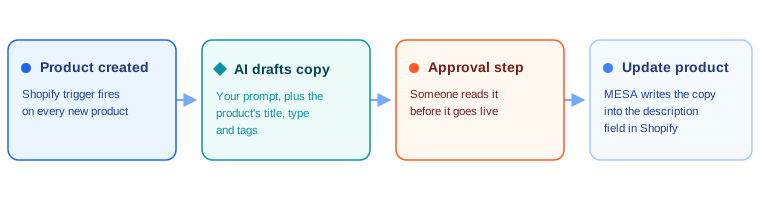
Four things are worth knowing before you turn it on.
- Add an approval step. The template's own documentation recommends it, and it is the difference between AI drafting your catalog and AI publishing your catalog. Nothing in this post is safe to ship unread.
- The trigger fires on creation, not updates. Descriptions you edit by hand afterwards will not be overwritten — but existing products will not be touched either, so backfilling a catalog is a separate job.
- Mind the length ceiling on the built-in AI tool. MESA's AI tool is powered by ChatGPT-4o and, per the documentation, "only reads and generates up to 500 words of text." That is comfortably more than any prompt above needs for output, but a voice-match prompt with two long samples pasted in can bump the input side of it — use the OpenAI connector instead when it does.
- Pass in more than the title. The trigger gives you the product's type, vendor, tags, and variant data as well. Every one of those is a fact you would otherwise be asking the model to invent.
If you want the click-by-click build rather than the prompt library, the older walkthrough on using ChatGPT to write Shopify product descriptions covers assembling the workflow itself, and it sits alongside the rest of MESA's AI automation tooling if you want to see what else the same AI step can do once it is in a workflow.
Where Shopify Magic fits
Shopify has its own description generator built into the admin, and it costs nothing:
"Shopify Magic tools and experiences are available for free, regardless of your subscription plan."Shopify Help Center
It takes a prompt, so all ten prompts above work in it. The constraint is where it runs: you click the Generate text icon inside a single product's description field, one product at a time, and Shopify notes that "text generation isn't supported on iPhone or Android" — it is a desktop-admin tool. That is a perfectly good fit for a store adding a handful of products a month, and a bad fit for a supplier feed dropping 300 products in overnight, which is the case the MESA workflow above exists for.
Shopify is also blunt about where responsibility sits, and it applies equally to anything you automate:
"You're responsible for the accuracy of all of the content that you publish to your store, even when you use automatic text generation to create it."Shopify Help Center
Three checks before any of this publishes
- Every claim traces back to a fact you passed in. This is what the guardrail sentences and the auditor prompt are for. Invented dimensions and invented certifications are the two failure modes that cost real money.
- Variants and near-identical products don't share generated copy. Generating a thin paragraph for every SKU in a catalog and publishing it unread is specifically the pattern Google names in its spam policies: "scaled content abuse is when many pages are generated for the primary purpose of manipulating search rankings and not helping users." (Google Search Central) A description written from real spec data for a real buyer is not that. The same paragraph reworded 400 times is.
- A person owns the output. Not a review process on paper — a named person who reads the drafts an approval step holds. Volume is the thing automation gives you here, and volume is exactly what makes an unnoticed bad claim expensive.
The prompts are the easy part, and they are reusable across every tool you might run them in. The part worth spending your time on is the spec data you feed them and the review step you put after them.
FAQs
Do AI-written product descriptions hurt SEO?
Not by virtue of being AI-written. Google's position is about purpose rather than method — its spam policies target content "generated for the primary purpose of manipulating search rankings and not helping users." A description built from your real spec sheet, answering the questions your shoppers actually ask, is not that. Mass-produced near-duplicate paragraphs across hundreds of SKUs are, whoever or whatever wrote them.
How long should a Shopify product description be?
Long enough to cover materials or ingredients, dimensions, and compatibility, which are the three details Baymard's research found shoppers abandoning pages over. In practice that lands most products between 90 and 150 words — which is why every prompt above specifies a word count. Left unspecified, models default to longer and vaguer.
Can I generate descriptions for products I've already published?
Not with the Product Created trigger, which only fires on new products. For a backfill, run the auditor prompt across your existing catalog first to find which descriptions are actually weak, then handle those as a deliberate batch rather than regenerating everything and overwriting copy that was already fine.
Which model should I use?
Prompt quality dominates model choice for this task, so start with whatever is already in front of you — MESA's built-in AI tool runs on ChatGPT-4o with no separate account needed. Reach for the OpenAI connector when you need more than the built-in tool's 500-word limit, or when you want to pin a specific model.
