
You can already paste an Etsy listing into Claude and ask for a better title. What Claude can't do on its own is look at your shop: it doesn't know what sold yesterday, which orders haven't shipped, or what your buyers said in last month's reviews. MCP (Model Context Protocol) is how you give it that access, and MESA's MCP trigger lets you do it without running a server or writing code.
This guide connects an Etsy shop to Claude through MESA, step by step. You'll build three small tools Claude can call: one that reads your orders, one that reads your reviews, and one that edits a listing's title and tags after you approve the change.
TL;DR: there's a template for that
How Claude talks to your Etsy shop
MCP is an open standard for connecting AI assistants to outside tools. An MCP server publishes a list of tools, each with a name, a description, and the inputs it accepts. When you ask Claude something one of those tools can answer, Claude calls it, reads what comes back, and answers you from that data.
With MESA, each tool is a workflow that starts with the MCP trigger. The trigger defines the tool's inputs (MESA calls them parameters), the steps after it do the work in Etsy, and the result goes back to Claude. You connect Claude to your MESA MCP server once, and every MCP workflow you turn on after that shows up as another tool. If MCP is new to you, our guide to MCP automation for ecommerce covers the concept in more depth.
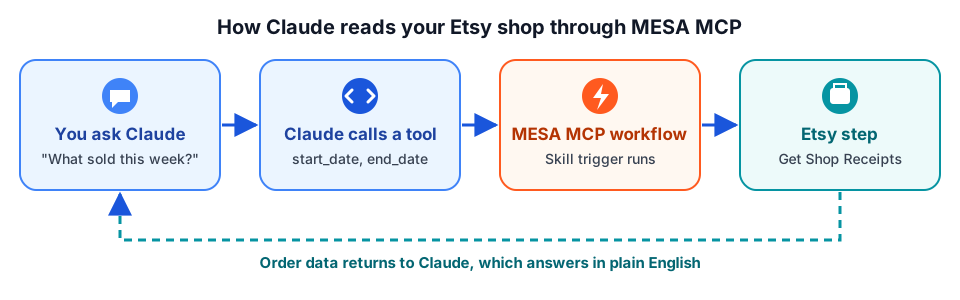
Two things follow from this design. Claude can only do what your workflows allow, so a read-only workflow can never change your shop. And you decide which Etsy fields come back, which matters more than it sounds (more on that below).
What you need before you start
- An Etsy shop connected to MESA. MESA's Etsy connector covers orders (receipts), listings, inventory, reviews, shipping profiles, and shop sections.
- Claude. MESA's own setup guide uses Claude Desktop, and you can also add MESA as a custom connector in Claude's settings on the web.
- About 15 minutes for the first workflow. Each one after that takes a few minutes, since the Claude side is already done.
Step 1: Build an order lookup tool
Start with orders, because that's the question most sellers ask first: what sold, and what still needs to ship?
- Create a workflow and add the MCP trigger. In MESA, create a new workflow, search for MCP, and select it as the trigger.
- Add parameters. Add
start_dateandend_date(the window the orders were placed in), plus optionalwas_shippedandwas_paidflags. Give each one a plain description, such as "The earliest order date to include, as YYYY-MM-DD." Claude reads these descriptions to decide what to pass in. - Add the Etsy step. Add Etsy's Get List of Shop Receipts action and map the parameters into its date and status filters.
- Name and describe the workflow for Claude. Something like "List Etsy Orders by Date," with a description that says what it returns. MESA's docs recommend being as explicit as possible here, because Claude picks tools by name and description. If you later add a similar workflow, the descriptions are what tell them apart.
- Turn the workflow on.
That's the whole tool: one trigger and one Etsy step. The template below sets it up with the parameters already described.
Return only the fields Claude needs
An Etsy receipt carries far more data than a typical question needs: addresses, transaction records, shipment details, and more. Every field you return takes up room in Claude's context window. MESA's documentation names this as the usual cause of Claude's "response was interrupted" error, and suggests trimming what the workflow returns or limiting the number of results. For order questions, the receipt ID, date, buyer name, total, shipped and paid status, and each item's title and quantity are usually enough.
There's also a time limit: MESA answers an MCP request within 60 seconds, and requests that run longer time out without a response. A tight date range keeps you well inside both limits.
Step 2: Connect Claude to your MESA MCP server
You do this once, no matter how many MCP workflows you build.
- Copy your connection details from the MCP trigger. Open the trigger, click "More fields," and add the MCP Server URL. Treat it like a password: anyone with it can run your MCP workflows.
- Add it to Claude. In Claude, go to Settings, then Connectors, click "Add custom connector," paste the URL, and click Add. If you'd rather use Claude Desktop's config file, the trigger also provides the JSON to paste there.
- Choose which tools Claude can use. Open the connector's settings to see your MESA workflows listed as tools, and turn off any you don't want in a given chat.
Our step-by-step guide to connecting Claude to an MCP server walks through each screen. If Claude Desktop doesn't pick up the server, this guide to Claude Desktop's three MCP setup paths covers the usual causes.
Step 3: Ask Claude about your shop
Start a new chat and ask a question the tool can answer. A few that work well with the order tool:
- "What sold in my Etsy shop this week, and what was the total?"
- "Which orders from the last 10 days are paid but not shipped yet?"
- "Which listing sold the most units in September?"
The first time Claude wants to use a tool, it asks your permission. After that it calls the workflow, reads the receipts, and answers. You can check exactly what it requested and what came back in MESA's activity log for that workflow, which is the fastest way to fix a tool that returns the wrong thing.
Add more Etsy tools
Each new MCP workflow is another tool in the same Claude connection. Two that pair well with the order tool:
Summarize your reviews
A workflow with a start_date parameter and Etsy's Get List of Shop Reviews action lets you ask, "What do buyers keep complaining about in the last 90 days?" Return each review's rating, text, listing ID, and date, and Claude can group complaints by theme and by listing. Like the order tool, it only reads, so Claude can't post or change anything in your shop with it.
Let Claude edit a listing, with your approval
Reading is safe by design. Writing needs one more step. This workflow takes a listing_id plus a new title, tags, or description, looks up the current listing with Retrieve Listing, waits at an Approval step that shows you the old and new copy side by side, and only then runs Etsy's Update Listing.
So the chat goes like this: you ask Claude to rewrite a listing's title and 13 tags, you read its suggestion, you tell it to apply it, and the change waits in MESA until you approve it. Two notes:
- If you approve after the 60-second request limit, the edit still goes through, but Claude won't see the confirmation. Ask it to look the listing up again.
- Keep Etsy's own limits in the parameter descriptions (titles up to 140 characters, up to 13 tags of 20 characters or fewer) so Claude's suggestions fit before they reach the approval step.
If you'd rather review rewrites for your whole catalog in a spreadsheet than one listing at a time in chat, this bulk Etsy listing audit with AI runs on a schedule instead.
MCP or an automated workflow?
MCP is for questions and one-off actions you start in a chat: "what sold," "rewrite this one." It isn't the right fit for things that should happen every time, without anyone asking, like creating a Pinterest pin for every new listing or logging every order to a sheet. Those belong in a regular MESA workflow that starts from an Etsy trigger (Receipt Created, Active Listing Created, or Active Listing Updated).
You can also put Claude inside one of those workflows instead of in a chat. MESA's Claude + Etsy integration has a Create Message action that drafts listing copy or summarizes an order as a step in an automated workflow. For more ideas on that side, see how to automate your Etsy shop.
FAQs
Can Claude change my Etsy shop without asking?
Only through a workflow you've built to do that, and Claude asks your permission before it uses a tool. The order and review tools in this guide only read data. The listing editor adds an Approval step in MESA, so nothing changes until you approve it.
Do I need to know how to code?
No. The MCP trigger, parameters, and Etsy steps are all set up in MESA's builder. The only thing you copy is the connection URL or config from the trigger.
Does this work with AI assistants other than Claude?
Yes. MESA's documentation uses Claude Desktop as its example but notes that MESA MCP also works with Cursor and many other AI apps that support MCP.
Why does Claude say its response was interrupted?
Usually too much data came back for Claude's context window. Narrow the date range, return fewer fields from the Etsy step, or start a new chat.
