
Two Etsy sellers asked our chat widget for the same thing in the same week. The first wanted Claude to "review my current listings and recommend revised title, tags, and description for ones that are not performing," and then do the same for new listings still sitting in Draft. The second wanted "to be able to do bulk edits on my Etsy listings" to help with listing SEO, and followed up with the question every seller with a real catalog eventually asks: "Which plan would work best with this? I have over 100 listings."
Both are asking for one job: run every listing's title, tags, and description through AI, see what it would change, and push the good changes back to Etsy without editing a hundred listings by hand. This post walks through that build in MESA as three small workflows (a catalog audit, a draft review, and a bulk apply step), then works through the task math for a 100+ listing shop so you can pick a plan before you start.
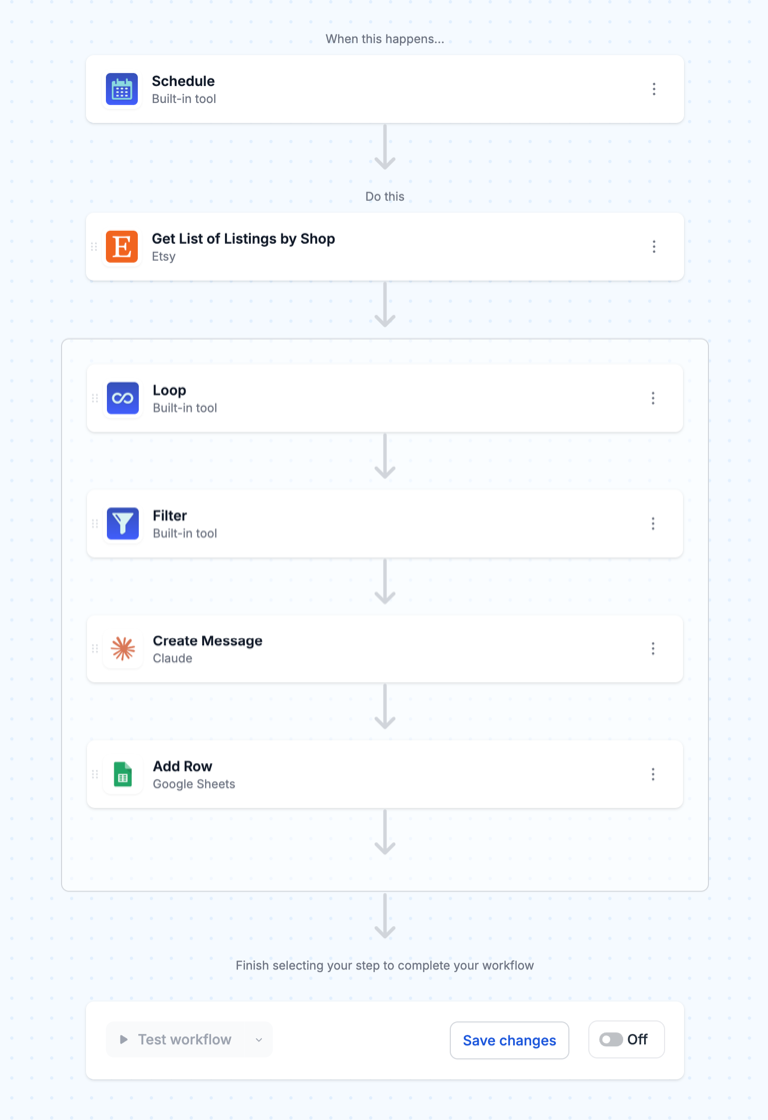
TL;DR: there's a template for that
Why AI should recommend, not publish
Neither seller asked for AI to rewrite their shop unattended, and that instinct is right. A listing that already sells has copy that works for reasons a model can't see: a phrase buyers search, a tag that brings in a gift-shopping crowd, a detail in the description that heads off returns. Overwrite it blindly and you can trade a working listing for a generic one.
So every workflow here writes Claude's suggestions to a Google Sheet next to the current copy, and nothing reaches Etsy until you mark a row approved. It is slower than a one-click rewrite, but it keeps a person in charge of the listings that pay the bills, and the sheet doubles as a record of what changed and when. That matters because Etsy search takes time to respond to a change, and you want to know which listings you touched if one of them slips.
MESA's own docs give the same advice about AI output in general:
"We recommend testing the prompt in the Anthropic dashboard before using MESA's Create Message action."MESA Docs, Claude
Try your prompt on five listings you know well before you point it at the whole catalog.
The workflow at a glance
The full loop is six steps across two workflows. The first four steps find listings worth rewriting and ask Claude for new copy; the sheet is where you decide; the last step pushes approved rows back to Etsy.
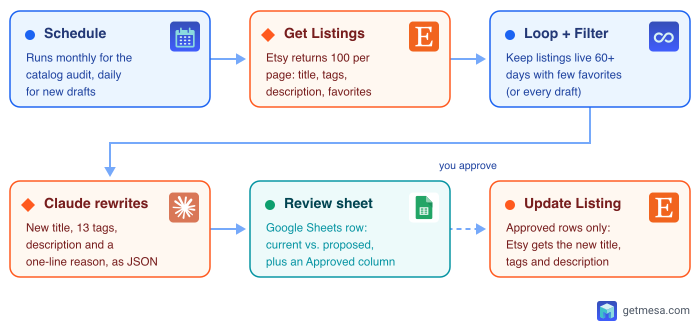
One detail shapes the whole design: MESA's Etsy connector has triggers for new orders, new active listings, and updated active listings, but nothing that fires when you save a draft or when a listing "isn't performing." Both the audit and the draft review therefore run on a Schedule trigger and go looking for listings, rather than waiting to be told about one.
Workflow 1: Audit your active listings with Claude
This is the one to build first. It runs once a month, finds your weakest active listings, and fills a review sheet with Claude's proposed rewrites.
1. Start on a schedule
Use the Schedule trigger and set it to monthly. Weekly is too often: a rewrite needs a few weeks in Etsy search before you can tell whether it helped, and re-auditing a listing you changed last week just generates noise in the sheet.
2. Fetch your active listings
Add Etsy's "Get List of Listings by Shop" step with the state set to active. Etsy returns at most 100 listings per request (the limit maximum in its getListingsByShop reference), so a shop with 140 listings needs a second call with an offset of 100. Each listing comes back with its ID, title, tags, description, creation timestamps, and a num_favorers count.
3. Loop and filter to the listings that need help
Wrap the rest of the workflow in MESA's Loop tool so each listing is handled on its own, then add a Filter step. "Not performing" needs a definition the workflow can actually check, and this is where Etsy's API is less helpful than you'd hope: the listing record has no view count. What it does have is favorites, which Etsy's API reference describes as "the number of users who marked this Listing a favorite."
A workable filter is: live for at least 60 days, and fewer favorites than a threshold that fits your shop (look at a few of your healthy listings to set it). The age rule keeps you from rewriting a listing Etsy hasn't had time to rank yet. If you'd rather review everything once, remove the filter for the first run and add it back afterward.
4. Ask Claude for a rewrite
Add the Claude "Create Message" step and pass it the listing's current title, tags, and description. The prompt does most of the work here, so be specific about Etsy's rules and about the format you want back:
- Title: under Etsy's 140-character limit, leading with the words a buyer would actually type, not a brand name or a string of adjectives.
- Tags: exactly 13 (Etsy's maximum), each 20 characters or fewer, multi-word phrases rather than single words, and not simply repeating words already in the title.
- Description: the first two sentences say what the item is and who it's for, since that opening is what shoppers see first.
- Reason: one line explaining what changed and why, so you can review a row in seconds.
- Format: return JSON with one key per field, so the next step can map each value to its own column.
Tell Claude to keep facts it can't verify out of the copy. It should never invent a material, size, or care instruction that isn't already in the listing.
5. Log each suggestion to a review sheet
Finish with Google Sheets' "Add Row" step. Give the sheet one row per listing with these columns: listing ID, current title, proposed title, current tags, proposed tags, current description, proposed description, Claude's reason, and an empty Approved column. Your whole review then comes down to reading two columns side by side and typing "yes" where the new version is better. Edit the proposed text in the sheet first if it's close but not quite right.
We've published this exact workflow as a template you can start from:
Workflow 2: Review new drafts before you publish
The first seller's second request was the smarter one long-term: fix the copy before a listing goes live, so it never lands in the audit at all.
The build is the same five steps with two changes. Set the schedule to daily, and set "Get List of Listings by Shop" to state draft. Then change the Filter to keep only drafts whose last_modified_timestamp falls within the past day, so a draft you're still working on doesn't get reviewed again every morning. Claude's prompt stays the same, except you might also ask it to list anything missing (no materials, a description shorter than a couple of sentences) since drafts are often half-finished.
Because drafts aren't live yet, you don't need a separate apply step. Open the draft in Shop Manager, copy in the suggestions you like, and publish as usual. Put the edit link in the sheet row to make that one click.
Workflow 3: Push approved rewrites back to Etsy in bulk
This is the "bulk edits" half the second seller asked about, and MESA already has a template for it. Update Etsy Listing Price from Google Sheets watches a sheet for edited rows and sends the changes to Etsy with the "Update Listing" step. Despite the name, it updates titles and descriptions as well as prices.
To use it with the review sheet:
- Point its Google Sheets trigger ("Row Updated (Advanced)") at your review sheet.
- Add a Filter so only rows where Approved is "yes" continue. This is the gate that keeps unreviewed suggestions off your live shop.
- Map the proposed title and description columns, not the current ones, into Etsy's "Update Listing" step, using the listing ID from the row.
- Map the proposed tags too. Etsy takes tags as a list, so split the comma-separated cell into separate tags when you map it, and keep it at 13 or fewer or Etsy will reject the update.
Approve a batch of rows, and each one updates its listing. Add a Google Sheets "Update Row" step at the end that writes today's date into an "Applied on" column, and your sheet becomes a change log you can check against sales a month later.
If you only want one field rewritten
You don't have to rewrite all three fields at once. If tags are the only problem, Create Smart Etsy Tags Using AI from Your Listing Details generates a tag set from a listing's title and description, and we cover how to tune that prompt in how to create Etsy tags using AI. For titles and descriptions on new listings, Create Optimized Etsy Listing Titles with AI and Generate AI-Powered Etsy Listing Descriptions run each time a listing goes live, and how to have AI write an Etsy listing walks through building one from scratch. The audit in this post is for the listings you already have.
How many tasks this uses for 100+ listings
This is where the second seller's question comes in. MESA bills by task, and the rule is simple:
"Typically, every step in a workflow will count as a task if it runs, except Loops and Paths. These are not billable tasks."MESA Docs, Plans & Billing
Here's the math for a shop with 100 active listings, counted generously (the trigger included) so the estimate errs high:
- Full audit, every listing reviewed: 1 trigger + 1 listing fetch + 100 Filter checks + 100 Claude steps + 100 sheet rows, or about 300 tasks.
- Applying every suggestion: each approved row runs the sheet trigger, the Approved filter, and Update Listing, about 3 tasks a row, or 300 for all 100.
- One complete pass: around 600 tasks. In practice you'll approve fewer than all 100, and after the first month the filter narrows the audit to your weakest listings, so later months run much lower.
- Daily draft review: about 30 runs a month plus 3 tasks per draft reviewed. For a shop adding a few listings a week, that stays well under 100 tasks a month.
Now compare that to MESA's plans. The free Starter plan includes 50 tasks a month and Basic ($12/month) includes 500, so one full pass over 100 listings runs past both. Flex ($29/month) includes 10,000 tasks, which covers a first full pass, monthly re-audits, and daily draft reviews with plenty of room left for your other workflows. For a 100+ listing shop that wants to run this ongoing rather than once, Flex is the plan to pick. If you only ever want a one-time cleanup, Basic can work if you run the audit in batches across billing months, though a single 7-day trial of Flex is the simpler way to do a one-off pass.
Two costs sit outside that task count:
- Claude's tokens. MESA's Claude step connects with your own Anthropic API key, so Anthropic bills the model usage directly to you. Testing your prompt in the Anthropic console first, as MESA's docs recommend, also shows you what each call costs.
- Premium tasks, if you use MESA's built-in AI tool instead. Swapping the Claude step for MESA's own AI step means no API key to manage, but AI steps are Premium tasks. Flex includes 500 Premium credits a month (Starter and Basic include 50), and each one past that costs $0.02, so a 100-listing audit fits comfortably inside Flex's allowance.
Making the rewrites actually help
A few habits separate an audit that moves sales from one that just churns copy:
- Change one batch, then wait. Apply 20 or 30 approved rewrites, then give them three or four weeks before judging. If you rewrite the whole shop at once, you can't tell which changes helped.
- Leave your best sellers alone. The favorites filter already skips most of them. Keep it that way, even when Claude's version reads better.
- Keep the language of your buyers. If your customers call it a "tumbler" and Claude writes "insulated drinkware vessel," reject it. Edit the prompt to tell Claude which terms to keep.
- Re-run the filter, not the whole catalog. After the first pass, the monthly audit should only surface listings that are still weak, so the review sheet stays short.
If you also sell on Shopify, the same pattern works there, and it's one of several reasons running Etsy and Shopify together gets easier with automation. For more Etsy workflows built from the same listing steps, see how to automate your Etsy shop.
FAQs
Will MESA change my Etsy listings without my approval?
Not with this setup. The audit and draft review only write suggestions to a Google Sheet. A listing changes only when you mark its row approved and the apply workflow's filter lets it through.
Can I use ChatGPT or MESA's AI tool instead of Claude?
Yes. The workflow shape is identical. Swap the Claude "Create Message" step for MESA's built-in AI step or another AI connector and keep the same prompt. MESA's AI step counts as a Premium task, while Claude runs on your own Anthropic API key.
How does the workflow know which listings are underperforming?
Etsy's API doesn't return listing views, so the filter uses what it does return: how long the listing has been live and how many shoppers favorited it. Set the favorites threshold by looking at a few listings you know are healthy.
Can the workflow trigger when I save a new draft?
Not directly. MESA's Etsy triggers cover new orders and new or updated active listings, not drafts, so the draft review runs daily on a schedule and picks up drafts edited in the past day.
Which MESA plan do I need for 100+ Etsy listings?
Flex ($29/month, 10,000 tasks). One full audit-and-apply pass over 100 listings is roughly 600 tasks, which is more than Basic's 500, and Flex leaves room for monthly re-audits and daily draft reviews.
