
If you sell at a counter with Square and online with Shopify, you have two order lists that never meet. The usual fix is someone retyping Square sales into Shopify at the end of the day so the reports add up. That works until a busy weekend, a refund, or a typo, and then neither list is right.
You can automate that retyping, but it helps to know up front what "in sync" can mean here. MESA can copy every completed Square sale into Shopify as a Shopify order, automatically and without duplicates. It can't link the two records, and it can't create Square orders from Shopify ones. This guide covers the workflow that does the copying, the three settings that keep it from causing new problems, and what to do about the other direction.
TL;DR: there's a template for that
What "in sync" can actually mean for Shopify and Square
Shopify and Square are competitors with no shared order system, and their APIs reflect that. MESA's own Square documentation is direct about it:
"Square orders cannot be automatically created in Shopify and linked with the original Square order when placed via Square. Vice versa, Shopify orders cannot be automatically created in Square and linked with the original Shopify order when placed via Shopify."MESA Square docs
The key word is linked. A Square sale can still be copied into Shopify as a new order with the same items, prices and discounts. What you get is a copy, not a mirror: if the Square order changes later, the Shopify copy doesn't change with it unless another workflow tells it to.
The reverse direction is narrower still. MESA's Square connector can read, pay, and update fulfillment on Square orders, but it has no action that creates one. So in practice:
- Square to Shopify: copy each completed sale into Shopify as an order. This is what removes the double entry.
- Shopify to Square: keep Square's stock counts current when something sells online. Your counter staff need the right inventory number, not a Square copy of a web order.
That split matches how most merchants who run both use them. Shopify becomes the place where all orders are reported, and Square stays the record of the money taken at the counter. If you're still weighing whether running both platforms is worth it, our guide to using Square alongside Shopify covers the tradeoffs first.
If you haven't settled on running both platforms yet, our Square vs Shopify comparison covers fees, POS and inventory differences that may decide whether you need a sync at all.
Copy every completed Square sale into Shopify
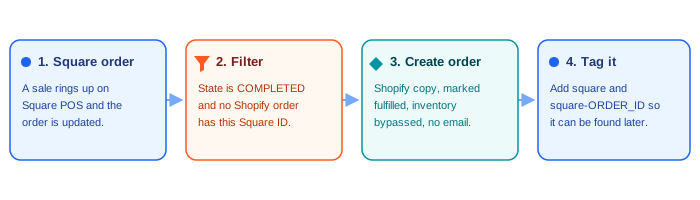
MESA's Create Shopify Orders from New Square Orders template is a two-step workflow: a Square Order Created trigger and a Shopify Create Order action. The trigger checks your Square account every hour for new orders. The action builds a Shopify order from each one with three settings already in place:
- Fulfillment status is set to fulfilled, because the customer walked out with the goods. Nothing lands in your unfulfilled queue for your warehouse to pick.
- Inventory is bypassed. Shopify's order API accepts an
inventory_behaviourofbypass, meaning "do not claim inventory." Square already took the item out of stock, so letting Shopify subtract it too would count the sale twice. - The source name is Square, so you can tell counter sales from web sales at a glance in the Shopify order list.
Shopify's order API also defaults send_receipt to false, so the customer who already got a Square receipt won't get a second confirmation email from Shopify. Leave it that way.
Three changes that stop the copy from causing new problems
The template works as installed for a simple counter. Most stores should make three changes before turning it on, because each one fixes a way the copy can drift from the truth.
1. Only copy orders that are fully paid
Not every Square order is a finished sale. Square uses four order states, and only one of them means money changed hands:
"COMPLETED: Indicates that the order is completed. Completed orders are fully paid. This is a terminal state."Square OrderState reference
The others are OPEN (can still be updated), DRAFT (can't be paid yet) and CANCELED (never paid). Add a Filter step before Create Order that continues only when the order's state is COMPLETED. If your staff use open tickets, such as a tab that's opened and paid later, also switch the trigger from Order Created to Order Updated, so the workflow sees the order again when it's finally paid instead of only when it was opened.
2. Tag each copy with its Square order ID, and skip ones already copied
The template's own FAQ is honest about this:
"The workflow will create duplicate Shopify orders since there's no built-in deduplication."MESA template FAQ
Switching to the Order Updated trigger makes this more likely, since a single order can be updated several times. The fix takes two steps. After Create Order, add a Shopify Order Add Tag step with two tags: square and square- followed by the Square order ID. Then, before Create Order, add a Shopify GraphQL Query step that searches orders for that same square- tag, and a Filter that continues only if nothing was found. Now each Square sale becomes exactly one Shopify order, however many times Square reports it.
That ID tag does a second job too: it's the only thread connecting the two records, which you'll need when a refund comes in (below).
3. Keep the copied orders out of your Shopify-to-Square inventory sync
This is the one that catches people who already sync stock. If you run the Update Square Inventory When Shopify Orders Are Created template, it fires on every new Shopify order, and that now includes the copies of Square sales. It reads the Shopify stock level and writes it into Square. Because the copy bypassed Shopify inventory, that Shopify number may still be the old, higher count, and it can overwrite the correct count Square just recorded.
Add a Filter as the first step of that workflow that stops when the order's tags include square (or its source name is Square). Square sales then update Square's stock once, at the counter, and only real web orders push numbers back into Square. Our walkthrough on syncing Shopify and Square inventory without overselling covers the rest of the stock side, including SKU cleanup and the polling window.
What the Shopify copy is, and isn't
A copied order is a sales record, not a payment. Shopify's API documentation is clear that creating an order this way moves no money:
"No payment information is collected, and no transaction is performed."Shopify Admin API, Order resource
That has three practical consequences:
- Square stays your money record. Card fees, payouts, tips and cash drawer totals live in Square. Reconcile your bank deposits against Square reports, not against the Shopify copies.
- Shopify becomes your sales record. Order counts, units sold and revenue by product now include the counter. Filter by the
squaretag when you want one channel on its own. - Edits don't carry over. If a Square order is changed after the copy was made, fix the Shopify copy by hand, or add an Order Updated workflow that finds it by its ID tag. That's one more reason to copy only completed orders, since they can't change.
It's the same principle as picking a single source of truth for inventory: decide which system wins for each kind of number, and write it down.
Customer records are a separate job from order copies. If you also want counter shoppers in your Shopify customer list, matched by email so nobody is duplicated, see how to sync customer profiles between Shopify and Square.
Handle Square refunds on the Shopify copy
A refund at the counter doesn't touch the Shopify copy, so Shopify keeps counting revenue you gave back. You can't refund the copy in Shopify either, because there's no Shopify payment behind it. What you can do is mark it.
Square's refund record carries the ID of the order it belongs to (its order_id), which is exactly what the ID tag from change 2 lets you search for. The workflow below starts from a Square Refund Created trigger, skips refunds that were rejected or failed, finds the Shopify order tagged with that Square order ID, adds the refund amount and date to its note, and tags it square-refunded. Exclude that tag from your saved order views and exports, and your Shopify revenue matches what you actually kept.
A setup order that avoids surprises
- Connect Square and Shopify in MESA and install the Square-to-Shopify order template.
- Add the three changes: the COMPLETED filter, the ID tag with its duplicate check, and the skip filter in any Shopify-to-Square inventory workflow you already run.
- Run it for a few days on real sales and compare the day's Square sales report with the Shopify orders tagged
square. The counts should match exactly. - Add the refund workflow once the copies look right.
- Stop the manual entry. Tell whoever was retyping sales, so you don't end up with a typed order and a copied one for the same sale.
Expect up to an hour between a counter sale and its Shopify copy, since the Square trigger checks hourly. For end-of-day reporting that doesn't matter. If you need the counter's stock to reach your storefront faster than that, it's the inventory sync to tune, not the order copy.
If you'd rather report on counter sales outside Shopify, the same completed-order filter works for sending Square sales to Airtable.
FAQs
Can Shopify and Square share one order list natively?
No. Neither platform has a built-in integration with the other, and their APIs don't allow an order on one to be linked to an order on the other. An automation tool like MESA can copy Square sales into Shopify as new orders, which removes the double entry, but the two records stay separate.
Will copying Square orders into Shopify reduce my Shopify inventory twice?
Not if inventory is bypassed on the Create Order step, which MESA's template does by default. Square already deducted the stock at the counter. Keep the copies out of any Shopify-to-Square inventory workflow too, or a stale Shopify count can overwrite Square's correct one.
Can I create Square orders from Shopify orders?
Not with MESA's Square connector, which has no create-order action, and MESA's docs say the two can't be linked either way. For web orders, the useful thing to send to Square is the stock change, so your counter staff see the right count.
Will customers get a second receipt?
No. Shopify only emails an order confirmation for an API-created order when send_receipt is set to true, and it defaults to false.