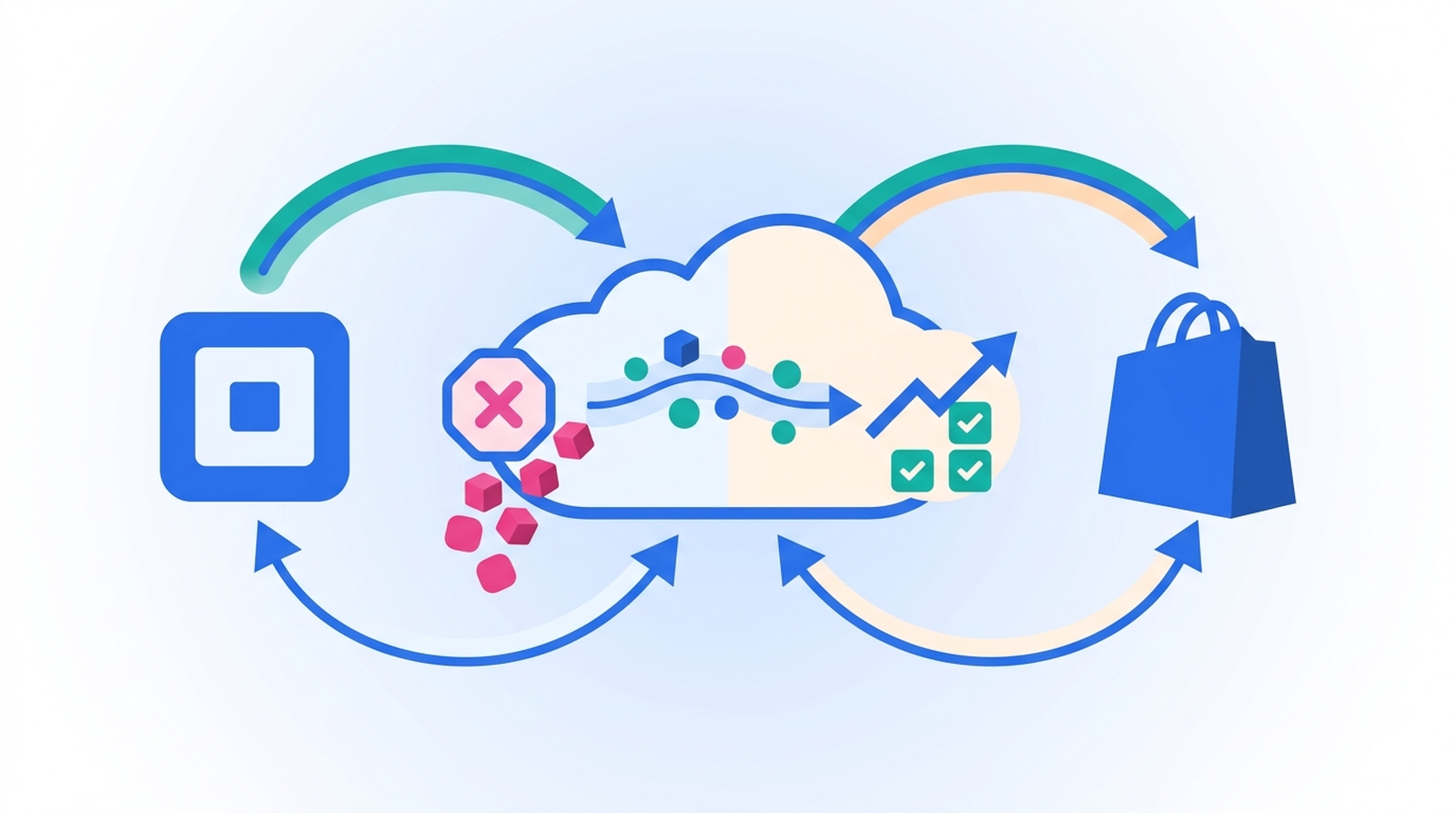
Shopify and Square have no native inventory integration, so a pair of boots sold at your counter at 11:00am is still listed as available on your storefront at 11:01am. Closing that gap takes two workflows — one per direction — joined on a single field both catalogs already have: the SKU.
This is the most common reason merchants who run both platforms end up overselling. It isn't that the numbers are wrong in Square or wrong in Shopify. Each system is perfectly accurate about the sales it can see, and completely blind to the other. Below is how to wire them together with MESA, what the SKU actually has to look like for any of it to work, and the specific window where overselling still happens after you've automated it.
TL;DR: there's a template for that
Why the two counts drift apart in the first place
Square tracks inventory per catalog item variation, per location, and per state. When something sells on the POS, Square moves that quantity out of the IN_STOCK state. Shopify tracks a separate number, on its own inventory item, at its own location. Neither one is subscribed to the other.
That's not a bug in either platform — it's the consequence of them being direct competitors with no shared plumbing. MESA's own Square documentation is blunt about where the boundaries are:
"Our integration does not allow you to use Square as a third-party payment provider in Shopify."MESA Square docs
You're not merging the two systems. You're keeping two independent ledgers agreeing with each other, which is a different and much more tractable problem. If you're still deciding whether running both platforms is worth it at all, our breakdown of using Square alongside Shopify covers the tradeoffs before you get to the automation.
SKUs are the only thing holding the two catalogs together
Everything below depends on this, so it's worth doing before you build anything. Square identifies a product by its catalog object ID. Shopify identifies one by its variant ID and inventory item ID. Those IDs have nothing to do with each other and never will.
The SKU is the bridge. A sync workflow reads the SKU off the Square catalog object, searches Shopify for a variant carrying that same SKU, and updates that variant. If the SKU is blank on either side, or reads BOOT-BLK-9 in Square and boot-blk-9 in Shopify, the lookup finds nothing and that line item is silently skipped.
Before turning on any sync, audit both catalogs for:
- Missing SKUs. Any variant without one can't participate. This is usually the bulk of the cleanup.
- Case and whitespace mismatches. A trailing space is invisible in the admin and fatal to a lookup.
- Duplicate SKUs. If two Shopify variants share a SKU, the workflow has no way to know which one the Square sale belonged to.
- Products that exist on only one side. Decide deliberately whether they should be excluded or created — don't discover it from a failed run.
This is the same discipline behind picking a single inventory source of truth: the automation can only be as consistent as the identifiers underneath it.
Customers need a shared identifier too, and there email plays the role SKUs play here. Syncing customer profiles between Shopify and Square covers matching people by email and linking the two records.
The two workflows that keep the numbers honest
Each direction is its own workflow, because each has a different trigger. MESA ships both as templates, so most of this is configuration rather than construction.
Square sale to Shopify inventory
This is the direction that prevents your storefront from selling something that's already off the shelf. The Update Shopify Inventory From New Square Orders template runs six steps:
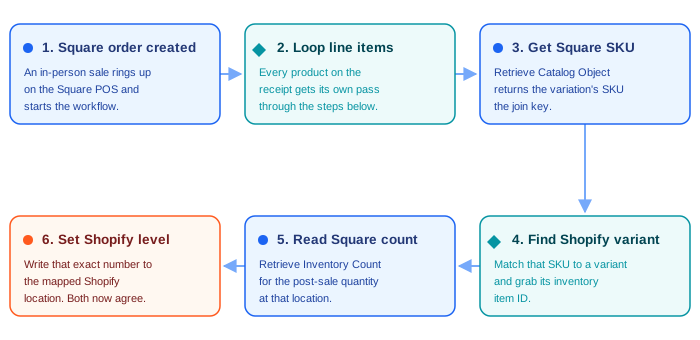
The detail worth noticing is step five. The workflow doesn't subtract the quantity sold from Shopify's number — it reads Square's current count and writes that exact figure into Shopify. That distinction matters more than it looks. A subtraction-based sync compounds every miss: one skipped run and the two numbers are permanently off by that amount. An absolute write is self-healing, because the next sale on that SKU overwrites whatever drift accumulated.
Square's own API is built on the same idea. Its Inventory API separates adjustments from verified counts, and treats the verified count as authoritative:
"InventoryPhysicalCount - Defines the verified quantity of an item variation at a location with a specific state as determined by a manual count or trusted system."Square Inventory API documentation
You'll need one piece of configuration the template can't guess: the Shopify location ID that should receive the update. Find it under Settings, then Locations, in your Shopify admin, and paste it into the final step.
Shopify order to Square inventory
The reverse direction matters less for your storefront and a great deal for your counter staff, who otherwise promise a customer the last unit of something that sold online an hour ago. The Update Square Inventory When Shopify Orders Are Created template mirrors the first: a Shopify order created trigger, a loop over line items, a variant lookup for the SKU and current level, a search of the Square catalog for the matching variation, and an inventory update in Square.
Square accepts that update in a few different shapes — a physical count, an adjustment, or a transfer between locations — and MESA's inventory update step asks you to pick one and fill in only the fields relevant to it. For a straightforward two-platform sync, the physical count is what you want: it says "this is the real number" rather than "move this much."
Why running both directions doesn't create a loop
This is the first thing experienced automation builders ask, and it's a fair worry. If a Square sale writes to Shopify, and Shopify orders write back to Square, what stops the two from chasing each other forever?
Nothing stops it in principle — but nothing starts it either, because of what the triggers are watching. Both workflows fire on order events, not inventory events. When the Square-to-Shopify workflow sets a Shopify inventory level, it doesn't create a Shopify order, so there's nothing for the Shopify-to-Square workflow to react to. The cycle never closes.
That's a deliberate property of building it this way, and it's worth preserving. If you ever extend either workflow to trigger on an inventory change instead of an order, you reintroduce exactly the loop you just avoided, and you'll need explicit guards — a source tag, a skip condition, a cooldown — to break it.
Closing the window where overselling still happens
Automating both directions doesn't make the sync instantaneous, and pretending otherwise is how merchants get surprised. MESA's Square order trigger polls: per the template's own step description, it checks your Square account every hour for new orders. On a busy Saturday, that's a real window in which your storefront is working from an hour-old number.
Three things shrink the damage:
- Turn off "Continue selling when out of stock" on synced variants. Shopify lets customers buy past zero when this is enabled, which converts every sync delay into an oversell. It's set per product or variant in the Inventory section of the Shopify admin — see Shopify's guide to selling out-of-stock products. For SKUs shared with a physical counter, leave it off.
- Hold back a buffer on genuinely scarce SKUs. If you have three of something, publish two to Shopify. The last unit absorbs the polling window instead of a customer absorbing it.
- Alert on low stock rather than waiting for zero. A Slack or email step in the same workflow, conditioned on the count dropping below a threshold, gives a human a chance to intervene before the race condition matters.
If you need sub-minute reconciliation — high-velocity, single-unit inventory, where an hour is genuinely unacceptable — be honest that you're past what a polling sync can promise. Square does expose an inventory.count.updated webhook at the API level for that class of problem, but it's a different build than the templated workflows above.
Map your locations before you turn anything on
Both platforms track stock per location, and neither template can infer how yours correspond. The Square-to-Shopify template reads from your primary Square location and writes to one Shopify location ID you supply.
If you run a single shop and a single online warehouse, that's the whole configuration. If you run three storefronts, you need a decision per pair: does each Square location map to its own Shopify location, or does the storefront sell from a pooled number? A multi-location setup usually means either a copy of the workflow per location, or a lookup step in the middle that resolves the right destination — and it's much cheaper to decide that now than to unpick a workflow that's been writing to the wrong warehouse for a month.
What this setup won't do
Worth stating plainly, because the gaps get discovered at the worst possible time:
- It doesn't link orders across the two systems. MESA's documentation is explicit that a Square order can't be created in Shopify and linked back to the original, or the reverse — an API limitation on both sides, not a MESA one. Order data can be copied; the relationship between the two records can't.
- It doesn't sync products or prices. A new product still has to be created on both platforms, with matching SKUs, before any inventory sync can touch it.
- It doesn't reconcile shrinkage, damages, or manual recounts unless those happen in Square and you let Square's count win. A stockroom adjustment made directly in Shopify will be overwritten the next time that SKU sells at the counter.
That last one is really a restatement of the first decision you have to make: which system is right when they disagree. Answer it once, out loud, and the rest of the configuration follows from it.
If you want Square sales in your Shopify order list too, see how to keep Shopify and Square orders in sync without double entry, including how to keep those copied orders from overwriting the counts this sync sets.
Start with the direction that costs you money
You don't need both workflows on day one. Turn on the direction where a stale number actually costs you — for most merchants that's Square-to-Shopify, because a refund and an apology email is more expensive than an awkward moment at the register. Run it for a week on a clean subset of SKUs, watch the numbers agree, then add the reverse.
The cleanup work on SKUs is the part that determines whether any of this holds. The workflows themselves are a template and a location ID.
