🚀📢 From expanding what MESA’s AI can do to releasing new templates and a fresh playlist, this month’s update is full of tools to help you move faster and stay inspired.
Here’s what’s new with MESA this month:
🧠 MESA’s AI in more places
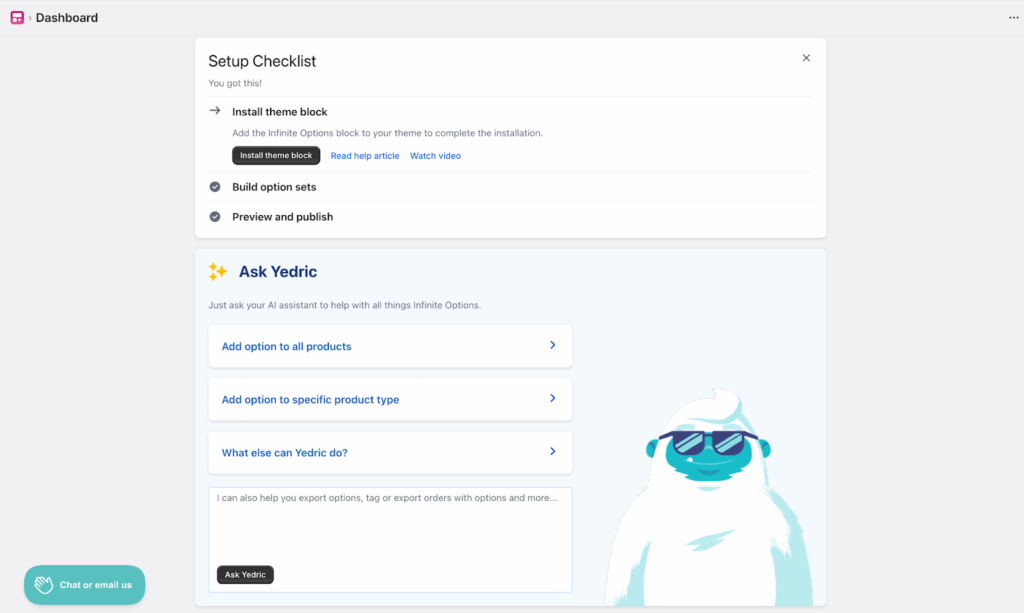
MESA’s built-in AI is now available in our popular product options app, Infinite Options! With MESA’s AI at the helm, you can instantly add product options, search product docs, and run skills directly in the app for a faster way to work. Pairing Infinite Options with MESA is a powerful way to manage and automate product variants on your store.
🛠️ Improvements
We’re always on the lookout for ways to make MESA even better. Here’s what’s new:
Shopify: You can now instantly copy any existing draft order with a single step. This makes it easier to recreate complex orders, speed up manual workflows, and support repeat customers without rebuilding line items, discounts, or custom notes from scratch.
Asana: Workspace selection in Asana steps is now faster and more intuitive. As you type, MESA automatically narrows down the list of available workspaces, helping you find the right one quickly and reducing setup friction.
📊 5 new Google Sheets templates
Send Shopify POS Orders to Google SheetsCapture every in-store sale by sending your Shopify POS order data directly to Google Sheets. Track sales patterns, analyze customer behavior, and create custom reports without manual data entry. Perfect for store owners who need real-time visibility into their retail performance and want to build comprehensive sales dashboards.
Send Square Orders to Google SheetsTrack every Square sale in a Google Sheets spreadsheet without manual data entry. Each new order from your Square POS automatically adds a separate row for every line item in that order—capturing item details, quantities, payment amounts, and timestamps. It’s perfect for business owners who want accurate sales reporting, detailed inventory tracking, or insights into customer purchasing patterns without switching between platforms.
Save New Shopify Products to Google SheetsExport your Shopify product catalog to Google Sheets instantly. This workflow sends product names, prices, inventory levels, and descriptions to a spreadsheet whenever you add items in your store. Perfect for inventory tracking, price analysis, and sharing product data with your team without manual copying.
Send Shopify Product Inventory Updates to Google SheetsKeep your product inventory organized outside Shopify by sending stock levels, SKUs, and product details directly to Google Sheets. Perfect for sharing inventory data with team members, creating custom reports, or maintaining backup records. This workflow sends your current inventory whenever products are updated, so your spreadsheet stays current without manual data entry.
Capture Incomplete Shopify Shipping Details and Route to Google SheetsStop losing sales to incomplete shipping addresses. This workflow captures orders with missing address details and sends them straight to Google Sheets, creating an organized list for your team to follow up. Instead of manually hunting through orders, you'll have every incomplete address in one spreadsheet with customer contact info, making it easy to reach out and complete the sale.
📝 3 new Google Docs templates
Generate Google Docs for New Shopify ProductsCreate comprehensive product documentation every time you add new items to your Shopify store. This workflow captures product names, descriptions, pricing, and inventory details, then generates organized Google Docs for your team. Perfect for maintaining product catalogs, sharing information with suppliers, or keeping detailed records for marketing campaigns without manual data entry.
Convert Meeting Audio to Text and Deliver Notes to Google DocsEffortlessly turn your meeting recordings into polished, organized notes. This pre-built workflow automatically pulls your audio files from Recall, transcribes the conversation into text, and saves the notes directly to a Google Doc so you can focus on the discussion instead of manual note-taking. Pair this template with Record Google Calendar Meetings with Recall to ensure every meeting is captured by a Recall transcriber. Once your meeting ends, the recording instantly triggers this workflow. Within moments, you will have a clean, shareable summary waiting in your chosen Google Doc, perfect for keeping your team aligned and informed.
Collect 5-Star Judge.me Reviews in a Google DocNever miss showcasing your best customer feedback again. This workflow monitors new 5-star reviews on Judge.me and automatically adds them to a Google Doc. Perfect for collecting testimonials for marketing campaigns, website updates, or sales presentations. Watch your success stories compile themselves while you focus on serving customers.
✨ 6 more workflow templates
Add Free Gift to Tagged Customer Order in ShopifyGive your best customers something extra. This workflow watches for new Shopify orders from customers with specific tags (like VIP or loyalty member) and automatically adds a free gift item to their order. Perfect for rewarding repeat buyers, celebrating milestones, or surprising your most valued customers with minimal effort.
Tag Shopify Orders if Unfulfilled After Set TimeNever lose track of delayed orders again. This workflow automatically monitors your Shopify orders and applies a custom tag when any remain unfulfilled beyond your set timeframe. By default, it checks for delays 10 days after an order is placed, but you can easily adjust this to fit your needs. It’s perfect for staying on top of shipping delays, prioritizing urgent orders, or triggering follow-up actions. Set your timeframe once, and MESA will handle the rest—so you can stay focused on getting those packages out the door.
Duplicate Tagged Draft Orders on a Set Day Each MonthCreate copies of specific draft orders every month on your chosen date. Perfect for subscription boxes, monthly services, or recurring product deliveries. Tag your template draft orders, pick your monthly date, and watch MESA handle the rest. No more manually recreating the same orders month after month. Simply set it once and let automation handle your recurring order workflow.
Update Shopify Order Metafield with Customer Company NameAutomatically capture your customer's company name from each new Shopify order and store it in order metafields. This workflow enriches your order data with business identifiers, making it easier to track and report on B2B accounts, manage wholesale relationships, and analyze order activity by customer organization. Perfect for merchants selling to multiple business clients who need accurate company-level insights for operations, fulfillment, and customer service.
Remove "On Sale" Product Tag When Compare-at Price Equals Regular PriceStop showing misleading sale tags on your products. This workflow checks your product prices and removes the "On Sale" tag whenever your compare-at price matches or is lower than your regular price. No more accidentally displaying sale badges on full-price items or confusing customers with incorrect discount signals.
Improved:
Create a Pinterest Pin from a New Etsy ListingMaintaining a consistent social media presence can drive traffic to your Etsy store and expand your reach. This template automatically creates a Pinterest pin whenever you publish a new Etsy listing, helping you generate searchable content that drives organic traffic over time. Boost your Etsy listings with the power of Pinterest and increase your discoverability effortlessly.
🔉Dance Dance playlist
This dance playlist has something for everyone, packed with upbeat tracks to keep your energy high during work lulls. Give it a listen and find your next favorite track.
What to do next…
The fastest way to automate anything is to start with a single task.