
An Etsy sales spreadsheet is a Google Sheet that gets one new row for every item you sell, without you copying anything out of Shop Manager. The quickest way to build one is a MESA workflow that starts on Etsy's Receipt Created trigger, loops through the order's items, and runs Google Sheets Add Row for each. Add a one-time run to bring in past orders and a monthly run that logs Etsy's fees, and you have a sales tracker that also works for bookkeeping.
What Etsy's own CSV export gives you
Etsy already lets you download your orders as a spreadsheet, and for a once-a-year tax pass that may be all you need. In Shop Manager, go to Settings, then Options, then the Download Data tab, and choose a CSV type under Orders (order items, orders, Etsy Payments sales or Etsy Payments deposits), plus a month and year. Leave the month blank to get the whole year.
"The resulting spreadsheet includes a list of all your orders, including the payment method, item price, item title, and SKU numbers of items if you've added them."Etsy Help: download a spreadsheet of your sold transactions
The catch is that each download is a snapshot. To keep a running tracker you download again, paste it over last month's, and fix whatever columns moved. Two smaller things to know if you build on the CSV:
- The order total includes refunds and cancellations. Etsy notes that the Orders CSV's Order Total doesn't subtract fully refunded and canceled orders, and suggests Order Value minus Discounts Amount if you want to match Shop Stats revenue (Etsy Help: Shop Stats revenue).
- Revenue isn't profit. That figure doesn't account for selling fees or shipping costs, which is why the fees section below exists.
If you want the sheet to fill itself as orders come in, use a workflow instead.
How the automatic sales spreadsheet works
The setup is three small workflows writing into one spreadsheet. Only the first is required; the other two fill gaps it leaves.
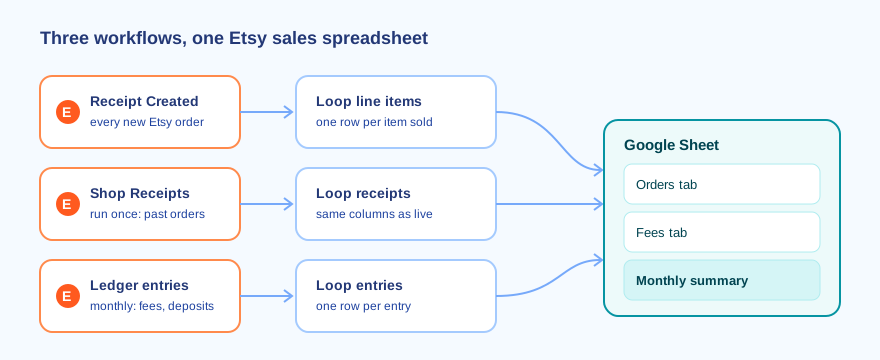
- New orders, logged as they come in (Receipt Created, Loop, Add Row).
- Past orders, pulled once so the sheet doesn't start empty (Get List of Shop Receipts, Loop, Add Row).
- Fees and deposits, pulled monthly from Etsy's payment account ledger, so you can see profit as well as sales.
Step 1: Log every new Etsy order
The Send Etsy Orders to Google Sheets template is the core of the tracker. It uses the Etsy Receipt Created trigger (Etsy calls an order a receipt), a Loop through the line items, and Google Sheets Add Row. Out of the box each row has the receipt ID, the buyer's name, the order total, and per item the product title, product ID, quantity and unit price, plus a link back to the order.
Set up your sheet with a header row first, then map each field to a column. A layout that holds up well:
- Date, Receipt ID, Buyer
- Item title, SKU, Quantity, Item price
- Order total, Channel (always "Etsy" for now; useful if you add another shop later)
Two things behave differently from what most sellers expect:
It isn't instant. Etsy triggers in MESA run on a polling schedule, checking "on every hour or whatever the selected frequency is selected in your MESA workflow" (MESA Docs, Etsy), and the frequencies available depend on your plan. A sale can take up to an hour to show up. That's fine for a sales log.
There's no shipping address. Etsy only shares address information with apps in its Preferred Partner program, so leave address columns out instead of keeping one that's always blank.
Step 2: Backfill the orders you already have
Receipt Created only fires for orders placed after you turn the workflow on. To get your history into the same columns, run the Backfill Past Etsy Orders to Google Sheets workflow once. It uses Etsy's Get List of Shop Receipts action for a date range you choose, loops through each receipt's items, and adds a row for each.
Set the end date to the day before you turned on Step 1, so the two workflows never write the same receipt. For a shop with a few years of sales, run it once per year: smaller runs are easier to check against Etsy's yearly order CSV.
If you'd rather not run a workflow for history, Etsy's yearly CSV download works too. Paste it into the same tab, reorder its columns to match your header row, and fill the Channel column yourself.
Step 3: Add Etsy fees and deposits for bookkeeping
An order log tells you what you sold. It doesn't tell you what you kept, because listing fees, transaction fees, payment processing and ads come out before Etsy deposits the rest. Those entries live in your Etsy payment account ledger, which MESA can read with Get List of Shop Payment Account Ledger's Entries.
The Log Etsy Fees and Deposits to Google Sheets workflow runs on the 1st of each month, pulls the previous month's ledger entries, and writes each one to a Fees tab with its date, type, amount and balance. Put it next to the Orders tab and the monthly summary below gets a net column.
Turn the rows into a monthly sales tracker
Once rows are flowing, a small Summary tab does the tracking. Assuming dates are in column A, receipt IDs in B, quantity in F, item price in G, and the Fees tab has dates in A and amounts in C:
- Item revenue for a month:
=SUMPRODUCT((TEXT(Orders!A2:A,"yyyy-mm")="2026-10")*Orders!F2:F*Orders!G2:G) - Orders in a month:
=COUNTUNIQUE(FILTER(Orders!B2:B,TEXT(Orders!A2:A,"yyyy-mm")="2026-10")) - Units sold:
=SUMPRODUCT((TEXT(Orders!A2:A,"yyyy-mm")="2026-10")*Orders!F2:F) - Fees and deposits for the month: the same SUMPRODUCT pattern over the Fees tab, split by entry type if you want each fee on its own line.
One order becomes several rows when a buyer orders several items, so never sum the Order total column: a three-item order would count three times. Count distinct receipt IDs for orders, and use item price times quantity for revenue.
A pivot table by item title and month shows your best sellers without any formulas. If you'd rather get that summary in your inbox, the Weekly Etsy Sales Digest with Claude via Email template sends one each week.
Selling on Shopify too?
Keep the same columns and add Shopify's orders to the same tab with the Channel column set to "Shopify". The full two-channel setup, including a Listings tab, is in getting every Etsy and Shopify order and listing into one Google Sheet. For Shopify alone, see how to connect Shopify to Google Sheets.
The same sheet can manage your listings as well as your sales. To change prices, titles or quantities across many listings at once, see how to bulk edit Etsy listings from a Google Sheet, and for other tasks worth handing off, start with the guide on how to automate your Etsy shop.
FAQs
How do I make an Etsy sales spreadsheet in Google Sheets?
Create a sheet with a header row (date, receipt ID, buyer, item, SKU, quantity, price, order total), then turn on a workflow that adds a row from Etsy's Receipt Created trigger for every item sold. Backfill past orders once with a receipts workflow or Etsy's CSV download.
Can I export Etsy orders to a spreadsheet without an app?
Yes. In Shop Manager, go to Settings, Options, Download Data, choose an Orders CSV type and a month or year, and select Download CSV. The file opens in Google Sheets, but it doesn't update itself, so you repeat the download for each new period.
How fast do new Etsy orders appear in the sheet?
Etsy triggers in MESA poll on a schedule, by default every hour, with the frequencies available depending on your MESA plan. Expect a new sale in the sheet within about an hour.
Can the spreadsheet track Etsy fees too?
Yes. A monthly workflow reading your Etsy payment account ledger writes each fee, sale and deposit to its own tab, so you can show sales, fees and net payout side by side for bookkeeping.
Why doesn't the sheet include buyers' shipping addresses?
Etsy only shares address information with apps in its Preferred Partner program, so a workflow can't fill an address column. Keep shipping details in Etsy.
