Discord is a staple for communities, businesses, and teams to communicate and collaborate. As these groups get more prominent and more active, managing communication and keeping everyone informed can be a real-time suck.
Automating Discord messages is a way to streamline communication, get updates in time, and keep engagement without having to send every message manually. By using automation tools and techniques, you can save time, be more efficient, and focus on growing your community or business.
In this article, we’ll cover the benefits of automating Discord messages, step-by-step instructions on how to set up automation, and best practices to help you get the most out of this.
Why automate Discord messages?
Automating Discord messages has several benefits that will help you manage your server better and engage your community:
Save time: Scheduling repetitive messages—daily announcements, reminders, or event notifications—means you don’t have to post them manually every time. That’s time you can use for other essential things.
Get engagement: Automated messages will keep your Discord server active and engaged even when you’re not around. By scheduling messages to be sent at the best times, you’ll keep your community informed and involved no matter the time zone or availability.
Provide timely updates: Automated messages are great for time-sensitive information such as product launches, limited-time offers, or important news. By setting up automation in advance, you’ll ensure your community gets those updates quickly.
Consistency and reliability: Automating messages means essential information is shared consistently and reliably. This is especially important for businesses or teams that use Discord for internal communication, as it keeps everyone on the same page and reduces the chance of missing updates.
Three ways to auto-send messages on Discord
If you just want to know how to auto send messages on Discord, there are three routes, and only two of them are allowed:
- A bot account (allowed): Messages are posted by a bot you add to your server, either a ready-made bot with a scheduled-message feature or one you code yourself against Discord's bot API. This is what Discord expects automation to use.
- An automation tool with a Discord connector (allowed): A tool like MESA posts through its own bot, so you can send a message on a timer (every morning, every Monday, every 6 hours) or when something happens in another app, such as a new Shopify order or a new Google Sheets row, with no code to host.
- A self-bot or auto-message script on your own account (not allowed): The many "Discord auto message sender" scripts that log in as you break Discord's Community Guidelines, which say: "Do not use self-bots or user-bots. Each account must be associated with a human, not a bot." Using one can get your account suspended.
The rest of this guide uses the second route: pick a trigger, write the message, and let the workflow post it for you.
Pre-built Discord automation templates
In addition, MESA has pre-built automation templates to make creating Discord message automation even easier. These templates are designed to handle common scenarios and can be customized to fit your needs.
Step-by-step: How to automate Discord messages
Time needed: 5 minutes.
To begin with, automating Discord messages with MESA is easy and can be customized to your needs. Follow these steps to create an automation that keeps your community informed.
- Choose your trigger
To begin with, choose the event that will trigger your Discord message automation. MESA offers several trigger options tailored to different scenarios:
Time-based triggers: Perfect for sending scheduled messages at a regular interval, daily digest, or weekly updates.
Event-based triggers: Great for sending messages when a specific event occurs, like when a new order is received in your Shopify store or when data is pulled via API.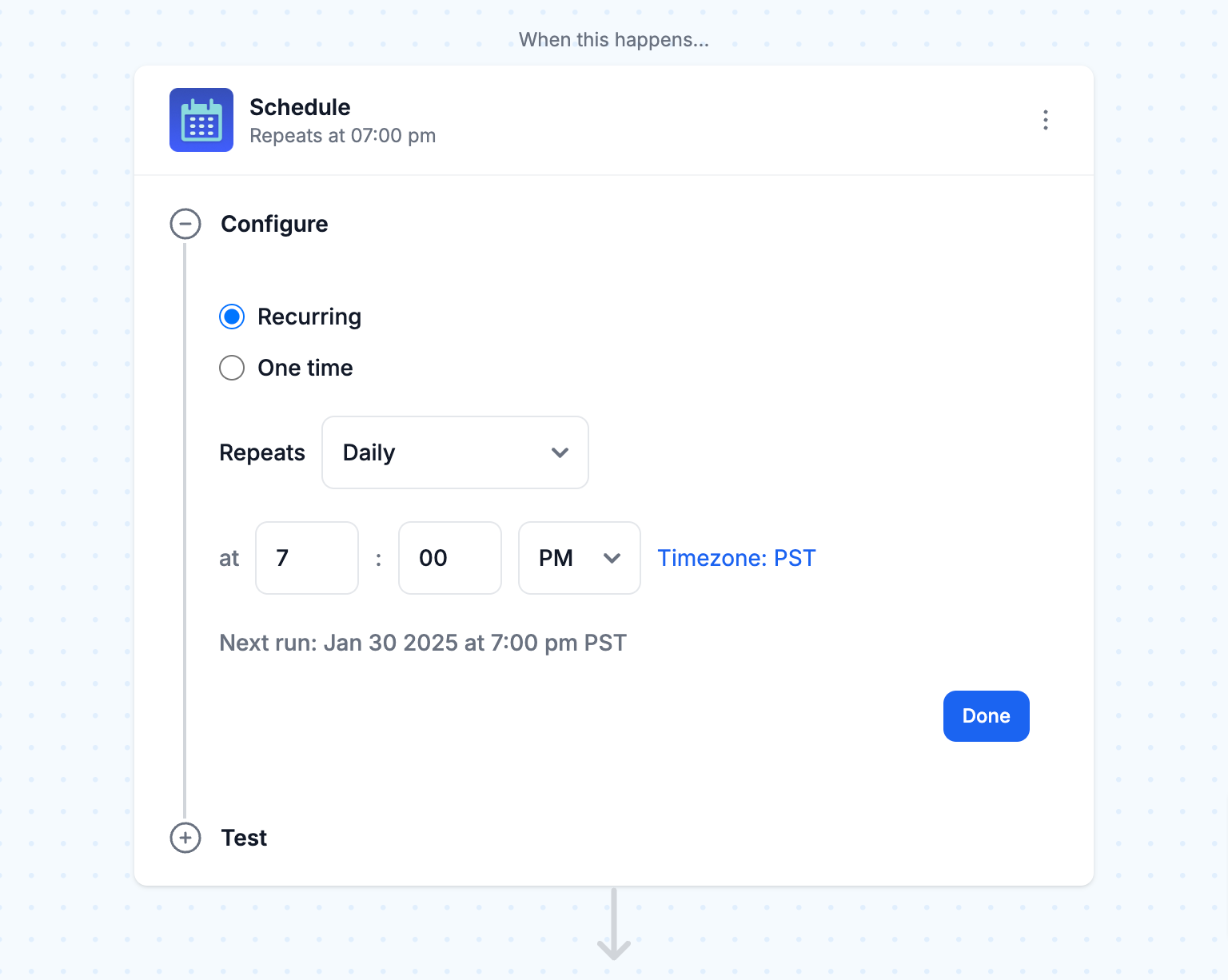
- Create message content
Now that you’ve chosen your trigger, it’s time to write the content of your automated message. MESA has an easy-to-use interface to craft messages that are informative and engaging:
Message text: Then, write your message's main content, and ensure it conveys the information you want to share. Use formatting like bold, italics, and bullet points to make it readable and understandable.
Add dynamic variables: Finally, customize your messages by adding variables like the recipient’s name, order details, or task information. This way, you can send targeted and relevant messages to your audience.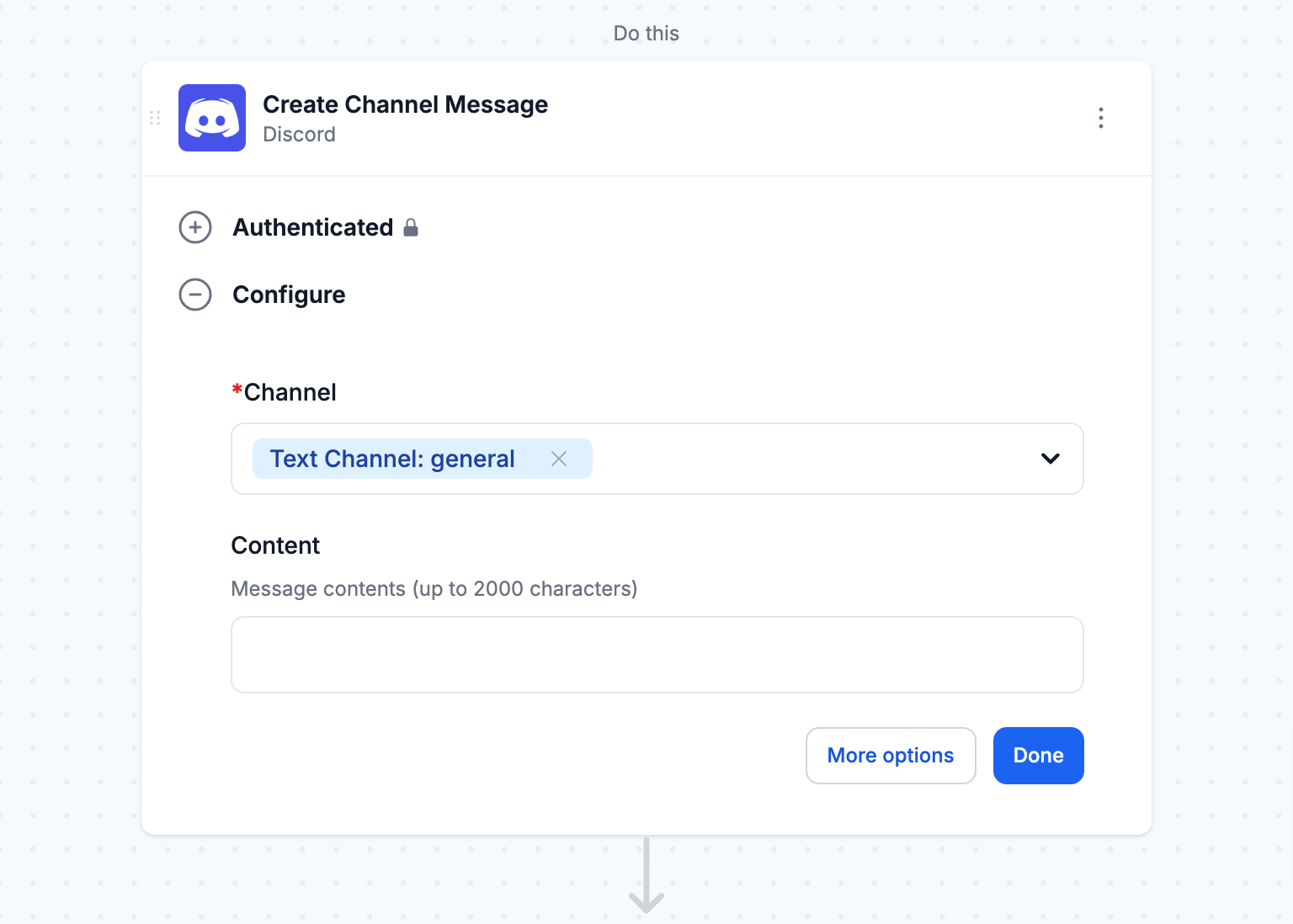
- Set up automation rules
To make sure your automated messages are sent at the right time to the right people, MESA allows you to set up multiple automation rules:
Timing and frequency: Decide when and how often you want your messages to be sent. This can be a specific time of day, a fixed interval (e.g., every 6 hours), or a specific day of the week.
Target channels: Then, choose the Discord channels to send your automated messages. This allows you to customize your messages for different audiences or topics.
Configure with Filters, Paths, and Approvals: Add conditional logic to control when and how your messages are sent. Use Filters to set conditions that must be met for the message to be sent, Paths to have multiple outcomes based on different situations, and Approvals to require manual review before sending messages.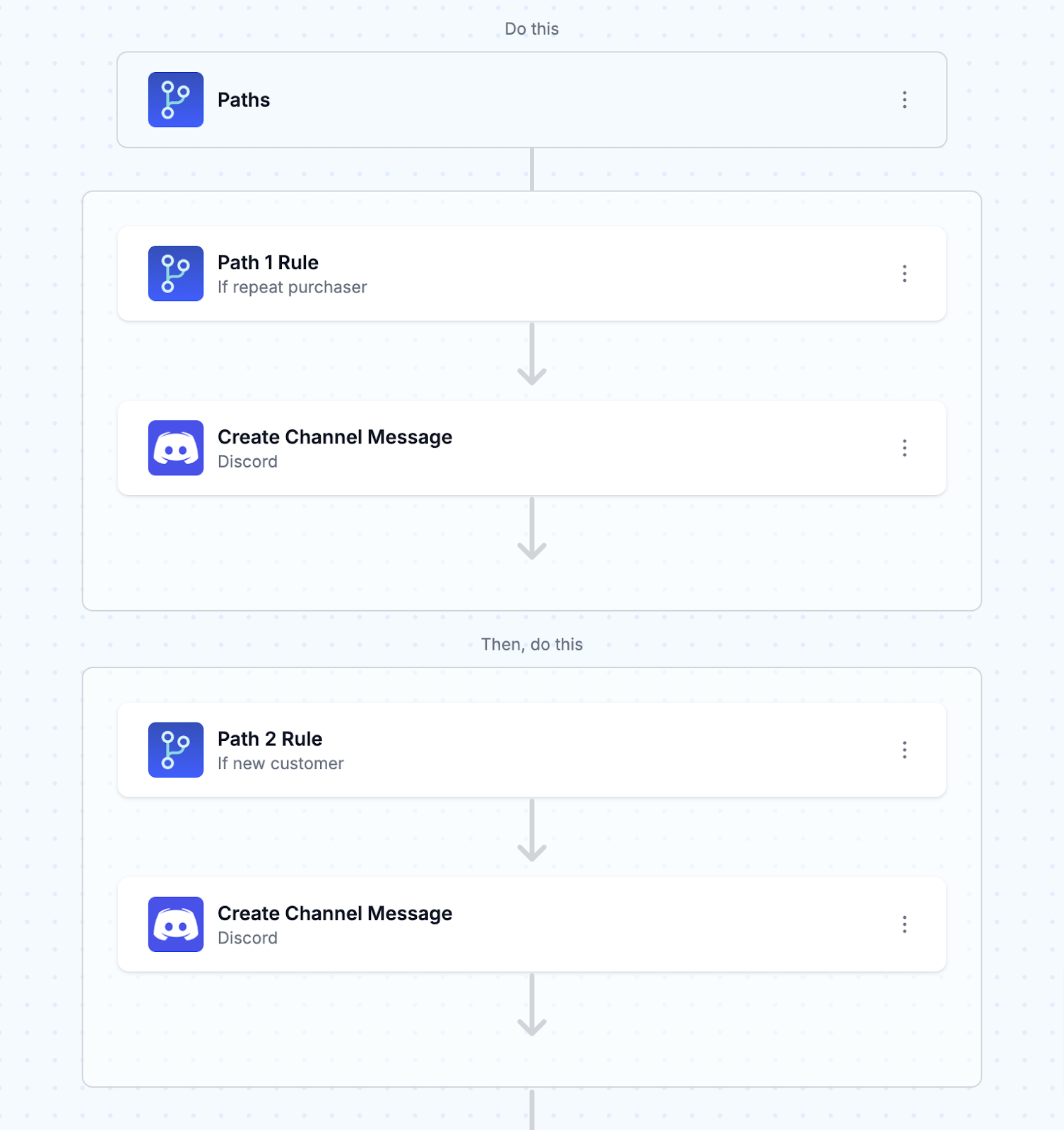
- Test your automation
Before you deploy your Discord message automation, test it thoroughly to ensure it works as expected. MESA has tools to help you test your automation:
Run workflow test: First, test your automation workflow to see how it works in real-time. This way, you can catch any issues or unexpected behavior before you deploy the automation to your live Discord server.
Timing check: Then, verify that you send messages at the right time and frequency. If needed, adjust your automation rules to fine-tune the timing.
Message formatting: Finally, check the structure of your automated messages to ensure they are visually appealing and readable. Also, check that any dynamic variables are populating correctly and that the overall message format matches your brand or community guidelines.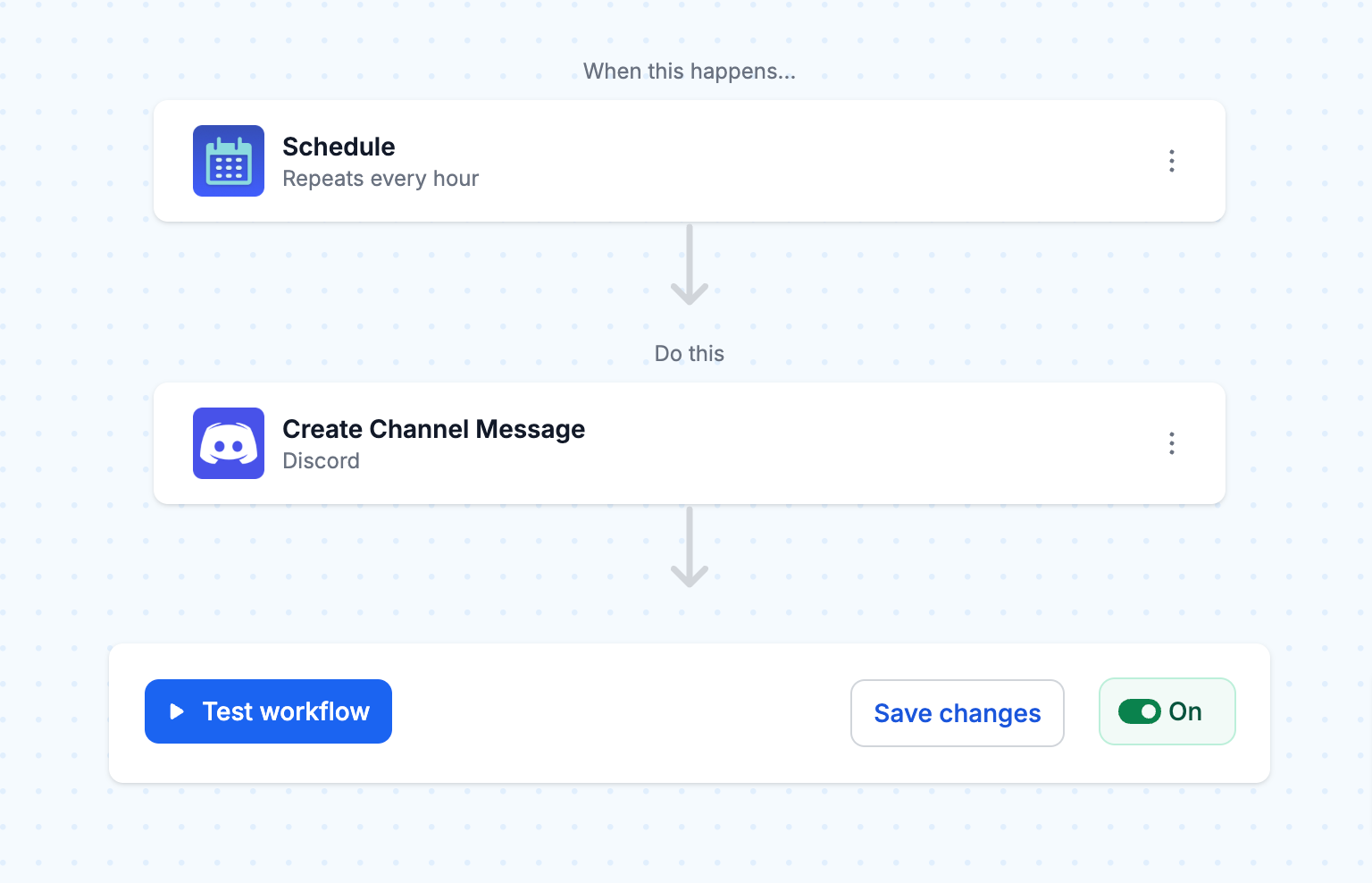
Want a worked example of an event-based trigger? Our guide to Discord notifications for Shopify inventory updates walks through posting a channel message every time stock levels change.
Discord message automation best practices
Follow best practices to ensure your Discord message automation is effective, well-received, and matches your community’s expectations. By doing so, you can create automation that delivers value, encourages participation, and improves the overall experience for your Discord members.
Don’t clutter the channel
However, one of the most critical parts of successful Discord message automation is finding the balance between sharing valuable information and not cluttering the channel. Sending too many or irrelevant automated messages to your channel can quickly lead to member frustration and disengagement.
- Be intentional: Carefully decide which messages to automate. Focus on messages that provide necessary updates, timely reminders, or valuable insights your community will appreciate.
- Use dedicated channels: Create specific channels for automated messages, like a “News” or “Updates” channel. This way, members can opt in to receive these messages, keeping other channels organized and focused.
- Frequency: Limit the frequency of automated messages so as not to overwhelm your members. Send messages over some time and allow members to customize their notification settings.
Automation can work the other way too. If important pings get buried in a busy server, you can get a text when someone pings your Discord server so mentions of your role never sit unread.
Make it relevant
Ensuring your automated messages are relevant and valuable to your community is key to engagement and member interest. Irrelevant or generic messages can quickly lead to members tuning out or leaving your server.
- Content: Customize your message to match your community’s interests, needs, and goals. Use personalization techniques like dynamic variables to create messages that speak to your members. See Connect ChatGPT to Discord for an example of using AI to draft announcements and summarize flagged messages instead of writing them by hand.
- Segment your audience: Use Discord’s role system to send automated messages to specific parts of your community. This will allow you to deliver more relevant content to each group and increase engagement.
- Collect feedback: Ask your community regularly for input on what automated messages they find most valuable. Use this feedback to refine your automation strategy and keep your messages relevant over time.
Test thoroughly
Before you deploy your Discord message automation, test thoroughly to find and fix any issues. Not testing your automation properly can lead to unintended consequences, such as the wrong message content or timing.
- Test in an isolated environment: Use a separate Discord server or channel. This way, you can test different automation configurations without affecting your central community.
- Message correctness: Double-check that your automated messages are error-free and typo-free and that formatting is correct. Make sure dynamic variables populate correctly and message content matches your intended purpose.
- Timing and triggers: Test your automation triggers and timing settings to send messages at the right time for the right events. Adjust as needed to optimize delivery times.
Analyze and refine
Lastly, once your Discord message automation is live, continuously monitor and adjust to your community’s changing needs. Regularly evaluating your automation will help you find areas for improvement and ensure that your messages stay relevant over time.
- Engagement metrics: Track metrics like message reactions, replies, and channel activity to see how well your automated messages perform. Look for patterns or trends to see which message type works best.
- Collect member feedback: Ask your community for feedback on your automated messages. Encourage members to share their thoughts, suggestions, and concerns through surveys, polls, or dedicated feedback channels.
- Refine and optimize: Iterate your automation strategy based on engagement metrics and member feedback. Try different message formats, content, and timing to see what works best for your community. Don’t be afraid to change and adapt.
With a thoughtful automation approach, you can increase engagement, build stronger relationships, and have a thriving Discord community.
Conclusion
MESA’s Discord message automation allows businesses and communities to simplify communication and engage with their members more.
As you set up your Discord message automation, craft content that resonates with your members and encourages them to participate. Each automated message should add to the overall vibe of your server: vibrant, supportive, and informative. Additionally, look for opportunities to use automation to create meaningful interactions and strengthen the bonds within your community.
Be open to feedback from your community and try new things.
FAQs
How do I auto send messages on Discord?
Use a bot, not your personal account. The no-code way is an automation tool with a Discord connector: in MESA, start a workflow with a Schedule trigger (for example every day at 9am) or an app event such as a new Shopify order, then add Discord's Create Channel Message action and pick the channel. The recurring Discord message template sets this up for you.
Is a Discord auto message sender against the rules?
It depends on what sends the message. Bots added to a server are allowed. Scripts that automate your own user account, often sold as "Discord auto message senders", are self-bots, and Discord's Community Guidelines say "Do not use self-bots or user-bots." Accounts caught using them can be suspended.
