Shopify Flow vs MESA: What’s the Difference and When You Need to Upgrade
-
- •
- Last updated: May. 13, 2026
- •
- 15 min read

Choosing the wrong automation platform doesn’t just waste time—it creates technical debt that follows you for years. Build workflows in a limited system, and you’ll eventually rebuild everything from scratch when your business outgrows it. Pick the right platform from the start, and you multiply your impact without multiplying the work.
If you’re running a Shopify store in 2026, you’ve likely heard of both Shopify Flow and MESA. Both promise to automate your ecommerce operations, but they take fundamentally different approaches. Shopify Flow is Shopify’s free, native automation tool—perfect for basic workflows and getting started. MESA is the go-to Shopify Flow alternative with AI capabilities, designed to handle complex business operations across your entire tech stack.
Here’s the reality: most growing Shopify stores will eventually need both. You’ll start with Flow for simple order tagging and basic triggers. Then, as your operations become more sophisticated, you’ll graduate to MESA for the workflows Flow simply can’t handle—multi-step conditional logic, AI-powered automation, advanced integrations, and custom business processes.
This guide gives you the complete picture. We’ll compare every aspect—from pricing and features to real-world use cases and migration strategies. You’ll understand exactly when Flow works, when MESA excels, and how to make the right choice for your store’s current stage and future growth.
Quick verdict: If you’re just starting with automation, begin with Shopify Flow- it’s free and included with Shopify. If you’re processing 100+ orders monthly, dealing with multiple sales channels, or need anything beyond basic triggers and actions, MESA is essential.
Table of Contents:
What is Shopify Flow? A 2026 perspective
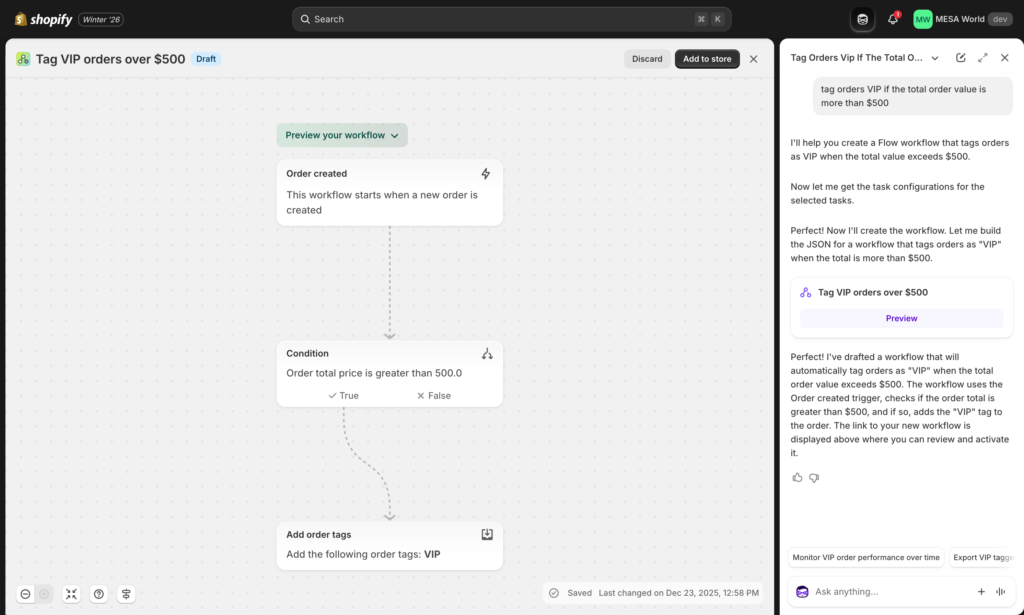
Shopify Flow is Shopify’s native, low-code automation platform that helps merchants automate repetitive tasks across their store operations. Originally launched in 2017 as a Shopify Plus exclusive, Flow became available to all Shopify plans in 2021—making it one of the most accessible automation tools in the ecommerce space.
How Shopify Flow works
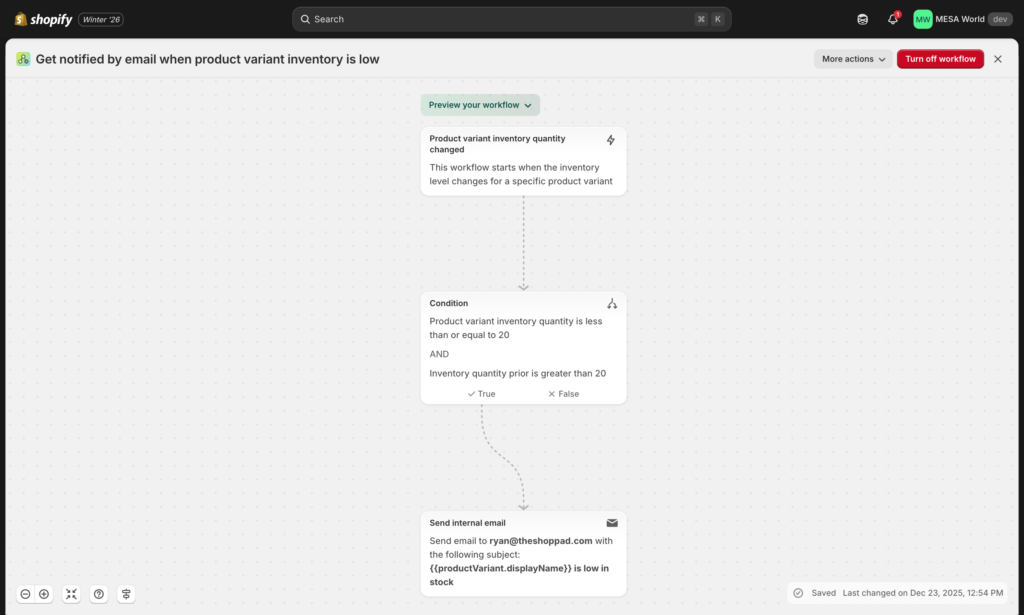
Flow operates on a simple trigger-condition-action framework. When something happens in your store (trigger), and certain criteria are met (condition), Flow automatically performs specific tasks (action). For example: when an order is placed (trigger) from a high-risk location (condition), automatically tag it for manual review (action).
The platform uses a visual workflow builder where you drag and drop elements to create automation sequences. It’s designed to be beginner-friendly—no coding required for basic workflows.
What Shopify Flow excels at in 2026
Flow shines in several key areas:
Native Shopify integration: Because Flow is built by Shopify, it has deep integration with core Shopify functions. Customer tagging, order management, inventory updates, and loyalty programs work seamlessly without any API configuration.
Zero cost entry: Flow is completely free for all Shopify merchants, regardless of plan tier. This makes it the obvious starting point for merchants just beginning their automation journey.
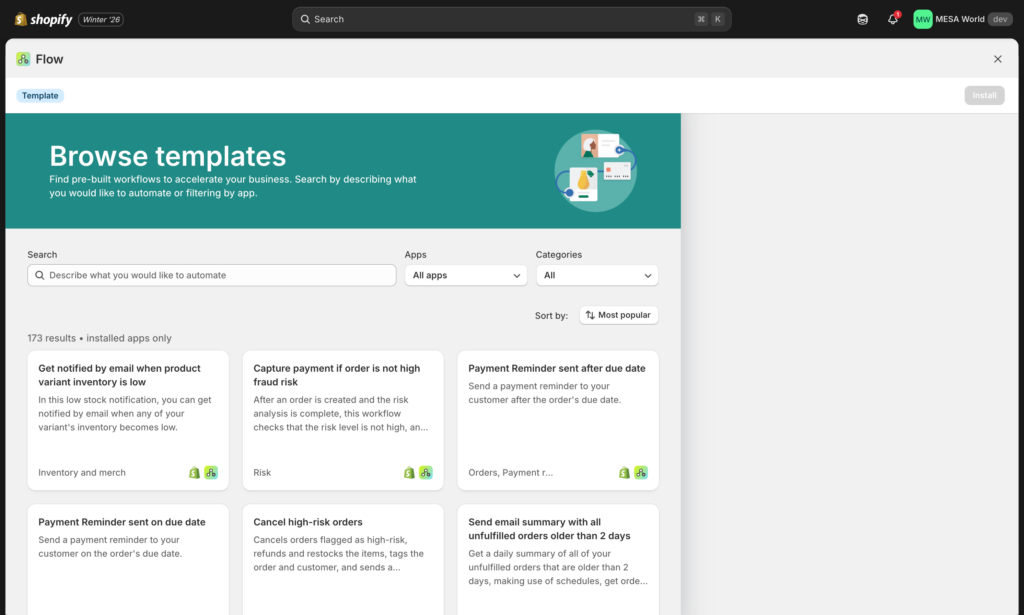
Pre-built templates: Shopify maintains a library of workflow templates addressing common use cases like fraud prevention, inventory management, and customer segmentation. You can install these with one click and customize as needed.
Shopify app ecosystem: Flow connects with hundreds of Shopify apps through “Flow connectors.” If an app supports Flow, you can include it in your automated workflows without additional setup.
Current capabilities and 2026 features
As of 2026, Shopify Flow includes:
- 300+ triggers across orders, products, customers, inventory, and fulfillment
- 200+ actions for automating tasks like tagging, email notifications, and metafield updates
- Conditional logic for basic if/then scenarios
- Scheduled workflows for time-based automation
- Flow connector support for compatible third-party apps
- Webhook triggers for advanced use cases (Shopify Plus only)
Recent updates have expanded Flow’s capabilities around B2B automation, company and location management, and improved integration with Shopify’s native tools like Shopify Email and Shopify Inbox.
Who Shopify Flow is built for
Flow targets three primary merchant profiles:
- Automation beginners who need simple, reliable workflows without technical complexity
- Shopify-centric merchants whose entire operation lives within the Shopify ecosystem
- Budget-conscious stores testing automation before investing in paid platforms
Notable limitations to understand
While Flow is powerful for basic automation, it has clear boundaries:
Shopify-first design: Flow is optimized for Shopify-native actions. Connecting external services requires those apps to build Flow connectors, limiting your options compared to platforms with direct API access.
Limited data manipulation: You can’t transform, calculate, or restructure data within Flow. If you need to parse JSON, perform mathematical operations, or reformat information, you’ll need external tools.
No multi-step complex logic: While you can add conditions, Flow doesn’t support advanced branching, nested logic, or the complex decision trees that sophisticated business processes often require.
Restricted error handling: When workflows fail, your options for automated error recovery are limited. There’s no built-in retry logic or fallback workflows.
No custom code: You cannot inject custom JavaScript or other code into Flow workflows. Everything must use pre-defined actions.
Ready to see the full feature breakdown? → Compare MESA vs Shopify Flow side by side
The bottom line on Shopify Flow
Shopify Flow is an excellent first automation tool. It’s free, it’s easy to learn, and it handles the most common ecommerce automation needs. For merchants processing fewer than 100 orders monthly with straightforward operations, Flow might be all you need.
However, as your business grows and your processes become more sophisticated, you’ll likely bump into Flow’s ceiling. When you need AI-powered automation, complex integrations, advanced data handling, or workflows that span beyond Shopify’s native capabilities—that’s when platforms like MESA become essential.
💡 Don’t wait until you’ve outgrown Flow. Many stores run both, using Flow for simple Shopify-native tasks and MESA for everything else.
Next, let’s look at what makes MESA different—and why it’s positioned as the AI-first alternative to traditional automation platforms.
What is MESA? The AI-first automation platform
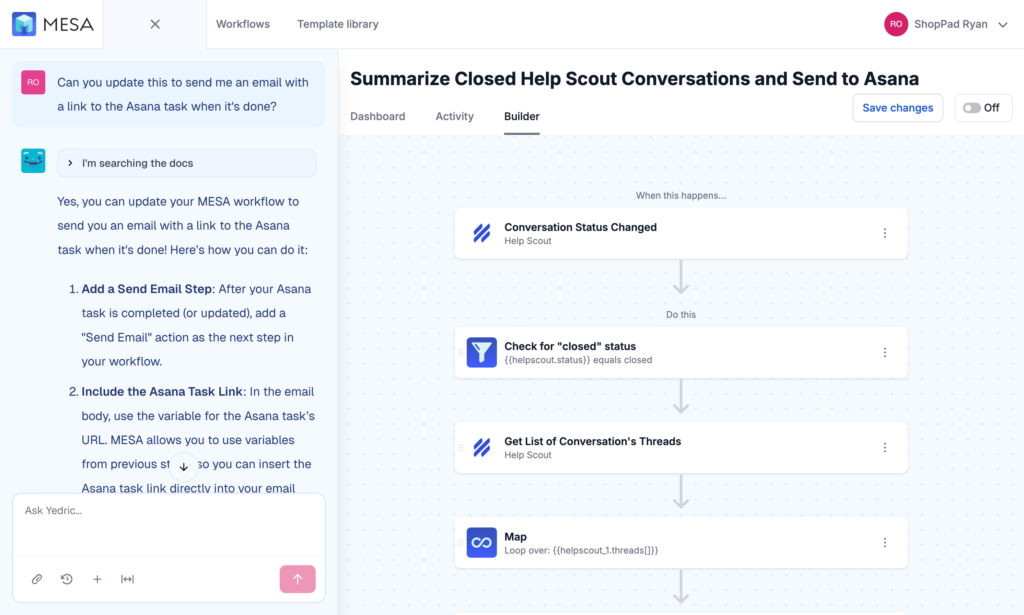
MESA is an AI-first, no-code automation platform built specifically for ecommerce brands who need to do more with less. Unlike generic automation tools that were retrofitted for online stores, MESA was purpose-built for the complexities of modern ecommerce operations—from order management and inventory sync to customer communications and multi-channel fulfillment.
Launched in 2017 by ShopPad, the team behind popular Shopify apps like Infinite Options and Tracktor, MESA has grown into the go-to automation platform for thousands of Shopify and Shopify Plus merchants who’ve outgrown basic workflow tools.
Core philosophy: Multiply impact without multiplying effort
MESA’s design philosophy centers on a simple truth: solo operators and small teams shouldn’t be limited by headcount. The platform enables one person to accomplish what traditionally required an entire operations team—without writing a single line of code.
This isn’t about replacing humans. It’s about freeing them from repetitive tasks so they can focus on strategic work that actually grows the business.
🎯 Whether you’re a solo founder or managing a team of 50, MESA helps you multiply your impact without multiplying the work.
How MESA works differently
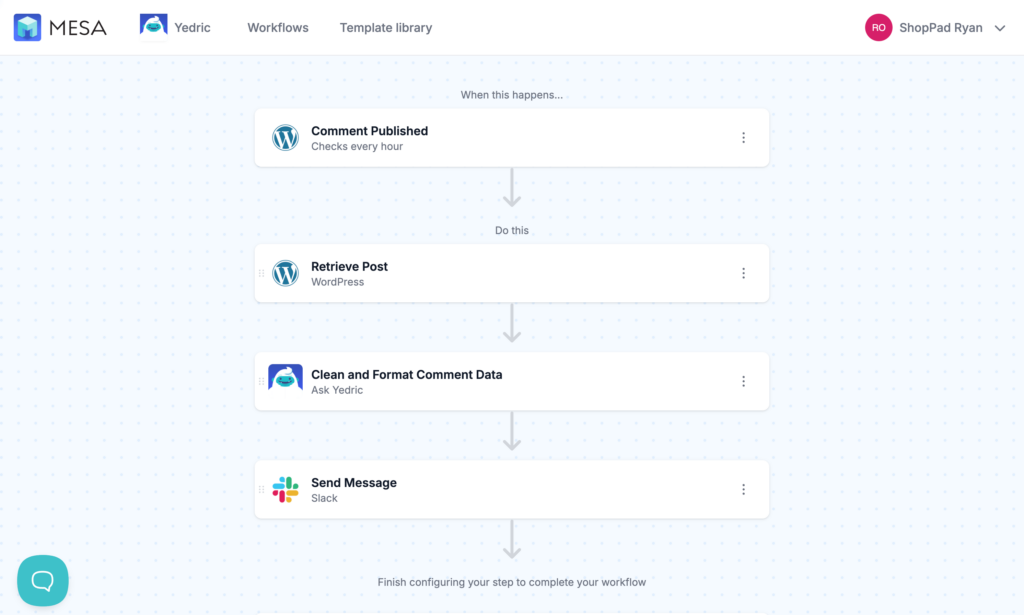
Like Flow, MESA uses a visual workflow builder. But that’s where the similarities end.
Unlimited customization: Every step in a MESA workflow can be configured with granular control. You can access any data point, transform it however you need, and send it anywhere—not just to pre-approved connectors.
Built-in tools: MESA includes built-in tools that other platforms require third-party integrations for: Email, SMS, AI/ChatGPT, Forms, FTP/SFTP, API calls, Approval workflows, and Data storage.
AI-first approach: In 2026, AI isn’t an add-on feature in MESA—it’s foundational. Generate product descriptions, summarize customer feedback, analyze order patterns, personalize communications, and make intelligent routing decisions—all within your workflows without external AI tools.
Who MESA is built for
MESA serves a wide range of merchants, but thrives with these profiles:
Growing Shopify stores: Merchants processing 100+ orders monthly who need automation that scales with their growth, not against it.
Multi-channel ellers: Brands selling on Shopify, Amazon, Etsy, social commerce, and wholesale who need unified automation across all channels.
Operations-focused teams: Merchants who’ve already automated the basics and need complex workflows involving multiple apps, conditional logic, and custom business rules.
Solo operators & small teams: Entrepreneurs who need enterprise-level automation without enterprise-level complexity or cost.
Shopify Plus merchants: Advanced sellers requiring headless commerce, B2B automation, multi-store management, and custom checkout flows.
Key differentiators at a glance
What makes MESA different from Flow—and every other automation platform?
100+ native integrations: MESA connects with over 100 popular ecommerce apps without requiring those apps to build special connectors. If it has an API, MESA can connect to it.
AI automation without code: Integrate ChatGPT, Claude, and other AI models directly into workflows. Generate content, analyze data, make predictions, and automate decisions that traditionally required human judgment.
Data transformation built-in: Filter, map, transform, and manipulate data without external tools. Perform calculations, parse JSON, format strings, convert currencies—all within the workflow builder.
Advanced logic & conditions: Build sophisticated decision trees with nested conditions, loops, and branching paths that mirror complex real-world business processes.
Error handling & monitoring: Automatic retry logic, detailed error logs, Slack/email alerts when workflows fail, and built-in debugging tools to troubleshoot issues quickly.
Custom code when needed: For advanced users, MESA supports custom JavaScript within workflows—giving you ultimate flexibility when pre-built steps aren’t enough.
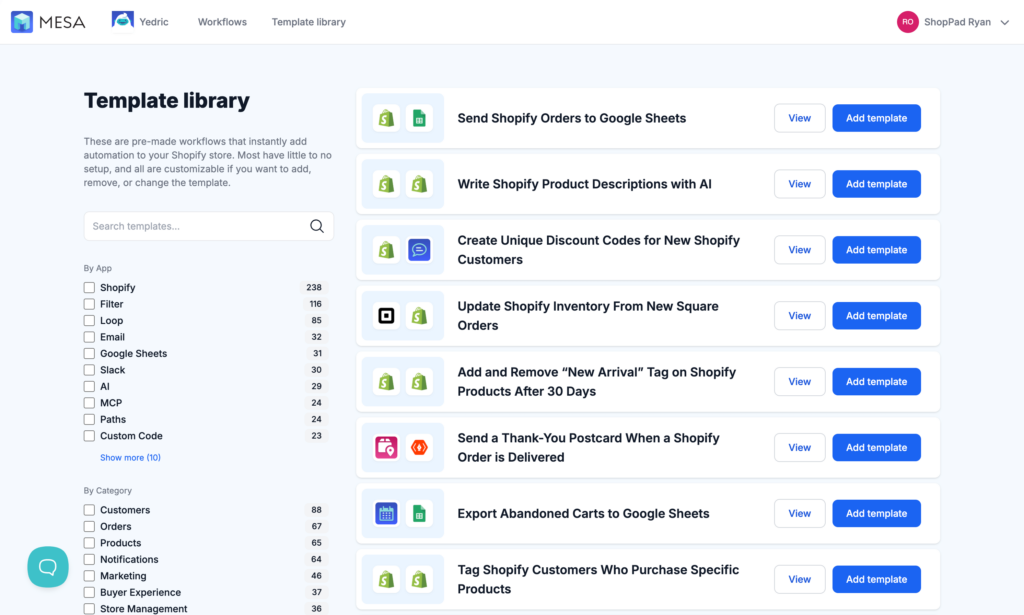
Template library: Pre-built workflow templates covering every ecommerce use case imaginable, from basic order notifications to complex multi-channel inventory sync.
Real-world MESA capabilities
Here’s what MESA handles that Flow cannot:
- AI-Generated Content: Automatically write product descriptions, email responses, social posts, and customer communications using ChatGPT integration
- Multi-Step Conditional Workflows: Create complex automation with 20+ steps, nested conditions, and parallel processing
- Cross-Platform Data Sync: Automatically sync inventory, orders, and customer data between Shopify, Amazon, wholesale portals, and ERPs
- Custom Approval Systems: Route high-value orders, refund requests, or product changes through multi-level approval chains
- File Processing: Generate CSVs, parse uploaded files, send reports via FTP, create PDFs, and handle bulk data operations
- Advanced Scheduling: Set up recurring workflows that run daily, weekly, or on custom schedules with timezone support
- Database Queries: Store and retrieve data from MESA’s built-in database or connect to external databases for complex data operations
- Intelligent Routing: Use AI to analyze customer inquiries and automatically route to the right team member or department
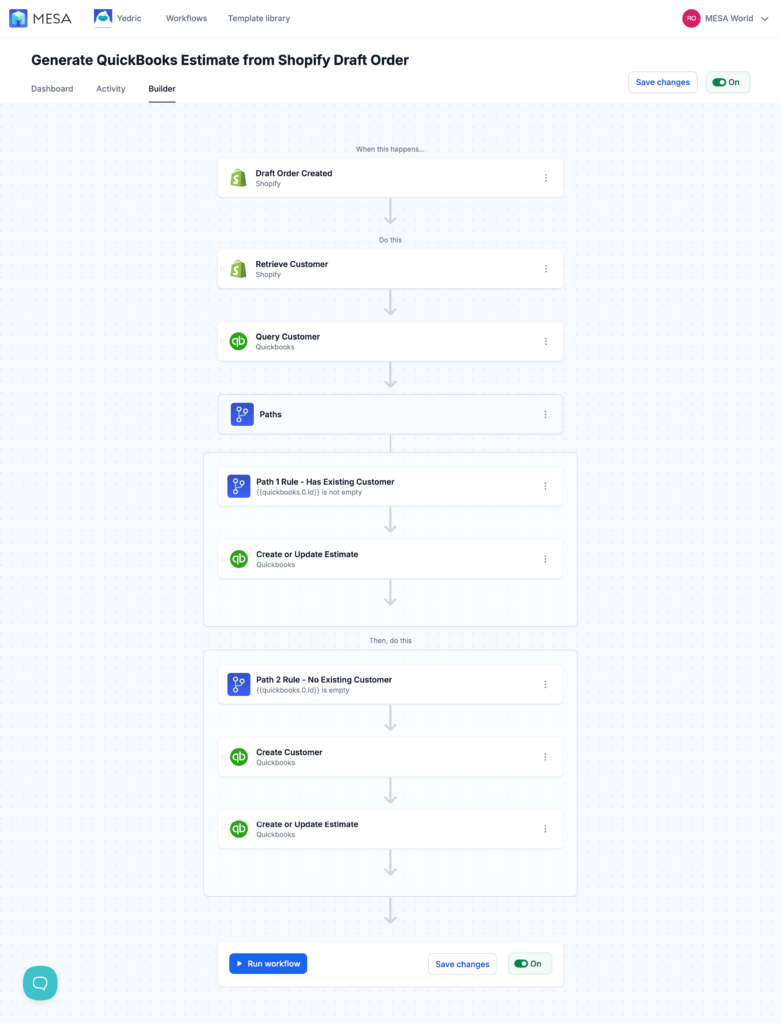
MESA’s AI-first vision for 2026
While many automation platforms are adding AI as a feature, MESA has rebuilt its entire approach around AI-native automation. This means:
Conversational workflow building: Describe what you want to automate in plain English, and MESA’s AI helps structure the workflow
Predictive automation: AI analyzes your store’s patterns and suggests workflows you didn’t know you needed
Self-optimizing workflows: Workflows that learn from outcomes and automatically adjust parameters for better performance
Natural language conditions: Write conditions in plain English rather than boolean logic: “if customer seems frustrated” instead of complex sentiment score thresholds
The support difference
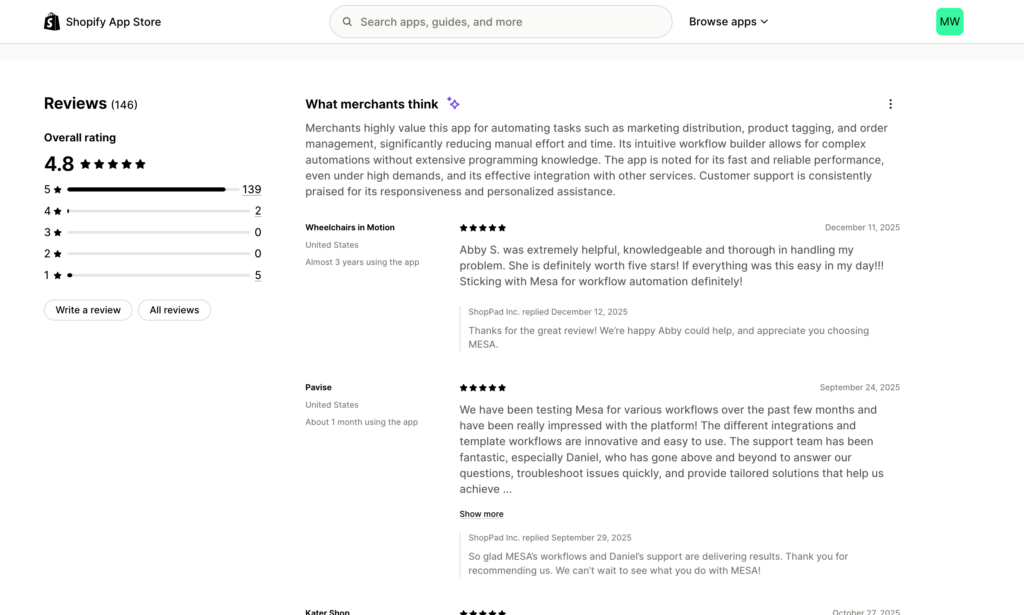
MESA’s 5-star customer support is frequently mentioned in reviews as a key differentiator. Unlike many SaaS platforms, MESA offers:
- Live chat support during business hours with actual automation experts (not chatbots)
- Email support with responses typically within a few hours
- Custom workflow services where MESA’s team can build complex automations for you
- Comprehensive documentation at docs.getmesa.com
- Video tutorials for common use cases
Pricing philosophy: Pay for value, not complexity
MESA’s pricing starts at $12/month with a 7-day free trial. Unlike platforms that charge per workflow, per task, or per integration, MESA uses straightforward tiered pricing based on your store’s order volume.
The philosophy: as your business grows and gets more value from automation, you pay more. But you’re never penalized for building sophisticated workflows or using advanced features.
The bottom line on MESA
MESA is what you graduate to when you’ve outgrown simple automation. It’s purpose-built for ecommerce, AI-native from the ground up, and designed to handle the complex, multi-step workflows that real businesses need.
If Shopify Flow is like using training wheels, MESA is the full bicycle—still easy to ride, but capable of going anywhere you need to go.
💡 MESA isn’t a replacement for Flow—it’s an upgrade. Many merchants run both: Flow for simple Shopify-native tasks, MESA for everything else.
Now that we understand what each platform offers, let’s compare them head-to-head across the factors that actually matter for your business.
Head-to-head: Shopify Flow vs MESA

Now that you understand what each platform offers, let’s compare them directly across the factors that actually impact your daily operations and long-term growth.
Ready to see the full feature breakdown? → Compare MESA vs Shopify Flow side by side
Pricing & value analysis
Shopify Flow: Free (with hidden considerations)
Shopify Flow is completely free for all Shopify merchants, regardless of your plan tier. No monthly fees, no per-workflow charges, no transaction costs. This makes Flow the obvious starting point for merchants new to automation.
However, “free” doesn’t mean “no cost.” Here’s what to consider:
Time investment: Flow’s limitations mean you’ll spend more time working around constraints, manually handling tasks it can’t automate, or rebuilding workflows as you grow.
Opportunity cost: Every hour you spend on manual tasks or workflow workarounds is an hour not spent on marketing, product development, or customer relationships.
App ecosystem costs: To extend Flow beyond basic Shopify functions, you’ll need paid apps with Flow connectors. A typical setup might include email marketing ($30/mo), SMS ($50/mo), and analytics tools ($40/mo)—adding $120/month to your stack.
Migration costs: When you eventually outgrow Flow, you’ll rebuild every workflow from scratch. The more you’ve invested in Flow, the more painful this transition becomes.
MESA: Tiered pricing based on value
MESA uses straightforward tiered pricing starting at $12/month:
- Basic Plan: $12/month – Up to 500 tasks/month, unlimited workflows
- Flex Plan: $29/month – Up to 10,000 tasks/month, unlimited workflows
- Pro Plan: $99/month – Up to 50,000 tasks/month, unlimited workflows
- Unlimited Plan: $299/month – Unlimited tasks/month, unlimited workflows
- Custom Plan: Custom pricing – SLAs, dedicated support
All plans include:
- Unlimited workflows and integrations
- All built-in tools (Email, SMS, AI, Forms, FTP, etc.)
- Full access to 100+ app connections
- Template library access
- Live chat and email support
- 7-day free trial
What you’re NOT charged for: Complexity of workflows, number of steps, advanced features, or support tickets. Build workflows as sophisticated as you need.
ROI calculator: When does MESA pay for itself?
Let’s say you spend 5 hours per week on tasks MESA could automate (order processing, inventory updates, customer communications, manual data entry). At $25/hour (a conservative valuation of your time), that’s $500/month in labor value.
With MESA starting at just $12/month for the Basic plan, the platform pays for itself by saving just 30 minutes per week of manual work.
MESA ROI Calculator
See how much time and money MESA saves your store
Cancel anytime
Real-world example:
A Shopify merchant processing 200 orders/month was spending 10 hours weekly on manual order tagging, inventory alerts, and customer follow-ups. After implementing MESA Flex plan ($29/month):
- Saved 9 hours per week (1 hour for workflow maintenance)
- Labor savings: $900/month ($25/hour × 9 hours × 4 weeks)
- Net monthly benefit: $871 ($900 savings - $29 MESA cost)
- Annual ROI: 36,100%
Understanding tasks: A "task" in MESA is any action a workflow performs—sending an email, updating an order tag, creating a customer record, making an API call. Most workflows consume 2-5 tasks per execution. For example, a workflow that tags an order, sends a Slack notification, and adds customer to a spreadsheet uses 3 tasks.
Average task consumption by store size:
- Small stores (0-100 orders/mo): 200-500 tasks/mo → Basic Plan ($12/mo)
- Growing stores (100-500 orders/mo): 2,000-8,000 tasks/mo → Flex Plan ($29/mo)
- Established stores (500-2000 orders/mo): 10,000-40,000 tasks/mo → Pro Plan ($99/mo)
- High-volume stores (2000+ orders/mo): 50,000+ tasks/mo → Unlimited Plan ($299/mo)
Total cost of ownership comparison
Let's compare the real cost over 12 months for a store processing 300 orders/month (typically consuming ~5,000 tasks/month in MESA):
Shopify Flow approach:
- Flow: $0
- Email marketing app: $360/year ($30/mo)
- SMS app: $600/year ($50/mo)
- Analytics/reporting tool: $480/year ($40/mo)
- Time spent on manual workarounds: $2,400/year (2 hours/week × $25/hour × 48 weeks)
- Total: $3,840/year
MESA approach:
- MESA Flex plan: $348/year ($29/mo)
- Built-in email, SMS, AI: $0
- Built-in analytics/reporting: $0
- Time saved on automation: -$4,800/year (4 hours/week × $25/hour × 48 weeks saved)
- Total: $348/year + massive time savings
The math is clear: MESA pays for itself within the first month for virtually any store serious about automation.
Ease of use & learning curve
Both platforms market themselves as "no-code," but what does that actually mean for your day-to-day experience?
Flow's simplicity is its strength. The interface is clean, the logic is straightforward, and the pre-built templates work out of the box. If you understand basic if/then logic, you can build Flow workflows.
MESA has more options, which means more to learn. However, the learning curve is gradual—you can start simple and progressively unlock advanced features as you need them.
MESA's live chat support dramatically flattens the learning curve. Stuck on something? Ask the support team, and they'll walk you through it or even build it for you.
Interface comparison
| Built-in tool | Shopify Flow | MESA |
|---|---|---|
| Email sending | Via Shopify Email app only | Native email tool with templates |
| SMS messaging | Via third-party app | Native SMS |
| AI/ChatGPT | No | Native AI step for content generation |
| Forms | No | Drag-and-drop form builder |
| FTP/SFTP | No | Native file transfer capabilities |
| API requests | Very limited | Full HTTP request builder |
| Webhooks | Receive only (Plus only) | Send and receive on all plans |
| Data storage | No | Built-in database for workflow data |
| Approvals | No | Multi-level approval workflows |
| Delays/scheduling | Basic delays | Advanced scheduling with cron support |
| Math/calculations | No | Full calculation capabilities |
| Text manipulation | No | Format, parse, transform text |
| JSON/XML parsing | Automatic (limited) | Full parsing and path extraction |
| Filters | Basic conditions only | Advanced filtering and data manipulation |
| Logging | Basic | Comprehensive execution logs |
AI & automation in 2026
The automation landscape in 2026 is fundamentally AI-driven. Here's how each platform approaches artificial intelligence.
Shopify Flow's AI roadmap
As of 2026, Shopify Flow has limited native AI features:
- AI-powered template recommendations (suggests workflows based on store patterns)
- Basic predictive analytics in Shopify admin (outside Flow)
- Smart auto-tagging based on pattern recognition
Flow doesn't provide direct access to large language models or AI services within workflows. Any AI functionality requires third-party apps with Flow connectors.
Shopify is investing in AI across its platform (Shopify Magic for content generation, predictive analytics in reporting), but Flow remains focused on simpler automation use cases rather than AI-native workflows.
MESA's AI-first approach
MESA positions AI not as a feature but as a fundamental capability available in every workflow:
- Direct ChatGPT integration via OpenAI API
- Support for Claude, GPT-4, and other LLMs
- Pre-built AI prompts for common tasks
- Custom prompt building for unique use cases
- AI-powered data analysis and classification
Practical AI use cases in MESA:
Product content generation: When a new product is created, AI generates SEO-optimized descriptions, meta titles, and social media posts automatically.
Customer service automation: AI analyzes incoming support tickets, determines urgency and category, suggests responses, and routes to appropriate team members.
Review analysis: Aggregate customer reviews, use AI to identify common themes, sentiment trends, and product improvement opportunities—then send weekly summaries to product team.
Content personalization: Generate personalized email content, product recommendations, and marketing messages based on individual customer purchase history and behavior.
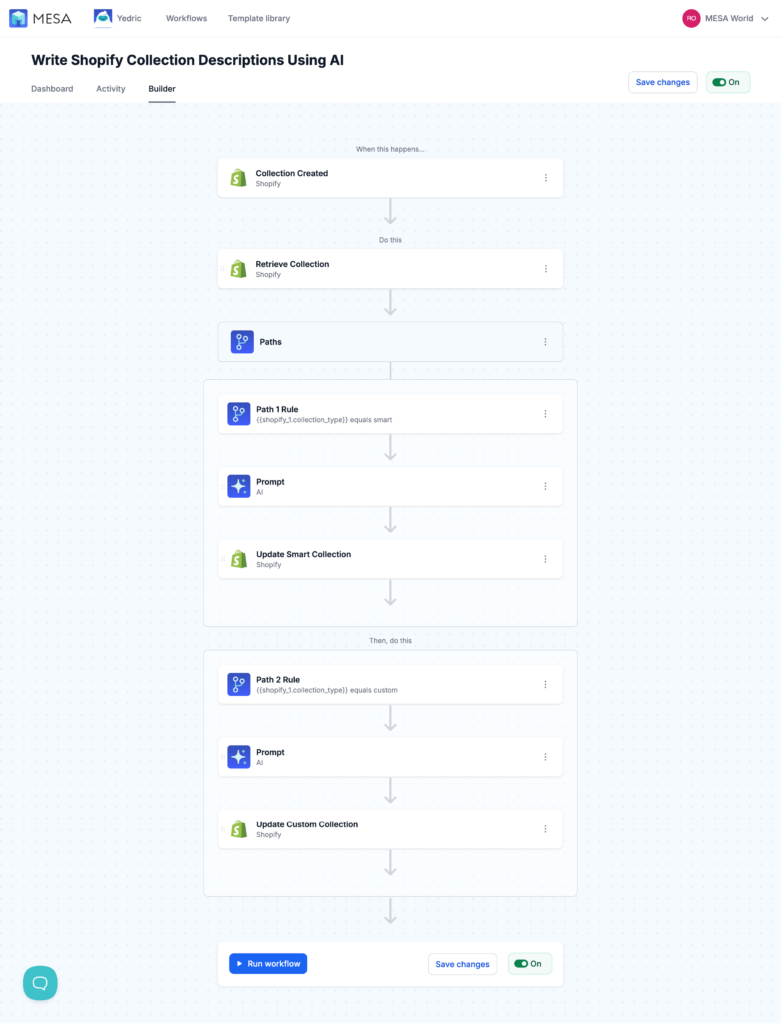
Automation without AI is like having a car without power steering—technically functional, but unnecessarily difficult. MESA's AI-first approach future-proofs your automation stack.
When to use Shopify Flow vs MESA: Decision framework
The right automation platform depends on where you are now and where you're heading. Here's a practical framework to guide your decision.
Start with Shopify Flow if you:
- Are new to automation and want to test basic workflows risk-free
- Process fewer than 100 orders monthly with straightforward operations
- Only need simple order tagging, basic notifications, and inventory alerts
- Work exclusively within Shopify's native ecosystem
- Have a limited budget and need zero-cost automation to start
Flow is perfect for learning automation fundamentals without financial commitment.
Upgrade to MESA when you need:
- Multi-step workflows with complex conditional logic and branching
- AI-powered automation for content generation, analysis, or decision-making
- Integration with apps and services beyond Shopify's Flow connector ecosystem
- Data transformation, calculations, or manipulation within workflows
- Advanced error handling, retry logic, and detailed execution logs
- Custom approval systems, form builders, or file transfer capabilities
- To connect proprietary systems, ERPs, or databases via API
Most stores processing 100+ orders monthly find MESA essential within 3-6 months of starting with Flow. Browse MESA templates →
Use both together: The hybrid strategy
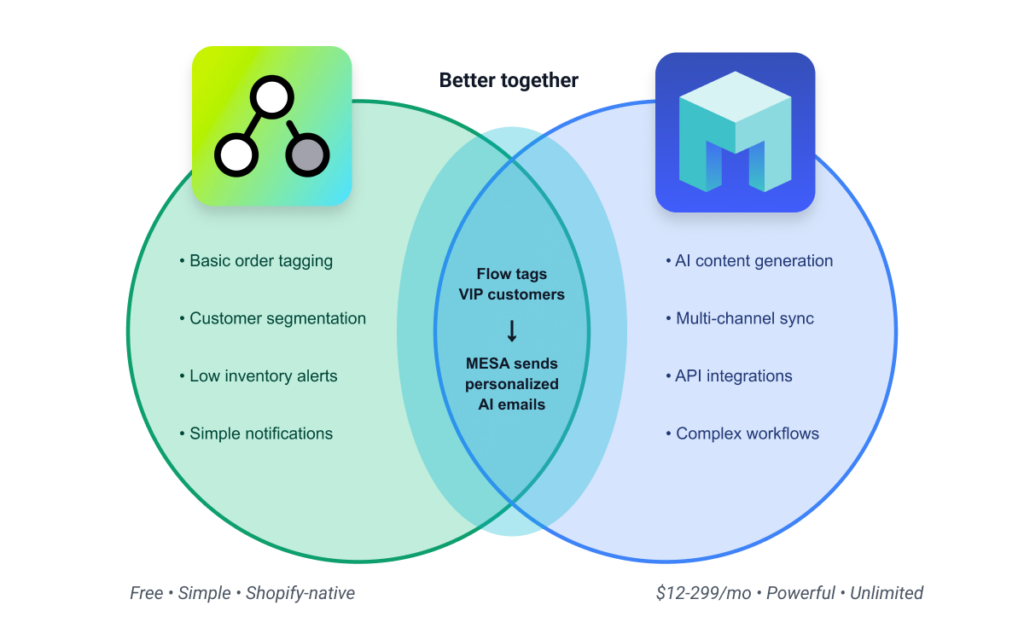
Here's the approach sophisticated merchants take: don't choose—use both strategically.
Run Shopify Flow for simple, Shopify-native tasks it handles well (basic order tagging, simple inventory alerts, customer segmentation). These workflows are stable, require zero maintenance, and cost nothing.
Deploy MESA for everything else—complex integrations, AI automation, multi-step processes, external service connections, and workflows that require sophisticated logic or error handling.
Real-world hybrid example:
A Shopify Plus merchant uses Flow to tag all VIP customers based on lifetime value (simple, Shopify-native). Then MESA monitors those VIP tags and triggers complex workflows: personalized AI-generated thank-you emails, Slack notifications to account managers, CRM updates in Salesforce, and special inventory allocation in their warehouse system. Flow handles the simple trigger, MESA orchestrates the complex response.
Migration strategy:
Start with Flow, identify its limitations as you grow, then gradually migrate complex workflows to MESA while keeping simple ones in Flow. You're not replacing Flow—you're complementing it with a more powerful platform for tasks Flow can't handle.
💡 Pro tip: Most successful stores run 3-5 simple workflows in Flow and 10-20 complex workflows in MESA. Use the right tool for each job.
Start where you are, use what works, and scale up when you need more power.
Real-world use cases
You've seen the feature lists and pricing tables. Now let's see what MESA actually does in real ecommerce operations. For each use case, we'll show you what's possible with basic automation and what becomes achievable when you have MESA's full capabilities at your fingertips.
Order management
Scenario: You want to automatically process high-value orders differently than standard orders—flagging them for review, notifying your fulfillment team, and adding customers to a VIP list.
Workflow steps:
- Trigger when order is created
- Check if order total exceeds $500 (or any custom logic: first-time high-value, specific product categories, shipping destination)
- Add tags to order and customer
- Send formatted Slack message with order details, customer history, and order breakdown
- Create task in Asana/Monday/ClickUp with order details
- Add customer to Klaviyo VIP segment
- Send personalized thank-you email using AI to generate custom message based on purchased products
- Log to Google Sheets for reporting
- Set delay to send follow-up if order hasn't shipped in 48 hours
Try these Order management templates:
MESA Template ID
tag-customers-as-vip-after-500-spend
MESA Template ID
shopify-order-details-to-slack-notifications
MESA Template ID
create-asana-task-for-new-shopify-order
MESA Template ID
send-shopify-orders-to-google-sheets
MESA advantages:
- Comprehensive automation across multiple platforms
- Rich notifications with formatted data
- Built-in AI for personalization
- Error handling and retry logic
- Advanced conditional logic (e.g., treat international high-value orders differently)
Upgrade to MESA when you need order workflows to connect with external tools, include approval processes, or trigger multi-step sequences across your tech stack.
Customer communications
Scenario: Send personalized post-purchase emails that adapt based on product purchased, customer history, and purchase value.
Workflow steps:
- Trigger after order fulfillment (or any custom trigger: delivery confirmation, customer review submission, etc.)
- Use AI to analyze purchased products and generate personalized email content
- Include product care instructions, styling tips, or usage recommendations specific to items purchased
- Adjust tone and content based on customer lifetime value
- Send via built-in email tool or integrate with Klaviyo, Mailchimp, etc.
- Include dynamic product recommendations based on purchase history
- Schedule follow-up sequence (request review in 7 days, replenishment reminder in 30 days)
- Different messaging for first-time vs. VIP customers
Try these Customer communication templates:
MESA Template ID
send-email-when-specific-product-is-purchased
MESA Template ID
send-klaviyo-message-shopify-order-delivered
MESA Template ID
send-postcard-to-customers-after-delivery
MESA advantages:
- Truly personalized content, not just "Hi [First Name]"
- AI generates unique messages for different product categories
- Multi-step sequences with delays and conditional branching
- Comprehensive customer journey automation
MESA excels when you want communications that feel handcrafted for each customer, adapt based on context, and drive measurable engagement.
Inventory management
Scenario: Automatically manage inventory across multiple sales channels, alert team when stock is low, and prevent overselling.
Workflow steps:
- Monitor inventory across Shopify, Amazon, Etsy, and other channels
- Sync inventory bidirectionally between platforms
- Send alerts via Slack, SMS, and email when inventory drops below custom thresholds (different thresholds for different product categories)
- Automatically adjust pricing when stock is low (scarcity pricing)
- Create purchase orders or supplier notifications when reorder point is reached
- Generate low-stock reports and send to Google Sheets/Airtable
- Pause marketing campaigns for out-of-stock products
- Allocate inventory based on channel performance (e.g., prioritize best-selling channel)
- Schedule daily inventory sync with warehouse management system via FTP/API
Try these Inventory management templates:
MESA Template ID
update-shopify-inventory-when-square-order-created
MESA Template ID
send-slack-alert-when-product-out-of-stock
MESA Template ID
shopify-inventory-updates-from-csv-on-ftp-server
MESA Template ID
sync-shopify-odoo-stock-levels
MESA advantages:
- True multi-channel inventory management
- Prevents overselling across all platforms
- Automated reordering workflows
- Integration with warehouse systems and 3PLs
MESA is essential for multi-channel sellers, stores with complex inventory rules, or businesses that need inventory automation integrated with purchasing and warehouse systems.
Fraud prevention
Scenario: Identify potentially fraudulent orders and route them through review process before fulfillment.
Workflow steps:
- Use Shopify's fraud analysis as one input
- Analyze customer behavior patterns using AI
- Check email/phone/IP against custom blocklists or third-party databases
- Route to different review queues based on risk severity
- Create approval workflow requiring manager sign-off for high-value risky orders
- Automatically cancel and refund if multiple fraud indicators present
- Send detailed Slack notifications with customer history and fraud indicators
- Log all fraud cases to database for pattern analysis
Try these Fraud prevention templates:
MESA Template ID
receive-slack-alert-for-high-risk-shopify-orders
MESA Template ID
auto-cancel-high-risk-orders-shopify
MESA Template ID
slack-alert-coupon-code-abuse-detection
MESA advantages:
- Multi-layered fraud detection
- Integration with specialized fraud services
- AI-powered pattern recognition
- Customizable risk scoring
- Detailed audit trails
- Approval workflows for edge cases
MESA delivers enterprise-grade fraud prevention for high-volume stores, high-ticket items, or merchants facing sophisticated fraud attacks.
Marketing automation
Scenario: Create targeted marketing campaigns that adapt based on customer behavior, purchase history, and engagement.
Workflow steps:
- Segment customers based on complex behavioral patterns
- Use AI to generate personalized marketing copy for each customer
- Coordinate campaigns across email, SMS, and social media
- Dynamic product recommendations based on browsing and purchase history
- Optimize send times based on individual customer engagement patterns
- Generate and send personalized discount codes based on customer lifetime value
Try these Marketing templates:
MESA Template ID
approve-thank-you-emails-before-sending
MESA Template ID
add-new-square-customers-to-klaviyo-subscriber-list
MESA Template ID
tag-local-customers-by-store-proximity
MESA Template ID
daily-product-rankings-based-on-sales
MESA advantages:
- True omnichannel marketing automation
- AI-generated personalized content at scale
- Sophisticated campaign logic and branching
- Real-time optimization based on customer behavior
MESA transforms marketing into a personalized, data-driven engine that adapts to each customer's journey—approaching what enterprise marketing automation platforms offer at a fraction of the cost.
The pattern across all use cases
MESA handles complexity—multi-step logic, AI-powered decisions, cross-platform integration, and sophisticated business rules. The decision isn't about which is "better"—it's about which matches your current needs and growth trajectory.
💡 Real talk: You don't need MESA's power for basic order tagging. But when you're coordinating 20-step workflows across 5 platforms with AI-powered decision-making—Flow can't get you there.
Frequently asked questions
Absolutely—and many sophisticated merchants do exactly this. Use Shopify Flow for simple, Shopify-native tasks like basic order tagging and inventory alerts. Deploy MESA for complex workflows involving AI, external integrations, multi-step logic, or custom business processes. They complement each other rather than compete. Flow handles the simple stuff for free; MESA handles everything else with power and flexibility.
Migration is straightforward but manual—you'll rebuild workflows in MESA rather than importing them directly. The good news: MESA's workflow builder is intuitive, templates cover most use cases, and the support team will help you migrate complex workflows. Most merchants complete migration in 1-2 days. Start by documenting your current Flow workflows, then recreate them in MESA one at a time, testing thoroughly before disabling the Flow versions.
MESA can do everything Flow does and much more, but complete replacement isn't always necessary or optimal. Many merchants keep Flow running for ultra-simple Shopify-native tasks (basic tagging, simple alerts) while using MESA for complex automation. Think of it as upgrading your toolkit—you might keep the basic hammer while adding power tools for bigger jobs. The decision depends on your complexity needs and preference for simplicity.
MESA wins decisively here. Shopify Flow relies on Shopify's general support channels, which are knowledgeable about Shopify but less specialized in automation strategy. MESA offers live chat with automation experts, email support with fast response times, comprehensive documentation, video tutorials, and even custom workflow building services. MESA's 4.7-star rating on the Shopify App Store frequently highlights support quality as a standout feature.
Yes. Every Shopify Flow workflow can be replicated in MESA, plus MESA adds capabilities Flow doesn't have: AI integration, advanced conditional logic, data transformation, custom API calls, file handling, approval workflows, multi-channel sync, and built-in tools for email, SMS, and forms. If you can build it in Flow, you can build it in MESA—usually with more flexibility and customization options.
You have three options: (1) Keep Flow for simple tasks and add MESA for complex ones—the hybrid approach most merchants take; (2) Migrate entirely to MESA for unified automation management; or (3) Explore enterprise automation platforms like Zapier or Make, though these typically cost more than MESA with steeper learning curves. Most growing stores find MESA the natural next step—it scales from startup to enterprise without forcing a platform change.
For stores processing 100+ orders monthly, MESA pays for itself within weeks. At $12-299/month (based on usage), MESA saves far more in labor costs than it charges. Consider: if MESA saves you just 2 hours per week at a $25/hour value, that's $200/month in savings—exceeding even the Pro plan cost. Plus, MESA's built-in email, SMS, and AI tools replace paid apps most stores subscribe to separately, often resulting in net cost reduction while dramatically increasing capability.
Getting started
You've seen the comparison. Now it's time to take action. Here's your practical roadmap based on where you are today.
Starting with Shopify Flow:
Step 1: Install and explore
Flow is available on all Shopify stores. Navigate to Settings > Apps > Flow to access the workflow builder.
Step 2: Start with proven templates
Don't build from scratch. Browse Flow's template library and install 2-3 workflows that solve immediate pain points: order tagging, low inventory alerts, or customer segmentation.
Step 3: Plan your upgrade path
Document the workflows you build and the limitations you encounter. When you hit Flow's ceiling (and you will), you'll have a clear migration checklist for MESA.
Starting with MESA:
Step 1: Start your free trial
Launch a 7-day free trial. You'll have full access to all features, templates, and integrations.
Step 2: Browse templates for quick wins
Visit the MESA template library and filter by your biggest challenge: order management, customer service, inventory sync, or marketing automation. Install 1-2 templates and customize them for your store.
Step 3: Talk to automation experts
MESA's customer success team isn't just technical support—they're automation consultants. Book a call to discuss your specific workflows. They'll either help you build them or build them for you.
Step 4: Start simple, scale smart
Begin with 1-2 essential workflows. As you see results, gradually add more sophisticated automation. Most merchants find their rhythm within the first month.
The best time to start automating was yesterday. The second best time is now.