
Shopify Workflow Ideas to Simplify Order Ops
Order operations get messy fast.
What starts as a manageable stream of orders can quickly turn into a daily pileup of manual reviews, low-stock checks, fulfillment exceptions, customer follow-up, spreadsheet updates, and “did anyone catch that?” moments. For growing Shopify brands, that operational drag slows the team down, introduces avoidable errors, and makes it harder to scale profitably.
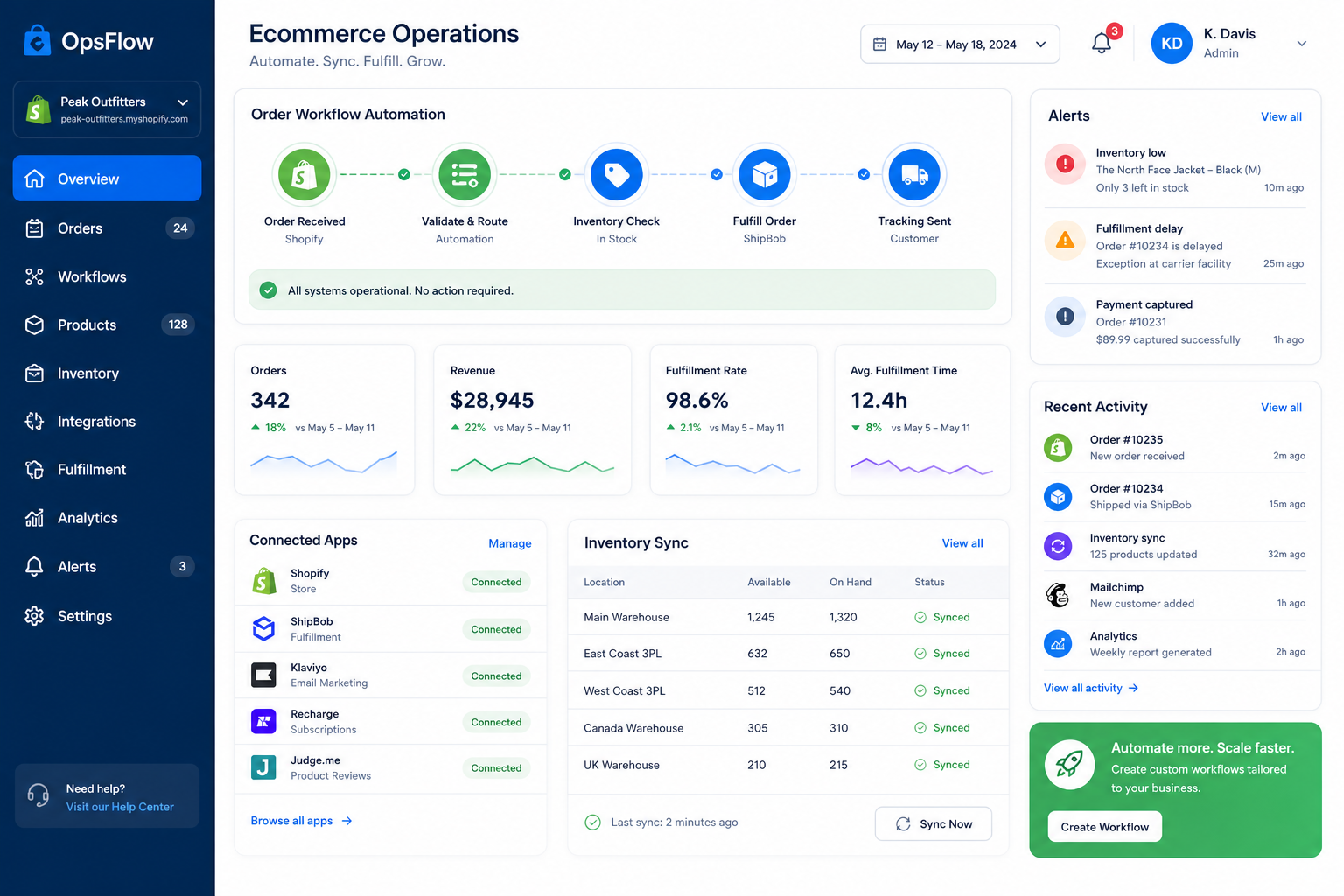
A Shopify workflow is the system of triggers, conditions, and actions that moves work automatically after something happens in your store. A Shopify order workflow applies that logic specifically to orders - everything from tagging risky orders and routing fulfillment, to syncing data across apps and alerting the right team before an issue becomes a customer problem.
This guide breaks down what merchants actually need to know: where order bottlenecks happen, what to automate first, and how to build workflows that reduce manual work without adding developer overhead.
"A significant 79% of consumers report they may not purchase again from a brand after a poor post-purchase experience." - Radial
That is the real business case for automation: better operations create better customer experiences.
What a Shopify workflow actually means
At a high level, a Shopify workflow is a repeatable automation that follows a simple structure:
A trigger happens
Example: an order is created, paid, tagged, fulfilled, refunded, or flagged as risky.Logic checks the context
Example: order value is above a threshold, a SKU belongs to a certain vendor, or inventory falls below a safe level.An action runs automatically
Example: send a Slack alert, update a Google Sheet, hold fulfillment, tag the customer, trigger Klaviyo messaging, or sync data to an ERP.
Competitor content often explains this in a basic “trigger-condition-action” format, which is useful - but too shallow for real operational teams. What merchants really need is a clearer view of how workflows fit into day-to-day order ops across systems, people, and exceptions.
That is where the difference between basic automation and scalable automation matters.
Basic workflow vs. scalable workflow
Workflow type | What it does | Limitation |
|---|---|---|
Simple Shopify-native workflow | Automates a single store event | Often stops at one action or one system |
Multi-step order workflow | Connects Shopify to multiple apps and teams | Requires more logic and orchestration |
Scalable operational workflow | Handles exceptions, alerts, sync, reporting, and follow-up | Hard to build and maintain without the right platform |
For many merchants, the gap appears right after “we automated one thing.” Orders touch shipping, inventory, support, CRM, finance, subscription tools, ERPs, and fulfillment systems. If those tools are not connected cleanly, the team still ends up doing manual cleanup.
Where Shopify order operations usually break down
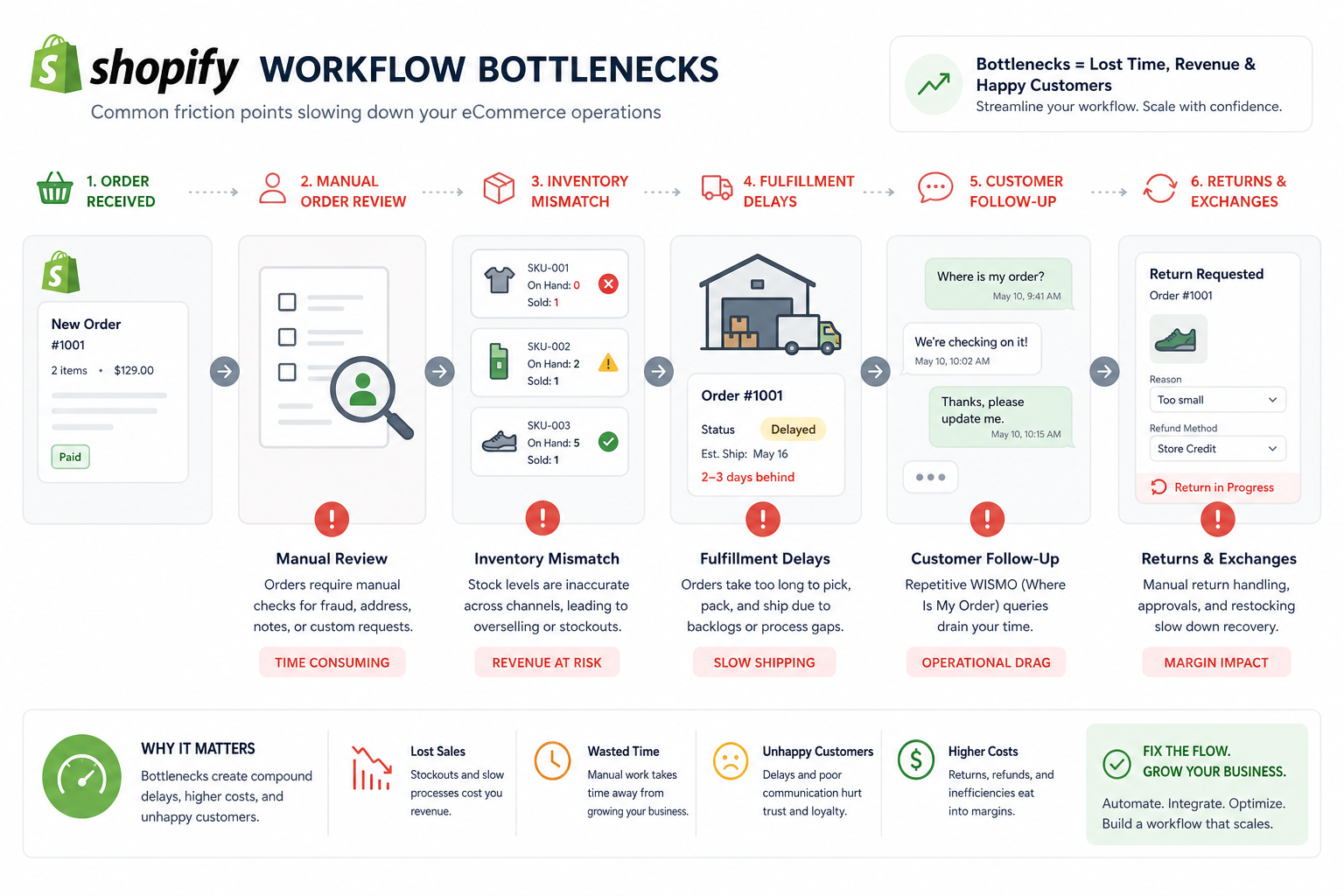
Most order operations problems are not caused by one major failure. They come from dozens of small manual tasks spread across the order lifecycle.
The most common bottlenecks
Orders that need manual review before approval
High-value or high-risk purchases that are not flagged fast enough
Inventory changes that do not sync across tools
Fulfillment delays that no one notices until customers ask
Out-of-stock products still being sold due to lagging data
Vendor-specific or warehouse-specific orders routed manually
Support teams lacking order context across systems
Post-purchase follow-up happening too late - or not at all
Reporting that depends on someone updating spreadsheets
What these bottlenecks cost
When order workflows are manual, teams pay for it in three ways:
Problem | Operational impact | Customer impact |
|---|---|---|
Manual order triage | Slower processing and more staff time | Delays before fulfillment starts |
Inventory mismatch | Overselling, backorders, extra support work | Frustration and lost trust |
Poor app-to-app sync | Duplicate work and broken data flows | Confusing communication |
Fulfillment blind spots | Missed SLAs and reactive fire drills | “Where is my order?” tickets |
Late follow-up | Lower repeat purchase rates | Weaker post-purchase experience |
This is why merchants searching for “shopify workflow” or “shopify order workflow” are often not looking for theory. They are looking for relief from operational clutter.
Common competitor advice - and the content gaps to fix
Across the competitor landscape, a few themes show up repeatedly:
Use triggers, conditions, and actions
Automate high-value order tagging
Set low-stock alerts
Flag risky orders
Improve fulfillment follow-up
Enhance post-purchase communication
Those are valid ideas. But most articles gloss over the parts that actually determine success:
Gap 1: They rarely explain workflow priority
Not every automation deserves to be built first. Merchants need a simple framework for choosing the workflows with the biggest operational ROI.
Gap 2: They underplay multi-app complexity
Basic examples stay inside Shopify. Real stores rely on Slack, Google Sheets, Klaviyo, Airtable, HubSpot, ShipStation, Odoo, and other tools. The handoffs between those systems are where operations get fragile.
Gap 3: They treat workflows as isolated events
A true Shopify order workflow is not just “tag order.” It is “tag order, notify team, sync data, trigger follow-up, and log the result.”
Gap 4: They mention alerts, not prevention
Many articles focus on alerts after something goes wrong. Smarter workflows prevent overselling, broken data syncs, and fulfillment delays before they become expensive.
Gap 5: They do not explain how non-technical teams can execute
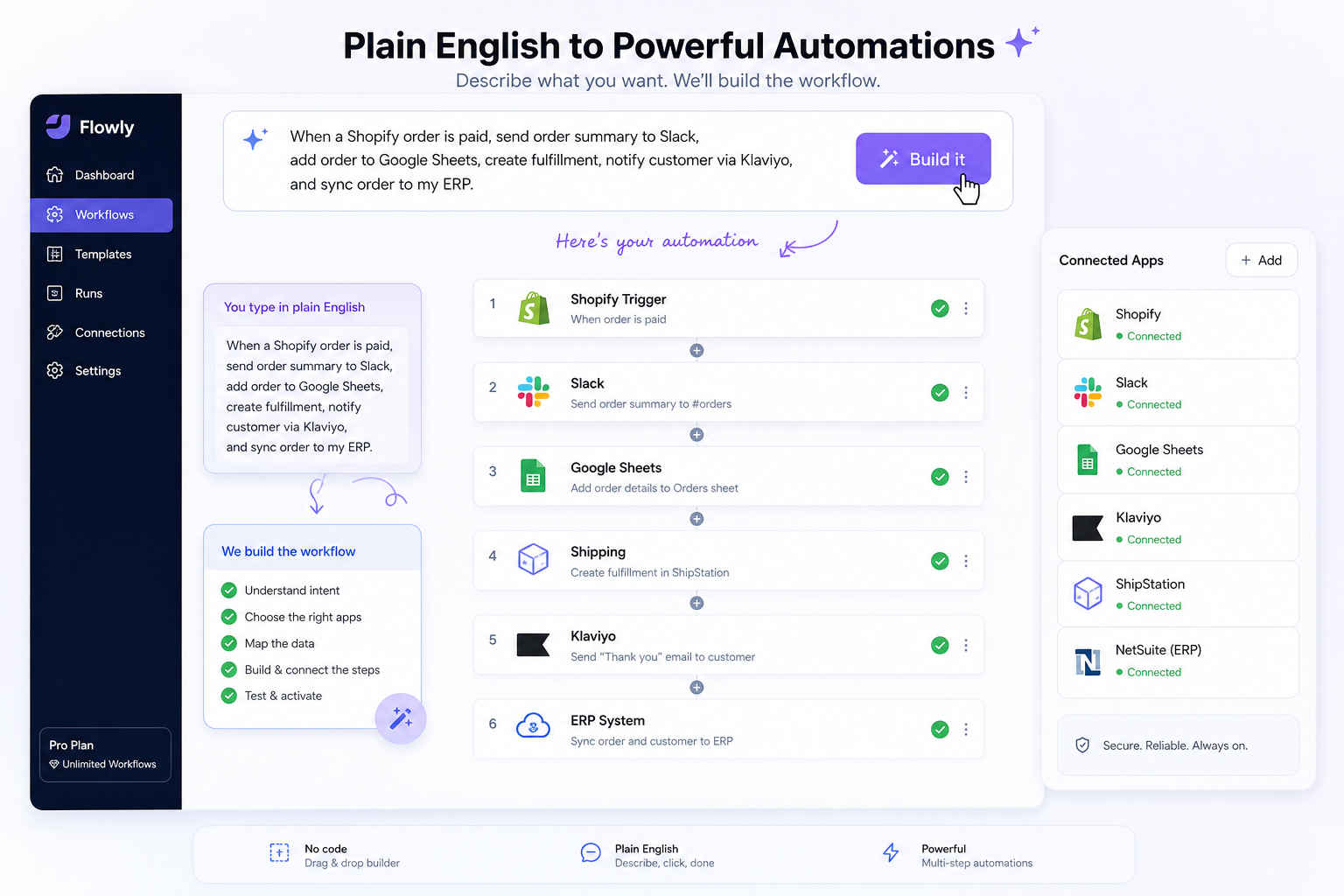
Growing brands do not always have developers available to build and maintain every operational rule. A modern workflow solution should let operators describe what they want in plain English and launch quickly.
That is exactly why platforms like MESA have become so valuable for Shopify teams. Instead of needing custom development for every process, merchants can build complex automations faster, connect 100+ apps, and use 300+ ready-made templates to get live quickly.
The Shopify order workflow ideas worth automating first
If your team wants fast wins, start with the workflows that directly reduce repetitive work and operational risk.
1. Auto-tag and route high-priority orders
This is one of the easiest and highest-value automations.
When an order crosses a certain threshold - high dollar amount, VIP customer, expedited shipping, wholesale profile, or flagged product mix - the workflow can automatically:
Add an order tag
Notify the operations or CX team in Slack
Create a record in Google Sheets or Airtable
Trigger special handling or white-glove fulfillment
Why it matters
Important orders should not rely on someone spotting them manually in the admin.
Example logic
Trigger: Order paid
Condition: Order total > $500 or customer tagged VIP
Actions: Tag order, send Slack alert, assign to priority fulfillment queue
2. Hold or review risky orders before fulfillment
Fraud prevention is one of the most practical use cases for a Shopify order workflow.
A workflow can analyze risk signals and automatically:
Tag the order for manual review
Put fulfillment on hold
Notify finance or operations
Create a review task in your project or ticketing system
Why it matters
This reduces chargeback exposure and helps teams standardize review instead of reacting inconsistently.
3. Send low-stock and oversell prevention alerts
Low-stock alerts are common. The smarter version is to combine alerts with protective actions.
A workflow can:
Alert the purchasing or ops team when inventory hits threshold
Pause marketing for nearly sold-out products
Update a shared spreadsheet or inventory board
Trigger back-in-stock messaging rules
Sync inventory status to other operational tools
Why it matters
Manual inventory checks are slow, and lagging stock data creates overselling risk.
Better approach
Do not stop at “email me when inventory is low.” Build a workflow that updates the systems downstream too.
4. Escalate unfulfilled orders before customers complain
This is one of the most useful operational automations for any growing brand.
A workflow can:
Wait a set number of hours after order creation
Check fulfillment status
Alert the warehouse, 3PL, or operations lead if still unfulfilled
Escalate again if the delay continues
Log the issue for reporting
Why it matters
The best time to catch a fulfillment delay is before it turns into a support ticket.
5. Route orders by vendor, warehouse, or SKU logic
As complexity grows, routing becomes a hidden bottleneck.
A Shopify order workflow can automatically route based on:
Vendor
Product type
Warehouse availability
Region
Shipping method
Subscription vs. one-time purchase
Bundle composition
Why it matters
Manual order sorting wastes time and introduces avoidable mistakes.
6. Sync order data to reporting tools automatically
Many teams still rely on manual exports for daily reporting.
A workflow can push order data to:
Google Sheets
Airtable
ERP systems
BI dashboards
Internal ops databases
Why it matters
If reporting depends on manual exports, it is always delayed and often incomplete.
7. Trigger post-purchase follow-up based on order events
Order workflows should not stop at fulfillment.
You can automate:
Review requests after delivery
Replenishment reminders
Cross-sell or upsell messages
Support check-ins for high-value orders
Warranty or registration follow-up
Customer retention campaigns in Klaviyo or HubSpot
Why it matters
Order operations and customer experience are directly connected.
8. Create exception workflows for refunds, returns, and replacements
A major content gap in competitor articles is the lack of exception handling. But exceptions are where teams lose time.
A strong Shopify order workflow can:
Detect a refunded or partially refunded order
Notify accounting and CX
Update tracking sheets
Trigger inventory restock logic
Segment customers for tailored communication
Launch replacement order workflows where needed
Why it matters
Returns and refunds are rarely just one action. They affect stock, finance, support, and customer retention.
What a good Shopify workflow system should include
Not all automation setups are built for operational reality.
Here is what merchants should look for when choosing how to manage Shopify workflows.
Capability | Why it matters for order ops |
|---|---|
No-code or low-code setup | Lets ops teams move fast without waiting on developers |
Plain-English workflow creation | Makes automation more accessible to non-technical users |
Multi-step logic | Needed for real order handling, not just one-off tasks |
Broad app integrations | Prevents disconnected processes across your stack |
Template library | Speeds up setup for common workflows |
Error handling and monitoring | Helps avoid broken data flows |
Human support | Important when workflows get complex |
Shopify-first architecture | Better fit for ecommerce-specific use cases |
This is where MESA stands out naturally.
MESA is built specifically for Shopify merchants who need practical automation without custom development. It allows users to describe what they want in plain English, then turns that request into a working workflow. For teams dealing with manual order processing, reporting lag, fulfillment complexity, and customer follow-up across multiple tools, that dramatically shortens the path from “we should automate this” to “it is live.”
Shopify-native automation vs. a broader workflow platform
Native tools can cover some basics. But many merchants outgrow them once workflows span multiple apps and teams.
A practical comparison
Need | Basic native automation | MESA |
|---|---|---|
Tag orders based on conditions | Yes | Yes |
Multi-step workflows across apps | Limited | Yes |
Plain-English workflow creation | No | Yes |
Connect Shopify with 100+ tools | Limited | Yes |
Ready-made workflow templates | Limited | 300+ templates |
Advanced order routing and sync | Partial | Strong |
Human help building workflows | Limited | Yes |
Complex operational orchestration | Harder to manage | Built for it |
For simple stores, native automation may be enough.
For growing brands, operations teams, and enterprise merchants with layered processes, MESA is more aligned with how work actually happens: across systems, with exceptions, deadlines, and dependencies.
How MESA simplifies Shopify order workflow automation
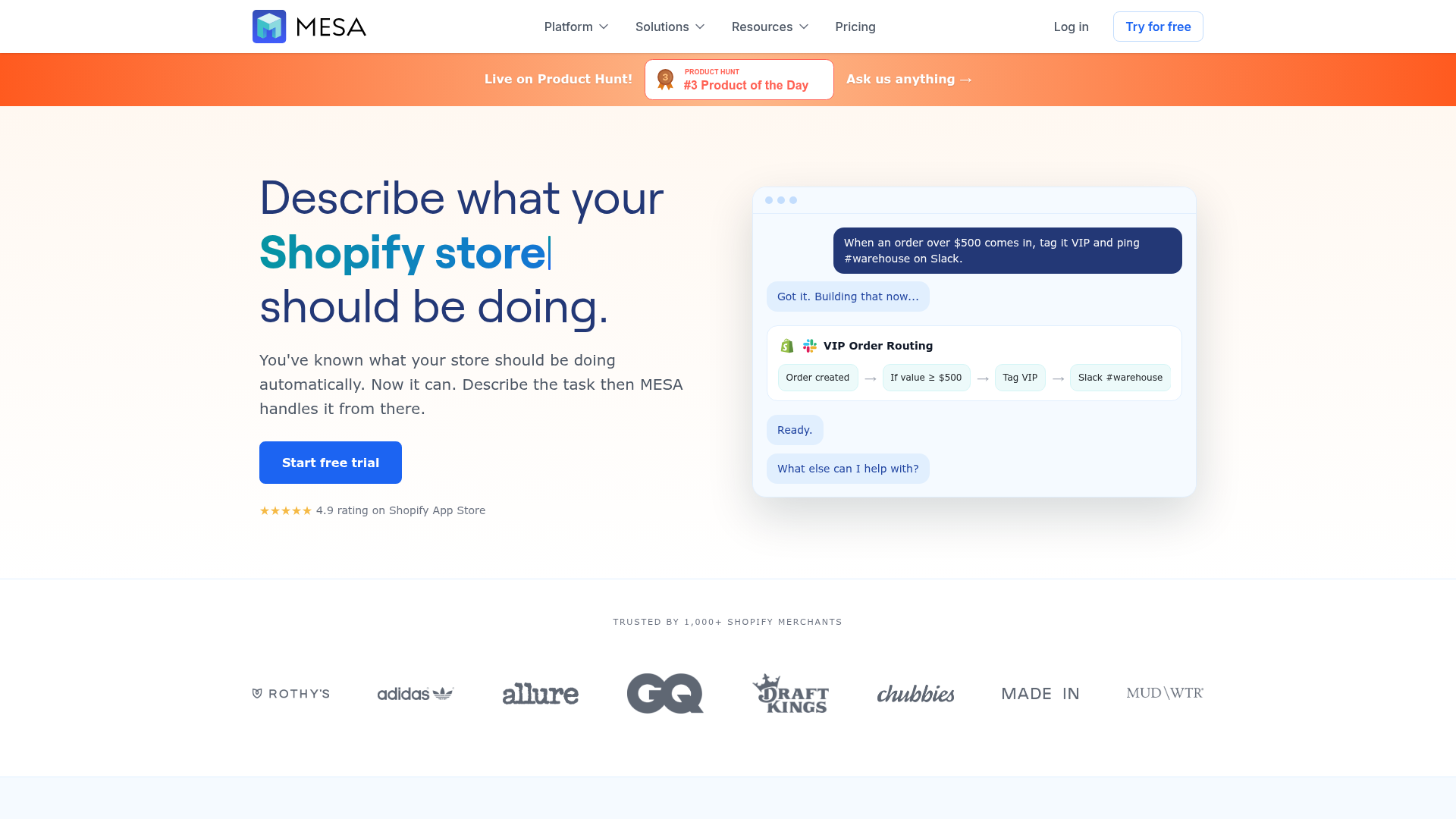
MESA helps merchants automate repetitive Shopify tasks without needing a developer. More importantly, it helps teams automate the workflows that usually get skipped because they are “too custom” or “too messy.”
What that looks like in practice
Turn a plain-English request into a live workflow quickly
Automate complex multi-step processes across Shopify and connected tools
Reduce repetitive operational work and backlog
Improve order handling, alerts, reporting, and customer follow-up
Sync inventory and data across systems more reliably
Help prevent overselling and broken handoffs
Launch faster with 300+ ready-made automation templates
Get real human support for setup and optimization
Example MESA workflow ideas
When a high-value order is paid, notify Slack, tag the order, add a row in Google Sheets, and trigger a VIP Klaviyo flow
When inventory drops below threshold, alert ops, update Airtable, and pause a campaign audience
When an order is older than 24 hours and still unfulfilled, notify the 3PL and escalate internally
When a return is initiated, update the order record, inform support, and sync the event to your ERP
When a customer places a second order within 30 days, trigger a loyalty or retention flow
These are the kinds of workflows that remove hidden operational drag.
A simple framework to choose the right workflows first
Do not try to automate everything at once.
Use this prioritization model:
1. Start with repetitive tasks
Ask: what does the team do every single day that follows a predictable pattern?
Good candidates:
Tagging orders
Sending alerts
Updating spreadsheets
Routing exceptions
Triggering post-purchase emails
2. Focus on high-cost mistakes
Ask: where do errors create refunds, chargebacks, overselling, or customer dissatisfaction?
Good candidates:
Fraud review
Inventory sync
Fulfillment delay alerts
Replacement and refund handling
3. Target handoff problems
Ask: where does work move between systems or teams and often get stuck?
Good candidates:
Shopify to Slack
Shopify to Google Sheets
Shopify to ERP
Shopify to Klaviyo
Shopify to warehouse or 3PL systems
4. Build for visibility, not just action
Good workflows do not just “do something.” They also make the process easier to monitor.
That means including:
Notifications
Logging
Status updates
Escalation steps
Reports
Warning signs your current order workflow needs automation
If any of these sound familiar, your team is probably overdue:
Staff members are copying order details into spreadsheets manually
The warehouse learns about priority orders too late
Customer support asks operations for order status constantly
Stock issues are discovered after products are sold
Teams are using inboxes as operational systems
Refund and replacement workflows vary by employee
Reporting depends on exports and manual cleanup
You are adding people to keep up with tasks that should be automated
"AI-powered chatbots can handle up to 80% of routine inquiries, leading to a 30% reduction in support costs." - Ringly
The exact tools and percentages may vary by operation, but the broader pattern is clear: repetitive work is expensive, and automating it frees teams to focus on exceptions, decisions, and growth.
How to build better workflows without creating more complexity
Automation should simplify operations, not create a second job managing automations.
Best practices
Keep naming and ownership clear
Every workflow should have a clear purpose, owner, and success metric.
Design for exceptions
Ask what happens if inventory is unavailable, an app fails to sync, or an order matches multiple conditions.
Use templates where possible
Starting from proven templates reduces setup time and avoids logic errors.
Monitor workflows after launch
Review results regularly so you can adjust thresholds, tags, routing rules, and alerts.
Avoid automating bad processes
If a process is inconsistent or confusing manually, clean it up before turning it into automation.
This is another reason merchants choose MESA. Its Shopify-first approach, large template library, and hands-on support make it easier to build automations that are useful in the real world - not just clever in theory.
Final verdict: the best Shopify workflow ideas are the ones that remove operational drag
A Shopify workflow is not just a nice productivity feature. Done well, it becomes the infrastructure that keeps order operations accurate, fast, and scalable.
The best Shopify order workflow automations do four things at once:
reduce repetitive manual work
improve visibility across teams
prevent expensive mistakes
create a smoother customer experience after checkout
Competitor articles tend to stop at basic examples like tagging, alerts, and first-time buyer logic. Those are a good start, but growing merchants need more than isolated automations. They need connected workflows that span Shopify, fulfillment, reporting, support, marketing, and inventory systems.
That is where MESA gives merchants a real operational advantage.
If your team wants to automate Shopify tasks without relying on a developer, turn plain-English requests into working workflows quickly, connect Shopify to 100+ tools, launch from 300+ templates, and get real human support when workflows get complex, MESA is built for exactly that.
For merchants serious about scaling order ops without scaling chaos, MESA is one of the smartest next moves you can make.
