To track email revenue in Shopify, you need three numbers, not one: what Shopify itself attributes to email (from UTM-tagged visits), what your email platform attributes to email (usually a wider window that counts opens), and an order-level record of which specific orders came from an email click. The first two will never match, and that's expected. This guide shows where to find each one, why they disagree, and how to build the third with a workflow that tags and logs every email-driven order automatically.
TL;DR: there's a template for that
Step 1: Make sure every email link carries UTM parameters
Shopify can only credit a visit to email if it can tell the visit came from email. The way it tells is UTM parameters on the link: utm_source, utm_medium, and utm_campaign. If your email links don't have them, the visit usually shows up as direct traffic, and the revenue disappears from any email report Shopify builds.
Shopify is explicit about what it needs:
"Traffic that comes to your store with utm_campaign parameters in the URL is attributed to marketing."Shopify Help Center, Measuring marketing performance
How to turn this on depends on your email tool:
- Klaviyo: go to your account name, then Settings > Other > UTM tracking, and toggle on Automatically add UTM parameters to links (Klaviyo's setup guide). Since June 2, 2025, Klaviyo's default
utm_mediumis the message type, so email links carryutm_medium=emailand SMS links carryutm_medium=sms(Klaviyo, Understanding UTM tracking). You can switch it off per campaign or per flow message, so spot-check a few. - Shopify Messaging (Shopify Email): campaigns created in Shopify show up as marketing activities in your admin, so Shopify attributes their orders without extra setup. UTM tracking is still worth having so the same visits are labeled correctly in Google Analytics (Shopify Messaging email analytics).
- Anything else: check the platform's settings for automatic UTM tagging. If there isn't one, add the parameters to your links by hand and keep the values consistent, since
Email,email, andnewsletterwill show up as three different mediums.
The quickest test: send yourself a campaign, click a link, and look at the URL in your browser's address bar. If you see utm_medium=email and a utm_campaign value, you're set.
Step 2: Read Shopify's own email revenue numbers
In your Shopify admin, the Growth section holds marketing performance: channel performance, campaigns, and top channel performance. The reports library also has Sales attributed to marketing and Performance by UTM campaign (Shopify marketing reports). Filter or group those by UTM medium or source to isolate email.
The number you see depends on the attribution model you pick. Shopify offers five, and last non-direct click is the default:
- Last non-direct click: full credit to the last channel before purchase, ignoring direct visits. If someone clicks your email, leaves, and comes back later by typing your URL, email still gets the credit.
- Last click: same, but a direct visit counts. The later return visit would take the credit.
- First click: full credit to the first channel the customer used.
- Any click: full credit to every channel the customer clicked, so totals across channels add up to more than your revenue.
- Linear: equal credit split across every click in the journey.
Two limits to keep in mind. Shopify only counts clicks, not opens, so an email that someone read and then acted on by searching for your store gets no credit. And Shopify's attribution data in the Growth section only goes back to October 1, 2021 (Shopify).
Step 3: Read your email platform's revenue numbers
Your email platform reports its own attributed revenue, and it's almost always higher than Shopify's. Klaviyo is the most common case for Shopify stores, so here's how it counts:
"For new customers after 10/9/2024 the default window is 5 days for email and SMS and 24 hours for push."Klaviyo Help Center, Understanding message conversion tracking
That window applies to both opens and clicks, and Klaviyo uses a last-touch model by default: the most recent message a customer interacted with inside the window gets the credit (Klaviyo, Understanding message attribution). So if a subscriber opens your Tuesday campaign, never clicks, and buys on Friday after finding you on Google, Klaviyo counts that order as email revenue. Shopify doesn't.
Opens are also the noisiest signal in email. Klaviyo lets you remove bot clicks and Apple Privacy opens from attribution; check whether that's on in your account, because Apple Mail Privacy Protection can register an "open" without a person reading anything. Accounts created before October 2024 may still be on older window settings, so confirm yours under your attribution settings (Klaviyo, How to change your attribution model) rather than assuming the default.
If you're still building out the flows that produce this revenue, our 10 Klaviyo and Shopify automation workflows and the abandoned cart emails that convert are good starting points.
Why Shopify and Klaviyo never agree
| Shopify (default) | Klaviyo (default) | |
|---|---|---|
| What counts as a touch | A click with UTM parameters | An open or a click |
| Model | Last non-direct click | Last touch within the window |
| Window | Set by the model and report | 5 days for email (newer accounts) |
| Other channels | Ads, search, social compete for the same order | Only Klaviyo messages compete |
| Typical result | Lower, stricter | Higher, includes assisted orders |
The last row is the one that matters. Klaviyo only compares its own messages against each other, so an order that also involved a Google ad and an Instagram post still goes to email if an email was opened within five days. Shopify weighs every channel against every other channel. Neither is wrong. They answer different questions: "which email should get credit?" versus "which channel drove this sale?"
A practical way to use both: treat Shopify's number as the floor (revenue email clearly drove) and Klaviyo's as the ceiling (revenue email plausibly influenced). Report the gap, not just one side of it. A widening gap usually means more of email's effect is assisted rather than direct, or that bot and privacy opens are inflating the platform number.
Step 4: Log every email-driven order to a spreadsheet
Both reports above are aggregates. Neither gives you a list of the actual orders, which is what you need to answer questions like "did the spring sale campaign sell the new collection or just discount the bestsellers?" or "which customers keep buying from email?". For that, build an order-level log.
Every Shopify order records the landing page of the visit that ended in the purchase, including any UTM parameters on it. A MESA workflow can read that field the moment an order is paid, keep only orders that arrived from an email link, tag them, and write them to Google Sheets:
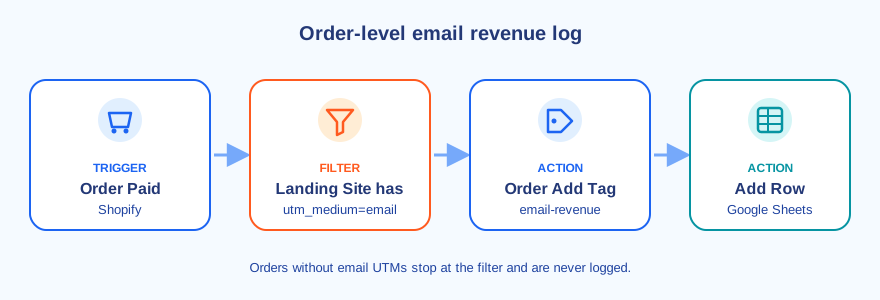
- Trigger: Shopify Order Paid. Paid, not created, so abandoned and unpaid orders never land in your revenue log.
- Filter: Landing Site contains
utm_medium=email. Change this to match your own links, for exampleutm_source=klaviyo. - Shopify Order Add Tag:
email-revenue. Now you can filter the orders list in Shopify admin by that tag and see every email order in one view. - Google Sheets Add Row. Log the order date, order name, customer email, total, currency, discount codes, the full landing URL, and the
utm_campaignvalue.
With that sheet, a SUMIFS on the total column grouped by week or by campaign gives you email revenue on your own terms, and every figure traces back to an order you can open. It will read lower than both reports above, because it only counts orders where the buying visit itself started from an email. That's the point: it's the strictest, most auditable version of the number.
One caveat: the landing page only reflects the visit where the order happened. If a customer clicked your email yesterday and came back directly today, this workflow won't count it (Shopify's last non-direct click model would). If you want that behavior, swap the filter for a Shopify GraphQL Query step that reads the order's customer journey summary, which lists UTM parameters for both the first and last visits.
Step 5: Keep a weekly history of Klaviyo's number too
Klaviyo's dashboard shows attributed revenue, but it's easy to lose track of how flows trend week to week, and exporting it every Monday is the kind of task that quietly stops happening. Klaviyo's API can return Placed Order revenue grouped by the flow it was attributed to (Klaviyo, Query Metric Aggregates), and MESA's Klaviyo connector exposes that as the Query Metric Aggregates action.
A weekly workflow runs on a Schedule, looks up the Placed Order metric with Get List of Metrics, queries the last 7 days of sum_value grouped by $attributed_flow, loops through the results, and adds one row per flow to a second tab of the same spreadsheet. Now your floor (the order log) and your ceiling (Klaviyo's attributed revenue) sit side by side, week by week.
Which number should you report?
It depends on who's asking:
- Deciding which email or flow to improve: use your email platform's numbers. They compare messages against each other consistently, which is what that decision needs.
- Deciding how much budget email deserves versus ads or social: use Shopify's numbers, since they weigh every channel with the same model.
- Answering "prove it": use the order log. Every dollar maps to an order number.
Whatever you pick, track email revenue as a share of total store revenue, not only as a dollar figure. Email revenue that grows only because the store grew isn't the same as email getting better. For the broader picture of what email and SMS automation can do for a Shopify store, see our Shopify email and SMS marketing automation guide.
FAQs
How do I track email revenue in Shopify?
Turn on UTM tracking in your email platform so every link carries utm_medium=email and a utm_campaign value, then use the Growth section and the Sales attributed to marketing report in Shopify admin to see revenue by UTM medium or campaign. For an order-by-order record, tag and log each paid order whose landing page contains your email UTM parameters.
Why is Klaviyo revenue higher than Shopify's email revenue?
Klaviyo counts opens as well as clicks inside a 5-day window by default (for accounts created after October 9, 2024) and only compares its own messages against each other. Shopify counts UTM-tagged clicks and weighs email against every other channel. An order influenced by both an email open and a Google ad usually goes to email in Klaviyo but not in Shopify.
Does Shopify count email opens?
No. Shopify attribution is based on visits to your store, so it only sees an email when someone clicks a link in it. Opens that lead to a purchase through another route aren't credited to email in Shopify's reports.
What UTM parameters should I use for email?
At minimum utm_source (for example klaviyo), utm_medium=email, and utm_campaign set to the campaign or flow name. Shopify needs utm_campaign present to attribute the visit to marketing. Keep values lowercase and consistent so reports don't split one channel into several.
