Shopify Flow Alternatives: Best Automation Apps for Shopify in 2026
-
- •
- Last updated: Jan. 27, 2026
- •
- 35 min read

Running a Shopify store means juggling dozens of repetitive tasks every day—tagging orders, updating inventory, segmenting customers, sending notifications. Shopify Flow helps automate some of these workflows, but many growing stores quickly hit its limitations. Whether you need AI-powered automation, customer update triggers, or connections to apps outside Shopify’s ecosystem, you’ll eventually need an alternative.
The good news? There are excellent Shopify-native automation apps that go beyond what Flow can do, without forcing you into expensive enterprise platforms. This guide covers the top Shopify Flow alternatives in 2026, focusing specifically on apps built for the Shopify ecosystem.
📘 For a complete overview, see our Complete Shopify Flow Guide
Related guides in this series:
Table of Contents:
Quick comparison: Top Shopify Flow alternatives
| App | Pricing | Rating | Best for | Key differentiator |
|---|---|---|---|---|
| MESA | $12/mo | 4.8 ★ (146) | AI automation, complex workflows | Only app with Claude/ChatGPT integration |
| React Flow | $19/mo | 5.0 ★ (176) | Shopify Functions, budget-conscious | Built for Shopify certified, free tier |
| Mechanic | $16/mo | 4.7 ★ (137) | Developers, technical teams | 250+ developer tasks, full control |
| Arigato | $15/mo | 4.7 ★ (189) | Quick setup, pre-built workflows | Virtual assistant, 100+ automations |
| Hextom SWA | $9/mo | 4.9 ★ (36) | Fraud detection, scheduled tasks | Established app, template library |

MESA: The AI powerhouse
Rating: ★★★★☆ 4.7 | 146+ reviews
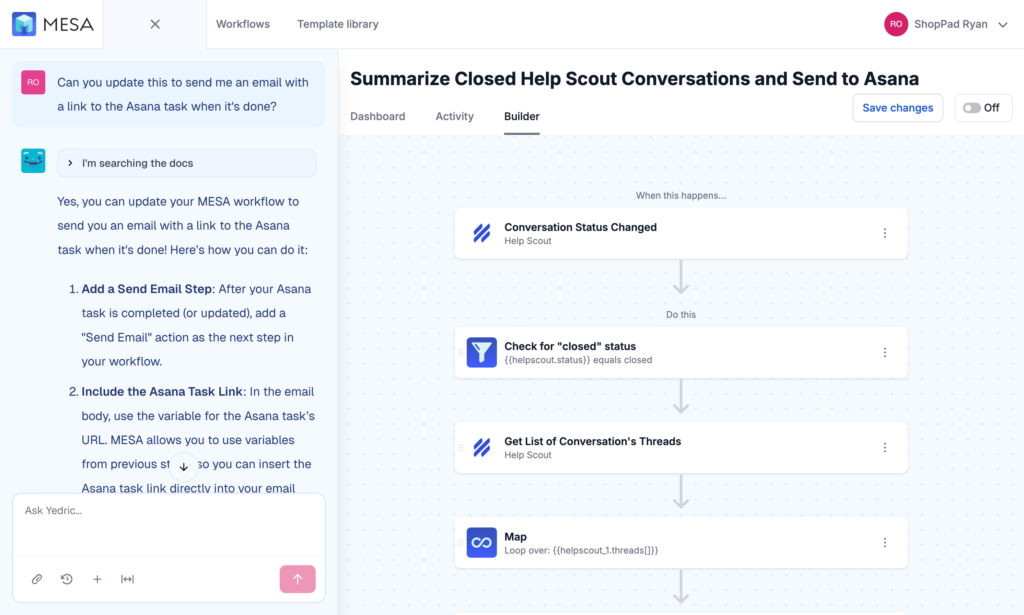
If you’re looking for the most powerful Shopify automation platform available in 2026, MESA stands alone. It’s the only Shopify app that brings AI automation directly into your workflows through Claude MCP and ChatGPT integration, letting you delegate tasks that previously required human judgment—like writing personalized email responses, analyzing customer feedback, or generating product descriptions at scale.
MESA was one of the first Shopify Flow alternatives, so they’ve spent years understanding exactly which repetitive tasks Shopify merchants need to automate most. The difference shows in their template library of 500+ pre-built workflows and 100+ deep app integrations across the ecommerce ecosystem.
What makes MESA different in 2026
The standout feature is AI automation. While other apps handle rule-based workflows, MESA lets you build workflows where AI makes decisions, generates content, and analyzes data. Need to automatically categorize support tickets by sentiment and urgency? MESA can do that. Want to generate unique product descriptions for 1,000 SKUs based on attributes and brand voice? Done. Looking to personalize email content based on customer behavior patterns? AI handles it.
Beyond AI, MESA includes more than 100 built-in workflow tools for complex data transformation, conditional logic, and multi-step automation that would be impossible in Shopify Flow. You can trigger workflows from customer updates (something Flow still can’t do), connect to apps outside the Shopify ecosystem, and build sophisticated automation that spans multiple platforms.
Pricing (2026)
- Basic: $12/month – 500 tasks per month
- Flex: $29/month – 10,000 tasks per month
- Pro: $99/month – 50,000 tasks per month
- Unlimited: $299/month – Unlimited tasks per month
All plans include access to AI automation, the full template library, and workflow setup assistance from Shopify experts.
Strengths
MESA shines when you need complexity. The deep Shopify and Shopify Plus integrations mean you can automate workflows that touch every part of your store—from checkout to fulfillment to customer service. The AI capabilities open up automation possibilities that didn’t exist even a year ago. And unlike most apps where you’re on your own after installation, MESA includes expert workflow setup assistance to help you build exactly what your business needs.
The breadth of integrations matters too. With 100+ apps connected through MESA, you can build workflows that span your entire tech stack. Send data to your CRM, sync inventory with your ERP, update your accounting software, post to Slack, create Airtable records—all from a single workflow triggered by events in Shopify.
Limitations
MESA’s power comes with a learning curve. While the template library helps you get started quickly, building advanced custom workflows with AI integration takes time to master. You’re also looking at a higher starting price than some alternatives, though the included expert support helps justify the cost if you need sophisticated automation.
Best for
MESA is the right choice if you need AI-powered automation, handle complex multi-app workflows, run on Shopify Plus, or simply want expert support to build exactly what you need. It’s particularly valuable for stores that have outgrown simple if-this-then-that automation and need workflows that can make intelligent decisions.
Popular workflow templates
MESA Template ID
add-and-remove-new-arrival-tag-on-shopify-products
MESA Template ID
send-slack-message-when-shopify-inventory-runs-low
MESA Template ID
escalate-angry-gorgias-tickets-to-slack
Browse the complete library with 500+ templates at getmesa.com/templates.
For a detailed comparison of features and capabilities, read our in-depth Shopify Flow vs MESA article.
React Flow
Rating: ★★★★★ 5.0 | 176 reviews
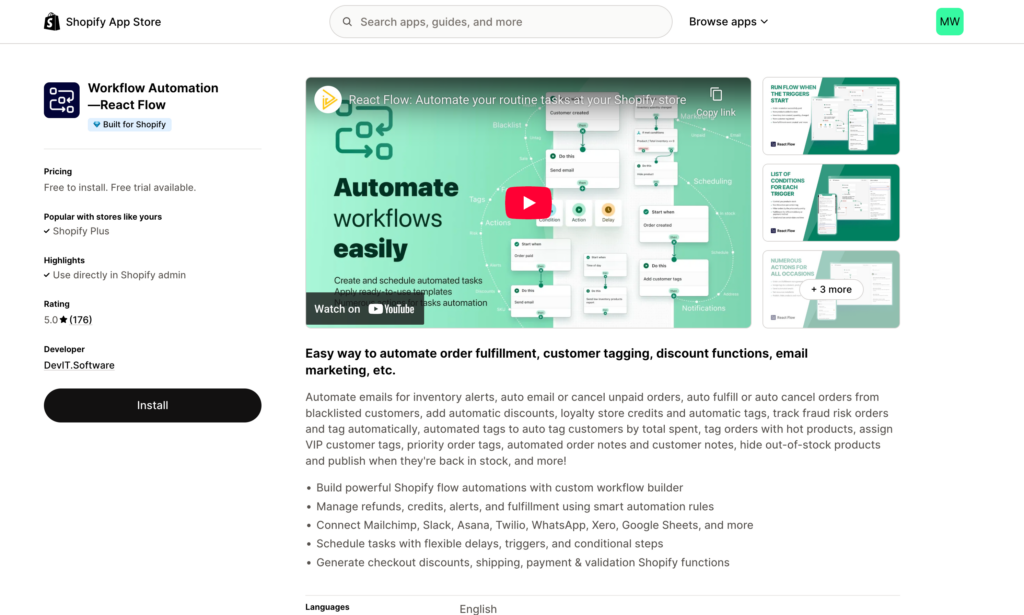
React Flow earned Shopify’s “Built for Shopify” certification, which means it meets Shopify’s highest standards for performance, design, and integration. If you value native Shopify integration and need automation that works seamlessly within your admin, React Flow delivers.
The app launched in December 2021 and has built a strong reputation for reliability and customer support. Merchants consistently highlight the responsive support team and the app’s ability to handle workflows that Shopify Flow can’t manage.
What makes React Flow stand out
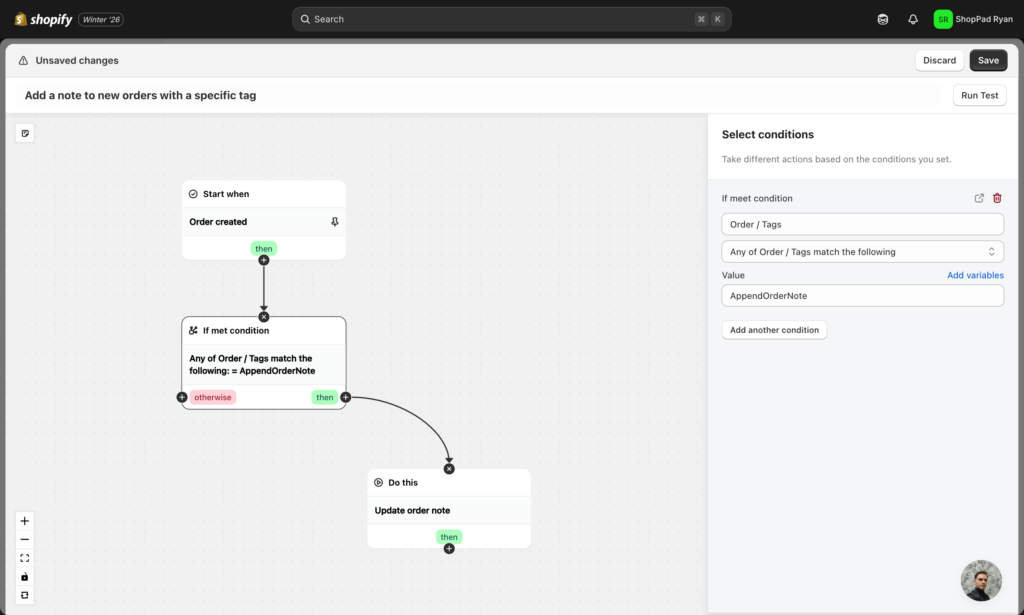
React Flow’s integration with Shopify Functions sets it apart. While other apps focus purely on workflow automation, React Flow lets you create custom checkout discounts, payment rules, and shipping logic using Shopify’s newest extensibility framework. This makes it particularly valuable for Plus merchants who previously relied on Shopify Scripts (which were deprecated in June 2026).
For merchants comfortable with code, React Flow supports Liquid templates in workflows. This means you can build highly customized automation with conditional logic and data manipulation that goes beyond drag-and-drop builders. You’re not writing complex applications, but you can add just enough code to make workflows do exactly what you need.
The app connects to 20+ popular services including Mailchimp, Slack, Asana, Google Sheets, Twilio, and WhatsApp. While not as extensive as MESA’s integration library, it covers the core apps most Shopify merchants use daily.
Pricing
- Pay as you go: Free – 20 active workflows, 100 runs per month, then $0.03 per extra run
- Starter: $19/month – Unlimited workflows, 1,000 runs per month, then $0.02 per extra run (7-day free trial)
- Standard: $29/month – 10,000 runs per month (7-day free trial)
- Professional: $49/month – 50,000 runs per month (7-day free trial)
All paid plans include unlimited workflows, triggers, actions, and conditions, plus 24/7 support.
Strengths
The free tier makes React Flow an excellent choice for stores just getting started with automation. You can run real workflows without spending money, which helps you understand exactly how automation fits into your business before upgrading to a paid plan.
Built for Shopify certification means React Flow follows Shopify’s best practices for performance and data handling. The app integrates directly into the Shopify admin interface, so you’re not constantly jumping between tabs or learning a completely new system.
Customer support is consistently praised in reviews. Merchants report fast responses and a support team that goes beyond basic troubleshooting to help design and implement custom workflows.
Limitations
The integration library is smaller compared to MESA. If you need to connect to specialized ecommerce apps or build workflows across many platforms, you might find React Flow limiting. The app also doesn’t offer AI automation capabilities like Claude or ChatGPT integration.
Best For
React Flow works well for merchants who are comfortable with Liquid code and want to customize automation beyond drag-and-drop templates. It’s ideal if you need Shopify Functions integration for checkout customization, want a free tier to experiment, or focus primarily on order fulfillment and inventory automation. The Built for Shopify certification makes it a safe choice if you prioritize native Shopify integration.
Mechanic
Rating: ★★★★☆ 4.7 | 137 reviews
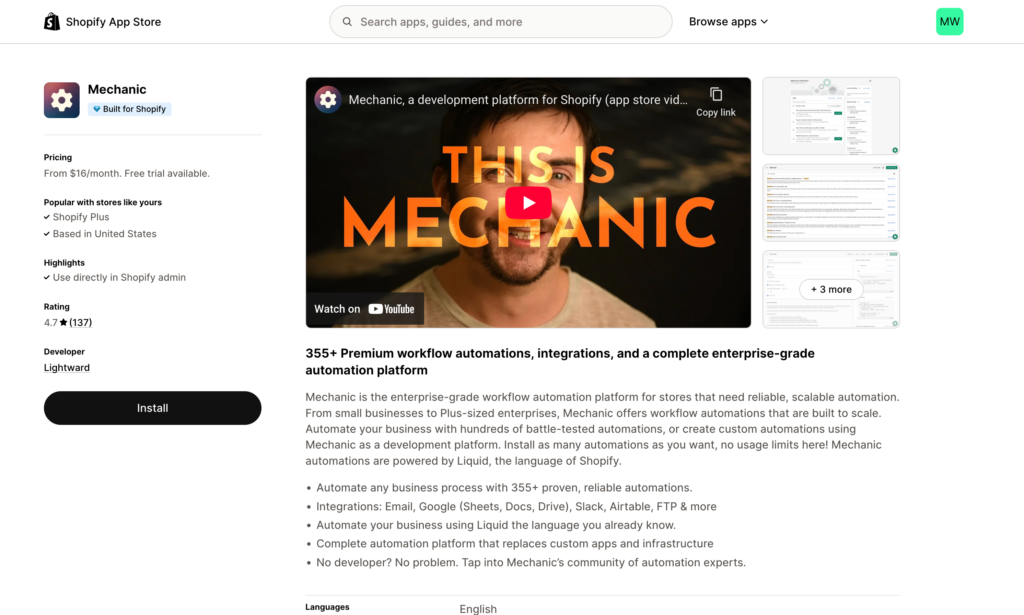
Mechanic takes a fundamentally different approach to automation. Rather than simplifying everything for non-technical users, it gives developers and technical teams the power to build exactly what they need using code. If you have development resources and need complete control over your automation, Mechanic delivers.
The platform offers 250+ pre-built tasks created and maintained by the developer community. These aren’t simple templates—they’re sophisticated automation workflows that handle complex ecommerce scenarios. You can use them as-is or customize them to match your exact requirements.
What makes Mechanic different
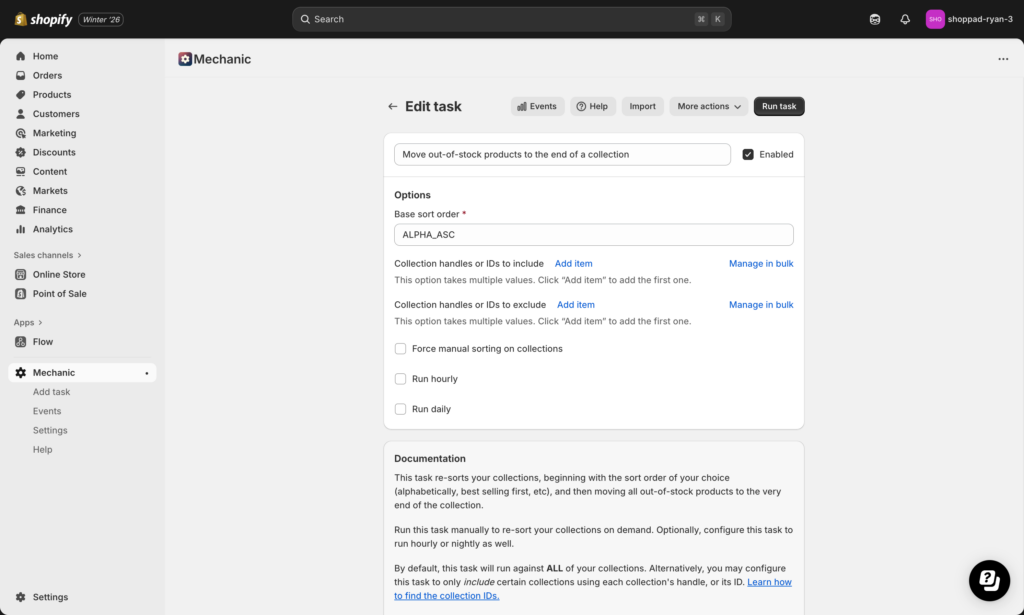
Mechanic was built for developers from day one. It uses Liquid (Shopify’s templating language) for workflow logic, which means anyone familiar with Shopify theme development can immediately start building powerful automation. The platform exposes data structures and system events that other apps hide behind simplified interfaces.
This developer focus means Mechanic can handle edge cases and custom requirements that would be impossible in drag-and-drop builders. Need to parse complex JSON responses from an API? No problem. Want to build multi-step workflows with intricate conditional logic based on dozens of data points? Mechanic handles it.
The community aspect matters too. Because Mechanic has been around for years and targets developers, there’s an extensive library of pre-built tasks, active community forums, and a YouTube channel with tutorials. When you hit a complex automation challenge, there’s a good chance someone else has already solved it and shared their solution.
Pricing
Mechanic uses Lightward’s unique “Pay what feels good” pricing philosophy, where suggested prices are provided but merchants can choose what feels right for their business. This trust-based approach is rare in SaaS and reflects the developer-friendly ethos of the platform.
- Basic Shopify: $16/month (suggested price)
- Grow Shopify: $29/month (suggested price)
- Advanced Shopify: $99/month (suggested price)
- Shopify Plus: $199/month (suggested price)
All plans include a 15-day free trial and have no additional usage fees. Pricing scales with your Shopify plan tier, aligning cost with your store’s size and complexity.
Strengths
If you have coding knowledge, Mechanic gives you capabilities that no other Shopify automation app can match. The 250+ pre-built tasks mean you’re not starting from scratch—you can find similar workflows, examine the code, and adapt them to your needs.
The developer-friendly UI makes it easy to see exactly what your workflows are doing at a code level. You’re not fighting against simplified abstractions that hide important details. The extensive documentation and video tutorials help technical users get up to speed quickly.
The “Pay what feels good” pricing model is refreshingly transparent and shows Lightward’s commitment to building trust with developers and merchants. This flexibility can be particularly valuable for agencies or developers managing multiple stores.
Limitations
Mechanic requires coding knowledge. If you’re not comfortable working with Liquid templates and JSON data structures, you’ll struggle to build even simple workflows. There’s less hand-holding compared to visual workflow builders, and the learning curve is steeper for non-technical merchants.
The app is purpose-built for technical users, so merchants without development resources should look at other alternatives that offer more guidance and pre-built solutions.
Best For
Mechanic is the right choice for technical teams, stores with in-house development resources, or businesses with highly custom automation needs that can’t be met by template-based solutions. If you’re a developer who wants full control over your automation and prefers working with code over drag-and-drop interfaces, Mechanic is your app.
Arigato Automation
Rating: ★★★★☆ 4.7 | 189 reviews
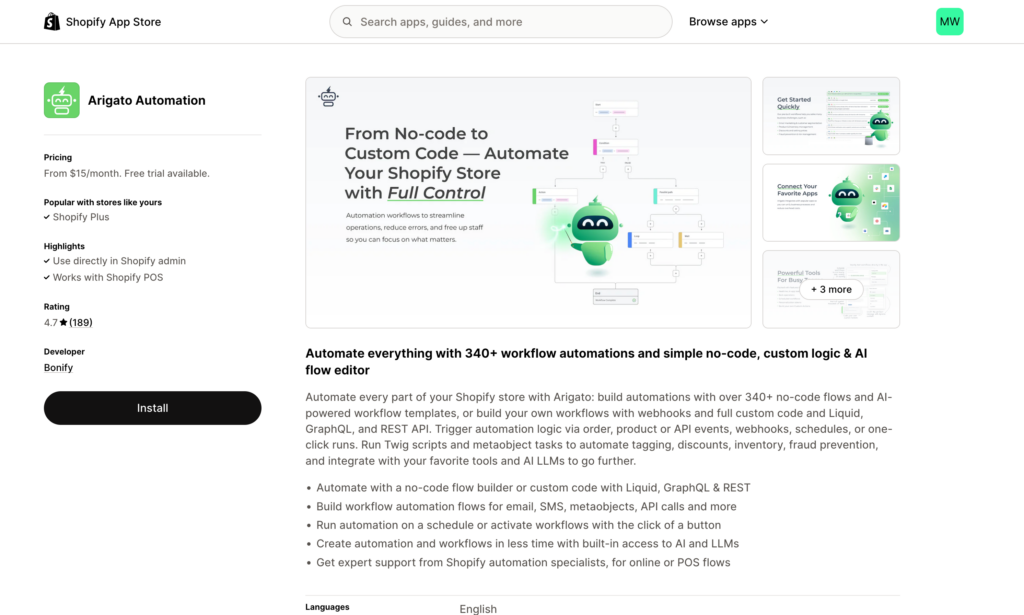
Arigato Automation focuses on making automation accessible to non-technical merchants through a large library of pre-built workflows. The app comes with 100+ ready-made automations covering common ecommerce tasks, from publishing products to triggering customer emails to managing returns.
One of Arigato’s unique features is its virtual assistant that helps with setup. Rather than figuring everything out yourself, you get guidance through the process of configuring automations for your specific needs.
What Arigato does well
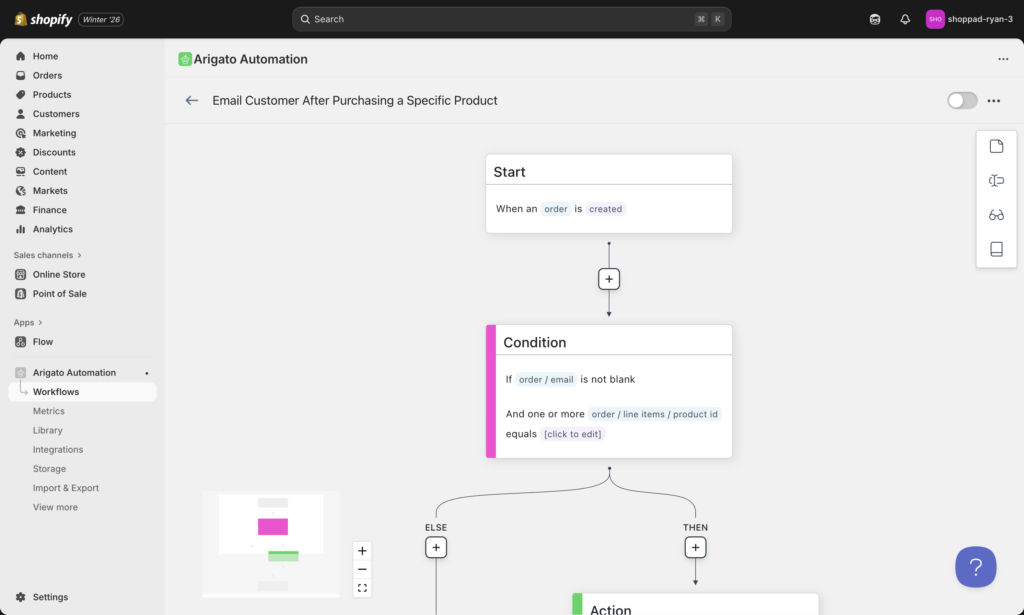
The strength here is breadth of pre-built options. Arigato offers 47 different actions that can be configured in thousands of combinations, giving you flexibility without requiring custom code. The platform provides access to 400+ data points and 350+ personalization tokens, so you can create workflows that respond to specific conditions and customize outputs based on order details, customer information, or product attributes.
For merchants who want to automate common tasks quickly without learning a new system or hiring developers, Arigato’s template library and virtual assistant remove most of the friction from getting started.
Pricing
Arigato’s pricing tiers align with your Shopify plan level, making it straightforward to understand what you’ll pay based on your store’s subscription.
- Basic: $15/month – For Basic Shopify stores, 5,000 actions per month, unlimited workflows
- Grow: $25/month – For Grow Shopify stores, 7,500 actions per month, unlimited workflows
- Advanced: $40/month – For Advanced Shopify stores, 10,000 actions per month, unlimited workflows
- Plus: $100/month – For Shopify Plus stores, 25,000 actions per month, unlimited workflows
All plans include free workflow setup, access to the pre-built workflow library, and a 14-day free trial. Plus merchants also get multi-store discounts and the option to choose a fair price for their needs.
Strengths
The pre-built automation library means you can get value immediately after installation. Many common workflows are already created—you just need to activate them and adjust settings to match your business rules.
The virtual assistant provides personalized help during setup, which is valuable if you’re new to automation and aren’t sure how to structure workflows. All plans include free workflow setup assistance, which removes friction from getting started and ensures your automations are configured correctly from day one.
The 400+ data points and personalization tokens give you flexibility to customize automations without writing code. Pricing that aligns with your Shopify plan tier makes budgeting straightforward—you know exactly what you’ll pay based on your store’s subscription level.
Limitations
While Arigato excels at common automation tasks, it may not handle highly custom or complex workflows as effectively as MESA or Mechanic. If your automation needs are unique to your business model, you might find the pre-built templates limiting.
Best For
Arigato works well for merchants who want quick setup, don’t have technical expertise, and primarily need to automate standard ecommerce workflows. It’s a good fit if you value guided setup and want to start seeing results from automation within hours rather than days or weeks.
Hextom: Workflow Automation
Rating: ★★★★☆ 4.9 | 36 reviews
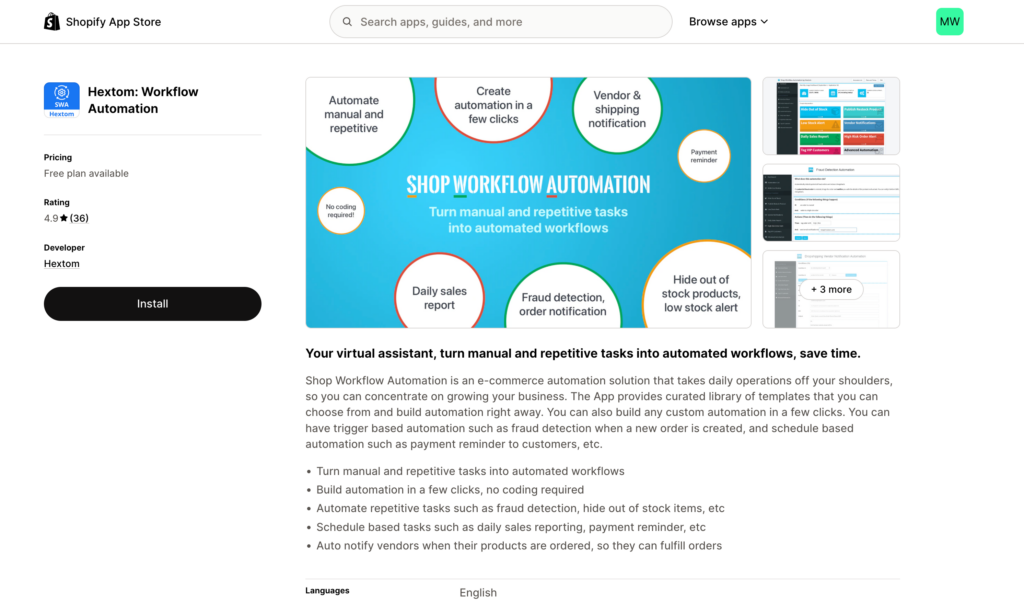
Hextom: Workflow Automation has been helping Shopify merchants automate daily operations since 2016. As one of the longer-established alternatives to Shopify Flow, it brings years of refinement and a curated template library that addresses common automation scenarios merchants face repeatedly.
The app is developed by Hextom, a well-known name in the Shopify ecosystem with multiple successful apps. This track record provides confidence that the app will continue to be maintained and updated as Shopify evolves.
What Hextom offers
Hextom focuses on making automation accessible through pre-built templates combined with the flexibility to build custom workflows. The template library covers common scenarios like fraud detection, inventory alerts, vendor notifications, payment reminders, and sales reporting. You can use these templates as-is or customize them to match your specific business rules.
The app handles both trigger-based automation (workflows that start when specific events occur, like a new order being created) and scheduled automation (recurring tasks that run on a set schedule, like weekly inventory reports or daily payment reminders). This combination covers most automation scenarios merchants need.
A standout feature is the fraud detection capabilities. Hextom can automatically identify high-risk orders based on various signals and alert you or take automated actions like tagging orders for review. This can help prevent chargebacks and reduce manual order screening.
The vendor notification system is particularly useful for stores working with multiple suppliers or dropshipping partners. When products are ordered, Hextom can automatically notify the relevant vendor so they can fulfill orders without manual coordination.
Pricing
- Starter Plan: Free – 50 automated actions per month, 5 active automations, curated data tables, multiple conditions-actions, scheduled tasks
- Growth Plan: $9.99/month – 300 automated actions per month, 5 active automations, all Starter features
- Basic Plan: $19.99/month – 1,000 automated actions per month, unlimited active automations, all Growth features
- Professional Plan: $49.99/month – 3,000 automated actions per month, unlimited active automations, all Basic features
The free plan provides genuine functionality—not just a limited trial. You can run real workflows and deliver value to your business without spending money.
Strengths
Hextom’s eight-year history in the Shopify App Store demonstrates stability and ongoing commitment. Apps that have survived this long tend to be well-maintained and regularly updated to work with Shopify’s latest features.
The template library removes much of the setup friction. Rather than starting from scratch, you can browse pre-built workflows for common scenarios, activate them, and adjust settings to match your needs. This is particularly valuable if you’re new to automation and aren’t sure where to start.
The fraud detection capabilities address a real pain point for growing stores. Manual order screening becomes unsustainable at scale, and Hextom provides automated risk assessment based on multiple data points.
The free plan is generous enough to provide real value. With 50 automated actions per month and 5 active workflows, small stores can automate key processes without any monthly fee.
Limitations
With 36 reviews, Hextom has a smaller user base compared to some alternatives. This means less community feedback, fewer use case examples, and potentially slower feature development driven by user requests.
The app doesn’t offer AI automation capabilities like MESA’s Claude or ChatGPT integration. Workflows are rule-based rather than intelligent, which limits the types of tasks you can automate.
While the template library is curated and useful, it’s not as extensive as MESA’s template solutions or as technically deep as Mechanic’s developer tasks.
Best for
Hextom makes sense for stores that need fraud detection automation, want scheduled recurring tasks like reports and reminders, prefer starting with proven templates rather than building from scratch, or want a free plan to test automation value before committing to paid tools.
The app works well if you value stability and track record—Hextom has been in the Shopify ecosystem for eight years, which provides confidence in ongoing support and compatibility.
What about Shopify Functions?
Before we continue, it’s important to address Shopify Functions—Shopify’s replacement for Scripts that became available to all Plus merchants in 2026.
Shopify Scripts deprecated: Functions take over
In June 2026, Shopify officially deprecated Scripts (as announced in the Winter ’26 Edition release). Scripts allowed Plus merchants to customize checkout, payment, and shipping logic using Ruby code. Shopify Functions replaced Scripts with a more powerful and flexible system that uses JavaScript and integrates with Shopify’s modern app extensibility framework.
When to use Shopify Functions
Shopify Functions are the right choice when you need checkout-specific automation like custom discount logic based on complex cart conditions, payment or shipping method customization based on order attributes, or checkout field validation and customization. Functions run directly in the checkout process with minimal latency, making them ideal for real-time decision-making during the purchase flow.
However, Functions require coding knowledge (JavaScript) and only work for checkout-related automation. They don’t help with workflows across your store, multi-app automation, or tasks that happen after checkout.
When to use automation apps instead
Automation apps like MESA or React Flow are better when you need to automate workflows across multiple apps, want to build automation without writing code, need AI-powered decision-making, or want expert support to design and implement workflows. React Flow actually integrates with Shopify Functions, giving you a visual interface to create Functions without writing JavaScript from scratch.
For most merchants, automation apps and Functions serve complementary purposes. Use Functions for checkout customization, and use automation apps for everything else.
Learn more about Shopify Functions in Shopify’s documentation.
When do you need a Shopify Flow alternative?
Shopify Flow handles basic automation well, but certain scenarios require more powerful tools. Here’s when you should consider an alternative and which app fits best.

Scenario 1: You need AI-powered automation
If your workflows require content generation, sentiment analysis, or intelligent decision-making based on unstructured data, Flow can’t help. You need AI capabilities.
Example use cases: Automatically generate unique product descriptions for new inventory based on product attributes and brand voice. Analyze customer support messages and route them to the right team based on sentiment and topic. Create personalized email content that adapts to customer behavior patterns and preferences.
Recommended solution: MESA is currently the only Shopify automation app with integrated AI through Claude MCP and ChatGPT. This lets you delegate tasks that previously required human judgment to AI-powered workflows.
Learn more: Check out our guides on AI Agentic Workflows and Shopify Admin AI with MCP.

Scenario 2: You need customer update triggers
Shopify Flow can’t trigger workflows when customer information changes. This creates a frustrating gap for stores using subscription apps, customer portals, or CRM systems that need to stay in sync with Shopify customer data.
Example use cases: When a customer updates their shipping address in your Shopify customer portal, automatically update their address in Recharge or other subscription apps. Sync customer tags, marketing preferences, or account status to your CRM when they change in Shopify. Trigger loyalty program updates when customer lifetime value crosses certain thresholds.
Recommended solution: MESA supports customer update triggers out of the box. Read our specific guide on how to start workflows from Shopify customer updated events and how to update customer addresses in Recharge when updated in Shopify.

Scenario 3: You need to connect non-Shopify apps
Flow only connects to Shopify apps that have built Flow Connectors. If your business relies on tools outside the Shopify ecosystem—like ERPs, custom databases, legacy systems, or specialized B2B platforms—you need an alternative.
Example use cases: Sync order data to NetSuite or other ERP systems. Push customer information to Salesforce or HubSpot. Send inventory updates to warehouse management systems. Connect to custom internal tools or databases.
Recommended solution within Shopify apps: MESA offers 100+ integrations across the ecommerce ecosystem, including many apps that don’t work with Flow.
Platform alternative preview: For connecting to apps outside the Shopify ecosystem entirely, you might need a platform automation tool like Zapier or Make.

Scenario 4: You need complex conditional logic
Flow handles simple if-this-then-that automation well, but complex workflows with multiple decision points, data transformation, or sophisticated filtering quickly become impossible.
Example use cases: Multi-step order processing that routes differently based on product type, customer segment, shipping destination, and inventory location. Customer segmentation that considers dozens of data points and historical behavior patterns. Dynamic pricing or discount logic that responds to real-time inventory levels, customer lifetime value, and seasonal factors.
Recommended solution for visual builders: MESA provides advanced conditional logic tools and data transformation capabilities without requiring code.
Recommended solution for developers: Mechanic gives technical teams complete control over complex logic using Liquid code.

Scenario 5: You’re working with budget constraints
Flow is free for most Shopify plans, but if you’re on Shopify Basic (where Flow isn’t available) or need capabilities beyond what Flow offers, you might assume automation is too expensive.
Example use cases: Testing whether automation provides value before committing to monthly fees. Getting started with basic workflows while bootstrapping your store. Running fraud detection and scheduled tasks without additional cost.
Recommended solution: Hextom offers a free plan with 50 automated actions per month and 5 active workflows, which covers fraud detection, inventory alerts, and scheduled tasks. React Flow also has a free tier with 20 active workflows and 100 runs per month. Both let you prove the value of automation before upgrading to paid plans.
Scenario 6: You need Shopify Functions integration
If you’re a Shopify Plus merchant and need to create custom checkout discounts, payment rules, or shipping logic—and you don’t want to write JavaScript from scratch—you need an app that integrates with Shopify Functions.
Example use cases: Create dynamic discount codes that change based on complex cart conditions. Customize payment methods shown at checkout based on customer attributes. Build shipping rules that consider product types, destinations, and order values in sophisticated ways.
Recommended solution: React Flow integrates directly with Shopify Functions, giving you a visual interface to build Functions without writing code. This is particularly valuable now that Scripts are deprecated (as of June 2026).
Scenario 7: You have developer resources and need full control
Some businesses have unique automation requirements that can’t be met by template-based solutions or visual builders. If you have in-house development resources and need to build completely custom workflows, Flow’s simplified interface becomes limiting rather than helpful.
Example use cases: Custom workflows that integrate with proprietary internal systems. Automation that requires parsing complex data structures or API responses. Edge cases and business logic that doesn’t fit standard automation patterns.
Recommended solution: Mechanic gives developers direct access to Liquid code and data structures, allowing complete customization of automation workflows.
Shopify Flow quick recap
Before choosing an alternative, it’s worth understanding what Shopify Flow actually offers. Flow is Shopify’s free automation app (available on all plans except Basic) that helps merchants automate repetitive tasks without coding.

What Flow does well
Flow excels at simple, single-app automation within the Shopify ecosystem. You can automate order tagging, customer segmentation, inventory notifications, and basic fulfillment workflows using Flow’s drag-and-drop builder. The app is free, reliable, and integrates seamlessly with Shopify admin.
Where Flow falls short
Flow only connects to Shopify apps that have built Flow Connectors, which excludes most third-party platforms and tools. It can’t trigger workflows from customer updates, a limitation that affects stores using subscription apps or customer portals. Complex conditional logic and data transformation are difficult or impossible in Flow’s simplified interface. There’s no AI integration, no expert support to help build workflows, and no ability to connect to apps outside Shopify’s ecosystem.
When Flow is enough
If your automation needs are straightforward and entirely within Shopify’s app ecosystem, Flow might be sufficient. It handles simple order tagging, basic inventory alerts, and customer segmentation well. For stores just getting started with automation, Flow provides a risk-free introduction to workflow automation concepts.
When you need an alternative
You’ve outgrown Flow when you need AI-powered automation, workflows that span multiple apps outside Shopify, complex conditional logic, or customer update triggers. If you’re spending time working around Flow’s limitations rather than building workflows, it’s time for an alternative.
For a comprehensive understanding of Flow’s capabilities and limitations, read our complete guide on Shopify Flow.
Choosing the right alternative
With five strong alternatives to consider, how do you choose? Start by answering these questions honestly about your business needs.
The decision framework
Do you need AI automation? If you’re generating content at scale, analyzing unstructured data, or need workflows that make intelligent decisions based on context, MESA is your only current option. No other Shopify automation app integrates Claude or ChatGPT.
Do you have a technical team? If you have developers in-house and want complete control over custom automation, Mechanic gives you that power. The code-based approach becomes an advantage rather than a limitation when you have technical resources.
Do you need checkout customization? If you’re building custom discount logic, payment rules, or shipping methods for your Shopify Plus store, React Flow’s integration with Shopify Functions makes it the clear choice. You get a visual interface for Functions without writing JavaScript.
Are you working with zero budget? If you can’t afford paid automation yet, Hextom’s free plan (50 actions/month, 5 workflows) or React Flow’s free tier (20 workflows, 100 runs/month) let you start automating without financial commitment. Hextom focuses on fraud detection and scheduled tasks, while React Flow offers broader automation capabilities in the free tier.
Do you want expert support? If you need help designing workflows, troubleshooting issues, or building complex automation, MESA includes workflow setup assistance from Shopify experts. This makes the higher price point worthwhile if you value support.
Do you need platform integrations? If your workflows need to connect apps outside the Shopify ecosystem—like ERPs, CRMs, or custom tools—you have two paths. Within Shopify apps, MESA offers 100+ integrations. For even broader platform connections, see our Shopify Flow vs Zapier comparison.
Still not sure?
The beauty of modern software is you can try before committing. Here’s a practical approach:
Start with free tiers. Install Hextom or React Flow’s free plan and build a few simple workflows. This helps you understand whether automation actually provides value for your specific business before spending money.
Review template libraries. Browse MESA’s template library, Hextom’s curated templates, or React Flow’s pre-built workflows to see if they match your needs. If you find templates that solve your problems, those apps will be easiest to implement.
Schedule a demo. If you’re considering MESA for complex or AI-powered automation, schedule a setup call with their team. They can help you understand whether the platform fits your requirements and assist with workflow design.
Test with real workflows. Don’t just experiment—build automation for actual business problems. You’ll quickly discover whether an app has the features and flexibility you need.
Beyond Shopify apps: Platform alternatives
This article focused on Shopify-native automation apps—tools built specifically for the Shopify ecosystem. But it’s important to know these aren’t your only options.
When you need platform automation
Platform automation tools like Zapier, Make, and n8n connect any apps together, not just those in the Shopify ecosystem. If your business relies heavily on tools outside Shopify, or you need workflows that span multiple platforms beyond ecommerce, platform alternatives might be a better fit.
Zapier is the best-known platform automation tool, connecting thousands of apps through a visual interface. It works well when you need to connect Shopify to CRMs, project management tools, marketing platforms, or other business software that doesn’t have native Shopify integrations.
MESA: The hybrid approach
It’s worth noting that MESA bridges multiple categories. It’s a Shopify-native app with deep platform integrations, but it also offers platform automation capabilities (100+ app connections) and AI-first features (Claude MCP, ChatGPT integration). This hybrid approach means you can often meet diverse automation needs with a single tool, rather than cobbling together multiple platforms.
Frequently asked questions
The best Shopify Flow alternatives are MESA (for AI-powered automation), React Flow (Built for Shopify certified with free tier), Mechanic (for developers), Arigato (pre-built workflows with free setup), and Hextom (fraud detection and scheduled tasks). MESA is the most powerful option with Claude and ChatGPT integration, while React Flow and Hextom offer free plans for budget-conscious merchants.
Yes, both React Flow and Hextom offer free plans. React Flow’s free tier includes 20 active workflows and 100 runs per month with unlimited triggers and actions. Hextom’s free plan provides 50 automated actions per month and 5 active automations, including fraud detection and scheduled tasks. Both free plans offer real functionality without trial limitations.
Shopify Flow is free and handles basic automation within Shopify’s ecosystem but only connects to apps with Flow Connectors. MESA ($12-$299/month) offers AI automation through Claude and ChatGPT, connects to 100+ apps, supports customer update triggers that Flow can’t handle, and includes expert workflow setup assistance. MESA provides more power and flexibility for complex automation needs.
Yes, MESA is currently the only Shopify automation app with AI integration. It connects to Claude MCP and ChatGPT, enabling workflows that generate content, analyze sentiment, make intelligent decisions, and handle tasks requiring human-like judgment. Other alternatives like React Flow, Mechanic, Arigato, and Hextom use rule-based automation without AI capabilities.
Most Shopify Flow alternatives don’t require coding. MESA, React Flow, Arigato, and Hextom all offer drag-and-drop builders with pre-built templates. Mechanic is the exception—it’s designed for developers and uses Liquid code for maximum customization. React Flow optionally supports Liquid for advanced users who want more control without full coding requirements.
Mechanic is the best Shopify Flow alternative for developers. It provides direct access to Liquid code, 250+ pre-built developer tasks, full control over workflow logic, and a developer-friendly UI. Mechanic uses Lightward’s unique “pay what feels good” pricing philosophy ($16-$199/month suggested) and offers complete customization that other visual builders can’t match.
Shopify Flow alternatives range from free to $299/month. Free options include React Flow and Hextom. Paid plans start at $12/month (MESA Basic), $15/month (Arigato Basic), $16/month (Mechanic Basic Shopify), and $19/month (React Flow Starter). Pricing typically scales with your store size and automation volume, with most apps offering 7-15 day free trials.
Shopify Flow cannot trigger workflows from customer updates, connect to apps without Flow Connectors, provide AI-powered automation, offer expert setup support, or handle complex data transformations. It also lacks customer update triggers needed for subscription apps and CRM syncing. For these capabilities, you need alternatives like MESA, React Flow, or Mechanic.
React Flow integrates directly with Shopify Functions, providing a visual interface to create checkout discounts, payment rules, and shipping logic without writing JavaScript. This is particularly valuable since Shopify Scripts were deprecated in June 2026. React Flow’s Built for Shopify certification ensures reliable Functions integration for Plus merchants needing checkout customization.
Yes, Shopify Flow is free for all Shopify plans except Basic. There are no monthly fees, usage charges, or hidden costs beyond your standard Shopify subscription. However, Flow only connects to apps with Flow Connectors and lacks advanced features like AI automation, customer update triggers, and complex conditional logic available in paid alternatives.
Yes, several Shopify Flow alternatives connect beyond the Shopify ecosystem. MESA offers 100+ app integrations including CRMs, ERPs, and external platforms. React Flow connects to 20+ services like Mailchimp, Google Sheets, Slack, and Twilio. For even broader platform automation, consider tools like Zapier as covered in our Shopify Flow vs Zapier comparison.
Conclusion: Finding your fit
Shopify Flow provides a solid foundation for basic automation, but growing stores quickly need more powerful tools. The right Shopify Flow alternative depends on your specific needs—AI automation, developer control, budget constraints, or checkout customization.
MESA stands out for stores that need AI-powered workflows, complex automation across multiple apps, or expert support to build sophisticated workflows. React Flow excels for merchants who want Built for Shopify certification, Shopify Functions integration, or a generous free tier. Mechanic gives developers complete control through code. Arigato offers quick setup with pre-built templates. Hextom provides an established solution with fraud detection and scheduled tasks, including a free plan for budget-conscious merchants.
Most importantly, automation isn’t all-or-nothing. Start with free tiers or focused solutions like Hextom, prove the value of automation for your business, then scale up to more sophisticated platforms as your needs grow.
The stores that thrive in 2026 and beyond will be those that automate repetitive tasks effectively, freeing up time to focus on strategy, customer experience, and growth. The tools are available—now it’s about choosing the right one for your situation.