
Stocky is gone. Shopify pulled it from the App Store on February 2, 2026, and it stopped working for good on August 31, 2026. Most of what it did came back inside Shopify admin — suppliers, purchase orders, receiving, transfers, adjustment reasons — but the part that told you when to buy did not. If your reorder timing lived in Stocky's forecasts and its min/max stock columns, you're walking into Q4 with a buying process and no early-warning system attached to it.
You can't rebuild demand forecasting in a workflow tool, and this article won't pretend otherwise. What you can rebuild in an afternoon is the safety net underneath it: a reorder point written down per SKU, and an automation that watches every inventory change against that number so a product announces itself before it hits zero, not after a customer finds the sold-out page.
TL;DR: there's a template for that
What Shopify absorbed from Stocky, and what it didn't
Shopify's own migration guide is the honest map here. Moved into admin natively:
- Purchase order creation and management
- Supplier records, assigned to orders
- Inventory transfers between locations
- Receiving workflows
- Inventory adjustments with preset reasons
Not replaced:
- Demand forecasting. There's no native forecasting screen. Shopify's guidance is to ask its AI assistant instead.
- ABC analysis. "Depending on your plan, you might need an app for ABC analysis."
- Supplier export. "Suppliers can't be exported from Stocky," so that list has to be rebuilt by hand.
- Full stocktakes. Quick count is built for spot-checking specific products, not a scheduled count of everything.
"Use Sidekick to help you forecast demand, identify which products need replenishing, and make more informed inventory planning decisions."Shopify Help Center
Asking an assistant what to reorder is a real answer to a one-off question. It isn't a system, because nothing fires on its own: someone has to remember to ask, on a day when they're already busy. That's the specific thing Stocky's min/max columns used to do quietly in the background, and it's the thing worth replacing first.
One housekeeping item before anything else: if you haven't pulled your Stocky data out yet, do it today. Shopify kept the door open, but not indefinitely — "you'll have read-only access to export your data for at least 90 days after that date." Your historical cost, supplier, and reorder data is the raw material for every number below.
Your reorder point is a number, not a feeling
The formula hasn't changed just because the tool did:
reorder point = (average daily units sold × supplier lead time in days) + safety stock
A SKU selling 8 units a day, from a supplier who takes 21 days, with two weeks of cushion, reorders at (8 × 21) + 112 = 280 units. That's a number you can look up in Shopify's inventory reports — inventory sold daily by product and products by sell-through rate give you the demand side — and confirm with the supplier for the lead-time side. Write it in a column. Revisit it quarterly, and before Q4 specifically, because lead times stretch in November and last spring's number will quietly lie to you.
Most stores are running on something less deliberate. A survey of 400 warehouse, inventory, and operations professionals found spreadsheets still doing the heavy lifting:
"84.8% of respondents use spreadsheets to track inventory"inFlow, State of Inventory Management 2026
The same survey found "44% of operators experience stockouts at least once a month." A spreadsheet isn't the problem — a spreadsheet nobody opens on a Tuesday afternoon is. The fix isn't to abandon it, it's to make Shopify push into it. If you're rebuilding this layer from scratch anyway, it's worth deciding first which system is allowed to be right about stock levels; we walk through that in setting up an inventory source of truth.
The safety net: three workflows
Shopify is direct about the fact that low-stock alerting isn't in the box:
"If you need to receive direct notifications of low stock levels, then install an inventory alert app from the Shopify App Store."Shopify Help Center
Here's what that looks like built as workflows rather than bought as another dashboard.
1. A real-time low-stock alert, per location
MESA's Shopify connector has an Inventory Level Updated trigger that fires on every stock change — sales, restocks, manual corrections. From there:
- Inventory Level Updated (Shopify trigger)
- Retrieve Inventory Item, then Retrieve Product Variant from SKU and Retrieve Location, so the alert says "Dorset Boot, 8M, Brooklyn warehouse" instead of an inventory item ID
- Filter: continue only when available stock is at or below the reorder point
- Slack or Email: notify whoever actually places the order
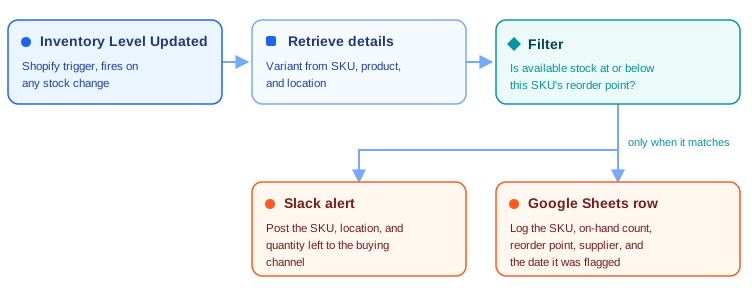
The Send Slack Alerts When Shopify Inventory Runs Low template ships with a flat threshold in the filter, which is the fastest way to get something live today. The location-specific version is the one multi-location stores want, since 20 units split across three warehouses isn't the same situation as 20 units in the one that ships your West Coast orders.
A flat threshold is a compromise, though: 280 units is nowhere near low for a SKU that sells one a week. Once the workflow is running, keep per-SKU reorder points in a sheet and read them with the Google Sheets Query Rows action before the filter, so each product is compared against its own number.
2. A reorder log that doubles as your buying list
An alert you read and move past is a notification. An alert that also writes a row is a queue. Add a Google Sheets Add Row step to the same workflow and log:
- SKU, product title, and variant
- Location
- Units on hand at the moment it tripped, and the reorder point it tripped against
- Supplier and lead time
- The date it was flagged
That last column is what makes the sheet worth keeping. The gap between "flagged" and "PO raised" is the number that tells you whether your reorder points are too tight or your buying cadence is too slow, and it's the closest thing to Stocky's reporting you can rebuild without a forecasting engine.
3. A scheduled digest, so the log doesn't rot
Real-time alerts get muted — that's just what happens to a busy channel in Q4. Pair them with a scheduled summary: a Daily Schedule trigger, a step to read the open rows from the reorder sheet, and a single email to the buyer listing everything still unactioned. One message on Monday morning that nobody can claim they missed beats forty pings nobody read.
Where Shopify Flow fits
Shopify Flow is free on every Shopify plan, including Basic, and has a Product variant inventory quantity changed trigger plus a native Send Slack message connector. If all you want is "ping the channel when this variant drops below 10," build it there and skip the rest of this section — genuinely.
The line shows up when the alert needs to leave Shopify's world: writing the reorder log row, reading a per-SKU threshold back out of a sheet, hitting a supplier portal or an ERP, or running a scheduled pass over data that Flow's event triggers never see. That's where a workflow tool with connectors on both sides earns its place, and it's the same split we lay out when comparing inventory tooling for Shopify stores.
What you still can't automate: the purchase order itself
Worth being blunt, because it's the first thing people try after wiring up the alert. Shopify's native purchase orders live in admin only — there's no PurchaseOrder object in the Admin GraphQL API, which developers have asked Shopify to change. No app, no Flow action, and no MESA step can create a PO, read one back, or fill in a field on one. Automation can generate and log the reference number a person then pastes into admin, which is exactly the workaround we detail in creating custom named and time-stamped purchase orders.
So the honest division of labor after Stocky: Shopify admin holds the POs, your workflows hold the watching and the logging, and a human still decides what to buy.
Set this up before Q4, not during it
- Export your Stocky data while the read-only window is open.
- Pick your top 30 SKUs by revenue and calculate a real reorder point for each one, using current lead times.
- Put those numbers in a sheet with supplier and lead time beside them.
- Build the low-stock alert from the template, starting with a flat threshold to get it live.
- Add the Google Sheets row so every alert leaves a trail.
- Add the scheduled digest once the channel starts getting noisy.
- Upgrade the filter to a per-SKU lookup when the flat threshold starts producing alerts people ignore.
None of this forecasts anything. If you need true SKU-level demand planning, a dedicated app is still the right buy, and it always was — Stocky's forecasting was the part hardest to replace precisely because it was the part doing real work. But a store that knows within seconds when a SKU crosses its reorder point, with a dated log of every time it happened, is in a dramatically better position in November than one waiting to notice.
FAQs
Can I still get my data out of Stocky?
For a limited time. Shopify states you'll have read-only access to export your data for at least 90 days after August 31, 2026. Suppliers are the exception — Shopify's migration guide says they can't be exported, so that list has to be rebuilt in admin by hand.
Does Shopify have built-in low stock alerts now?
Not as a setting. Shopify's inventory documentation points you at an inventory alert app from the App Store or at Shopify Flow to build the notification yourself. A MESA workflow on the Inventory Level Updated trigger is the same idea with somewhere to write the result.
Can MESA calculate reorder points for me?
No — it doesn't forecast demand. You set the number, from your own sales history and supplier lead times, and the workflow enforces it. Store per-SKU reorder points in a Google Sheet and read them with the Query Rows action so each product is checked against its own threshold instead of a single store-wide one.
Do I need Shopify Plus for any of this?
No. Shopify Flow is a free app on every plan including Basic, and Shopify documents the native inventory and purchase order tooling as part of core inventory management rather than a Plus feature. The one plan caveat its Stocky guide calls out is that depending on your plan you might need an app for ABC analysis. MESA workflows need a paid MESA plan, not a specific Shopify one.
