Most guides about moving from Etsy to Shopify describe a switch: export your listings, import them, close the shop, done. That is the version that costs you money. Etsy's search rank, your review count, and your buyer relationships are all owned by Etsy, and none of them come with you. Turn the shop off on a Friday and you start Monday with a store nobody has ever heard of.
The migration that doesn't cost you sales is a slower one: get everything Etsy will hand over into Shopify, keep the Etsy shop selling while you build demand on your own domain, and make Shopify the system of record so you're not maintaining two catalogs by hand. This walkthrough covers the file-level mechanics — where the CSVs live, exactly how they need to be reshaped, what genuinely can't be moved — and the automation that keeps both channels honest once Shopify is your home base.
TL;DR: there's a template for that
What "migrating" from Etsy actually means
Etsy is a marketplace. Shopify is software you run a store on. That difference decides everything about how the move works.
On Etsy, discovery is the platform's job. Your listings rank in Etsy search, Etsy runs the ads, and Etsy owns the buyer. On Shopify, discovery is your job: your domain, your SEO, your email list, your paid spend. A migration isn't a data transfer between two equivalent systems — it's taking over a function Etsy has been performing for you.
That's why the sequencing matters more than the export. Sellers who lose revenue in a migration almost always lose it in the gap between "Etsy traffic stopped" and "my own traffic started." Everything below is arranged to keep that gap at zero.
What transfers, what transfers with work, and what doesn't
Shopify publishes an official Migrate from Etsy guide, and it's worth reading before you touch a spreadsheet, because it's candid about the limits. Here's the honest breakdown:
- Transfers via CSV: product titles, descriptions, prices, quantities, tags, materials, SKUs, and image URLs.
- Transfers, but needs a third-party app: customers, historical orders, and reviews. Shopify points to App Store tools for these rather than offering a first-party importer.
- Doesn't transfer at all: your Etsy search ranking, your shop's star rating and review count as a unit, your favorites, your Etsy listing URLs, and any link equity attached to them. There is no redirect from an Etsy listing to a Shopify product page.
One limit catches people out on day one. The Etsy export only covers what's live right now:
"The CSV file from Etsy only includes listings that are currently available for sale."Shopify Help Center
Sold-out, expired, and draft listings aren't in the file. If you have seasonal products sitting inactive, renew or reactivate them before you export, or rebuild them by hand later.
Two Etsy rules that shape your entire migration plan
Before you plan any "tell my Etsy customers about the new store" campaign, read these two policies. They rule out the tactic most migration advice quietly assumes.
First, you can't take your Etsy buyer list with you:
"Without the buyer's consent, and subject to other applicable Etsy policies and laws, you may not add any Etsy member to your email or physical mailing list, use that buyer's identity for marketing, or obtain or retain any payment information."Etsy Seller Policy
Second, you can't route Etsy shoppers to your Shopify checkout:
"A transaction initiated on Etsy may not be completed off of Etsy."Etsy Off-Platform Transactions policy
Etsy's policy explicitly covers indirect methods too — encouraging buyers to purchase an item from your Etsy shop somewhere else, or pointing them off-platform with a QR code. So the plan can't be "redirect my Etsy audience." It has to be "build a second audience while the first one keeps paying the bills." That's a months-long job, which is exactly why you start it before you need it.
Step 1: Export everything Etsy will give you
Etsy's exports all live in one place: Shop Manager → Settings → Options → Download Data. Pick a CSV type and a date range, then download. Grab all of these while you're there:
- Listing Data CSV — one row per currently-for-sale listing, with the title, description, price, currency code, quantity, tags, materials, SKU, and image URLs (Etsy Help). This is the file you'll reshape for Shopify.
- Order Item CSV — item-level sales history. Useful for working out which products actually carry your revenue before you decide what to rebuild first.
- Order CSV — order-level records including payment method and fee detail.
- Etsy Payments Sales and Deposits CSVs — your payout and reconciliation trail. Download these even if you never import them; once the shop closes, they're gone.
Download by year rather than by month where you can (leave the month dropdown unset), and save the raw files somewhere untouched. You'll want an unedited copy to go back to the first time an import goes sideways.
Step 2: Reshape the listing CSV before you import it
You cannot upload Etsy's listing CSV to Shopify as-is. The two formats disagree on the single most important thing: what a row means. Etsy gives you one row per listing. Shopify wants one row per variant.
"If each of your variants has a unique SKU, then you'll need one row in your CSV file per unique combination of variants."Shopify Help Center
In practice that means expanding every variable listing into a block of rows that share one Handle, adding Option1 Name / Option1 Value column pairs (up to three), and giving each row its own Variant SKU. Product-level fields — title, description, images — belong on the first row of each block only.
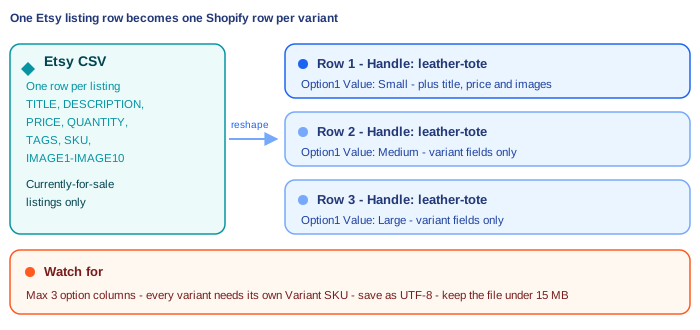
A few constraints worth knowing before you spend an afternoon on this:
- Three options, hard stop. Shopify's guide is explicit: "A product can have a maximum of 3 options - products with more than 3 options won't have their options imported." If you sell a made-to-order item with five choices, that product needs a different approach — a product-options app, or splitting it into separate products.
- Prices by location aren't supported on this path; Shopify sets the product to its highest price. Check anything you priced regionally.
- Headers are case-sensitive.
Handleimports;handlefails. - Save as UTF-8, and keep the file under 15 MB. Shopify's product import documentation caps it there — split large catalogs into multiple uploads.
- Don't sort the sheet. Shopify warns that sorting a product CSV in a spreadsheet program can "cause your products to be removed from their relevant image links on the CSV, and your product's images will be lost." Sorting breaks the row-order relationship between a product and its images.
Do a test import with ten products first. Check variants, images, and inventory on the storefront, then delete them and run the full file. Ten minutes here saves you unpicking 400 half-broken products later.
Step 3: Bring over what the CSV can't
Reviews are the highest-value thing you're leaving behind, and the one worth paying to move. A product page with 200 reviews converts differently than an identical page with zero. Review platforms have built importers for exactly this migration — Judge.me syncs Etsy reviews into Shopify and keeps pulling new ones on a schedule, and Shopify's own migration guide names third-party apps for reviews and historical orders rather than offering a native path. Set this up before launch, not after, so your Shopify product pages never go live bare.
Customers need care. Shopify's customer import needs an Email column and lets you set an Accepts Email Marketing value per row. Do not set that to yes for your Etsy buyers. Etsy's Seller Policy above prohibits it, and Shopify's own guidance is blunt about the consequences: "Only send marketing emails to customers who have opted in to receive email marketing from your business" (Shopify Help Center). Import them as non-subscribed contacts so you have order history for support, and grow the marketing list from people who opt in on your own site.
Order history is optional. Import it if you need lifetime-value reporting or expect warranty claims on old orders. If you don't, the Order CSVs sitting in your archive folder are usually enough.
Step 4: Run both storefronts instead of switching one off
The single biggest lever on "without losing sales" is not closing the Etsy shop. Etsy keeps sending you buyers while your Shopify store has no organic presence yet, and there's no rule against selling in both places — only against moving an Etsy-initiated transaction off Etsy. Plenty of stores run both Etsy and Shopify permanently, treating Etsy as a discovery channel and Shopify as the margin-friendly one that builds a brand.
The operational risk of running both is overselling: one unit of stock, two storefronts, two buyers. You need inventory to move in one place and follow in the other. Shopify's own answer is Marketplace Connect: "You can sync your store's product catalog, inventory, and sales with Etsy by adding the Marketplace Connect app to your store admin" (Shopify). There are also dedicated Etsy sync apps in the App Store if you want finer control over how listings map.
Pick one and get it running before your first Shopify sale, not after your first oversell.
Step 5: Make Shopify the source of truth
Once both channels are live, decide which one you maintain. It should be Shopify — it's the one you own, and it's the one with an API worth building on. Every new product gets created in Shopify, and Etsy follows automatically instead of getting a second round of manual data entry.
MESA does that with a three-step workflow: a Shopify Product Created trigger, a Retrieve Product step that pulls the full record including variants and image URLs, an Etsy Create Draft Listing step built from those fields, and an Upload Image on Listing step for the main photo. The Etsy listing lands as a draft, so you still get to set the taxonomy and shipping profile before it goes live.
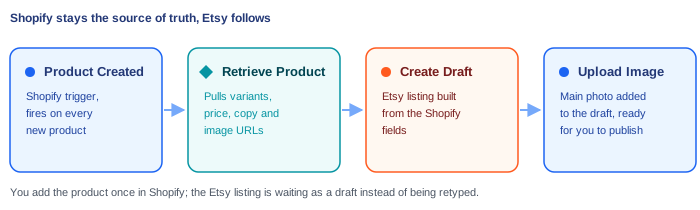
That's the anchor, but it's rarely the only one worth building. Once Shopify is the hub, the same pattern handles the rest of the cross-channel busywork — pushing Etsy receipts into the same Google Sheet as your Shopify orders so you can report on both, or tagging customers by which channel they came from. Our guide to connecting Shopify to Etsy covers the connection itself step by step, and there's a broader rundown of what's worth automating in an Etsy shop if you're deciding where to start.
A migration schedule that doesn't cost you a month of sales
Rough shape of a move that keeps revenue flat. Adjust the calendar to your catalog size, but keep the order.
- Weeks 1-2 — Build quietly. Export the Etsy CSVs, reshape and test-import products, set up the theme, import reviews. Etsy keeps selling; nothing changes for buyers.
- Weeks 3-4 — Launch small. Shopify store goes live. Turn on inventory sync between the two channels. Start the Shopify email list from scratch with an on-site signup, and point your existing off-Etsy audience (your own social accounts, your packaging, your newsletter if you already have one) at the new domain.
- Months 2-4 — Grow the second channel. Shopify SEO takes months to move. Run ads or content against your own domain, and watch what share of revenue Shopify is carrying.
- Month 5+ — Decide, with data. If Etsy is still a profitable discovery channel, keep it. Most sellers who planned to leave end up staying on both, and that is a perfectly good outcome — you now own the customer relationship on one of them.
Notice what's missing: a cutover date. There doesn't need to be one.
FAQs
Can I redirect my Etsy listings to my Shopify store?
No. You have no control over Etsy listing URLs, so a 301 redirect isn't possible, and Etsy's Off-Platform Transactions policy prohibits directing buyers off Etsy to complete a purchase — including indirectly, such as via a QR code. Plan on rebuilding search presence on your own domain rather than inheriting it.
Will I lose my Etsy reviews?
Your Etsy shop rating stays on Etsy, but the review content can be brought across. Review apps such as Judge.me offer Etsy review syncing into Shopify, and Shopify's migration guide points to third-party apps for reviews. Do this before launch so your product pages aren't empty on day one.
Can I email my Etsy customers about my new Shopify store?
Not without their consent. Etsy's Seller Policy states you may not add any Etsy member to your email or physical mailing list, or use a buyer's identity for marketing, without consent. Import them into Shopify as unsubscribed contacts for order history and support, and build your marketing list from on-site opt-ins.
Should I close my Etsy shop after migrating?
Usually not, at least not immediately. Etsy provides discovery your new Shopify store doesn't have yet, and running both is allowed as long as you keep Etsy transactions on Etsy. Keep both open, sync inventory so you can't oversell, and let revenue share tell you when — or whether — to close.
What about products with more than three options?
Shopify's Etsy CSV import supports a maximum of three options per product, and products with more won't have their options imported. Handle those separately: split them into multiple products, or use a product-options app to capture the extra choices at checkout.
