Shopify Flow vs Zapier: How They Compare (And When You’ve Outgrown Both)

The automation game changed overnight in 2026. What once required technical expertise or expensive consultants now happens through conversations with AI. Shopify’s Sidekick can generate complete workflows from plain English, while Zapier’s Unified Copilot builds cross-platform automation across 8,000+ apps with the same ease.
For Shopify merchants, this creates a fascinating choice: stick with Shopify Flow—now turbocharged with AI and still completely free—or invest in Zapier’s enterprise-grade platform that connects your entire business ecosystem. The answer isn’t obvious, and it depends entirely on where your store is today and where you’re headed.
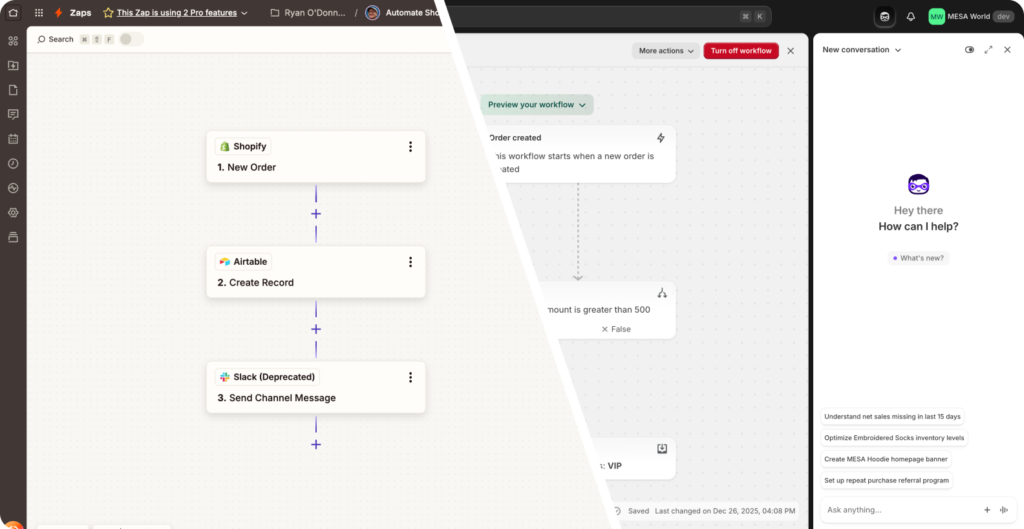
This guide cuts through the hype to give you real answers. We’ve reviewed both platforms extensively with the latest 2026 updates, built workflows on each, and analyzed exactly when one outperforms the other. You’ll get honest comparisons across pricing, features, AI capabilities, and real-world use cases—no marketing fluff.
In this article:
Who should read this
This comparison is for Shopify merchants who:
- Are deciding between Flow and Zapier for the first time
- Currently use Flow but wonder if Zapier is worth the upgrade
- Use Zapier and question whether Flow’s 2026 updates are enough
- Need to justify automation platform costs to stakeholders
- Want to understand MESA as a middle-ground alternative
Whether you’re running a $50K side hustle or a $50M operation, we’ll help you choose the right tool.
What you’ll learn
We’ll compare Flow and Zapier across every dimension that matters: pricing, integrations, AI capabilities, workflow complexity, enterprise features, and real-world scenarios. You’ll see exactly where each platform excels, where it falls short, and—critically—when the free option (Flow) is actually the smarter choice than the paid one (Zapier).
By the end, you’ll know exactly which platform fits your store, your budget, and your growth plans.
⚡ TL;DR Quick verdict
- Shopify Flow (Free): Best for basic Shopify-only automation. Perfect for stores just starting with workflows. Now AI-powered via Sidekick integration.
- Zapier (From $19.99/mo): Best for complex multi-platform automation connecting 8,000+ apps. Ideal for scaling operations beyond Shopify ecosystem.
- MESA (From $12/mo): Best middle ground combining Shopify-native power with external integrations and AI capabilities. Ecommerce-focused automation.
Now let’s dive into what changed in 2026—and why it matters for your automation strategy.
What’s new in 2026
Both platforms made massive leaps in 2026, but in completely different directions. Shopify doubled down on AI-powered simplicity for merchants, while Zapier focused on enterprise-grade intelligence and governance. Here’s what changed.
Shopify Flow gets Sidekick superpowers
The Winter ’26 Edition transformed Flow from a visual workflow builder into an AI-powered automation assistant. The standout feature is Sidekick integration—you can now describe what you want to automate in plain English, and Sidekick generates the complete workflow instantly.
“Tag high-value orders over $500 and notify my fulfillment team” becomes a working Flow workflow in seconds. Sidekick understands Shopify-specific concepts like metafields, customer lifetime value, and inventory policies, so it generates workflows that actually make sense for ecommerce operations.
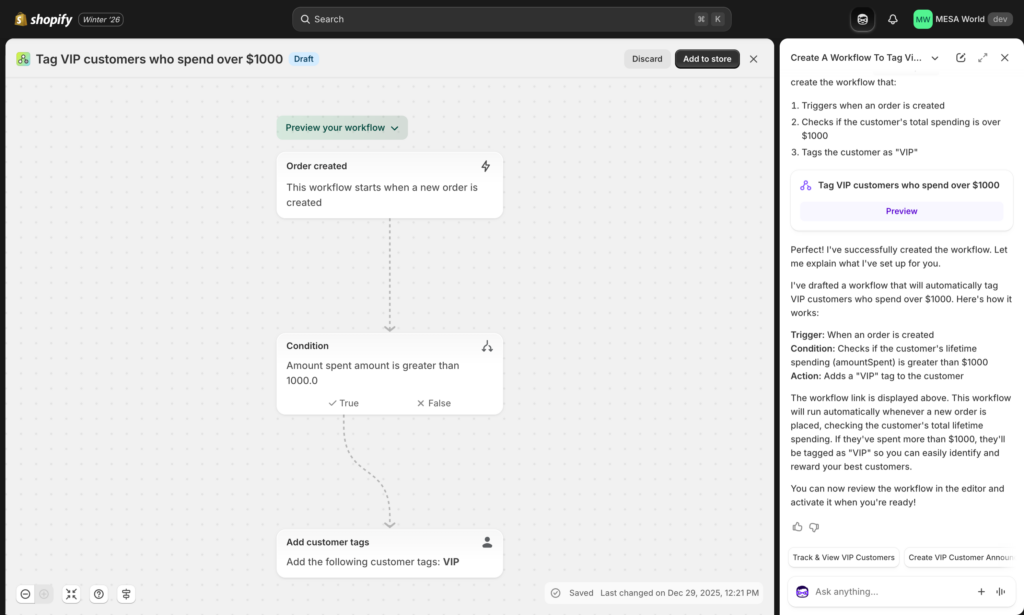
Beyond AI generation, Flow finally added preview mode—you can test workflows with sample data before they run on live orders. This was a major pain point that’s now solved. The vertical editor redesign gives you more room to build complex automations without endless scrolling, and you can now cancel workflow runs mid-execution if something goes wrong.
Flow also plugs into Shopify’s broader agentic commerce vision, where AI agents handle routine tasks across your entire store. Flow becomes one piece of a larger intelligent system rather than a standalone tool.
Zapier embraces AI orchestration at scale
Zapier’s ZapConnect ’25 announcements positioned them as the enterprise AI automation platform. The Unified Copilot now works across Zaps, Tables, Interfaces, Canvas, and Agents—one AI assistant that understands your entire automation ecosystem and can build or modify any part of it.
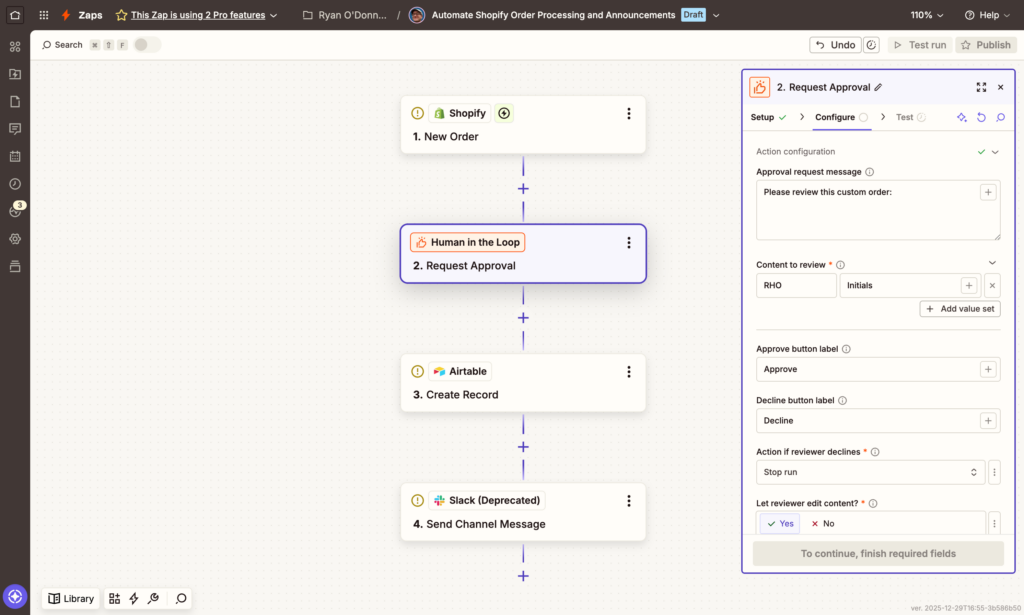
The biggest workflow innovation is Human-in-the-loop: automations can now pause for human approval at critical decision points. This solves the “I trust automation but not that much” problem. Your workflow can process an order, detect it’s high-risk, and send an approval request to your manager before proceeding—all within one automated sequence.
Perhaps the most significant pricing change: Tables, Interfaces, and MCP (Model Context Protocol) are now included in every Zapier plan at no extra cost. These were previously $20-50/month add-ons. This makes Zapier dramatically more cost-effective for building complete applications, not just simple automations.
Zapier added 32 new AI integrations (bringing the total to 400+), including Perplexity, DeepSeek, Mistral, and native MCP support for Claude and other AI assistants. You can now build sophisticated AI agents that take actions across your entire tech stack with proper audit logging and security controls.
Enterprise features got major upgrades: app approval workflows, comprehensive audit logs, and granular admin controls for IT teams who need visibility into every automation running across their organization.
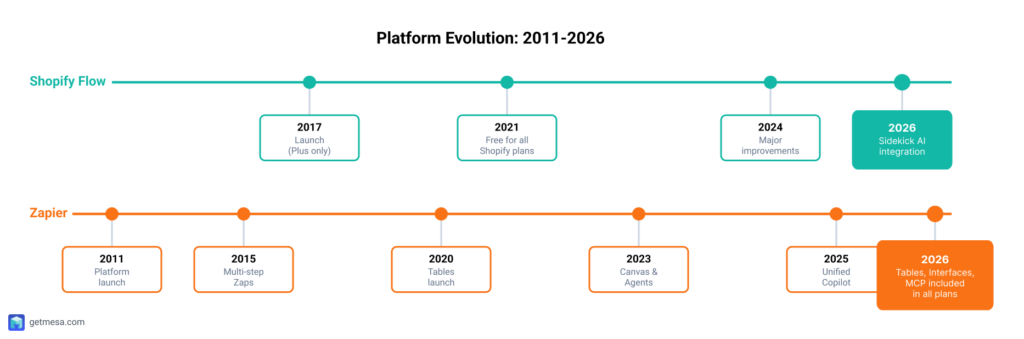
The takeaway: Flow became smarter for Shopify-specific tasks, while Zapier became the platform for orchestrating AI and automation across your entire business. Both are more powerful than ever—which makes choosing between them more nuanced than simply “free vs paid.”
🎯 2026 Game Changer: Both platforms now feature AI-powered workflow generation, but with different approaches—Flow via Sidekick (Shopify-specific), Zapier via Unified Copilot (cross-platform).
Platform overviews
Shopify Flow: The native automation solution
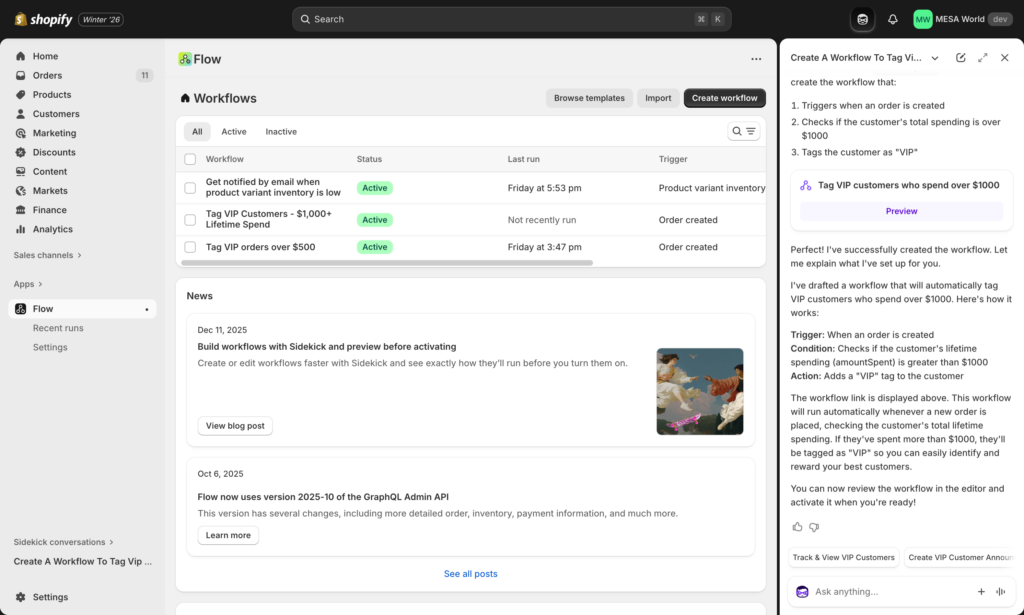
Shopify Flow is Shopify’s built-in automation platform, designed with a simple premise: every merchant should have access to powerful automation without technical expertise or additional cost. Since becoming free for all Shopify plans in May 2021, Flow has established itself as the default automation tool for hundreds of thousands of Shopify merchants worldwide.
The platform operates on Shopify’s trigger-condition-action framework, a straightforward model that makes automation accessible even to first-time users. When something happens in your store (a trigger), Flow checks if specific conditions are met, then executes actions automatically. This might look like: when an order is placed (trigger) and the total exceeds $500 (condition), then tag the customer as VIP and send a thank-you email (actions).
Flow’s native integration with Shopify gives it inherent advantages. It has direct access to Shopify’s data structures, meaning automations execute faster and more reliably than external platforms that connect through API calls. Updates to Shopify’s platform typically include corresponding Flow enhancements, keeping the automation layer in sync with new commerce features. The platform currently offers 300+ triggers and 200+ actions covering everything from inventory management to customer segmentation.
Beyond Shopify’s core functions, Flow has built a connector ecosystem that extends its reach to popular apps like Klaviyo, Slack, and Google Sheets. These connectors allow Flow to interact with your broader tech stack while maintaining its simple interface. With a 4.7-star rating in the Shopify App Store based on thousands of reviews, merchants appreciate Flow’s reliability and zero-dollar price tag.
As of 2026, Flow continues evolving with Shopify’s AI strategy. The integration with Shopify Sidekick brings natural language automation creation, allowing merchants to describe what they want in plain English rather than building flows manually. The Winter ’26 update cycle introduced enhanced filtering capabilities and expanded connector options, particularly around customer lifecycle management and inventory optimization.
Zapier: The cross-platform automation powerhouse
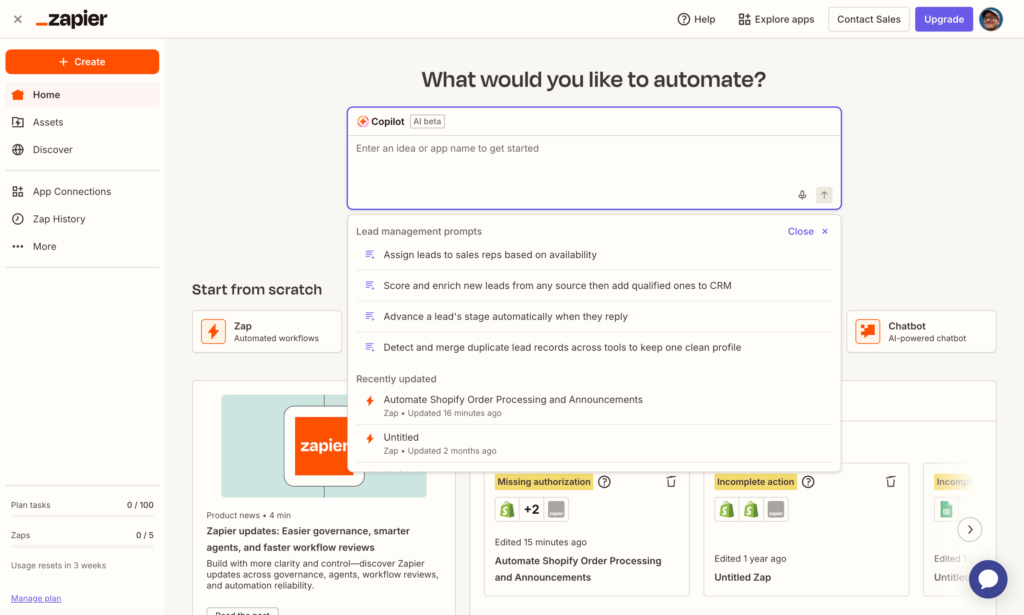
Zapier has defined the automation-as-a-service category since its 2011 founding, building the largest app integration ecosystem in the industry. With 8,000+ connected applications, Zapier positions itself as the universal translator between business software, allowing data and actions to flow between platforms that were never designed to work together.
The platform’s core product—the Zap—follows a multi-step automation model that can chain together complex sequences across different applications. A single Zap might retrieve data from a Google Sheet, create a customer record in Salesforce, send a notification to Slack, and add a row to a project management tool, all triggered by a form submission. This cross-platform approach makes Zapier particularly valuable for businesses with diverse tech stacks that need a central automation layer.
Zapier has expanded beyond simple integrations into a comprehensive automation suite. Tables provides a database layer for storing and manipulating data within Zapier. Interfaces allows users to build custom forms and internal tools without code. Canvas offers visual workflow mapping for complex automation scenarios. Most recently, Agents introduces AI-powered automation that can make decisions and handle multi-step processes autonomously.
The platform’s enterprise features include team collaboration tools, advanced administrative controls, version history, and dedicated support. Zapier Premier plans offer high-volume task execution, priority support, and enhanced security features that meet compliance requirements for larger organizations. This enterprise focus has made Zapier the automation backbone for companies ranging from startups to Fortune 500 enterprises.
In 2026, Zapier’s development centers on AI integration. The unified Copilot experience brings conversational automation building across all Zapier products, allowing natural language descriptions to generate complex workflows. Human-in-the-loop functionality adds approval steps and manual intervention points into automated processes, addressing governance concerns in regulated industries. The platform’s MCP (Model Context Protocol) integration allows AI models to trigger and manage automations directly, positioning Zapier as infrastructure for the agentic AI workflow era.
Head-to-head comparison

| Category | Shopify Flow | Zapier | 🏆 |
|---|---|---|---|
| Pricing | Free | $19.99-$2,398/mo | Flow |
| Shopify Integration | Native, deep | Via connector | Flow |
| External Apps | Limited (Flow connectors) | 8,000+ apps | Zapier |
| AI Capabilities | Sidekick generation | Unified Copilot + 400 AI apps | Zapier |
| Ease of Use | Very simple | Moderate learning curve | Flow |
| Workflow Complexity | Basic to moderate | Simple to enterprise | Zapier |
| Data Storage | None | Tables included | Zapier |
| Custom Interfaces | None | Interfaces included | Zapier |
| Testing/Preview | Preview before live (2026) | Built-in testing | Tie |
| Error Handling | Basic logging | Advanced + Human-in-the-loop | Zapier |
| Enterprise Features | None | SSO, audit logs, governance | Zapier |
| Support | Shopify support | Tiered by plan | Tie |
Pricing breakdown
The cost difference between Shopify Flow and Zapier represents the starkest contrast between these platforms. Flow is completely free for all Shopify merchants—from Basic plan stores just starting out to Shopify Plus enterprises processing millions in monthly revenue. There are no task limits, no feature restrictions based on plan tier, and no hidden upgrade paths. You get the same automation capabilities on day one as you’ll have years later.
Zapier operates on a task-based pricing model that scales with usage. As of 2026, their pricing structure includes a Free plan offering 100 tasks per month—enough for light automation needs or testing workflows. The Starter plan at $19.99/month provides 750 tasks, suitable for small businesses with modest automation requirements. Professional plans at $49/month include 2,000 tasks and unlock multi-step Zaps, while Team plans start at $299/month for 50,000 tasks with collaboration features. Company plans at $599/month offer 100,000 tasks, and Enterprise pricing is custom-quoted based on volume and requirements.
Zapier’s 2026 pricing restructure notably bundled previously separate products into core plans. Tables, Interfaces, and MCP integration—which previously cost $20-50/month as add-ons—now come included with paid plans. This consolidation improves value but still represents significant monthly costs for businesses running substantial automation volumes.
For Shopify-focused merchants, the pricing math is straightforward: Flow costs nothing regardless of how many workflows you run or how complex your automation becomes. For businesses needing cross-platform automation beyond Shopify’s ecosystem, Zapier’s costs become the price of connecting disparate systems.
Integration capabilities
The integration ecosystems of Flow and Zapier reflect their fundamentally different design philosophies. Flow prioritizes depth over breadth, offering native integration with every aspect of the Shopify platform plus roughly 50 Flow connector apps covering popular merchant tools. These connectors include email marketing platforms like Klaviyo and Omnisend, customer service tools like Gorgias, inventory management systems, and productivity apps like Slack and Google Sheets.
Flow’s native Shopify access provides advantages external platforms can’t match. It can read and modify any Shopify data point—from customer metafields to fulfillment locations to inventory policies—without API rate limits or authentication headaches. This direct access means faster execution, more reliable triggers, and automation possibilities that simply aren’t available to external platforms working through API constraints.
Zapier counters with sheer breadth: 8,000+ app integrations spanning every business category imaginable. Need to connect Shopify to your enterprise resource planning system, sync orders with construction management software, or update records in a legacy database? Zapier likely has a pre-built integration or supports custom webhooks to bridge the gap.
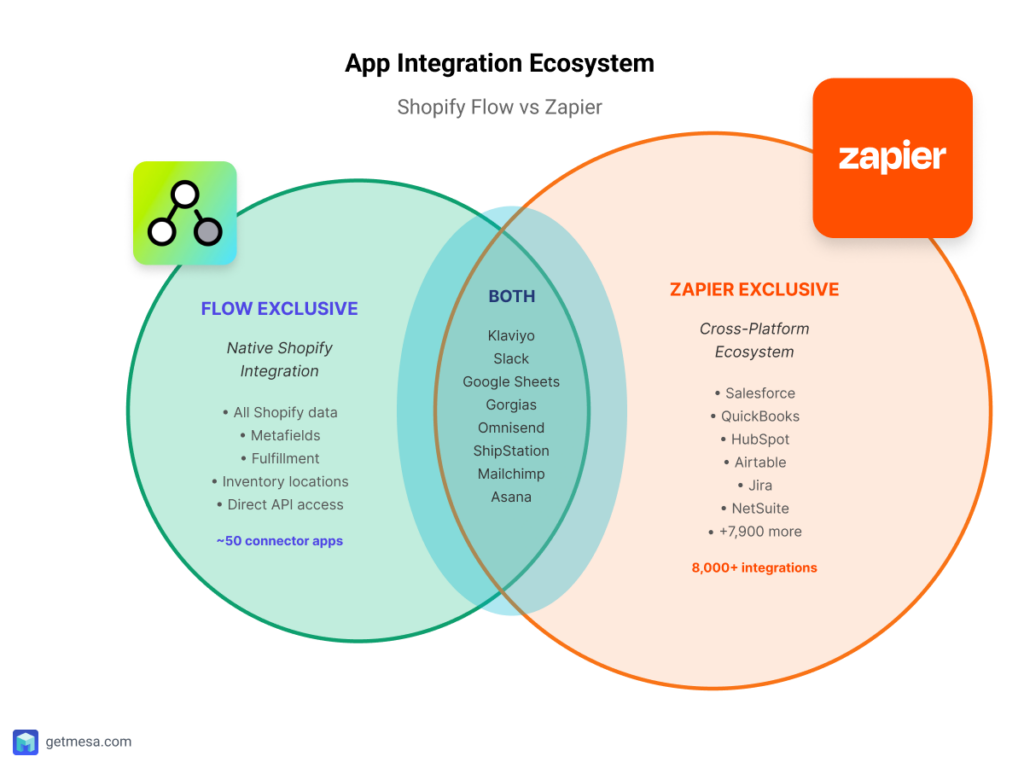
The practical difference emerges in real-world scenarios. If you’re automating purely within the Shopify ecosystem—managing customer tags, adjusting inventory, segmenting orders, triggering email flows—Flow handles everything natively. But if you need Shopify to communicate with QuickBooks, update Salesforce records, create Jira tickets, or sync with proprietary internal systems, Zapier’s massive integration library becomes essential.
For merchants evaluating this dimension, the question isn’t which platform has “better” integrations—it’s whether your automation needs stay within Shopify’s world or require extensive cross-platform orchestration.
AI and automation intelligence
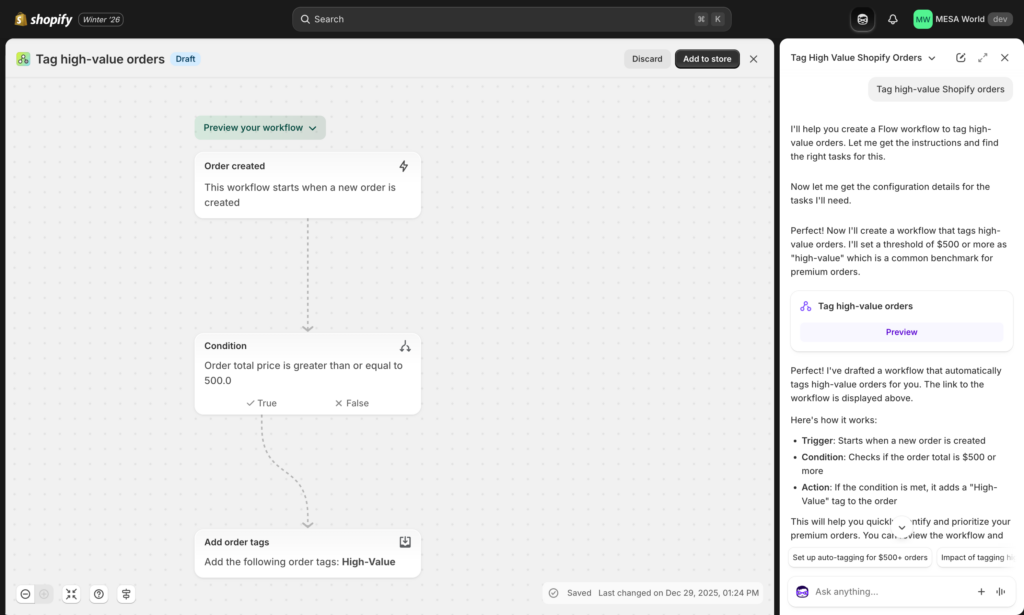
Both platforms have aggressively integrated AI capabilities in 2025-2026, but their approaches reflect different strategic priorities. Shopify Flow’s AI integration centers on Sidekick, Shopify’s AI assistant that brings natural language workflow creation to Flow. Instead of manually configuring triggers, conditions, and actions, merchants can describe what they want in conversational language: “Tag customers as VIP when they spend over $1,000” or “Send me a Slack message when inventory drops below 10 units.”
Sidekick’s advantage lies in Shopify-specific optimizations. It understands merchant terminology, suggests workflows based on your store’s actual data patterns, and integrates with Shopify Magic features across the platform. The AI can analyze your order history and recommend automation opportunities you might not have considered, like identifying repeat customers who haven’t purchased in 90 days or flagging unusual order patterns that might indicate fraud.
Zapier’s AI ecosystem takes a broader, more platform-agnostic approach. The unified Copilot experience spans all Zapier products—Zaps, Tables, Interfaces, and Canvas—allowing natural language automation building regardless of which tool you’re using. Copilot can generate complex multi-step workflows, suggest optimizations for existing Zaps, and even troubleshoot automation failures by analyzing execution logs.
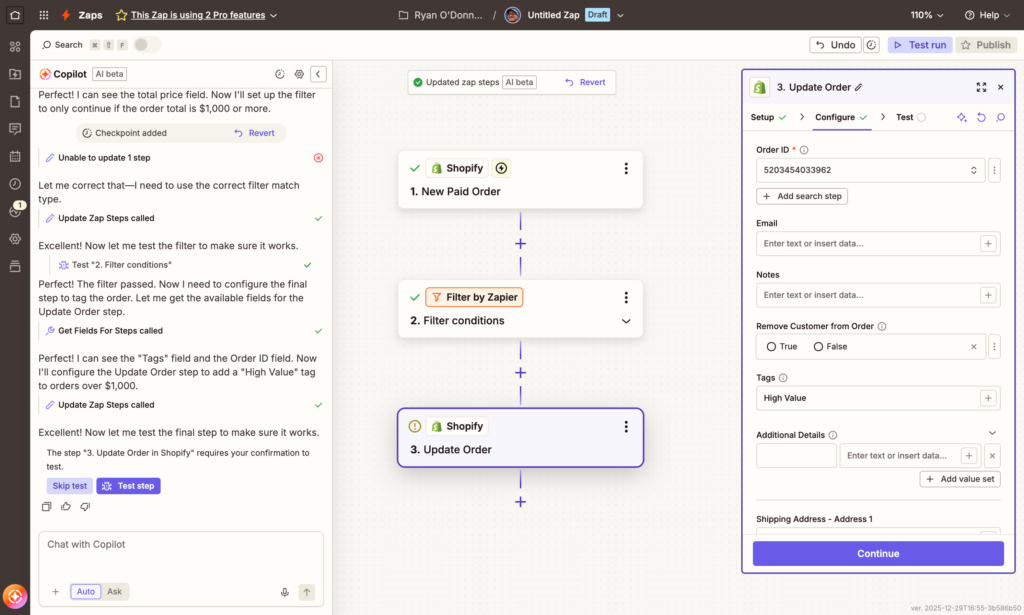
Beyond workflow creation, Zapier offers 400+ AI app integrations, including native connections to ChatGPT, Claude, Gemini, and Perplexity. This allows sophisticated AI-powered automations: analyze customer feedback sentiment before routing to teams, generate personalized email content based on customer data, or summarize order notes for fulfillment teams. Zapier’s MCP (Model Context Protocol) support lets AI models trigger and manage automations directly, positioning Zapier as infrastructure for agentic AI workflows.
The custom AI Agents feature represents Zapier’s most ambitious AI implementation—autonomous agents that can execute multi-step processes, make decisions based on data, and adapt to changing conditions without constant human intervention. For businesses exploring AI-driven operations, Zapier provides a more comprehensive AI experimentation platform.
Workflow complexity limits
The architectural differences between Flow and Zapier become most apparent when building complex automations. Flow operates within defined boundaries that keep the platform accessible but impose real limitations for advanced use cases.
Flow workflows follow a linear, single-trigger model. Each workflow starts with one trigger event and progresses through conditions and actions in sequence. While you can add multiple conditions and branch logic within that flow, you can’t combine multiple triggers or create parallel processing paths. Flow also lacks built-in database storage—there’s no way to store custom data, build lookup tables, or maintain state across workflow executions. The platform doesn’t support custom user interfaces, so all workflow management happens through Flow’s standard builder. For merchants needing custom code, API calls, or webhook integration, Flow provides no native capabilities.
These limitations aren’t oversights—they’re design decisions that keep Flow simple and maintainable for non-technical merchants. But they do create a ceiling on complexity.
Zapier removes most of these constraints. Canvas allows multi-trigger workflows where different events can initiate the same automation, and branching logic can create entirely different execution paths based on conditions. Tables provides a full database layer for storing data, building lookup systems, or maintaining automation state. Interfaces lets you build custom forms, dashboards, and internal tools without writing code. Code steps support Python and JavaScript for custom logic, calculations, or data transformations that pre-built actions can’t handle. Webhooks and API capabilities allow integration with any system that exposes endpoints.
This flexibility enables genuinely complex automation scenarios: maintain a custom customer scoring system in Tables, update scores based on multiple trigger events, and display a dashboard in Interfaces while triggering different workflows based on score thresholds. For businesses with sophisticated automation requirements, Zapier’s architecture accommodates complexity that Flow simply can’t support.
Enterprise and governance
Enterprise automation requirements extend beyond functionality to include control, visibility, and compliance capabilities. This is where the platforms diverge most sharply in their target markets.
Shopify Flow provides basic automation features without enterprise-specific governance tools. There’s no approval workflow for who can create or modify automations, no ability to restrict which apps or triggers employees can access, and limited audit capabilities beyond basic execution logs. For most Shopify merchants, these limitations don’t matter—Flow serves its purpose as a reliable automation tool without administrative overhead.
Zapier’s 2026 Enterprise offering addresses governance comprehensively. App approval workflows let administrators control which of Zapier’s 8,000+ integrations employees can use, preventing unauthorized data connections. Allowed apps lists create guardrails around which platforms can participate in automations, critical for industries with data residency or compliance requirements. Comprehensive audit logs track every automation creation, modification, execution, and failure, providing the paper trail compliance teams need.
Single Sign-On (SSO) and SCIM support enable centralized identity management, letting IT teams provision and deprovision Zapier access through existing directory services. The new Human-in-the-loop controls add approval gates within automations, ensuring critical processes require manual confirmation before executing sensitive actions. The admin center provides real-time monitoring of automation health, task consumption, and team activity across the entire organization.
For regulated industries, multi-national enterprises, or businesses with strict data governance requirements, Zapier’s enterprise features provide the control layer that Flow lacks. For individual merchants or small teams focused on Shopify automation, Flow’s simplicity becomes an advantage—there’s no complex administration to manage because there’s nothing to administer.
Real-world use case comparisons

Scenario 1: Basic order tagging and customer segmentation
The challenge: You want to automatically tag orders over $500 as “High-Value” and add those customers to a VIP segment for special treatment and targeted marketing campaigns.
Flow approach: This is precisely what Shopify Flow was built for. Create a workflow with an “Order created” trigger, add a condition checking if the order total exceeds $500, then use native actions to tag both the order and customer. The entire setup takes two minutes, requires zero technical knowledge, and runs unlimited times at no cost. Flow’s direct Shopify integration means tags apply instantly without API delays.
Zapier approach: Zapier can absolutely handle this scenario through its Shopify integration. You’d create a Zap that watches for new orders, uses a filter step to check the total, then tags the order and customer. However, this consumes tasks from your monthly allocation—potentially hundreds of tasks per month for active stores. You’re paying for functionality that Shopify provides free.
MESA alternative: MESA handles this identically to Flow with the same native Shopify access, but adds sophisticated targeting options and can chain this into more complex multi-step workflows if needed.
🏆 Verdict: Flow wins decisively. This Shopify-native automation doesn’t benefit from Zapier’s cross-platform capabilities, making the cost unjustifiable. Flow’s instant setup and unlimited free execution make it the obvious choice.
Scenario 2: Multi-channel inventory synchronization
The challenge: Your business sells across Shopify, Amazon, eBay, and a Square POS system in your retail location. When inventory updates in Shopify, you need those changes reflected across all platforms to prevent overselling.
Flow approach: Flow hits a hard wall here. It cannot connect to Amazon, eBay, or external POS systems outside Shopify’s ecosystem. Flow’s connector library focuses on Shopify-adjacent apps, not competing marketplaces or external sales channels. You could manage inventory within Shopify’s multi-location system, but external platform synchronization isn’t possible.
Zapier approach: This scenario showcases Zapier’s cross-platform strength. Connect Shopify, Amazon Seller Central, eBay, and Square through pre-built integrations. When inventory changes in Shopify, Zapier propagates updates to all connected platforms. You can even build bidirectional sync so inventory updates from any platform flow everywhere else. The complexity requires Zapier’s Tables for tracking inventory states across platforms.
MESA alternative: MESA can handle this with Shopify-native performance plus connections to major marketplaces, offering middle-ground pricing between Flow (free but limited) and Zapier (capable but expensive for high-volume inventory updates).
🏆 Verdict: Zapier wins by default. Flow simply cannot execute this automation. For merchants selling across multiple platforms, Zapier’s integration breadth becomes essential infrastructure despite the cost.
Scenario 3: Customer lifecycle email sequences
The challenge: Send personalized email sequences based on customer behavior—welcome emails for first purchases, win-back campaigns for customers who haven’t ordered in 90 days, anniversary emails on purchase milestones, and post-purchase education sequences.
Flow approach: Flow can identify the customer segments and add appropriate tags, which is valuable groundwork. However, Flow’s email capabilities are extremely limited—it can send basic admin notifications but cannot create sophisticated, branded email sequences with dynamic content. You’d need to tag customers in Flow, then manually create segments in your email platform.
Zapier approach: Zapier excels at connecting Shopify customer data with email marketing platforms. Create Zaps that detect customer behaviors in Shopify, then trigger specific email sequences in Klaviyo, add contacts to HubSpot workflows, or update Mailchimp audience segments. The integration is bidirectional—email engagement data can flow back to Shopify as customer tags or metafields. Zapier’s ability to format data and map fields between platforms ensures clean data transfer.
MESA alternative: MESA provides similar cross-platform email connectivity with the advantage of Shopify-native customer data access, meaning faster trigger detection and more granular behavioral tracking before passing to email platforms.
🏆 Verdict: Zapier wins for sophisticated email marketing. While Flow can handle basic tagging, meaningful lifecycle marketing requires robust email platform integration that only Zapier and MESA provide. The cost justifies the revenue impact of proper email automation.
Scenario 4: Shopify-only fulfillment workflow automation
The challenge: Automatically fulfill orders for digital products and drop-shipped items, send fulfillment confirmations to customers, and notify your operations team via Slack whenever orders require special handling based on shipping address or product type.
Flow approach: This is Flow’s sweet spot. Use Shopify’s native “Fulfill order” action with full control over fulfillment status, tracking numbers, and notification settings. Flow’s Slack connector sends formatted notifications with order details directly to designated channels. Set up conditions based on product tags, shipping zones, or custom order attributes. The entire workflow leverages Shopify-native actions that execute instantly and reliably.
Zapier approach: Zapier can execute this exact scenario using its Shopify and Slack integrations. However, you’re paying task fees for every order processed, every fulfillment created, and every Slack message sent. For stores processing hundreds of orders daily, this automation alone could consume thousands of monthly tasks. You’re buying the same functionality Shopify provides free.
MESA alternative: MESA handles Shopify fulfillment workflows with the same native access as Flow but can add conditional logic, data transformations, and more sophisticated Slack formatting if needed.
🏆 Verdict: Flow wins convincingly. Shopify-native workflows don’t benefit from Zapier’s cross-platform capabilities. Using Zapier here wastes money on functionality that Flow provides free with better performance and no task limits.

Scenario 5: High-value order approval workflows
The challenge: Orders exceeding $10,000 should pause before fulfillment, triggering a manager approval request via email or Slack. Once approved, the order proceeds to fulfillment automatically. If rejected, the order is tagged for customer service follow-up and a refund is processed.
Flow approach: Flow can detect high-value orders and tag them, send Slack notifications to managers, and even hold fulfillment by not creating a fulfillment record. However, Flow cannot pause mid-workflow for human input. There’s no mechanism to wait for approval before proceeding. You’d need managers to manually resume the workflow in Shopify, defeating the automation purpose.
Zapier approach: Zapier’s 2026 Human-in-the-loop functionality was built for exactly this scenario. When a high-value order triggers the Zap, it pauses and sends an approval request to designated managers. Approvers receive a notification with order details and approve/reject buttons. Upon approval, the workflow automatically resumes, creating fulfillment and sending confirmations. Rejections trigger the refund and tagging workflow. This creates genuine end-to-end automation with governance controls.
MESA alternative: MESA offers approval workflows with similar human-in-the-loop capabilities, providing the governance that Flow lacks while maintaining Shopify-native performance for order processing.
🏆 Verdict: Zapier wins for governed workflows. Flow’s linear execution model cannot accommodate approval gates. For businesses requiring compliance, financial controls, or managerial oversight, Zapier’s approval capabilities justify the investment despite higher costs.
When to use Shopify Flow
Shopify Flow shines when your automation needs stay firmly within Shopify’s ecosystem. If you’re running a Shopify store and your workflows primarily involve Shopify data—orders, customers, products, inventory—Flow delivers professional automation at zero cost with zero technical complexity.
Flow is perfect for:
Budget-conscious merchants appreciate that $0 is genuinely unbeatable. Whether you’re processing ten orders or ten thousand monthly, Flow never charges per task or restricts features based on plan tier. For stores just starting their automation journey, Flow provides an ideal learning environment—experiment freely without worrying about burning through paid task allocations.
The platform excels at simple IF/THEN logic requirements. When an order is placed AND the total exceeds a threshold, THEN add tags and send notifications. This straightforward trigger-condition-action model covers the majority of common Shopify automation scenarios without unnecessary complexity. If your workflows only use Shopify data—customer information, order details, product attributes, inventory levels—Flow’s native integration provides faster, more reliable execution than any external platform.
Specific use cases where Flow excels:
- Order tagging and customer segmentation form Flow’s bread and butter.
- Automatically categorize high-value customers, tag first-time buyers, or segment by product preferences.
- Inventory alerts notify your team via Slack or email when stock drops below thresholds, preventing stockouts without manual monitoring.
- Customer loyalty tagging identifies repeat purchasers, enabling targeted retention campaigns.
- Basic fraud detection flags suspicious order patterns—mismatched shipping addresses, unusually large orders from new customers, or high-risk payment methods.
- Product publishing rules automatically make items visible or hidden based on inventory, seasonality, or sales performance.
- Simple discount automation applies percentage discounts or triggers promotional codes based on customer tags or order attributes.
When to graduate from Flow:
Flow’s limitations become apparent when you need to connect non-Shopify apps like accounting software, CRM platforms, or project management tools. If workflows require approval gates where managers review orders before fulfillment, Flow’s linear execution can’t accommodate human-in-the-loop steps. Businesses needing to store intermediate data, transform information between formats, or build lookup tables will find Flow lacks database capabilities. Multi-step conditional logic with branching paths exceeds Flow’s architecture. As you scale beyond Shopify’s ecosystem into multichannel selling, external fulfillment networks, or complex tech stacks, Flow’s connector limitations become constraints. Finally, enterprise requirements for sophisticated error handling, automatic retry logic, or detailed execution logs point toward more robust platforms.
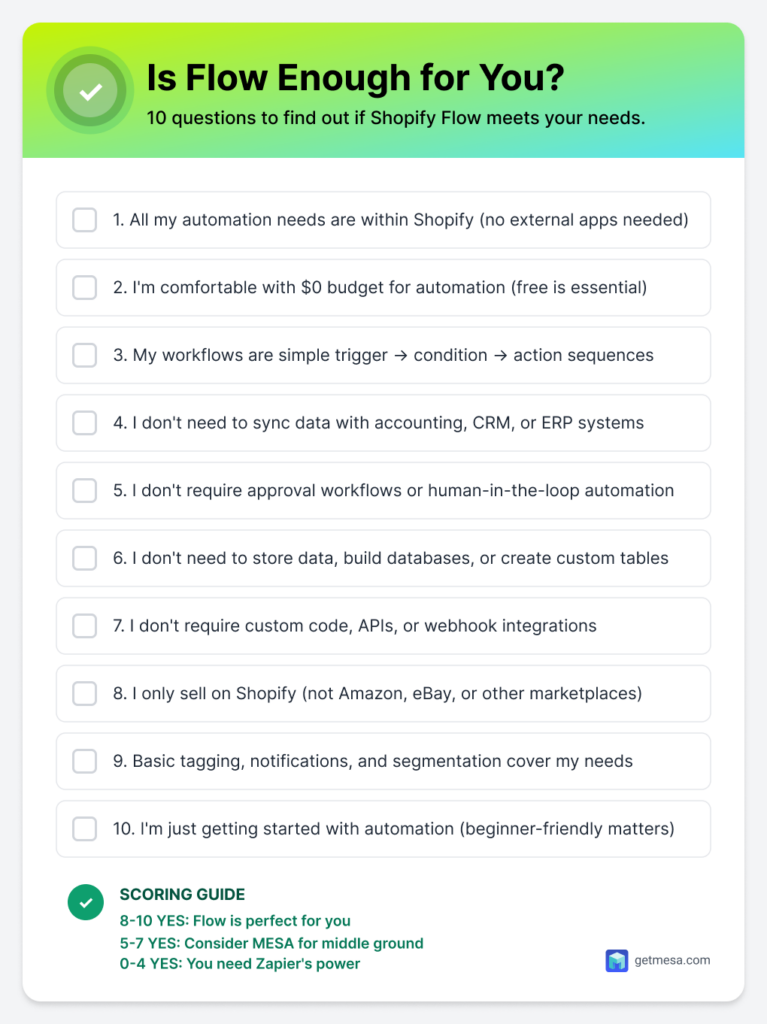
When to use Zapier
Zapier becomes essential when your business operations extend beyond Shopify’s ecosystem into a complex web of interconnected platforms. If your workflows require orchestrating data and actions across multiple apps, Zapier’s 8,000+ integrations provide the connective tissue that specialized platforms like Flow simply cannot offer.
Zapier is perfect for:
Multi-platform operations form Zapier’s core strength. Businesses running Shopify plus ERP systems, CRM platforms, and marketing automation tools need a central automation layer that speaks every platform’s language. Complex workflows requiring branching logic—where different conditions trigger entirely different execution paths—exceed Flow’s linear architecture. Zapier’s Canvas enables these sophisticated decision trees with visual workflow mapping.
The platform shines when you need databases and data transformation capabilities. Tables provide persistent storage for customer scoring systems, inventory tracking across platforms, or custom business logic that maintains state between workflow executions. Custom user interfaces built with Interfaces allow you to create internal tools, approval dashboards, or data entry forms without hiring developers.
Approval and human-in-the-loop workflows address governance requirements that Flow cannot support. When orders, refunds, or inventory adjustments require managerial sign-off before execution, Zapier’s 2026 approval features ensure compliance while maintaining automation efficiency. Enterprise governance and audit requirements—comprehensive logging, SSO integration, role-based permissions, and allowed-app restrictions—make Zapier viable for regulated industries and large organizations.
AI-powered intelligent automation leverages Zapier’s 400+ AI app integrations to build truly smart workflows that make decisions, generate content, and adapt to changing conditions autonomously.
Specific use cases where Zapier excels:
- Shopify + NetSuite + Salesforce synchronization keeps order data, customer records, and financial information aligned across your entire tech stack.
- Lead scoring across marketing platforms aggregates engagement data from email, social media, and website interactions to prioritize sales outreach.
- Cross-platform customer data management creates unified customer profiles regardless of where interactions occur.
- Automated financial reporting pulls data from Shopify, payment processors, and accounting software into formatted reports.
- Advanced inventory management across channels prevents overselling when you’re live on Shopify, Amazon, eBay, and physical retail simultaneously.
- AI-powered content generation workflows use ChatGPT or Claude to create product descriptions, email copy, or social media posts based on product data.
- Custom internal tools with Interfaces build order lookup systems, inventory dashboards, or approval queues tailored to your specific processes.
When NOT to use Zapier:
Simple Shopify-only automation wastes money on capabilities you won’t use—Flow handles these scenarios free and faster. Extremely tight budgets where $0 is non-negotiable make Flow the only viable option. If you genuinely don’t need external app connections and your workflows stay entirely within Shopify, paying for Zapier’s integration breadth makes no sense. Basic tagging and notification needs represent automation overkill when Flow’s native actions accomplish the same result without monthly fees.
2026 automation trends
The automation landscape is shifting dramatically as AI transforms from enhancement to foundation. Both Shopify Flow and Zapier are racing to embed intelligence into every workflow, but their approaches reflect fundamentally different philosophies about automation’s future.
AI-first workflows have moved from experimental to essential. Shopify’s Sidekick integration brings natural language workflow creation to Flow, while Zapier’s unified Copilot spans their entire product suite. The promise is simple: describe what you want in plain English and watch automation build itself. For merchants historically intimidated by workflow builders, this democratization removes the final barrier to entry.
Agentic commerce represents Shopify’s broader vision where AI assistants handle routine business operations autonomously. Flow serves as the execution layer for these AI decisions—when Sidekick identifies that a customer segment needs attention, Flow implements the operational response. This positions Flow not as a standalone tool but as infrastructure for AI-powered commerce.
Cross-platform intelligence gives Zapier a distinct advantage through its 400+ AI app integrations. While Flow’s AI understands Shopify deeply, Zapier’s ecosystem connects ChatGPT, Claude, Gemini, and specialized AI services into workflows that analyze sentiment, generate content, or make predictions across your entire tech stack. The MCP (Model Context Protocol) integration particularly positions Zapier as infrastructure for the emerging agentic AI workflow era, where AI models directly orchestrate business processes.
Human-in-the-loop workflows are becoming standard rather than advanced features. Zapier’s 2026 approval capabilities address the governance gap that prevented automation adoption in regulated industries and high-stakes scenarios. This shift acknowledges that the best automation isn’t fully autonomous—it’s intelligently supervised.
No-code/low-code convergence continues accelerating as platforms recognize that the future belongs to business users, not developers. Flow’s simplicity and Zapier’s Interfaces both target the same audience: people who understand business logic but shouldn’t need programming skills to implement it.
Enterprise adoption is accelerating as governance features mature. Zapier’s admin center, audit logs, and SSO support now match what IT departments demand, while Flow’s simplicity appeals to enterprises seeking to empower teams without creating shadow IT risks. The winner isn’t necessarily the most powerful platform—it’s whichever best balances capability with control.
Frequently asked questions
Yes, Flow is completely free for all Shopify plans with no hidden costs, task limits, or premium tiers. Shopify includes it as part of their platform to encourage automation adoption.
Yes, many merchants use both—Flow for Shopify-specific workflows and Zapier for cross-platform automation. They don’t conflict. For example, use Flow to tag orders, then Zapier to sync those tags with your CRM and accounting software.
A task is each successful action in a Zap. If a Zap triggers 100 times with 3 actions each, that’s 300 tasks. Check your usage in Zapier’s dashboard. Flow has no task concept since it’s free.
Only through Flow connectors—apps that have built specific Flow integrations. This includes ~50 apps like Slack, Google Sheets, Klaviyo. If an app doesn’t have a Flow connector, you cannot connect it in Flow. Zapier connects to 8,000+ apps regardless of Flow connector availability.
Yes, Zapier has a mature Shopify integration covering most triggers and actions. However, Flow’s native integration is deeper—it accesses some Shopify data and features Zapier cannot (like metafields, Flow-specific triggers). For pure Shopify automation, Flow is stronger. For Shopify + other apps, Zapier is necessary.
Tables (and Interfaces and MCP) were previously paid add-ons ($20-50/month). As of ZapConnect ’25 (September 2025), they’re included free in all Zapier plans, making the platform more cost-effective for complex workflows.
No, Flow cannot pause a workflow for human approval. Once triggered, it runs completely. Zapier’s Human-in-the-loop (launched 2025) enables approval workflows. MESA also supports approvals. If you need manager sign-off before actions execute, Flow won’t work.
In 2026, both excel but differently: Flow integrates with Sidekick for Shopify-optimized AI workflow generation. Zapier connects to 400+ AI apps (ChatGPT, Claude, Gemini, etc.) for cross-platform intelligence. Flow is better for Shopify-specific AI tasks, Zapier for complex multi-app AI workflows. MESA offers AI focused on ecommerce use cases specifically.
No coding required for basic use of either platform. Both offer visual, no-code builders. However, Zapier supports code steps (Python, JavaScript) for advanced users who want them. Flow has no code capabilities. MESA also offers code steps for advanced customization.
MCP (Model Context Protocol) is Anthropic’s standard for AI tool integration. Zapier adopted it, allowing AI agents (like Claude) to execute actions across 8,000+ apps securely. This enables AI-powered automation at enterprise scale with proper governance. Currently, only Zapier and MESA support MCP broadly—Flow doesn’t yet, though Shopify’s agentic commerce vision may incorporate it.
Conclusion & Next steps
After comparing these platforms across pricing, capabilities, use cases, and 2026 features, the choice becomes clear once you understand your actual needs versus aspirational requirements.
Shopify Flow remains unbeatable for merchants operating primarily within Shopify’s ecosystem. The combination of zero cost, unlimited workflows, native Shopify integration, and AI-powered workflow generation through Sidekick makes Flow the obvious starting point for Shopify stores. Its 2026 enhancements prove that “free” doesn’t mean “limited” for Shopify-native automation.
Zapier dominates when operations extend beyond Shopify into complex multi-platform environments. With 8,000+ integrations, enterprise governance features, Human-in-the-loop workflows, and comprehensive AI ecosystem including MCP protocol support, Zapier serves as the cross-platform orchestration layer that sophisticated businesses require. The cost reflects genuine value when you need capabilities Flow cannot provide.
MESA occupies the strategic middle ground—more powerful than Flow for complex ecommerce workflows, more affordable than Zapier for Shopify-focused businesses. It’s the Goldilocks option for growing merchants who’ve outgrown Flow but don’t need Zapier’s full enterprise feature set.
Your action plan
If you’re just starting with automation:
- Begin with Shopify Flow (it’s free, so there’s zero risk)
- Build 3-5 basic workflows covering your most repetitive tasks
- Monitor what you can’t automate with Flow over 30-60 days
- Evaluate upgrade needs quarterly as your business grows
If you’re actively scaling:
- List all apps and platforms in your current tech stack
- Identify workflows that require cross-platform data movement
- Calculate Zapier costs versus time savings and revenue impact
- Consider MESA for ecommerce-specific automation needs
- Trial Zapier’s free tier (100 tasks/month) to test viability
If you’re operating at enterprise scale:
- Audit governance, compliance, and audit trail requirements
- Evaluate Zapier Enterprise features against your security policies
- Consider a hybrid approach using Flow for Shopify-native workflows and Zapier for cross-platform orchestration
- Budget for professional services or internal automation specialists
Final recommendation
Don’t overthink this decision. Start with Shopify Flow if your automation needs stay within Shopify’s ecosystem. Choose Zapier if you need to connect external platforms from day one. The beauty of modern automation platforms is flexibility—you can always add another tool or migrate workflows as your needs evolve.
The worst decision is no decision. The best automation platform isn’t the most powerful or feature-rich—it’s the one you’ll actually implement this week rather than researching for another month. Pick one, build your first workflow, and iterate from there. Your future self will thank you for starting today.
What to do next…
The fastest way to see automation working in your store is to start with a single workflow.
- Try MESA free — start a 7-day free trial and get your first workflow running.
- Browse the template library — pre-built workflows for the most common Shopify automation tasks.
- Talk to Yedric — describe what you want to automate, and let our AI assistant build it for you.
- Get free workflow setup — MESA’s team will build your first workflow at no cost.