Automate Repetitive Tasks and Save Time Fast

In this article:
Automate Repetitive Tasks and Save Time Fast
If your team is still copying order data between apps, fixing inventory mismatches, chasing fulfillment updates, building the same reports every week, or sending the same customer follow-ups by hand, you do not have a productivity problem – you have an automation opportunity.
For Shopify merchants and ecommerce operators, repetitive work compounds quickly. A few “small” manual tasks across orders, inventory, reporting, support, and marketing can quietly create delays, errors, and backlog. The good news is that you do not need a developer or a six-month systems project to automate tedious tasks anymore. Today, the fastest path is usually a no-code, Shopify-first automation platform that turns plain-English instructions into live workflows.
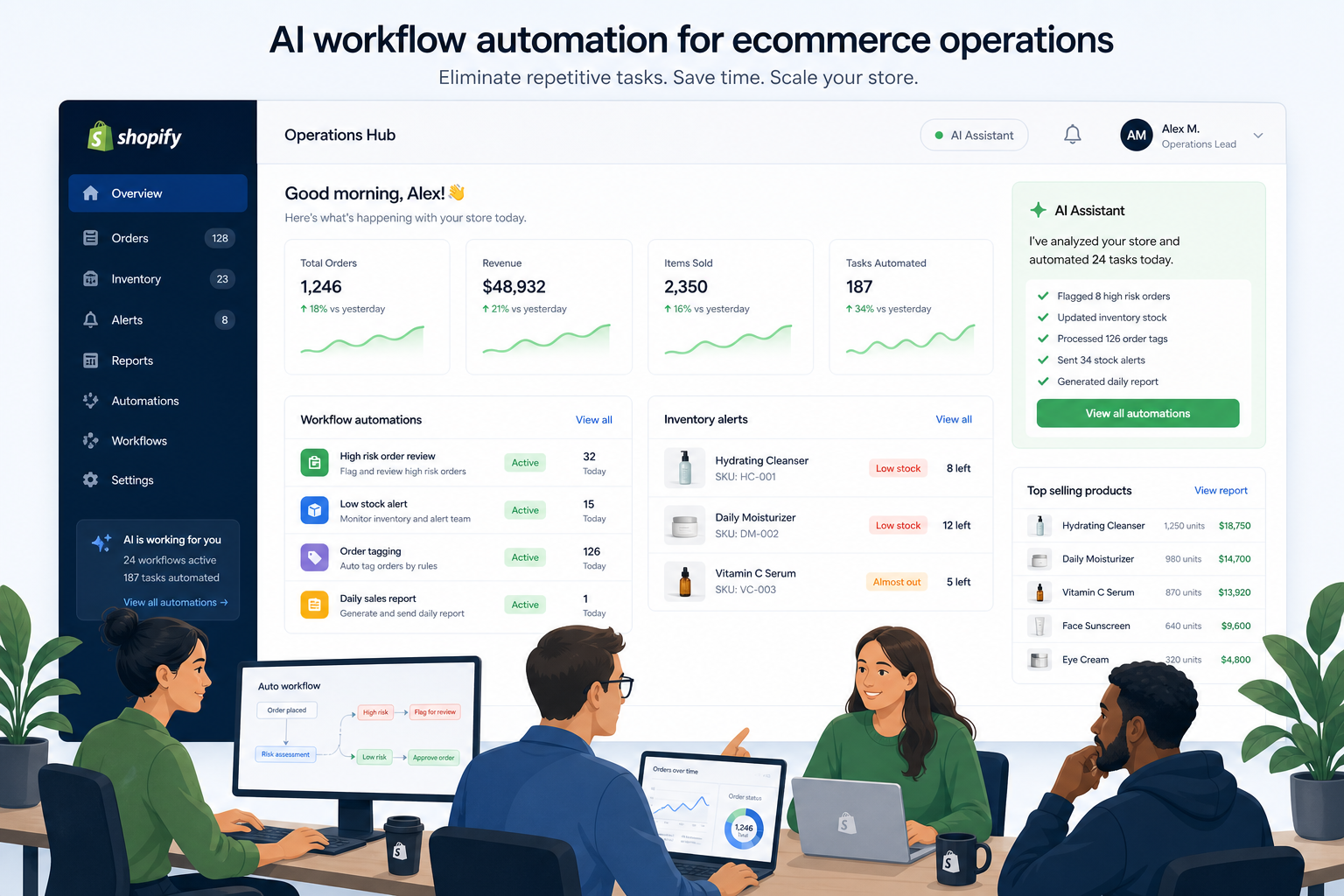
In this guide, we will break down how to:
-
identify the best tasks to automate first
-
automate work tasks without custom development
-
reduce human error and operational drag
-
connect Shopify with the rest of your app stack
-
scale faster with workflows that keep running in the background
Along the way, we will show where MESA fits in as a practical solution for merchants who want to automate repetitive tasks across Shopify, fulfillment, inventory, reporting, and customer operations.
“Office workers spend over 40% of their day on manual digital administrative processes.” – Automation Anywhere
“Human errors account for 60% to 80% of inventory inaccuracies.” – Apsion
Why repetitive tasks slow down growing ecommerce teams
Manual work feels manageable when your store is small. Then sales volume rises, more apps get added, more people touch the process, and suddenly the team is buried in exceptions, duplicate work, and inconsistent data.
Common symptoms include:
-
orders that need manual tagging, routing, or splitting
-
stock levels that do not sync fast enough across systems
-
reporting that depends on spreadsheets and copy-paste
-
customers receiving delayed or inconsistent updates
-
internal teams relying on Slack messages instead of system triggers
-
fulfillment delays caused by missing data between apps
The problem is not just time. It is also risk.
When teams automate tasks properly, they usually gain three things at once:
|
Benefit |
What it looks like in practice |
Why it matters |
|---|---|---|
|
Time savings |
Fewer repetitive clicks and manual checks |
Teams focus on exceptions and growth |
|
Accuracy |
Cleaner handoffs between apps and systems |
Fewer costly mistakes |
|
Scalability |
Processes continue working as volume grows |
Operations stay lean without adding headcount at the same rate |
What it really means to automate repetitive tasks
To automate repetitive tasks means creating a workflow that performs a predictable action when a trigger happens.
A simple example:
-
Trigger: A new Shopify order is created
-
Condition: The order contains a preorder item
-
Action: Tag the order, notify Slack, and update a spreadsheet
That is automation in its most useful form: one event causes a chain of actions without someone stepping in manually.
The four building blocks of business automation
Most useful automations follow this structure:
|
Building Block |
Description |
Example |
|---|---|---|
|
Trigger |
The event that starts the workflow |
New order, low stock alert, customer created |
|
Condition |
The logic that decides what happens next |
VIP customer, backordered SKU, high-value order |
|
Action |
The step taken automatically |
Send email, tag order, update CRM, create row |
|
Destination |
The connected app or system |
Shopify, Slack, Google Sheets, Klaviyo, HubSpot |
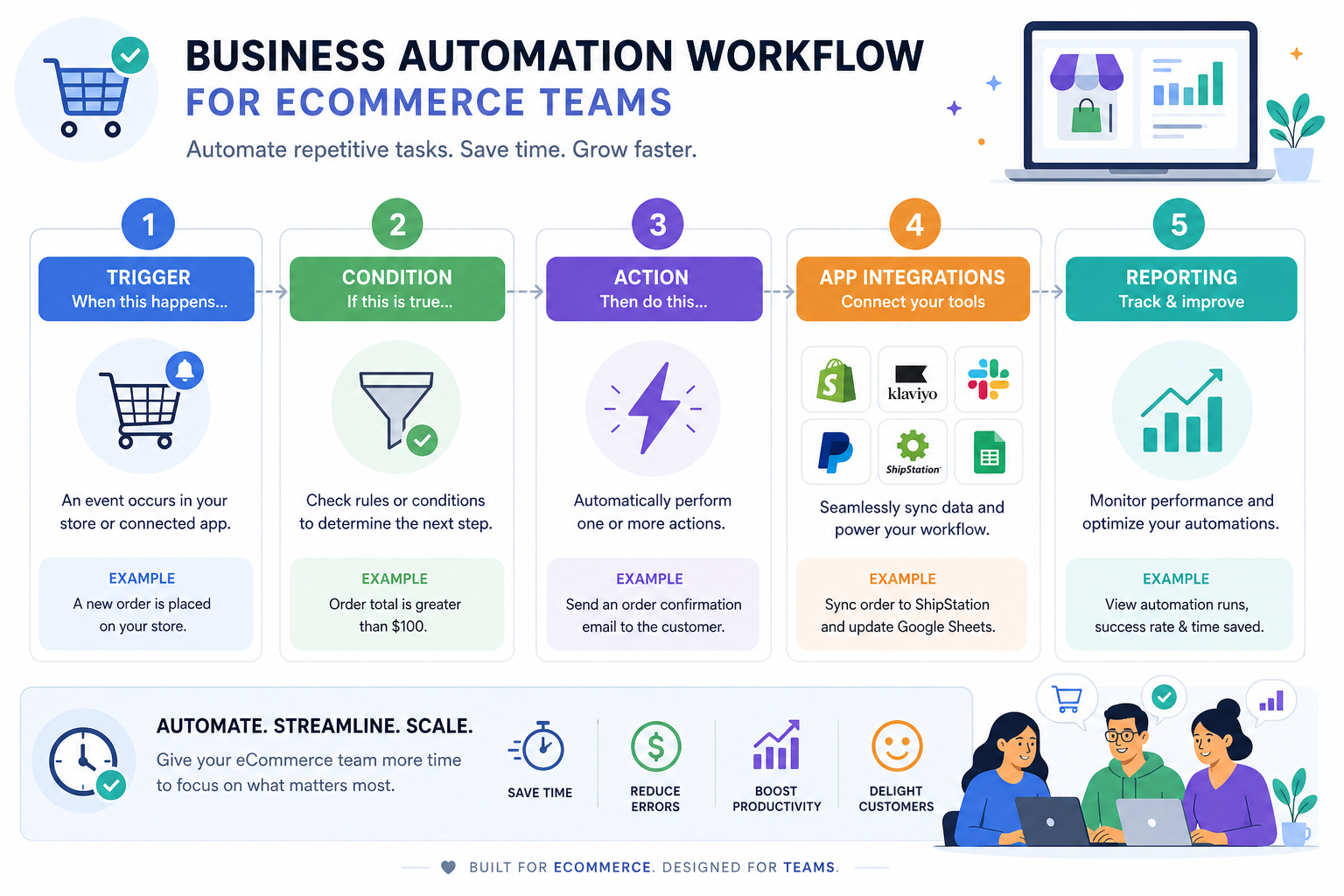
The best platforms do more than automate one action. They support multi-step workflows that handle branching logic, data transformations, app-to-app sync, and fallback notifications when something fails.
That is where many generic tools start to feel limited for ecommerce teams.
Which tasks should you automate first?
The best first automations are not always the biggest. They are the tasks that are:
-
repeated frequently
-
rule-based
-
time-consuming
-
error-prone
-
annoying enough that your team avoids them
A quick prioritization framework
Score each task from 1 to 5 across these categories:
|
Criteria |
Question |
|---|---|
|
Frequency |
How often does this happen? |
|
Repetition |
Does the process follow the same steps every time? |
|
Error risk |
What happens if someone misses a step? |
|
Time drain |
How much time does it consume per week? |
|
Cross-app complexity |
Does it require updating more than one tool? |
Tasks with high scores are usually the best automation candidates.
High-impact examples for Shopify merchants
Here are some of the first workflows many ecommerce teams choose to automate:
-
tag and route orders based on product, region, or value
-
send internal alerts for high-risk or urgent orders
-
sync customer or order data to Google Sheets, Airtable, or a CRM
-
trigger Klaviyo flows based on fulfillment or return events
-
alert the team when stock falls below thresholds
-
flag suspected overselling before it becomes a customer issue
-
notify support when a VIP customer order is delayed
-
create weekly or daily operational summaries automatically
Common repetitive tasks worth automating in ecommerce
Competitor articles often stay broad and say things like “automate emails” or “automate data entry.” That advice is fine, but it misses what ecommerce operators really need: concrete workflows tied to revenue, fulfillment, customer experience, and systems reliability.
Below are the practical categories that matter most.
Order handling and order management
Order operations are full of repeatable decisions.
You can automate:
-
tagging wholesale, VIP, subscription, or preorder orders
-
splitting orders based on inventory or fulfillment location
-
sending internal alerts for high-value or expedited purchases
-
assigning orders to the right warehouse or 3PL logic path
-
updating downstream apps with order details instantly
This saves time, but it also shortens response windows and reduces fulfillment mistakes.
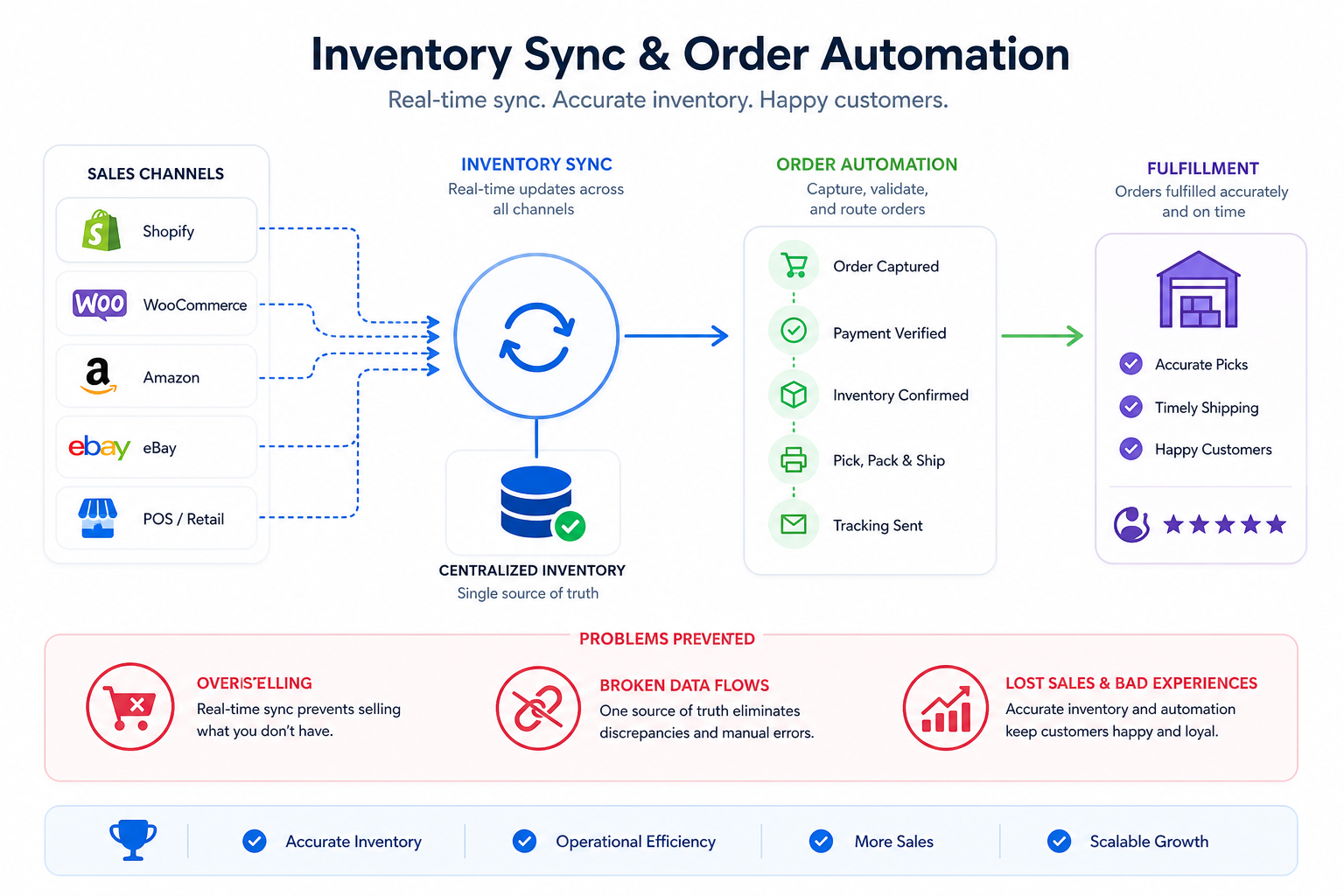
Inventory sync and low-stock prevention
Inventory mistakes are some of the most expensive manual errors in ecommerce. Overselling, stale counts, and delayed updates hurt margins and trust.
With automation, you can:
-
sync stock data across apps
-
send low-stock alerts to Slack or email
-
pause promotions when inventory is too low
-
trigger replenishment workflows
-
update external systems the moment inventory changes
Customer communication and follow-up
A lot of customer communication is repetitive but still important.
Examples include:
-
sending post-purchase follow-ups
-
notifying customers about delays or backorders
-
triggering loyalty or VIP outreach
-
routing service issues based on order status
-
syncing customer segments into marketing tools
Automation helps your team stay responsive without manually managing every message.
Reporting and operational visibility
Reporting is one of the easiest areas to automate, yet many teams still build reports by hand.
You can automate:
-
daily sales snapshots
-
fulfillment backlog reports
-
low-stock summaries
-
exception reports for failed payments or fraud review
-
exports to Google Sheets, Airtable, or BI tools
Internal alerts and exception handling
Teams often waste time because they only learn about issues after a customer complains.
Smart alerting workflows can notify the right people when:
-
an order is stuck
-
inventory falls below threshold
-
an app sync fails
-
a high-value customer submits a support issue
-
a data flow breaks between platforms
This is one of the most underrated ways to automate work tasks: do not just automate the happy path, automate the detection of problems too.
How to automate tasks without a developer
This is where many teams get stuck. They assume automation requires APIs, scripts, or engineering time. In reality, modern tools can handle most business workflows with no-code logic, prebuilt integrations, and templates.
The fastest path: plain-English workflow creation
Instead of building logic from scratch, a newer approach is to describe the workflow in plain English and let the platform generate it.
For example:
-
“When a Shopify order contains a preorder item, tag it as preorder, send a Slack message to operations, and add the order to Google Sheets.”
-
“If inventory for any SKU falls below 10, notify the merch team and pause the related Klaviyo campaign.”
-
“When a customer places a second order within 30 days, add a VIP tag and trigger a personalized follow-up.”
This is where MESA stands out. It is built specifically for Shopify merchants who want to automate repetitive tasks quickly without custom development. With MESA, users can describe what they want in plain English, and its AI assistant Yedric helps turn that request into a live workflow.
Why Shopify-first automation matters
Generic automation tools can work, but ecommerce teams often hit friction because those tools are not built around Shopify logic.
A Shopify-first platform like MESA is better suited for:
-
order events and product logic
-
line item and fulfillment workflows
-
inventory sync use cases
-
customer tags and store data
-
ecommerce-specific app connections
That focus matters when your workflows are directly tied to revenue and customer experience.
What makes MESA a strong choice for ecommerce automation
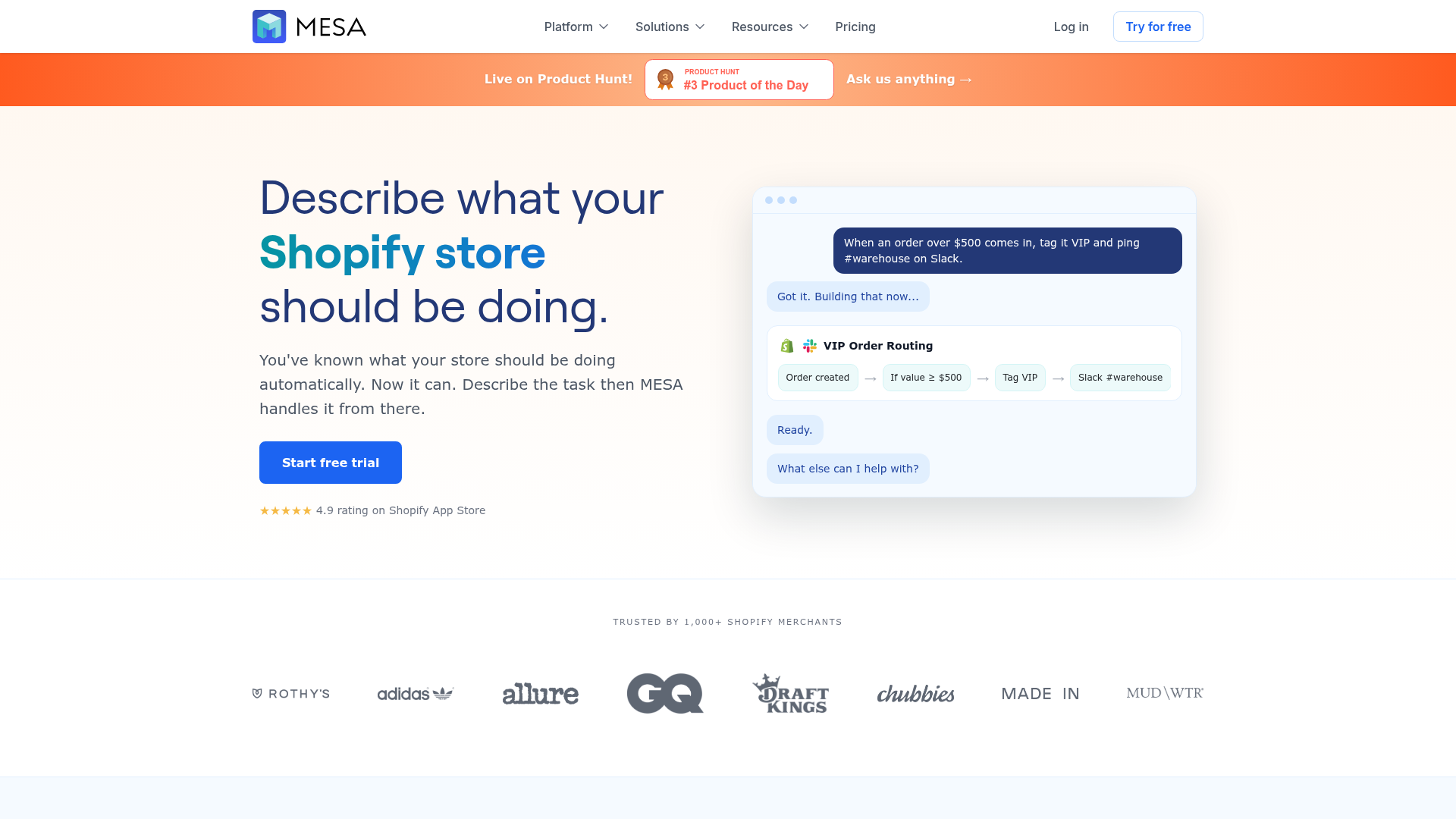
If your goal is to automate tedious tasks in Shopify without adding more complexity, MESA is designed for exactly that.
Key advantages of MESA
|
MESA capability |
Why it matters |
|---|---|
|
Plain-English workflow building |
Lets teams create automations quickly without technical setup |
|
Shopify-first design |
Better fit for real ecommerce operations than generic automation tools |
|
100+ integrations |
Connect Shopify with Slack, Google Sheets, Klaviyo, Airtable, HubSpot, Odoo, ShipStation, and more |
|
300+ ready-made templates |
Launch faster with proven workflows instead of starting from zero |
|
Multi-step automation support |
Go beyond one trigger and one action into real operational workflows |
|
Human support |
Get help designing, troubleshooting, and optimizing workflows |
|
Error prevention |
Reduce broken data flows, missed alerts, and overselling risks |
Where MESA adds value beyond basic automation articles
Most competitor content talks about “saving time” in general. MESA addresses the operational layer where teams actually struggle:
-
back-office work keeps piling up
-
departments use disconnected tools
-
manual sync creates hidden errors
-
store growth increases exceptions faster than headcount
-
automation needs to be tailored to how the brand already works
Because MESA supports both templates and custom logic, merchants can start simple and expand into more sophisticated workflows over time.
A beginner-friendly process to automate repetitive tasks fast
Here is a straightforward way to move from idea to working automation.
Step 1: Pick one painful task
Start with a workflow that hurts enough to matter but is simple enough to launch fast.
Good examples:
-
sending a Slack alert for expedited orders
-
exporting daily orders to a spreadsheet
-
tagging subscription orders automatically
-
alerting staff when inventory is low
Step 2: Define the trigger
Ask: what event should start the workflow?
Examples:
-
order created
-
product updated
-
inventory changed
-
fulfillment status changed
-
customer created
Step 3: Add conditions
Ask: when should the automation behave differently?
Examples:
-
only if order value is above $200
-
only if the SKU belongs to a specific collection
-
only if inventory is below a threshold
-
only if the customer has placed more than one order
Step 4: Define the actions
What should happen automatically?
Examples:
-
tag the order
-
send an internal alert
-
create a spreadsheet row
-
update a CRM record
-
trigger a marketing event
Step 5: Test with real-world exceptions
Do not just test the happy path. Test:
-
missing data
-
duplicate events
-
multi-item orders
-
partial fulfillment
-
out-of-stock scenarios
Step 6: Measure the result
Track:
-
hours saved per week
-
manual touches eliminated
-
error rate reduction
-
response speed
-
backlog reduction
Real examples of workflows that save time quickly
Example 1: Order risk alert workflow
Problem: High-value or unusual orders need review, but the team often notices too late.
Automation: When an order exceeds a set value, MESA tags it, sends an alert to Slack, and logs it to Google Sheets.
Result: Faster review, less fraud exposure, and no more manual monitoring.
Example 2: Inventory protection workflow
Problem: Products oversell because stock updates are delayed between tools.
Automation: When inventory drops below threshold, MESA notifies the team, updates connected systems, and can trigger follow-up logic.
Result: Fewer stockouts, fewer apology emails, and better merchandising control.
Example 3: Customer follow-up workflow
Problem: Repeat customers do not always receive timely personalized follow-up.
Automation: On a repeat purchase, MESA adds a customer tag and triggers the right marketing or support action.
Result: Better retention and a more consistent customer experience.
Example 4: Reporting workflow
Problem: Operations manually compile end-of-day performance reports.
Automation: MESA collects key order or inventory data and sends a summary automatically.
Result: Less spreadsheet work and faster visibility for leadership.
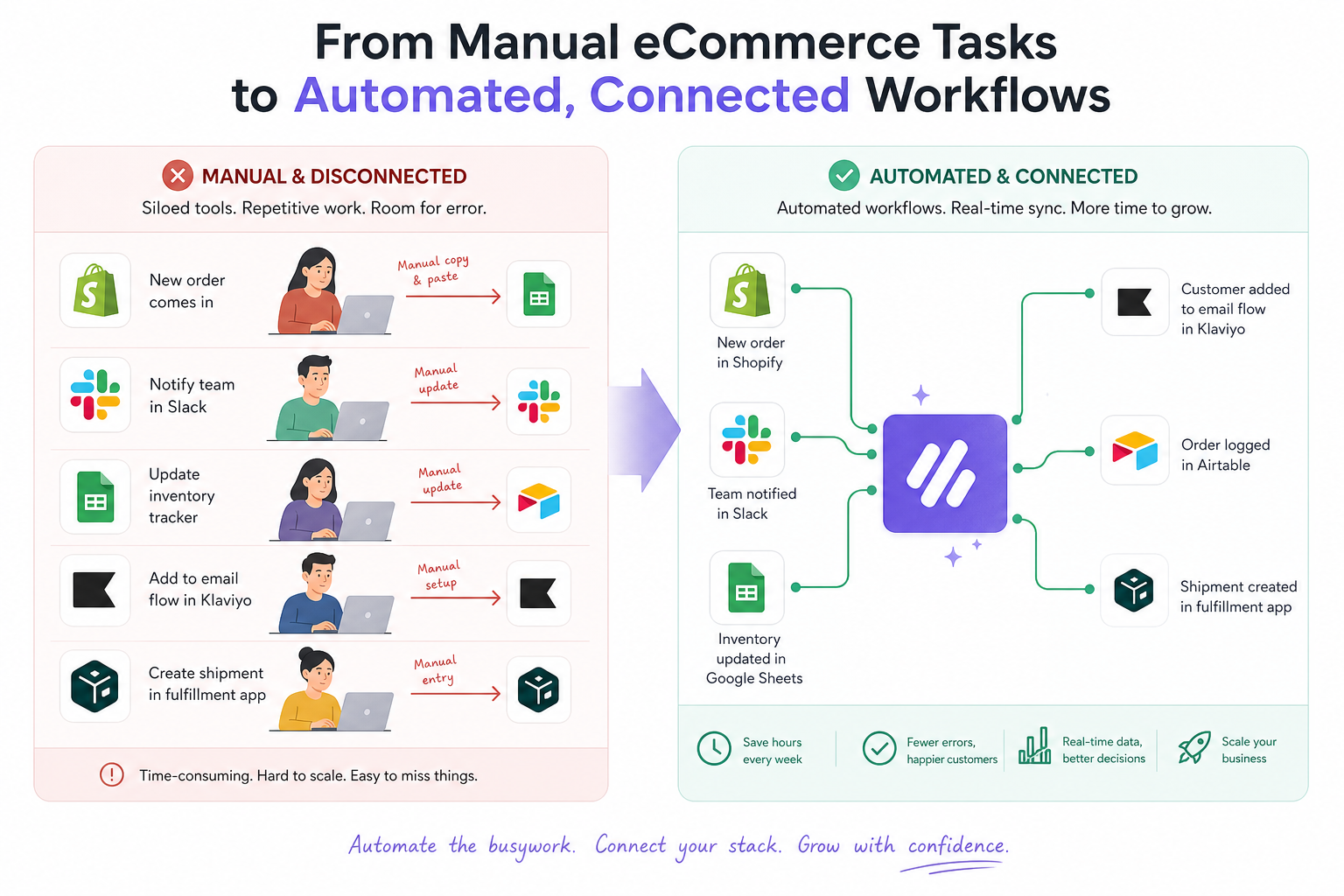
Manual work vs automation: a practical comparison
|
Process |
Manual approach |
Automated approach with MESA |
|---|---|---|
|
Order tagging |
Staff reviews each order and adds tags |
Tags applied instantly based on logic |
|
Inventory alerts |
Team checks stock reports manually |
Alerts fire automatically at thresholds |
|
Customer follow-up |
Staff sends messages inconsistently |
Workflow triggers based on events |
|
Reporting |
Copy-paste into spreadsheets |
Data pushed automatically on schedule or event |
|
Cross-app updates |
Users re-enter data in multiple tools |
One trigger updates connected apps |
The hidden content gaps most articles miss
After reviewing competitor-style content on this topic, several gaps show up repeatedly. They explain why so many articles are useful for beginners but not enough for ecommerce operators.
Gap 1: They rarely discuss operational failure points
It is not enough to say “automate emails” or “use Zapier.” Real businesses need to prevent:
-
broken data flows
-
overselling
-
duplicate actions
-
missed internal alerts
-
inconsistent customer handling
Good automation is not just convenient. It is protective.
Gap 2: They ignore multi-step workflows
Many articles treat automation as one trigger and one action. Ecommerce workflows are often more complex:
-
one order event might need tagging, notifications, CRM updates, and reporting
-
inventory changes may affect marketing, support, and merchandising at once
-
different products or customer types may require branching logic
MESA is valuable here because it supports complex multi-step automations, not just simple one-off tasks.
Gap 3: They underplay the importance of support
A lot of tools advertise no-code simplicity, but teams still need help with workflow design. One of MESA’s biggest practical advantages is real human support for workflow setup and optimization. That matters when the automation touches live store operations.
Gap 4: They are not ecommerce-specific enough
Broad business automation advice does not always help Shopify teams. Ecommerce requires workflows tied to:
-
product and variant data
-
order states
-
inventory behavior
-
fulfillment events
-
store-specific app ecosystems
That is why a specialized platform can outperform a general-purpose one.
Best practices when you automate tasks
To get good results, follow these principles.
Start with one measurable use case
Do not begin with “automate everything.” Start with one workflow that saves time or reduces a recurring error.
Build for exceptions, not just the ideal case
Ask what happens if:
-
the data is missing
-
the SKU is wrong
-
the order is edited
-
the app is temporarily unavailable
Keep workflows documented
Document:
-
what triggers the workflow
-
what apps are involved
-
what conditions exist
-
who owns the process
Use templates when speed matters
MESA offers 300+ ready-made templates, which helps teams launch faster and avoid rebuilding common workflows from scratch.
Review and optimize regularly
As your store grows, the same workflow may need new branches, extra alerts, or tighter conditions.
How to choose the right automation platform
Not every automation platform is a fit for ecommerce. Use this checklist.
|
Question |
Why it matters |
|---|---|
|
Is it easy for non-developers to use? |
Your ops team should not wait on engineering |
|
Is it built for Shopify? |
Ecommerce-specific events and data are critical |
|
Does it support multi-step logic? |
Real workflows rarely end after one action |
|
Does it connect to our existing stack? |
Sync across tools is where the value multiplies |
|
Does it offer templates? |
Faster time to value |
|
Is support available? |
Helpful when workflows affect live operations |
For many Shopify brands, MESA checks these boxes especially well because it combines a Shopify-first architecture, plain-English workflow creation, strong integrations, and human support.
Final verdict: the fastest way to reduce manual work and scale smarter
If your team wants to automate repetitive tasks, the goal is not automation for its own sake. The goal is to remove operational drag, improve consistency, and create room for higher-value work.
For Shopify merchants, that means automating the work that slows down store growth:
-
order handling
-
inventory sync
-
reporting
-
alerts
-
customer follow-up
-
cross-app data flow
MESA makes that process practical. Instead of waiting on a developer or stitching together fragile workflows manually, you can turn plain-English requests into live automations, use ready-made templates, connect to 100+ tools, and get real support when your workflows need to scale.
If you want a faster, safer, and more Shopify-native way to automate tedious tasks, MESA is one of the clearest paths forward.
FAQ
What is the 3 3 3 rule at work?
The 3 3 3 rule at work is a productivity method that usually means focusing on three important tasks, three shorter tasks, and three maintenance tasks in a day. It is not an automation framework, but it can help you identify which repetitive tasks should be automated first. Teams often use it to separate high-value work from low-value manual work.
Which section can help automate repetitive tasks to help save time and increase productivity?
The best place to start is the section on identifying which tasks to automate first, followed by the step-by-step workflow-building process. Those sections show how to choose rule-based, repetitive tasks and turn them into automations that save time and reduce errors.
What are the 5 D’s of automation?
The 5 D’s of automation are commonly described as dirty, dull, dangerous, difficult, and dear tasks – work that is repetitive, risky, complex, or expensive to do manually. In ecommerce, that often includes manual data entry, inventory checks, repetitive reporting, and order routing.
What is the 10 20 70 rule for AI?
The 10 20 70 rule for AI generally means technology is only part of success, while process and people make up the majority of outcomes. In practical terms, tools like MESA can automate workflows fast, but strong process design and team oversight are what make automation reliable and scalable.
What is Elon Musk’s 5 minute rule?
Elon Musk’s 5 minute rule is often associated with breaking work into short, tightly scheduled blocks to maintain speed and focus. In operations, the takeaway is to remove repeated low-value tasks from those blocks through automation so your team spends time on decisions, not manual clicks.
What is the 9 9 6 rule?
The 9 9 6 rule refers to working from 9 a.m. to 9 p.m., six days a week. It is often cited as a symbol of overwork, which is exactly why automation matters: better workflows help teams scale output without relying on excessive manual effort.