A wholesale order lands in your Shopify admin looking a lot like every other order, and then nothing downstream treats it the same. It carries negotiated pricing. It needs a PO number on the paperwork. It sits on net 30 that somebody has to remember to chase. It has to reach the accounting system, and it absolutely must not get swept into the abandoned-cart email that goes to retail shoppers. So it gets handled by hand, one order at a time, by whoever knows the account.
That was a defensible way to run a side channel. It stopped being defensible in April 2026, when Shopify moved native B2B onto every paid plan and a lot of stores suddenly had a real wholesale channel sitting on top of the same manual back office they had before. This post covers what Shopify's B2B tooling now handles for you, the five wholesale workflows worth automating first, and where you'll need something beyond Shopify to finish the job.
TL;DR: there's a template for that
What Shopify's B2B gives you now
Start here, because the plan story changed recently enough that most of what you'll read online is out of date. Native B2B was Plus-only for roughly four years, and plenty of guides still say so. Shopify's own changelog is unambiguous:
"Merchants on Basic, Grow, and Advanced plans can start selling wholesale using native B2B features"Shopify Changelog, April 2, 2026
Per Shopify's B2B features by plan reference, every paid plan — Basic, Grow, Advanced and Plus — includes companies and company locations, location-level permissions, quantity rules and price breaks, net terms with payment reminders, ACH payments (US only), vaulted credit cards, draft orders and PO numbers, easy reorders, sales staff permissions, the Trade theme with quick order lists, and Shopify Flow automations. None of that costs extra.
Three things stay gated. Basic, Grow and Advanced can assign up to 3 active catalogs across all B2B markets, where Plus gets unlimited. Assigning a catalog directly to a specific company or location — rather than through a market — is Plus-only, as are deposits, partial payments and payment requests per fulfillment. Contextual checkout and storefront customization through Shopify Markets needs Advanced or Plus. If you're weighing that jump, our Shopify vs Shopify Plus upgrade guide walks through the rest of the trade-offs.
Worth knowing before you build: B2B checkout is incompatible with accelerated checkouts (Shop Pay, Apple Pay, Google Pay, Amazon Pay), local delivery, pickup points, subscriptions and tipping. Orders cap at 500 line items and draft orders at 200 — high enough for most wholesale, low enough to matter if you sell components.
What B2B still leaves on your desk
Shopify's B2B is an ordering surface. It gives your buyers a place to log in, see their pricing, and place an order without emailing your sales rep a spreadsheet. What it does not give you is the operational layer behind that order. The gap shows up in a few specific places.
The bluntest example is payment terms. Shopify supports net 7 through net 90, plus due-on-fulfillment and a fixed date on draft orders — and then leaves the collection to you:
"Payments aren't automatically captured when the payment terms expire."Shopify Help Center, B2B payment terms
So an order can sit past net 30 indefinitely and nothing in Shopify will nudge anyone. The same pattern repeats elsewhere: draft orders exist but nobody tells your accounting system about them, company records exist but don't reach your CRM, and wholesale orders flow into exactly the same tags, reports and email flows as retail unless you separate them yourself.
Meanwhile the orders keep getting bigger. McKinsey's ninth annual B2B Pulse Survey, covering 3,942 decision makers, found buyer comfort with large self-serve orders climbing fast:
"39% of B2B buyers, up from 28%, are willing to spend over $500,000 per order."Digital Commerce 360, on McKinsey's B2B Pulse Survey
Manual handling that was merely annoying at $2,000 an order is a genuine liability at fifty times that.
Five wholesale workflows worth automating first
1. Split wholesale off from retail the moment the order lands
Every other automation on this list depends on this one, because almost nothing you want to do to a wholesale order should happen to a retail order. The pattern is a filter immediately after the order trigger: check whether the order belongs to a B2B company (or carries a wholesale tag, if you're running wholesale through tags rather than native B2B), then send it down its own branch.
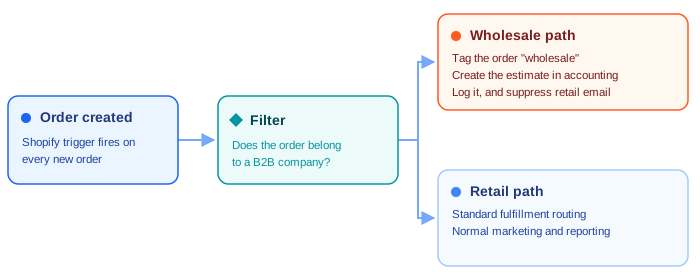
Once the tag exists, the rest of your stack can read it. Fulfillment rules can route wholesale to a different pick location, your email platform can exclude the tag from consumer campaigns, and your reporting can finally separate two revenue streams that behave nothing alike. If tagging logic is new to you, we cover the mechanics in depth in our guide to Shopify tags.
2. Turn every draft order into a quote in your accounting system
Wholesale runs on quotes. A buyer asks for 400 units at a price you agreed on a call, someone builds a draft order, and someone else rebuilds the same line items as an estimate in QuickBooks or Xero. That second build is pure duplication, and it's where the transcription errors live.
MESA's Shopify connector has a Draft Order Created trigger, which makes this a short workflow: catch the draft, retrieve the customer, check whether they already exist in your accounting system, then create the estimate on the right record — creating the customer first if they're new. That branching is what a Paths step is for. We've written the full build as its own walkthrough: generating QuickBooks estimates from Shopify draft orders.
3. Rebuild standing orders on a schedule instead of retyping them
This is the most distinctly wholesale item on the list and the one most stores are still doing by hand. A distributor takes the same 30 SKUs on the first of every month. A café restocks the same order every other Tuesday. Somebody opens last month's order and types it again.
The automated version is a scheduled workflow rather than an event-driven one: on your chosen day, pull the list of draft orders, loop over the ones carrying a duplication tag, copy each one, strip the duplication tag off the copy so it can't compound, and stamp the new draft with a tracking tag so you can tell generated orders from hand-built ones. That last detail is easy to skip and painful to debug later. The MESA template linked at the end of this post does exactly this in about six minutes of setup, and our post on using draft orders for repeat purchases covers the customer-facing side of the same idea.
Not every standing order is identical, though. A wholesale customer restocking dozens of different SKUs in different quantities each time doesn't fit the duplicate-last-month's-draft pattern above. A case study from a Shopify app-development shop puts a number on that gap. A Canadian sustainable-products distributor's wholesale buyers were placing orders with dozens to hundreds of line items by clicking through product pages and entering quantities one at a time; a typical order took 30 to 45 minutes. Buyers didn't complain. They just ordered less often, or went elsewhere. After the distributor built a custom CSV bulk-order uploader, order placement time dropped to under 3 minutes, average order value rose 28%, and cart abandonment on bulk orders fell 65%.
You don't need a custom app to close most of that gap. Swap the Schedule trigger above for MESA's FTP Fetch CSV File Row Created trigger: a wholesale customer drops a CSV of SKUs and quantities into a shared folder instead of retyping the order line by line. Loop over the rows, use Shopify's Retrieve Product action to confirm each SKU is still in stock, then feed the results into the same Create Draft Order and Send Invoice for Draft Order steps as the repeat-purchases workflow above, just triggered by an uploaded file instead of a delay timer.
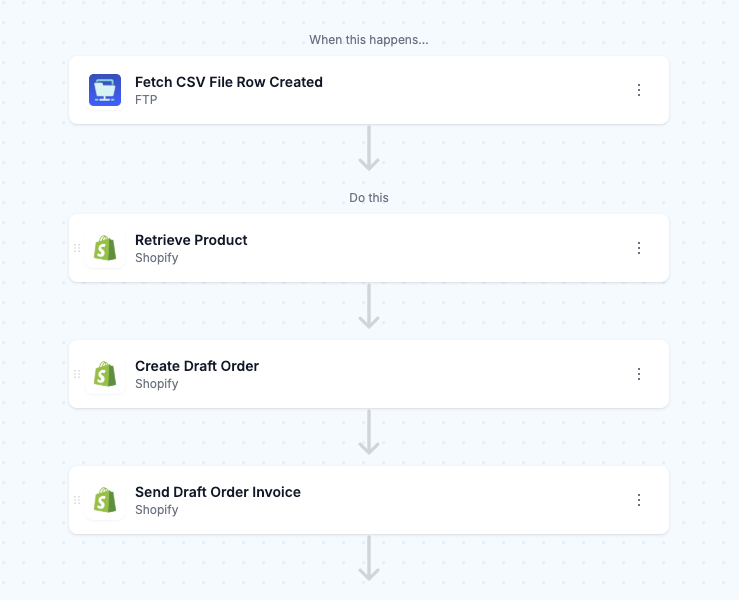
That's not a like-for-like replacement for a bespoke uploader. There's no live, in-browser drag-and-drop with stock validation as the buyer types. It won't apply cart-level promotions like BOGO on its own either; that logic belongs to Shopify's checkout, not the workflow. What it does replace is the 30-to-45-minute manual entry, and it's buildable in an afternoon rather than a three-week custom build. If you haven't timed how long a real wholesale order actually takes to place through your store, that's worth checking before deciding whether this is worth building.
4. Chase net terms before they age out
Since Shopify won't capture payment when terms expire, the follow-up is yours to build. The useful version isn't a single reminder — it's a small escalation. A scheduled workflow reads unpaid orders with payment terms, works out how many days remain, and acts on the number: a friendly note to the buyer a few days ahead of the due date, a Slack message to whoever owns the account on the due date itself, and a row appended to an aging spreadsheet once an order goes past due.
Shopify's built-in payment reminders cover the first of those three. The value of building the rest is that your team finds out an account is slipping from a channel they actually watch, rather than during month-end reconciliation.
5. Push wholesale order data where the rest of the business can see it
Wholesale answers different questions than retail — which accounts are reordering, what the average order value per company location looks like, which SKUs move in cases rather than units. Those questions get answered in a spreadsheet, an ERP or a CRM, not in the Shopify admin.
A workflow that appends each wholesale order to a Google Sheet with the company name, location, PO number, terms and line items is unglamorous and immediately useful. If your accounting system is the destination instead, MESA has connectors for QuickBooks, Xero and Odoo, and the general approach applies across all of them. Our broader guide to automating Shopify orders covers the retail-side equivalents of these same syncs.
Shopify Flow or MESA?
Use both — they're good at different halves of this.
Shopify Flow is free on every plan and now carries real B2B triggers: Draft order created, Draft order deleted, Company created, Company location created, Company contact created, and Company contact assigned permission. If the work stays inside Shopify — tag the order, add a metafield, alert the team in Slack, adjust inventory — Flow will do it and cost you nothing. Workflow #1 above is a natural Flow job.
Where Flow stops is at the edge of Shopify. It has no idea whether a customer exists in QuickBooks, can't loop over a filtered list of draft orders on a schedule and duplicate each one, and can't reconcile a payment recorded in your accounting system back onto a Shopify order. Workflows #2, #3, #4 and #5 all cross that boundary, which is where MESA fits: it uses the same Shopify events, adds a scheduler, loops, conditional paths and 100+ app connectors, and can run alongside Flow rather than replacing it. If you already have Flow workflows you like, extending Flow rather than migrating off it is usually the right call.
Plan around the three-catalog ceiling early
One practical warning for anyone below Plus. Three active catalogs sounds generous until you meet the way wholesale pricing actually gets negotiated — one rate for distributors, another for retailers, a third for a single large account, and then a fourth request arrives.
Two ways to stretch it. Use quantity rules and price breaks inside a catalog to express volume tiers, so a single catalog serves accounts that differ by order size rather than by relationship. And handle genuine one-off pricing through draft orders instead of a dedicated catalog, which is what draft orders are for — a rep builds the order at the agreed price and sends the invoice. If you find yourself repeatedly wanting a fourth and fifth catalog for accounts you can't consolidate, that's a concrete, measurable reason to price out Plus rather than a vague one.
A sensible build order
Don't build all five at once. In order of payback:
- Tag and split wholesale from retail. An afternoon in Flow, and everything else gets easier.
- Sync draft orders to your accounting system. This is where the transcription errors are, and errors on wholesale-sized orders are expensive.
- Automate standing reorders if you have accounts that order on a rhythm. If you don't, skip it.
- Add net-terms escalation once enough money is sitting on terms that a missed follow-up hurts.
- Sync the data out when someone starts asking questions the Shopify admin can't answer.
Wholesale on Shopify is no longer the thing you needed a Plus contract and a specialist app to attempt. What's left is the operational work between the order arriving and the money landing — and that part has always been automatable.
