The customer journey ends at checkout. After all your marketing spend, all your product page optimization, all your trust-building—it comes down to those final few clicks between "Proceed to Checkout" and "Place Order."
And that's exactly where most of your potential revenue is disappearing.
Here's the sobering reality: 70% of shoppers abandon their carts without completing a purchase. If you're doing $500,000 in annual revenue, that means roughly $1.17 million worth of merchandise was added to carts but never purchased. For a store doing $2 million annually? You're looking at $4.67 million in abandoned revenue.
But before you panic, understand this: cart abandonment is normal. Every ecommerce store deals with it. The question isn't whether you'll have cart abandonment—it's whether you'll do something about it.
Why shoppers abandon (and what you can do)
Baymard Institute's comprehensive study of 48 cart abandonment research papers identified the top reasons customers bail:
- 48% abandoned due to unexpected costs (shipping, taxes, fees)
- 26% were forced to create an account when they wanted guest checkout
- 17% faced a too long/complicated checkout process
- 13% didn't see their preferred payment method
- 19% didn't trust the site with credit card information
- 13% encountered errors or crashes
Notice something? Nearly every reason on that list is fixable. These aren't customers who decided they didn't want your product—they're customers who hit friction in your checkout flow and gave up.
That friction is costing you real money. But here's the opportunity: implementing abandoned cart recovery can increase your overall revenue by 7-8%—without spending a dollar on new customer acquisition.
This guide covers 15 tactics split into two categories:
Checkout Optimization: These prevent abandonment by removing friction from your checkout process. Think of these as fixing the leaky bucket—plugging holes so fewer customers abandon in the first place.
Cart Recovery: These win back customers who've already abandoned. Think of these as filling the bucket back up—bringing customers back to complete their purchase.
The most effective strategy uses both. Optimize your checkout to reduce abandonment rates from 70% to 60% or even 50%, then implement recovery tactics to win back 10-15% of the remaining abandoners. The compound effect can be transformational.
7 ways to optimize your checkout flow
The best abandoned cart is the one that never happens.
Everything in this section focuses on reducing friction in your checkout process so fewer customers abandon in the first place. These are preventative measures—removing obstacles, building trust, and making the path to purchase as smooth as possible.
Think of your checkout flow like a water slide. Every unnecessary step, confusing form field, or unexpected cost is a rough patch that slows customers down or makes them bail out entirely. Your job is to make it so slippery-smooth that customers slide from "Add to Cart" to "Order Complete" without thinking twice.
The average checkout flow has 14.88 form fields, but best-in-class checkouts use only 7-8. Every field you eliminate, every click you remove, every question you answer before it's asked—these small improvements compound into measurably higher conversion rates.
The tactics below are ordered roughly by impact and ease of implementation. Start with express checkout and guest checkout (the biggest wins), then work your way through the list. Even implementing 3-4 of these can reduce your abandonment rate by 10-15 percentage points.
Free Shipping thresholds: The AOV multiplier
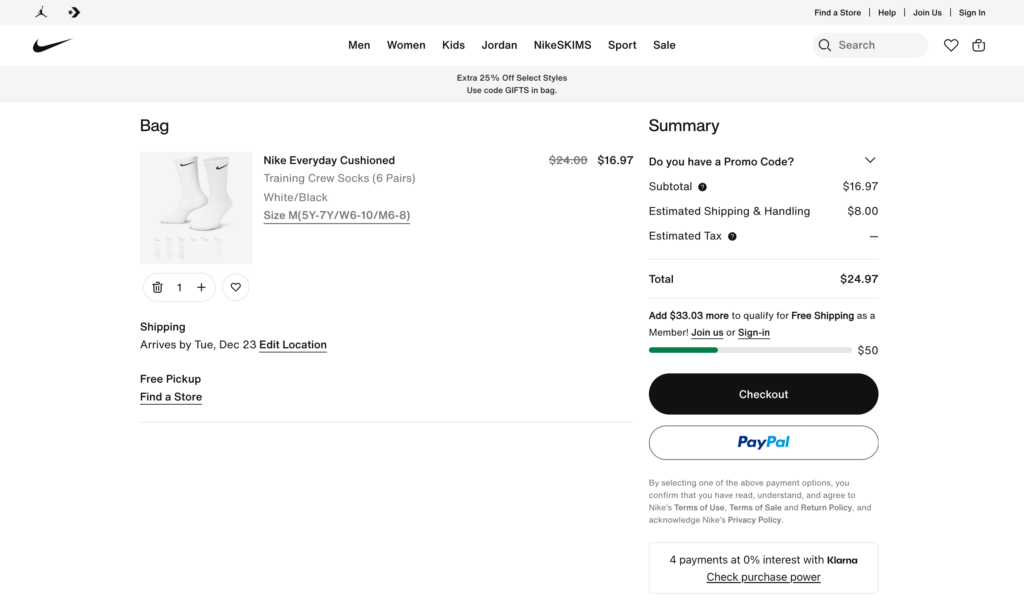
Here's a stat that should get your attention: 93% of consumers will take action to receive free shipping, with adding extra items being the most common strategy. And 84% of consumers admit they've added items to their cart in the past year specifically to hit a free shipping threshold.
Free shipping isn't a "nice to have"—it's table stakes. The question isn't whether to offer it, but how to offer it without destroying your margins.
How to calculate your optimal threshold:
Start with data, not guesses. Pull your last 12 months of order data (to account for seasonal fluctuations) and calculate your current average order value (AOV). Let's say it's $50.
Next, determine your average shipping cost. If it's $8, you need customers to spend enough that the margin on additional items covers that $8.
Your free shipping threshold should sit 15-30% above your current AOV. If AOV is $50, set your threshold at $60-65. This creates a "reachable goal"—customers will add one more item to qualify, increasing your AOV while covering shipping costs.
Display progress toward the threshold: "Add $15 more for free shipping!" This simple progress bar can increase add-to-cart rates significantly. Shopify apps like Slide Cart or CartHook make this easy to implement.
Pro tip: For products with wildly different price points, consider tiered thresholds by category or exclude oversized/heavy items from the free shipping offer. You don't need a one-size-fits-all approach.
Enable express checkout options
Shopify's express checkout buttons—Shop Pay, Apple Pay, Google Pay, PayPal—dramatically reduce friction by letting customers skip the traditional form-filling process entirely.
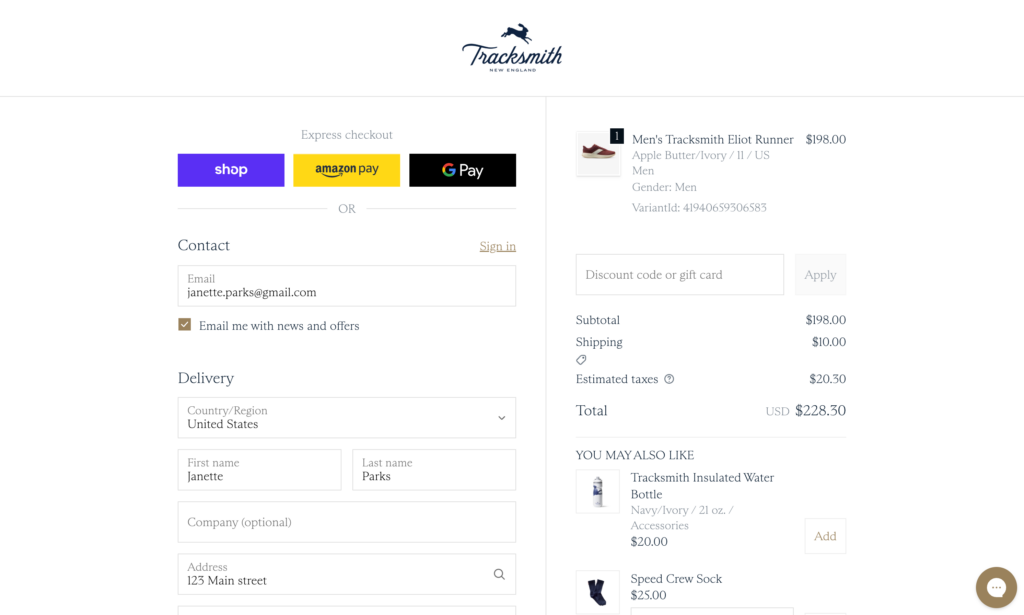
These one-click payment options pull saved information from secure wallets, meaning customers can complete purchases in seconds rather than minutes. According to an external study commissioned by Shopify, Shop Pay can lift conversions by up to 50% compared to guest checkout. While this is Shopify's own research (so take it with appropriate skepticism), the general principle holds: removing steps increases completion rates.
Enable these in your Shopify admin under Settings → Payments → Shopify Payments → Manage. Check the boxes for Shop Pay, Apple Pay, and Google Pay. They'll appear as prominent buttons on your product and cart pages, giving customers the fastest path to purchase.
Offer guest checkout (this is non-negotiable)
Here's a stat that should make every store owner wince: forcing customers to create an account increases cart abandonment by 26-35%. On the flip side, offering guest checkout can boost conversion rates by up to 45%.
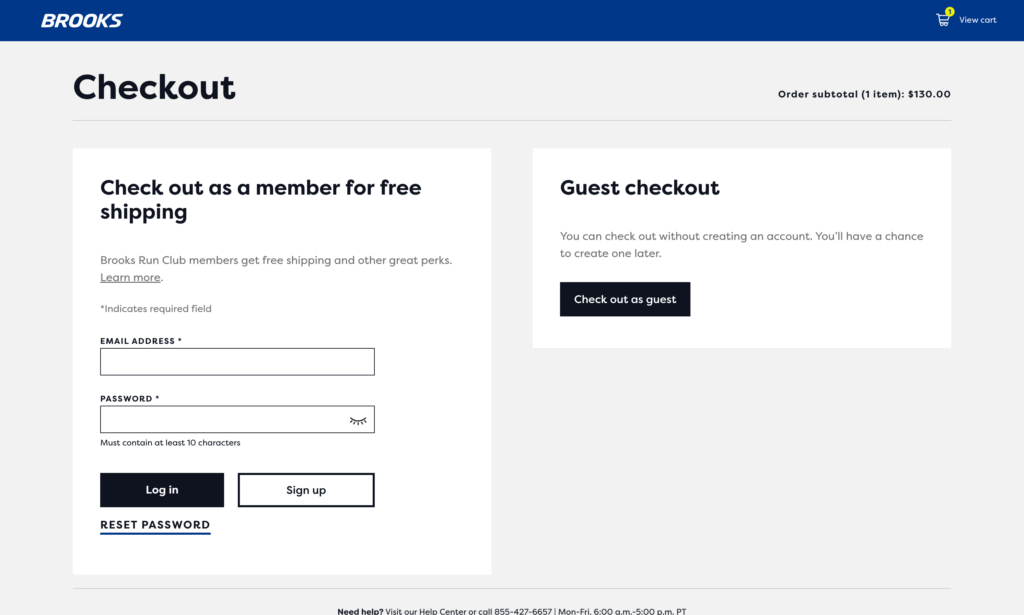
The math is simple: new customers want to test your products before committing to a relationship with your brand. Making them jump through account creation hoops before they've even received their first order feels presumptuous and wastes their time.
The smart approach: Make guest checkout the default, prominent option. Then, after purchase completion, offer to save their information for faster future checkouts. You can even incentivize account creation with a discount on their next purchase or exclusive perks for members. This "earn the relationship" approach respects customer autonomy and actually increases long-term loyalty.
Shopify's checkout allows guest checkout by default, but verify it's enabled in Settings → Checkout → Customer contact method. Ensure "Customers can only check out using email" or "Customers can check out using their email or phone number" is selected—not "Accounts are required."
Reduce checkout steps to the bare minimum
Every additional step in your checkout process is a chance for customers to reconsider, get distracted, or simply give up. Research shows that 17% of shoppers abandon due to complex or lengthy checkout processes.
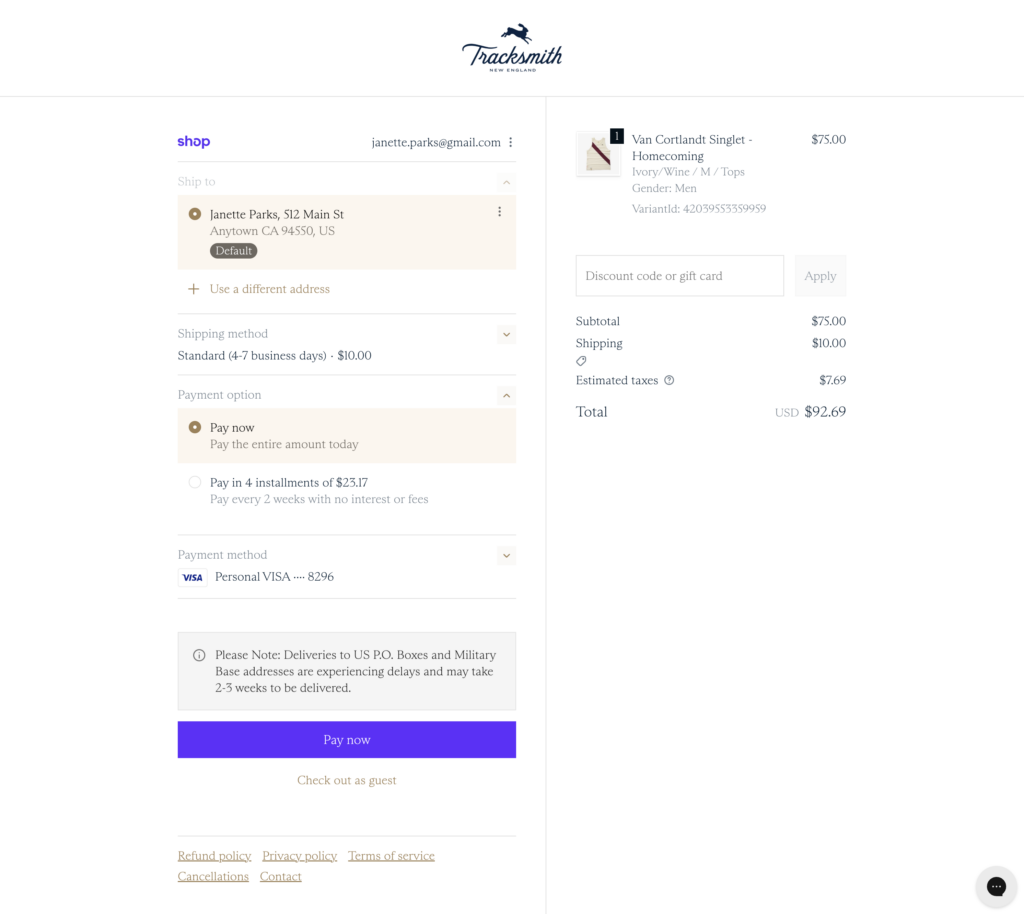
Shopify's checkout is already pretty streamlined, but there are still decisions you control:
Combine shipping and billing information. Add a checkbox that says "Billing address is the same as shipping address" and automatically fills the fields. Most customers use the same address for both—don't make them type it twice.
Use auto-complete and address validation. Shopify's checkout includes smart address completion powered by Google. Let it do the work. Customers start typing their address and the rest auto-fills. This prevents typos and speeds up the process significantly.
Remove optional fields. Do you really need customers' company name or apartment number for every order? Only ask for information you absolutely need to fulfill the order. Every field you remove increases completion rates.
Show a progress indicator. Let customers know they're on "Step 2 of 3" or show a visual progress bar. This reduces anxiety about how much longer the process will take and encourages completion. Shopify Plus stores can customize this; standard Shopify stores have it built into the default checkout.
Offer multiple payment methods
Limited payment options cause 13% of cart abandonments. In 2026, customers expect flexibility in how they pay. The more options you offer, the more likely you'll match each customer's preference.
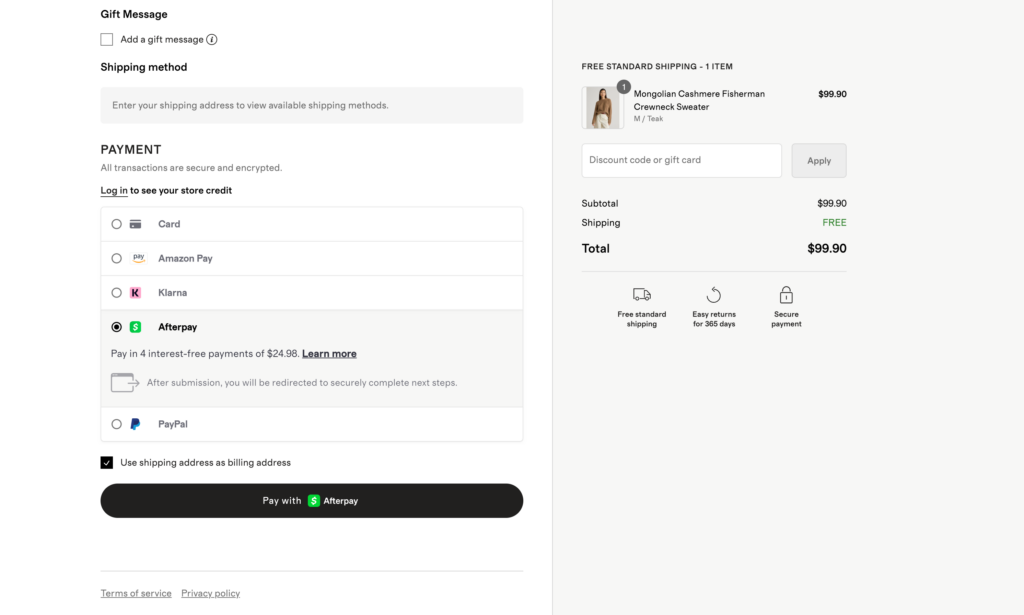
The essentials:
- Credit/Debit cards - The baseline. Shopify Payments handles this automatically.
- Shop Pay - Fast, secure, and increasingly popular (especially on mobile)
- Apple Pay / Google Pay - Critical for mobile shoppers and those who prefer digital wallets
- PayPal - Still one of the most trusted payment methods, especially for older demographics
Buy Now, Pay Later (BNPL): This deserves special attention. 86.5 million Americans used BNPL services like Affirm, Klarna, or Afterpay in 2024, and research shows BNPL users spend 6.42% more than non-BNPL customers. For higher-ticket items ($100+), offering installment payments removes the "sticker shock" and makes purchases feel more affordable.
Enable BNPL options through Shopify Payments → Manage → Shop Pay Installments (powered by Affirm) or install dedicated apps like Klarna or Afterpay.
Display security badges prominently
Trust is currency in ecommerce. 25% of customers abandon carts due to credit card trust issues, and 19% cite general security concerns.
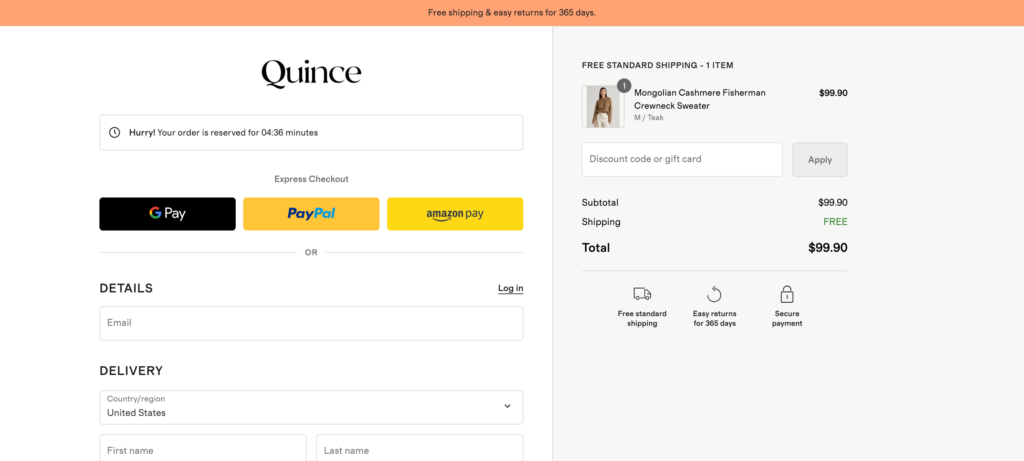
Display trust badges prominently on your cart summary and checkout page:
- SSL certificate indicators - That padlock icon in the browser bar. Ensure your entire site uses HTTPS.
- Payment security badges - Visa, Mastercard, Norton, McAfee, or "Secured by Shopify" badges
- Money-back guarantees - "30-Day Money-Back Guarantee" or "100% Secure Checkout"
- Social proof - "Join 50,000+ happy customers" or trust seals from organizations like BBB
Show shipping costs early (eliminate surprise fees)
Remember: 48% of cart abandonments happen because of unexpected costs. Don't hide your shipping fees until the last second.
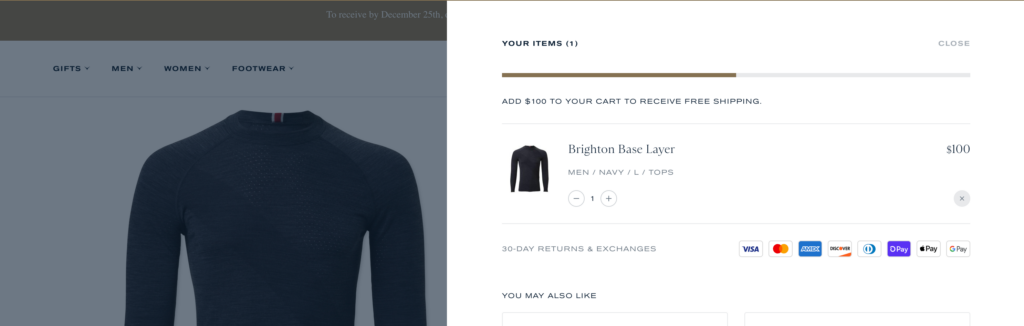
Best practices for shipping transparency:
Calculate shipping on product pages. Show estimated shipping costs right on the product page based on the customer's location. Add a widget that lets customers enter their zip code and see shipping costs before adding to cart.
Display a shipping threshold. "Free shipping on orders over $75" creates a clear target and actually increases average order value as customers add items to qualify. Show progress toward this threshold in the cart: "Add $23 more for free shipping!"
Show costs in the cart, not just at checkout. Your cart page should display subtotal, estimated shipping, estimated taxes, and total—all before the customer clicks "Checkout." No surprises means fewer abandonments.
Be honest about delivery times. Don't just show shipping costs—show delivery dates. "Standard Shipping ($5.99) - Arrives Dec 15-18" sets clear expectations and reduces post-purchase anxiety.
Enable cart saving features
Not every visitor who adds to cart is ready to buy immediately. Give them a way to save their cart and return later.
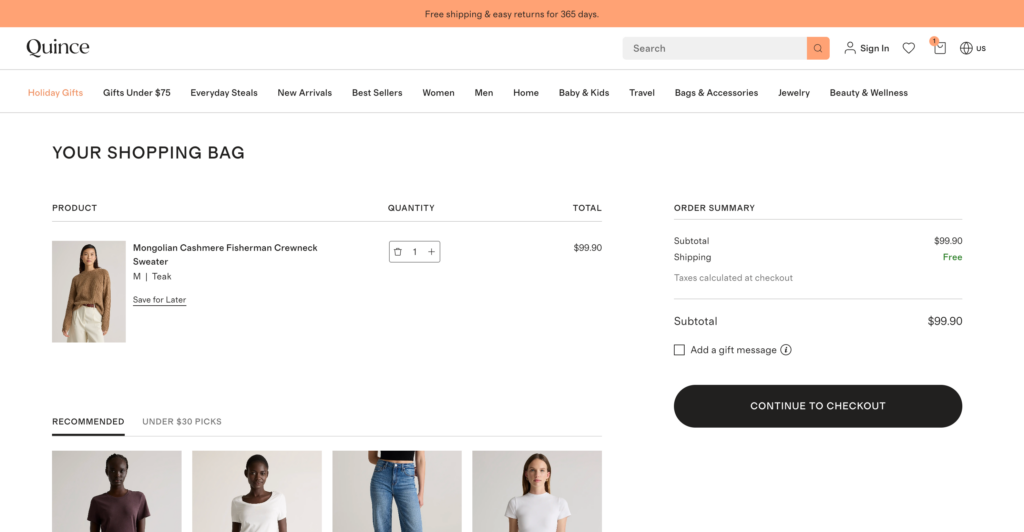
Making it easy for customers to save items for later reduces psychological pressure and keeps them engaged with your store.
Persistent carts for logged-in users are automatic in Shopify. When customers create an account and add items to their cart, those items remain there across sessions and devices. This is one more reason to encourage (not force) account creation.
Wishlist functionality gives customers a low-commitment way to save items they're interested in but not ready to purchase. Research from Google shows 40% of shoppers want this feature, and one study found that implementing wishlists increased overall sales by 19.3% on average.
Wishlists work especially well for:
- Higher-priced items (customers need time to consider)
- Gift shopping (save items to share with others)
- Seasonal shopping (save summer items for later purchase)
Saved for later at checkout: Let customers move items from their cart to a "Save for Later" list during checkout. This prevents cart abandonment caused by "I want this but not right now" items that inflate the total.
7 ways to recover abandoned carts
No matter how optimized your checkout becomes, 50-60% of customers will still abandon their carts. That's not failure—that's reality. People get distracted, need time to think, want to compare prices, or simply aren't ready to buy yet.
But here's the critical insight: abandoned doesn't mean lost. These customers have already demonstrated purchase intent. They found products they wanted, added them to cart, and seriously considered buying. They're warm leads, not cold prospects.
The tactics in this section focus on bringing those customers back. Through strategic email sequences, well-timed popups, retargeting ads, and SMS reminders, you can recover 10-15% of abandoners—sometimes even 20-25% if you execute well. For a store with 200 monthly cart abandoners and a $75 average order value, recovering just 10% means an extra $1,500 in monthly revenue with zero additional traffic.
The key to effective cart recovery is being helpful, not pushy. You're reminding customers about something they wanted, removing obstacles, and making it easy to complete their purchase. Done right, recovery tactics feel like customer service, not harassment.
Here's how to win back the customers who got away.
Build a cart abandonment email sequence
Email is still the most effective cart recovery channel. Cart abandonment emails have an average open rate of 45% and a click-through rate of 10-15%—significantly higher than standard marketing emails. About 10-15% of recipients will complete their purchase after receiving a recovery email.
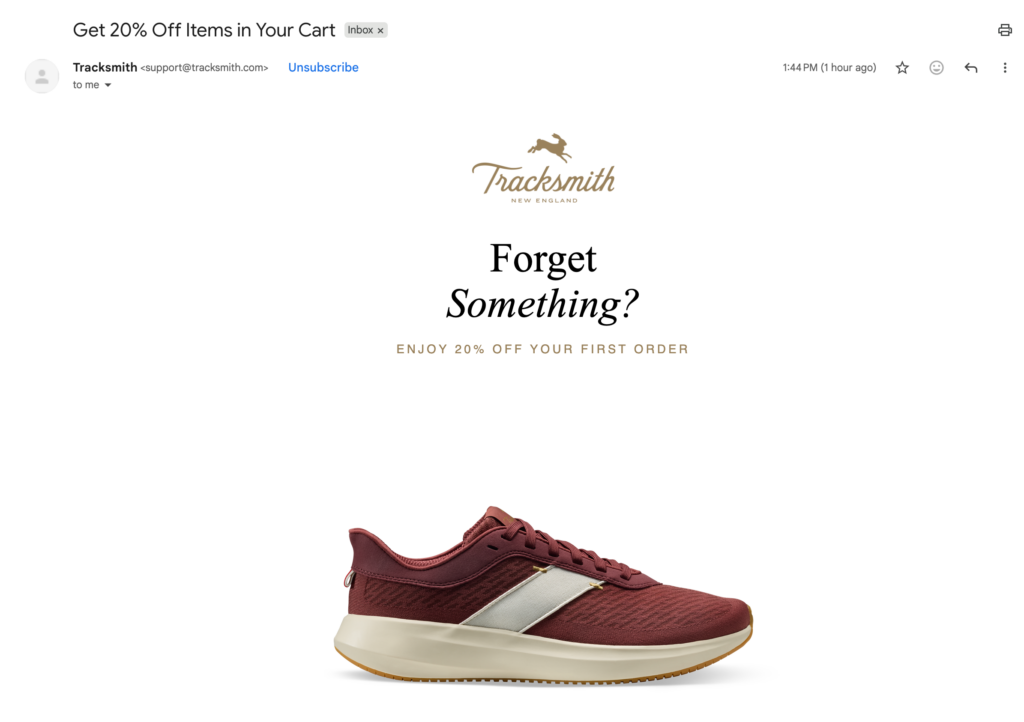
Timing is everything:
The first email should go out within 1 hour of abandonment. The customer is still in shopping mode, they might still have your tab open, and purchase intent is highest. Research shows the first email in a sequence generates the highest revenue per recipient ($10.76 on average) and sending within 1 hour can boost conversions by 20%.
Send your second email 24 hours after abandonment. This catches people who abandoned because they got distracted or needed time to think. Include social proof, address common objections, and potentially offer a small incentive.
The third email should arrive 48-72 hours later. This is your last shot—make it count with your strongest offer (if you're using one) or create genuine urgency ("items in your cart are selling fast").
What to include in each email:
Email 1 (1 hour): Keep it simple and helpful. Show images of abandoned items, include product names and prices, and make the CTA button prominent: "Complete Your Purchase" or "Return to Cart." Don't offer discounts yet—many customers will complete the purchase without them.
Email 2 (24 hours): Add social proof. Include customer reviews for the abandoned items, show how many people purchased recently, or display trust badges. Address common concerns: "Free shipping on orders over $X" or "30-day money-back guarantee."
Email 3 (48-72 hours): Create urgency (ethically). If stock is actually running low, mention it. If you're going to offer a discount, this is when to do it. Consider a limited-time offer: "Here's 10% off—expires in 24 hours."
Subject lines that work:
- "You left something behind" (simple, direct)
- "Still interested in [Product Name]?" (personal, specific)
- "Your cart is about to expire" (urgency, if true)
- "Is something wrong?" (caring, opens conversation)
Use exit-intent popups (carefully)
Exit-intent technology detects when a user's mouse movement suggests they're about to leave your site, triggering a last-second popup. When done well, these can recover 2-4% of abandoning visitors. When done poorly, they're annoying spam.
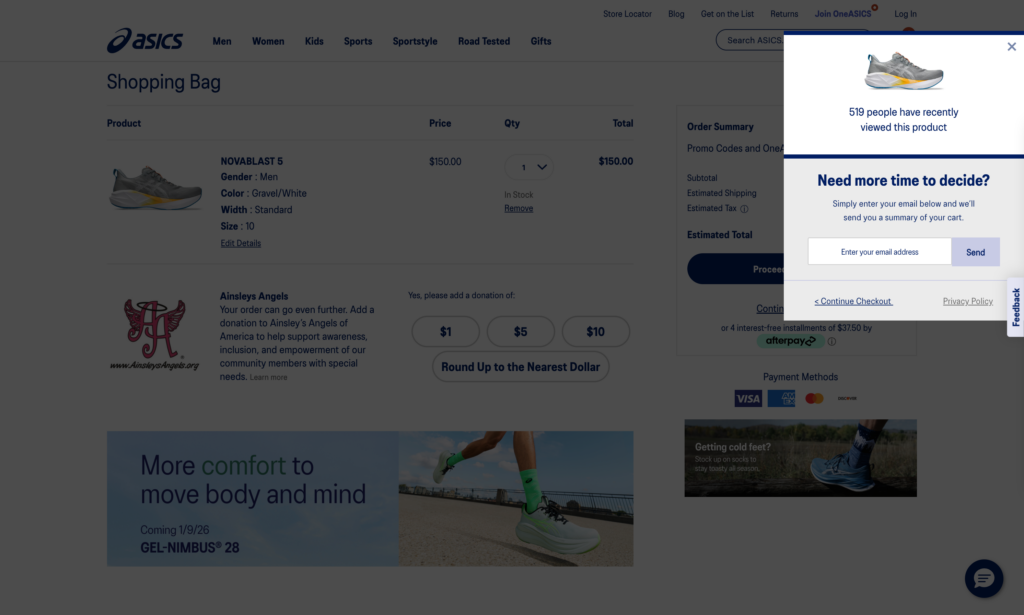
When exit-intent popups work:
At checkout. If someone's about to abandon the checkout page, that's your highest-value intervention point. A simple "Wait! Is something wrong?" popup can surface objections you can address.
On high-value product pages. If someone's viewing a $500 product and about to leave, an exit popup offering help ("Questions? Chat with us") or an incentive ("Join our list for 10% off") can work.
First-time visitors. For new visitors, an exit popup collecting emails ("Get 10% off your first order") builds your list even if they don't buy today.
When exit-intent popups don't work:
Don't trigger them on every single page—that's intrusive. Don't show them to the same visitor repeatedly. And don't make dismissing them difficult with tiny X buttons or fake close mechanisms.
Exit-intent popups average a 3-5% conversion rate, which is solid. But aggressive implementations can increase bounce rates and damage brand perception.
Best practices:
- Show once per session (don't retrigger if dismissed)
- Make the close button obvious
- Offer genuine value: discount, free shipping, helpful content
- Keep copy short: one clear benefit, one clear CTA
- Test different offers to see what resonates
Launch retargeting campaigns
Email recovery works great for customers who reached checkout (Shopify captured their email), but what about everyone else? That's where retargeting ads come in.
Retargeting shows ads to people who visited your store but didn't purchase, keeping your products in front of them as they browse Facebook, Instagram, Google, and other sites.
Google retargeting:
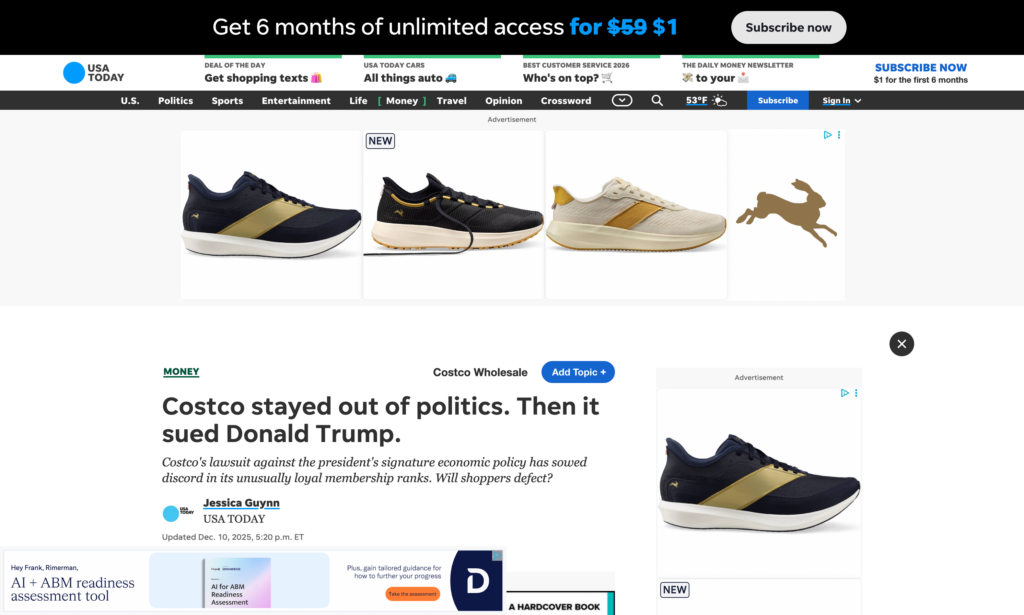
Google Ads remarketing works similarly but appears in Google search results, Gmail, YouTube, and across the Google Display Network. Display retargeting campaigns average a 0.7% click-through rate, which is 10x higher than standard display ads.
Set up Google Ads retargeting through the Google & YouTube app in Shopify.
Start with $10-20/day for retargeting. These are warm audiences, so costs per click are typically lower than cold traffic. Run retargeting campaigns for 30 days after someone visits—beyond that, intent drops significantly.
Be frequency-capped. Seeing your ad 2-3 times is reminder marketing. Seeing it 20 times is harassment. Set frequency caps at 3-5 impressions per person per week.
Facebook/Instagram retargeting:
Install the Facebook pixel on your Shopify store (Settings → Apps and sales channels → Facebook & Instagram). This tracks visitors and lets you create custom audiences.
Audience segments to create:
- All website visitors (past 30 days)
- Product page viewers
- Cart abandoners
- High-value browsers (viewed 3+ products)
Ad creative that works: Show the actual products they viewed with a clear offer: "Still interested?" or "Complete your order." Dynamic product ads automatically show the exact items someone looked at.
Add SMS cart recovery
SMS cart recovery is the new frontier. While email open rates have declined over the years, SMS messages have a 98% open rate and 90% of texts are read within 3 minutes.
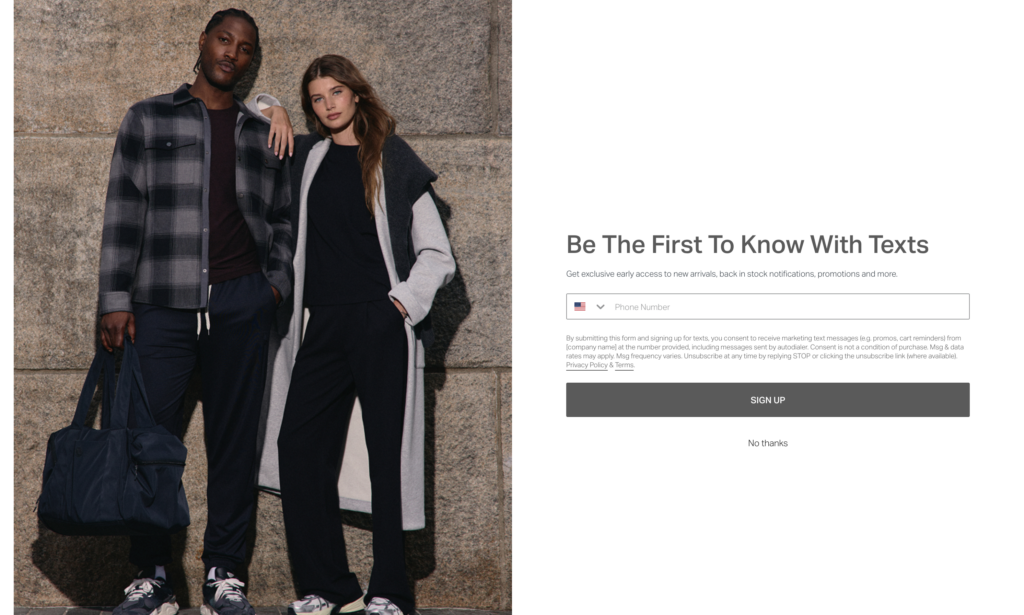
The challenge: you need customers' phone numbers, and they need to opt-in to receive marketing texts (legally required in the US via TCPA).
How to collect phone numbers:
- Offer a discount at checkout for SMS opt-in: "Get 10% off + order updates via text"
- Popup during cart abandonment: "Text me my cart for later"
- Post-purchase: "Want shipping updates via text?"
SMS cart recovery best practices:
Timing: Send the first SMS 3-6 hours after abandonment—quick enough to be relevant, but not so fast it feels aggressive.
Keep it concise: "Hi [Name]! You left [Product] in your cart. Complete your order here: [link]" That's it. SMS is about brevity.
Personalize: Use their name, reference the specific product, make it feel human.
Don't overdo it: One SMS reminder is usually enough. Two is the absolute maximum. More than that and you'll trigger unsubscribes and complaints.
SMS cart recovery messages have a 12-25% conversion rate—higher than email. But building your SMS list takes time since customers must explicitly opt-in.
Survey your cart abandoners
Want to know why people abandon carts? Ask them.
Adding a simple survey to your cart or checkout page can reveal friction points you'd never discover otherwise. You might think people are abandoning because of price, but the survey reveals they can't find information about international shipping.
Where to place surveys:
Exit-intent popup: "Before you go, mind telling us why you're leaving?" with multiple choice options:
- Shipping costs too high
- Just browsing / not ready to buy
- Found a better price elsewhere
- Concerns about security
- Need more time to think
- Other: [text field]
Abandoned cart email: "We noticed you didn't complete your purchase. Was there a problem?" This opens a dialogue and shows you care.
Post-purchase survey: Ask customers who did complete checkout: "Was there anything that almost stopped you from completing this purchase?" Their hesitations often mirror abandoners' reasons.
What to do with survey data:
If 40% of respondents say "shipping costs too high," you know you need to adjust shipping strategy or communicate costs earlier. If 30% say "just browsing," you might need stronger urgency or value proposition messaging. If 20% say "found better price elsewhere," you have a competitive pricing issue.
Track survey responses monthly and adjust your cart experience accordingly. This is invaluable qualitative data that analytics can't provide.
Try a progressive discount strategy
Here's where cart abandonment recovery gets strategic. Not every abandoner is equal—some need a 10% nudge, others won't buy even with 30% off. Progressive discounting adapts your offer based on behavior.
How progressive discounting works:
Email 1 (1 hour): No discount. Just a reminder with a clear CTA. About 40% of cart recovery revenue comes from emails with no incentive—these people were going to buy anyway, they just needed a reminder.
Email 2 (24 hours): Still no discount, but add value: highlight free shipping threshold, money-back guarantee, or customer reviews. Some customers need reassurance, not discounts.
Email 3 (48-72 hours): Offer a modest discount (10%) with a deadline: "Here's 10% off if you complete your order in the next 24 hours." This creates urgency and rewards the customer for considering your store.
Why progressive discounting works:
It maximizes margin by not giving away discounts to customers who would've purchased anyway. It segments customers by price sensitivity. And it prevents training customers to always wait for discounts before buying.
The risk: If you always send discount codes after abandonment, savvy customers will abandon carts intentionally to trigger the discount. To prevent this:
- Don't send discounts to every abandoner (maybe 60-70% of them)
- Vary the timing and discount amounts
- Occasionally send a "final reminder" with no discount after the discount email
A/B test your strategy:
Split your abandoners into two groups. Group A gets the progressive discount sequence. Group B gets reminders only with no discounts. Measure total recovery rate and revenue per recovery. You might find that aggressive discounting increases recovery rate but decreases overall revenue due to margin erosion.
The cart abandonment tech stack
Here's a typical cart abandonment recovery setup for a growing Shopify store:
Basic (Budget: $50-100/month):
- Shopify's built-in abandoned cart email (free)
- Privy for exit-intent popups ($24/month)
- Facebook pixel for retargeting (free to install, ad spend separate)
Intermediate (Budget: $200-300/month):
- Klaviyo for sophisticated email sequences ($60-150/month)
- OptiMonk for exit-intent + surveys ($29-99/month)
- Facebook + Google retargeting ($500-1000/month ad spend)
Advanced (Budget: $500+/month):
- Klaviyo + Attentive for integrated email/SMS
- Fairing for post-purchase attribution surveys
- Multi-channel retargeting across Facebook, Google, TikTok, Pinterest
Cart abandonment isn't the enemy—it's an opportunity. Every abandoned cart represents someone who was interested enough to take action. Your job is to understand why they left and make it easy for them to come back.
But remember the golden rule: don't be creepy or aggressive. One person's "helpful reminder" is another person's "stalker marketing." Respect unsubscribes, honor frequency preferences, and always provide value rather than just pestering people to buy.
The best cart abandonment strategy is fixing whatever caused the abandonment in the first place. Use surveys to identify friction, test solutions, and continuously improve your checkout experience. Recovery tactics are important, but prevention is better than cure.
Your checkout optimization action plan
You've now got 14 proven tactics to reduce cart abandonment and recover lost revenue. But reading about tactics and implementing them are two different things. Here's how to actually put this into practice.
Start here: The 48-hour quick wins
If you only have two days to work on checkout optimization, focus on these high-impact changes:
Day 1: Checkout Flow (2-3 hours)
- Enable guest checkout (Settings → Checkout → Customer contact method)
- Add Shop Pay, Apple Pay, Google Pay (Settings → Payments)
- Set up Shopify's default abandoned cart email (Settings → Notifications)
- Display shipping costs on cart page before checkout
Day 2: Trust & Recovery (2-3 hours)
- Add security badges to cart page
- Create exit-intent popup for cart page
- Set up Facebook pixel for retargeting
- Test your entire checkout on mobile
These six changes alone can reduce your abandonment rate by 10-15 percentage points and recover another 5-10% of abandoners through email.
The 30-day action plan
For stores serious about maximizing checkout conversions, here's your month-long roadmap:
Week 1: Baseline & Prevention
- Document current cart abandonment rate
- Enable express checkout options
- Ensure guest checkout is prominent
- Add trust badges throughout checkout
Week 2: Advanced Checkout
- Implement real-time shipping cost calculator on product pages
- Add progress indicators to multi-step checkout
- Enable multiple payment methods including BNPL
- Test checkout flow on 3+ mobile devices
Week 3: Recovery Systems
- Build 3-email abandoned cart sequence (1hr, 24hr, 72hr)
- Set up exit-intent popups with compelling offers
- Install and configure retargeting pixels (Facebook, Google)
- Create cart persistence for logged-in users
Week 4: Advanced Recovery
- Add SMS cart recovery for customers with phone numbers
- Set up "reasons for abandonment" survey
- Launch retargeting campaigns with $20/day budget
- Test progressive discount strategy (no discount → small discount)
Measure Progress: Track your cart abandonment rate weekly. A 5-10% improvement in 30 days is realistic. A 15-20% improvement over 90 days is achievable with consistent optimization.
Know your starting point
Not every tactic matters equally for every store. Here's how to prioritize based on your specific situation:
If your abandonment rate is 80%+: You have major checkout friction. Focus on checkout optimizations before worrying about recovery. Fix guest checkout, shipping transparency, and payment options first.
If your abandonment rate is 60-70%: You're in the normal range but have room to improve. Implement a balanced approach: 3-4 checkout optimizations plus email recovery at minimum.
If your abandonment rate is below 60%: You're doing well. Focus on advanced recovery tactics (SMS, retargeting, progressive discounts) to squeeze out additional revenue. Consider A/B testing different checkout layouts.
If you don't know your abandonment rate: Start there. Shopify Analytics → Reports → Abandoned checkouts. You can't improve what you don't measure.
Automation is your secret weapon
Here's the reality: manually managing checkout optimization is exhausting. You need systems that work 24/7 without your constant attention.
That's where automation becomes your competitive advantage:
- Abandoned cart emails that send automatically based on customer behavior
- SMS reminders triggered when high-value carts are abandoned
- Retargeting pixels that build audiences and show ads without manual intervention
- Exit-intent popups that appear at precisely the right moment
- Inventory alerts that notify customers when out-of-stock items are available again
MESA specializes in exactly this kind of ecommerce automation for Shopify. Our pre-built workflows handle abandoned cart recovery, post-purchase follow-ups, customer segmentation, and dozens of other conversion-supporting tasks—all without requiring you to write code or constantly monitor systems.
While you're optimizing your checkout experience, MESA handles the automation that ensures no abandoned cart falls through the cracks.
The truth about checkout optimization
Cart abandonment will never hit zero. Even Amazon, with the most optimized checkout experience in ecommerce history, loses 70%+ of carts. That's not a failure—it's reality.
Your goal isn't perfection. Your goal is progress:
- Reduce unnecessary friction that drives customers away
- Build trust at every step of the checkout process
- Recover the recoverable customers with smart follow-up
- Test, measure, and continuously improve
Every percentage point you reduce abandonment translates directly to revenue growth. A store doing $500K annually that improves from 70% to 60% abandonment adds $71,400 in annual revenue. That's real money that drops straight to your bottom line.
Take action today
The difference between stores that grow and stores that plateau isn't knowledge—it's execution. You now know exactly what to do. The question is: will you do it?
Your next step: Pick one tactic from the 48-Hour Quick Wins list and implement it today. Not this week, not when you have more time—today. Set a timer for 30 minutes and make one improvement.
That single change might recover $1,000 this month. $12,000 this year. And it compounds as you add more optimizations.
Your customers are ready to buy. Make it easy for them to complete that purchase.
Ready to automate your cart recovery? Explore MESA's abandoned cart automation workflows and start recovering revenue on autopilot.
Beyond checkout: Your complete CRO strategy
Start with strategy:
- Shopify Conversion Rate Optimization: Complete Strategy Guide
(New to CRO? Start here for the complete framework)
Explore related tactics:
Ready to scale?
- Shopify Automation for CRO: Scale Your Optimization Without More Work
(Automate these tactics to save time and increase consistency)
Frequently asked questions
What is the average cart abandonment rate for Shopify stores?
The average cart abandonment rate across all ecommerce is approximately 70%, meaning seven out of ten shoppers who add items to their cart leave without purchasing. Rates vary by industry: fashion/apparel sees 65-75%, electronics 70-80%, and health/beauty 60-70%. If your abandonment rate is below 60%, you're performing exceptionally well. Above 75% indicates significant checkout friction that needs addressing.
Why do customers abandon shopping carts?
The top reasons for cart abandonment are: unexpected costs like shipping or taxes (48% of abandoners), being forced to create an account (26%), complicated or lengthy checkout process (17%), lack of preferred payment methods (13%), security concerns about entering credit card information (19%), and website errors or crashes (13%). Most of these issues are fixable through checkout optimization.
How do I reduce cart abandonment on Shopify?
Reduce cart abandonment by: enabling express checkout options (Shop Pay, Apple Pay, Google Pay), making guest checkout the default, displaying shipping costs before checkout, offering multiple payment methods including buy-now-pay-later, showing security badges prominently, reducing checkout steps to the minimum, and ensuring your checkout works flawlessly on mobile devices. These changes can reduce abandonment by 10-20 percentage points.
What is the best abandoned cart email timing?
Send three emails at strategic intervals: Email 1 within 1 hour (captures 40-50% of all recoveries), Email 2 at 24 hours (adds social proof and addresses objections), and Email 3 at 48-72 hours (final reminder with urgency or discount if appropriate). This sequence recovers 10-15% of abandoned carts on average. Avoid sending discounts in the first email—many customers will purchase with just a reminder.
Should I offer guest checkout on Shopify?
Yes, absolutely. Forcing customers to create an account increases abandonment by 26-35%, while enabling guest checkout can boost conversions up to 45%. Make guest checkout the default, prominent option, and only offer account creation after purchase completion with an incentive like order tracking or exclusive discounts. Configure this in Settings → Checkout → Customer Contact Method.
How much revenue can cart recovery emails generate?
Cart recovery emails typically recover 10-15% of abandoned carts with an average open rate of 45% and click-through rate of 21%. For a store with 200 monthly cart abandoners and a $75 average order value, recovering 12% means 24 additional orders worth $1,800/month or $21,600/year. Email recovery has exceptional ROI, often 30:1 or better, making it one of the highest-impact tactics.
Do exit-intent popups reduce cart abandonment?
Exit-intent popups can recover 2-5% of abandoning visitors when implemented correctly. They work best on checkout pages where purchase intent is highest. Effective popups offer genuine value (discount, free shipping, help via chat) rather than generic "Wait! Don't leave" messages. Show them once per session maximum and make the close button obvious to avoid frustrating customers who've already decided to leave.