You've optimized your checkout. Your product pages convert better. Site speed is solid. Your store is running well.
But here's the problem: you're now manually sending abandoned cart emails, checking inventory levels, following up with VIP customers, requesting reviews, and trying to remember which customers need what. Every optimization you've implemented creates ongoing work that doesn't scale.
What if your store could optimize itself?
That's the promise of automation—not just saving time, but executing your conversion strategy consistently, perfectly, 24/7, without you. Retailers who implement intelligent automation see 20-30% improvements in operational efficiency and corresponding increases in customer satisfaction and conversion rates.
This article is about moving from manual optimization to automated optimization. You'll learn how to automate cart abandonment recovery, post-purchase workflows, customer segmentation, review collection, and operational tasks that directly impact conversion rates. Every tactic ties to workflows you can build today, without writing code.
The merchants who win aren't those who manually execute great ideas sometimes—they're the ones whose stores automatically execute great ideas every single time.
TL;DR: there's a template for that
Why automation is the next CRO frontier
You know abandoned cart emails work. Research shows they recover 10-15% of abandoners. But are you sending them consistently? At the perfect timing? With personalized content based on cart value and customer history?
Probably not. Because manual execution doesn't scale.
The manual CRO problem
Every optimization you implement creates work. You add a review collection process—now you need to remember to email customers 10 days after delivery. You decide VIP customers should get special treatment—now you need to manually identify them and remember to follow up. You know low-stock urgency drives sales—now you need to constantly monitor inventory and update messaging.
Manual processes have three fatal flaws:
They're inconsistent. You send abandoned cart emails on Tuesday but forget on Friday when you're busy. Some customers get great follow-up, others fall through the cracks. Inconsistency means you're leaving money on the table.
They don't scale. When you have 10 abandoned carts per week, manual follow-up is manageable. At 100 per week, it's overwhelming. At 500, it's impossible. Manual processes create a ceiling on your growth.
They're prone to human error. You meant to send that restock notification but got distracted. You forgot to tag that VIP customer's order. You didn't update the inventory alert threshold when the product became popular. Small mistakes compound into lost revenue.
Automation as a conversion multiplier
Automation doesn't replace optimization—it multiplies its effectiveness.
Consider abandoned cart recovery. Manually, you might recover 5-7% of abandoners (when you remember to follow up). With automation, you consistently recover 10-15% because:
- Emails send at optimal times (1 hour, 24 hours, 48 hours) automatically
- SMS follows email for high-value carts without you tracking which customers need what
- Content personalizes based on cart value, customer history, and product type
- Every single abandoner gets perfect follow-up, not just the ones you had time for
The same principle applies to every conversion tactic. Low-stock alerts are more effective when they trigger automatically when inventory hits 5 units. Review requests work better when sent at the optimal moment for each product type. Post-purchase upsells convert higher when they happen immediately after checkout, not 3 days later when you remember.
Businesses using marketing automation see an average 14.5% increase in sales productivity and a 12.2% reduction in marketing overhead. For ecommerce specifically, the impact is even higher—automated workflows can increase customer lifetime value by 30-50%.
What can (and should) be automated
Not everything should be automated—some things require human judgment and personal touch. But these conversion-critical processes absolutely should run on autopilot:
Cart abandonment recovery: Email and SMS sequences triggered by abandoned carts, segmented by cart value and customer type.
Post-purchase optimization: Upsells immediately after purchase, review requests at optimal timing, replenishment reminders for consumables, thank-you sequences that build loyalty.
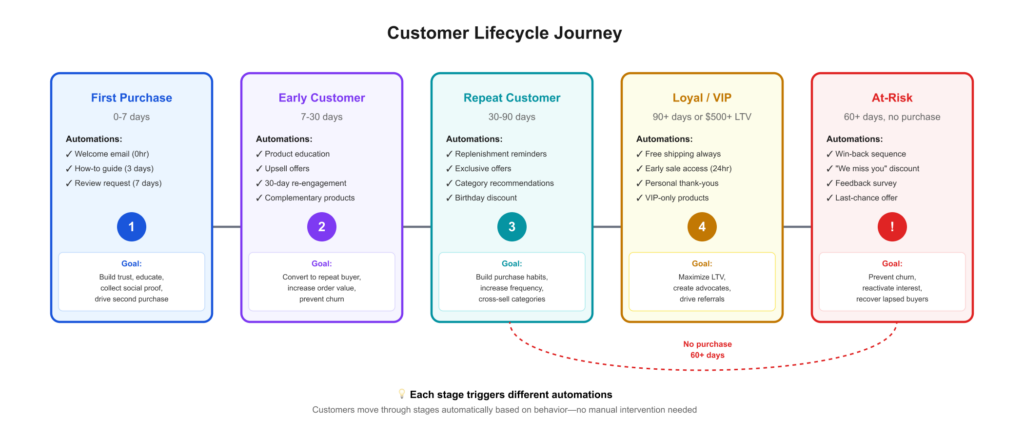
Customer lifecycle workflows: Welcome sequences for first-time buyers, re-engagement for customers who haven't purchased in 30+ days, VIP recognition and rewards, win-back campaigns for churned customers.
Personalization and segmentation: Automatically tagging customers based on behavior, serving different content to different segments, triggering specialized workflows based on purchase patterns.
Inventory and operations: Low-stock alerts to create urgency, restock notifications for waitlisted customers, vendor reorder triggers, customer service routing based on issue type.
The MESA advantage
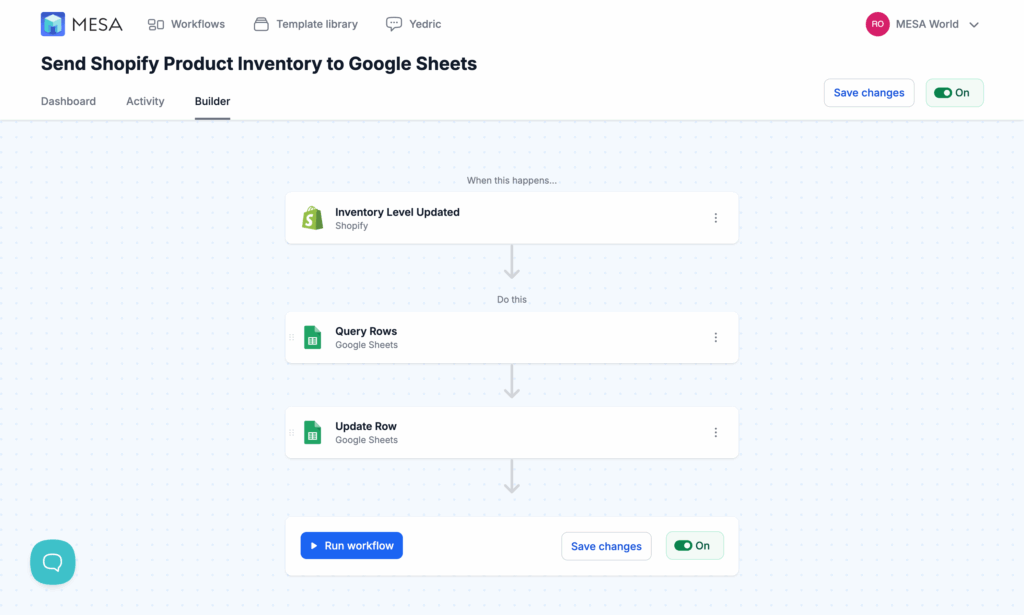
Generic automation tools like Zapier work across thousands of apps but aren't optimized for ecommerce. Shopify's built-in Flow is ecommerce-focused but limited in triggers and integrations. MESA sits in the sweet spot: built specifically for Shopify merchants, integrates with hundreds of ecommerce tools, and requires no coding to build sophisticated workflows.
MESA's visual workflow builder lets you create complex automation logic—if/then conditions, delays, multiple actions, cross-app integrations—without technical expertise. You can automate cart recovery that sends email via Klaviyo, SMS via Postscript, and a Slack notification to your sales team for carts over $500, all triggered by a single abandoned cart event.
Let's look at exactly how to automate the highest-impact conversion workflows.
Automate cart abandonment recovery
Seventy percent of shoppers abandon their carts. For most stores, that's hundreds of recovery opportunities every month. Manual follow-up is impossible at this scale, and timing is critical—emails sent within 1 hour convert 3x better than those sent at 24 hours.
Automation solves both problems: perfect timing and 100% coverage.
The automated recovery sequence
A complete automated cart recovery system has multiple touchpoints across channels:
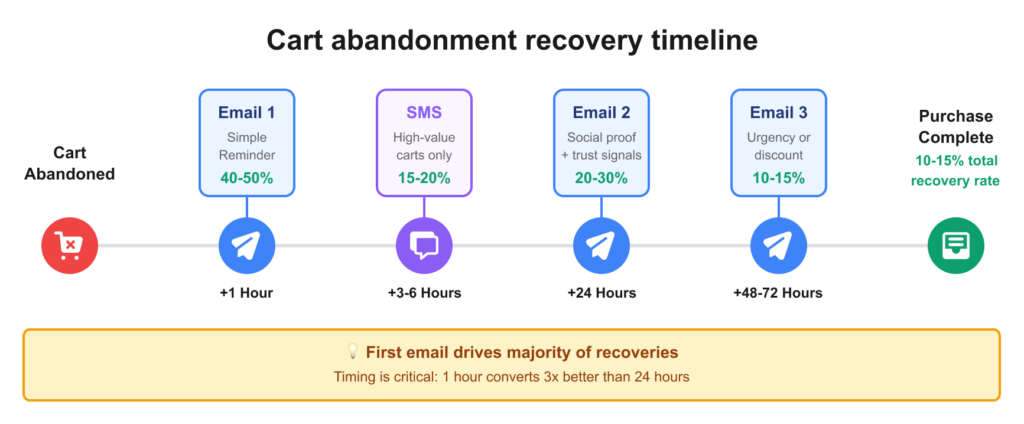
Email 1 (1 hour after abandonment): A simple reminder showing the exact products left behind, with a direct link back to cart. No discount yet—many customers just got distracted and will complete the purchase with a simple reminder. These emails see 40-50% open rates and typically drive the highest conversion in the sequence, recovering 4-6% of abandoners.
Email 2 (24 hours later): Add social proof and address common objections. Include customer reviews for abandoned products, highlight your return policy, showcase trust badges, and mention free shipping thresholds if applicable. This catches customers who needed reassurance about quality or reliability.
Email 3 (48-72 hours later): Create urgency or offer a modest incentive. "Items in your cart are selling fast" (if actually true) or "Here's 10% off to complete your order—expires in 24 hours." This is your last shot at recovery.
SMS recovery (3-6 hours after abandonment): For customers who provided phone numbers, send a short text: "Hi [Name]! You left [Product] in your cart. Complete your order here: [link]" SMS has a 98% open rate and converts 12-25% of recipients.
Exit-intent popup (real-time): Before abandonment even happens, trigger a popup when the customer's mouse moves toward closing the tab on your cart or checkout page. Offer help ("Questions? Chat with us"), remove friction ("Free shipping on all orders today"), or provide an incentive.
The key is that all of this happens automatically, with perfect timing, for every single abandoned cart.
Beyond basic abandoned cart emails
Sophisticated automation goes further than generic recovery sequences. You can create conditional logic that adapts to customer behavior and cart characteristics:
Segment by cart value. A $50 abandoned cart gets the standard email sequence. A $500 cart triggers an additional Slack notification to your sales team with customer details, suggesting a personal phone call. High-value customers deserve high-touch recovery.
Segment by customer type. First-time visitors get educational content ("New here? Here's what makes us different"). Returning customers who've purchased before get different messaging ("Welcome back! Your favorites are waiting"). VIP customers with multiple past purchases might skip the discount entirely and get express shipping instead.
Dynamic product content. Pull real-time data into recovery emails: current inventory levels ("Only 2 left!"), recent customer reviews posted since they abandoned, related products they might also like, price changes (rare, but "The item in your cart just went on sale" is incredibly effective).
Cross-channel coordination. If Email 1 opens but doesn't convert, automatically trigger SMS. If SMS doesn't convert, add the customer to a retargeting audience for Facebook/Instagram ads. If they click the retargeting ad but still don't purchase, escalate to a phone call for high-value carts.
Integration with your CRM and team. Sync abandoned cart data to your CRM (HubSpot, Salesforce, etc.) so your sales team has visibility. For B2B or high-ticket items, trigger a task for your sales rep to personally follow up. Send daily Slack summaries of recovered revenue vs. still-abandoned carts.
Building cart recovery workflows in MESA
MESA provides pre-built templates for abandoned cart recovery that you can customize:
Send abandoned cart email sequence
- Trigger: Daily Schedule
- Actions: Get abandoned Shopify checkouts
- Condition: Customer email exists
- Action: Send email (via Klaviyo or your email platform)
- Delay: 23 hours
- Action: Send second email with social proof
- Delay: 24 hours
- Action: Send final email with urgency/discount
Get Slack alerts for high-value abandoned carts
- Trigger: Daily Schedule
- Actions: Get abandoned Shopify checkouts
- Condition: Cart value > $500
- Action: Send Slack notification to sales channel
- Action: Create task in CRM for personal follow-up
- Action: Add customer to "High-Intent VIP" segment
Send SMS recovery message for mobile cart abandoners
- Trigger: Daily Schedule
- Actions: Get abandoned Shopify checkouts
- Condition: Customer has phone number
- Action: Send SMS (via Twilio or your own platform)
- Condition: If checkout doesn't convert
- Delay: 24 hours
- Action: Send follow-up SMS
The beauty of automation: once configured, these workflows run perfectly 24/7. You wake up to recovered orders you didn't manually touch.
Use these customizable templates:
Measurable impact
Let's calculate the value of automated cart recovery for a typical store:
Starting scenario:
- 300 abandoned carts per month
- $75 average cart value
- Manual recovery: 6% (18 recovered carts) = $1,350/month
- Time spent: 5 hours/week = 20 hours/month
After automation:
- Same 300 abandoned carts
- 12% recovery rate (perfect timing + consistency) = 36 recovered carts
- Revenue: $2,700/month (+$1,350)
- Time spent: 30 minutes/month (monitoring only)
That's an extra $16,200 annually, with 95% less time investment. And as your store grows to 500, 1,000, or 2,000 monthly abandoned carts, the automated system scales effortlessly while manual follow-up would collapse.
Post-purchase optimization: The overlooked CRO opportunity
Most merchants obsess over getting the first sale and ignore what happens after. That's backwards. Acquiring a new customer costs 5-25x more than selling to existing customers. Post-purchase is where you build customer lifetime value, generate reviews that boost conversion, and create repeat buyers.
The problem? Post-purchase optimization requires perfect timing and consistent execution—exactly what humans are bad at and automation excels at.
Automated review collection
Customer reviews increase product page conversions by 10-15% according to our earlier research. But manually requesting reviews is inconsistent and poorly timed.
The psychology of review timing: Ask too soon (3 days after delivery) and customers haven't used the product enough to have an opinion. Ask too late (30+ days) and they've forgotten about the purchase. The optimal timing varies by product type:
- Fast fashion / everyday apparel: 7-10 days
- Furniture or home goods: 21-30 days
- Electronics: 14-21 days
- Consumables (food, supplements): 10-14 days
- Books / entertainment: 7-14 days
Automation lets you customize timing per product category without manually tracking when to email each customer.
The automated review workflow:
- Customer completes purchase
- Wait [X days based on product type]
- Send email: "How's your [Product Name]? Share your experience"
- If no response after 3 days, send SMS reminder (for customers with phone numbers)
- If customer leaves review, send thank-you email with discount for next purchase
- If customer leaves 5-star review, request permission to use as testimonial
- Pull new reviews into product pages automatically (Judge.me, Loox, Yotpo integration)
Result: Instead of collecting 10-15 reviews per month through sporadic manual requests, automated workflows collect 50-100+ reviews consistently. More reviews = higher conversion rates on product pages = more first-time sales.
Use these customizable templates:
Post-purchase upsells and cross-sells
Traditional upselling happens before the purchase—adding friction to checkout. Post-purchase upselling happens after the customer has already bought, when psychological resistance is lowest and payment information is already captured.
Post-purchase upsells are remarkably effective. Product recommendations can drive 10-30% of total ecommerce revenue. Industry benchmarks show post-purchase offers convert at 4-10% on average, with well-optimized stores reaching 30% conversion—significantly higher than pre-purchase upsells which typically convert at 2-5%.
Post-purchase upsell types:
Order bump: Immediately after checkout completion, offer a complementary product at a discount. "Add this to your order for 20% off before we ship!" Works especially well for:
- Accessories (bought shoes → offer socks, insoles, shoe care kit)
- Consumables (bought coffee → offer filters, travel mug)
- Digital add-ons (bought course → offer workbook PDF)
Thank-you page offers: The confirmation page is prime real estate. Use it to showcase:
- Related products they might need
- Your bestsellers
- Products frequently bought together with what they just purchased
Follow-up sequence: 3-5 days after delivery, email suggesting complementary products based on what they bought. This feels like helpful recommendations, not aggressive selling.
Automation advantage: Manually offering post-purchase upsells is impossible. Automation can trigger different offers based on what was purchased, customer history, cart value, and product category. A first-time customer buying a $50 item gets a different offer than a VIP buying their 5th $200 order.
Use these customizable templates:
Replenishment and reorder automation
For consumable products—supplements, coffee, pet food, cosmetics, cleaning supplies—replenishment automation is a conversion goldmine.
The workflow:
- Customer purchases 30-day supply of product
- Automation triggers countdown: 30 days from purchase
- Day 25: Email reminder: "Running low on [Product]? Reorder now with one click"
- Day 30: Second reminder with slight urgency: "Time to restock your [Product]"
- Day 35: Final reminder with incentive: "Here's 10% off your reorder"
Subscription conversion: After the first manual purchase, offer a subscription option in the follow-up sequence. "Switch to subscription and save 15% + never run out." Customers who tried the product once and liked it are prime subscription candidates.
Advanced replenishment: Track customer purchase cadence. If someone typically reorders every 28 days, send their reminder on day 24, not day 25. If they haven't reordered by day 40 (when they usually reorder by day 30), trigger a win-back sequence. Automation can personalize timing to individual customer behavior.
Measurable impact: Stores using automated replenishment typically see 20-30% of customers convert to repeat buyers within 60 days, compared to 5-10% without automation.
Use these customizable templates:
Customer lifecycle automation
Different customers need different experiences. Automation lets you create sophisticated lifecycle workflows that adapt to where each customer is in their journey.
First purchase (Day 0-7):
- Welcome email sequence introducing your brand story
- Product education: how to use what they bought, tips for best results
- Expectations setting: when to expect delivery, what happens next
- Subtle cross-sell: products that complement their first purchase
30-day mark:
- For customers who haven't made a second purchase: re-engagement sequence
- Showcase different product categories
- Offer first-purchase discount reminder if they have one
- Ask for feedback: "How was your experience?"
60-day mark:
- Segment: active customers (2+ purchases) vs. at-risk (only one purchase)
- Active customers: VIP recognition, early access to new products, exclusive offers
- At-risk customers: Stronger re-engagement, "We miss you" messaging, special incentive
90+ days:
- Active repeat customers: Consider for VIP tier unlock
- Lapsed customers: Win-back campaign with compelling offer
- Track: Which customers churned? What was their last purchase? Can you prevent similar churn?
Use these customizable templates:
VIP customer workflows
Your top 10-20% of customers generate 50-70% of your revenue. They deserve automated VIP treatment.
Identifying VIPs automatically: Set criteria based on your business:
- 3+ purchases in the past 90 days
- $500+ lifetime value
- High average order value (2x your store average)
- Frequent engagement (opens emails, visits site regularly)
Automated VIP perks:
- Early access to sales (email 24 hours before public announcement)
- Free shipping automatically applied (no minimum threshold)
- Birthday discounts triggered on their birthday month
- Exclusive products or bundles not available to general customers
- Personal touches: handwritten thank-you note trigger, free gift with purchase
VIP workflow example:
- Customer hits VIP threshold (3 purchases, $500 LTV)
- Automatically tagged as "VIP" in Shopify
- Trigger Slack notification to team: "New VIP customer! [Name] just qualified"
- Send congratulations email with VIP perks explanation
- Add to VIP email segment for exclusive communications
- For future orders: automatically add free gift, expedite fulfillment, send founder thank-you email
The personal touch at scale: When a VIP places an order, trigger a Slack notification to your founder or team lead. They can send a personal thank-you text or email. This feels incredibly personal to the customer but takes the team member 30 seconds because automation flagged which orders deserve this attention.
Use these customizable templates:
The psychology of post-purchase timing
Post-purchase automation is more art than science because timing dramatically affects effectiveness.
The honeymoon period (0-48 hours): Customer is excited, engaged, and receptive. Perfect for:
- Thank you messaging
- Social media follow requests
- Loyalty program signups
- Immediate upsells (while excitement is high)
The usage period (3-14 days): Customer is actively using the product. Perfect for:
- Product education and tips
- Usage-based recommendations ("You might also need...")
- Review requests (once they've formed an opinion)
The consideration period (15-30 days): Initial excitement fades, customer considers whether to return. Perfect for:
- Re-engagement content
- Showcasing other products
- Asking for feedback ("How's everything going?")
The reorder window (30-60 days): For consumables, customer is running low. Perfect for:
- Replenishment reminders
- Subscription offers
- Bulk purchase discounts
Automation executes perfect timing consistently. You set the logic once, and every customer gets the optimal experience.
Use these customizable templates:
Personalization and segmentation at scale
Generic messaging converts generically. Personalized messaging converts 2-3x better according to Epsilon research. The problem: manual personalization doesn't scale beyond a handful of customers.
Automation makes sophisticated personalization possible for stores of any size.
Behavioral triggers
Automation can respond to customer behavior in real-time, triggering relevant actions based on what customers do (or don't do).
Browse abandonment (viewed but didn't add to cart):
- Customer views product 3+ times without adding to cart
- Trigger: Email highlighting customer reviews and key benefits
- Or: Retargeting ad pixel adds customer to custom audience
- Or: Live chat widget offers help ("Can I answer any questions about [Product]?")
Category interest without purchase:
- Customer browses "Running Shoes" category, views 5+ products, doesn't buy
- Trigger: Email next day showcasing bestselling running shoes
- Include: Buying guide, size chart, customer testimonials
- Timing: Strike while interest is fresh (within 24 hours)
Cart manipulation (added, removed, added again):
- This behavior signals uncertainty or comparison shopping
- Trigger: Live chat offer: "I noticed you're comparing options—can I help?"
- Or: Email with comparison chart or detailed FAQ
- Psychology: They're close to buying but need reassurance
High time on site, low conversion:
- Customer spends 10+ minutes on site, views 15+ pages, doesn't purchase
- Trigger: Exit-intent popup with survey: "What's stopping you from purchasing today?"
- Options: Price too high, unclear product information, shipping cost, comparing options, just browsing
- Use feedback to improve store and offer relevant solutions
Customer data enrichment
Automation can automatically tag and segment customers based on behavior, making future personalization more effective.
Behavioral tagging:
- Purchase frequency: first-time, second-time, repeat (3+), loyal (5+), VIP (10+)
- Product preferences: category interest (athletic wear, casual, formal), price sensitivity (only buys on sale vs. full-price buyer)
- Brand preference: specific brands they repeatedly purchase
- Engagement level: email opener (80%+ open rate), SMS responder, non-engaged (hasn't opened email in 90 days)
Using enriched data: Once customers are properly tagged, automation can serve personalized experiences:
- First-time buyers get education and brand story
- Repeat buyers get "welcome back" messaging and recently viewed products
- Sale shoppers get early sale notifications
- Full-price buyers get new arrival previews
- Non-engaged customers get win-back campaigns with compelling offers
Progressive profiling: Each interaction adds data. Over time, you build detailed customer profiles without manual work:
- First visit: Location, device type, traffic source
- First purchase: Product category, price point, payment method
- Second purchase: Purchase frequency, category preferences
- Email engagement: What subject lines work, optimal send time
- 6 months in: Complete behavioral profile enabling sophisticated personalization
Use these customizable templates:
Dynamic content based on segments
Different customers should see different content—not just in emails, but throughout their experience.
Email personalization:
- New visitors: Educational content, brand story, social proof ("Join 50,000+ happy customers")
- Returning visitors: "Welcome back!" + recently viewed products + new arrivals in categories they've browsed
- Past purchasers: Related products, "Complete your collection," replenishment reminders
- VIPs: Exclusive access messaging, premium product launches, "You're in our top 5% of customers"
Cross-channel consistency: Automation ensures the personalized experience extends across all touchpoints:
- Customer tagged as "athletic wear enthusiast" in Shopify
- Sees athletic wear recommendations on site
- Receives email about new athletic collections
- Gets added to "Athletic Interest" custom audience for Facebook ads
- Receives SMS about flash sale on athletic shoes
- All coordinated automatically based on single behavioral tag
Integration for sophisticated personalization
The real power of automation comes from connecting multiple tools to create seamless experiences.
Shopify + Klaviyo: Email personalization based on browse and purchase history. Klaviyo's flows can reference specific products viewed, categories browsed, and purchase timing to send perfectly relevant messages.
Shopify + Facebook Ads: Automatically create custom audiences for retargeting. Customers who viewed Product X but didn't buy get ads featuring Product X with reviews and social proof.
Shopify + SMS: Coordinate email and SMS so customers aren't overwhelmed. If email opens but doesn't convert, trigger SMS. If both don't convert, pause communications for 48 hours.
Shopify + Slack: Alert your team when specific customer segments need attention. VIP customer has a problem? Escalate immediately. High-value lead abandoned cart? Sales team gets notified for personal outreach.
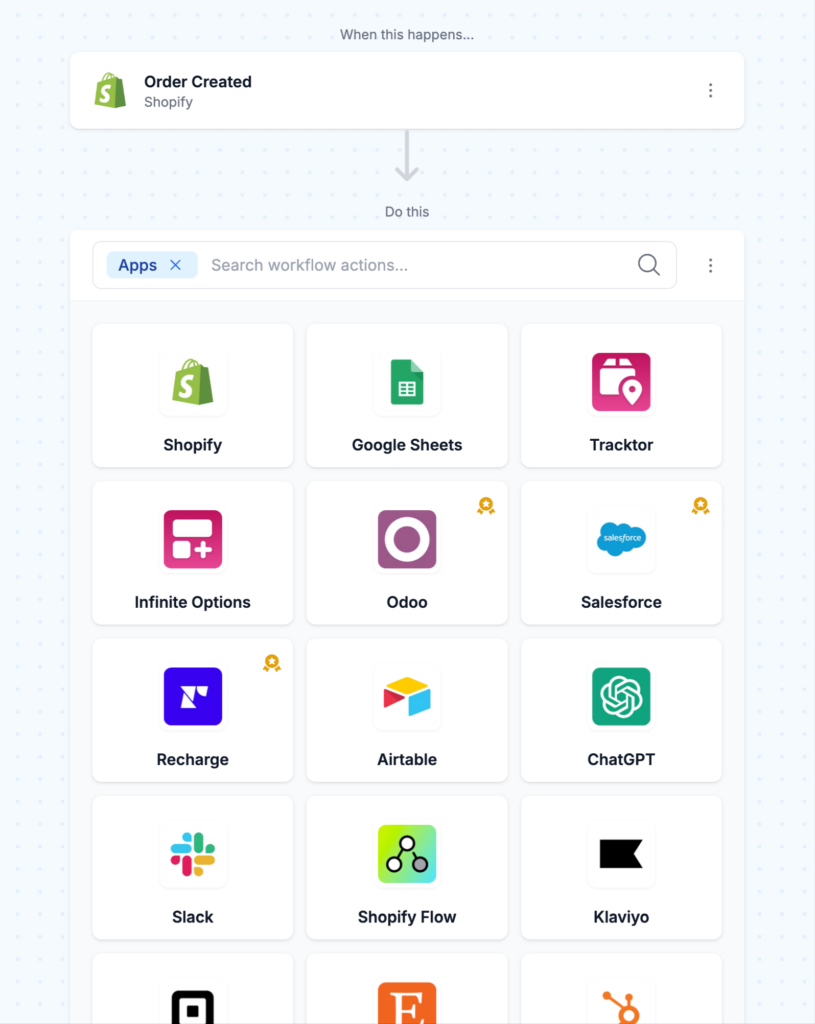
MESA's integration advantage: MESA connects 100+ apps without requiring custom API development. You can build workflows like:
- Customer makes third purchase →
- Tagged as "Loyal" in Shopify →
- Added to "Loyal Customers" segment in Klaviyo →
- Enrolled in VIP email sequence →
- Added to "Exclude from Discount Ads" audience in Google Ads →
- Team gets Slack notification
All of this happens instantly, automatically, without manual work.
Inventory and operations automation that improves conversion
Operational excellence directly impacts conversion rates. Out-of-stock products, slow customer service responses, and fulfillment errors all kill conversions. Automation keeps operations running smoothly, which keeps conversion rates high.
Low stock and restock alerts
Authentic scarcity creates urgency—but only if it's actually authentic. Automation ensures your scarcity messaging is always truthful and timely.
Low stock alerts (customer-facing):
- Automatically display "Only [X] left in stock!" when inventory drops below threshold
- Threshold varies by product: high-volume items might trigger at 20 units, specialty items at 5 units
- Remove message when inventory is replenished
Restock notifications:
- Customer tries to buy out-of-stock product
- Automation captures email via "Notify me when back in stock" form
- When inventory is replenished, automatically emails everyone on waitlist
- Subject line: "[Product Name] is back in stock!"
- Creates urgency: "We've restocked, but it won't last long based on demand"
Vendor and operations alerts:
- When inventory hits reorder point, automatically notify supplier via email
- Create purchase order or send to procurement system
- Alert team when popular product is trending toward stockout (before it's out)
- Prevents lost sales from stockouts that could have been avoided
Use these customizable templates:
Customer service automation
Fast, helpful responses improve conversion and customer lifetime value. Automation ensures no customer inquiry falls through the cracks.
Intelligent ticket routing:
- Customer submits support ticket → Automation reads keywords and routes appropriately
- "Where's my order?" → Fulfillment team
- "Product defect" → Quality team + tag order for potential replacement
- "VIP customer" tag → Escalate to senior support rep
- "Refund request" → Retention team (who can offer solutions before processing refund)
Auto-responses for common questions:
- "Where's my tracking number?" → Automation sends tracking link instantly
- "What's your return policy?" → Sends link to return policy + summary
- "Do you ship to [country]?" → Automated yes/no with shipping timeframes
- Customers get instant answers, support team handles only complex issues
Proactive support triggers:
- Order hasn't shipped within expected timeframe → Auto-email: "Your order is being prepared carefully, ships by [date]"
- Tracking shows delivery attempted but failed → Auto-email with redelivery instructions
- Tracking shows delivered but customer hasn't opened package (no review, no repeat visit) → Check-in email: "Did everything arrive as expected?"
Live chat automation for high-intent visitors:
- Customer on checkout page for 60+ seconds → Trigger chat widget: "Any questions before you complete your order?"
- Cart value over $200 + visitor returns to cart 3+ times → Proactive chat offer
- Customer clicks "shipping calculator" → Chat offers: "Need help with shipping options?"
- Psychology: Offering help at the moment of hesitation prevents abandonment
Use these customizable templates:
Order tagging and fulfillment optimization
Proper order tagging ensures smooth fulfillment, which leads to happy customers who leave good reviews and return to buy again.
Automated order tagging:
- VIP customer: Gets priority fulfillment, extra quality check, thank-you note
- First-time customer: Include welcome insert, product care instructions, discount for next purchase
- Gift order: Gift wrapping, gift message, omit invoice with pricing
- Fragile/special handling: Alert warehouse team, use specific packing materials
- Expedited shipping: Highlight for immediate processing
Fulfillment routing:
- Customer in California, you have warehouses in LA and NY → Route to LA automatically
- International order → Route to fulfillment partner specializing in international shipping
- Bulk order (10+ units) → Alert warehouse to prepare for large shipment
Packing slip personalization:
- VIP customers see: "Thank you for being a valued customer! Here's 15% off your next order: [CODE]"
- First-time buyers see: "Welcome to our community! Follow us @[handle] and tag us in your photos"
- Repeat customers see: "Welcome back! You're awesome. Enjoy [product]!"
- All automated based on customer tags
Use these customizable templates:
Data sync and performance monitoring
Automation can alert you when conversion rates drop or opportunities arise.
Automated reporting:
- Every Monday morning: Email with week-over-week performance (revenue, conversion rate, AOV, top products)
- Every month: Google Sheet automatically updated with detailed metrics for trend analysis
- Real-time: When key metric hits threshold (conversion rate drops 20%, cart abandonment spikes), Slack alert triggers
Performance alerts:
- Conversion rate drops significantly → Alert team to investigate (site broken? Shipping costs changed? Competitor running sale?)
- Product page bounce rate spikes → Indicates possible issue (bad review posted? Image broken? Price error?)
- Specific product sells out faster than expected → Trigger restock alert, increase paid ad budget for similar products
Opportunity identification:
- Product trending (views up 200% week-over-week) → Increase inventory, feature in emails, boost on homepage
- Customer segment showing high engagement → Create targeted campaign
- Traffic spike from specific source → Investigate what's driving it, optimize landing page for that source
Operational automation isn't flashy, but it's the foundation that enables everything else. Fast fulfillment, responsive support, accurate inventory—these create the baseline experience that allows your other conversion tactics to work.
Use these customizable templates:
Common automation mistakes (and how to avoid them)
Automation is powerful, but it's not "set it and forget it." These common mistakes can turn helpful automation into annoying spam or missed opportunities.
Mistake 1: Over-automating communication
The problem: Customer receives 5 automated emails in 24 hours (abandoned cart + review request + new product launch + general newsletter + birthday discount). They feel spammed, not valued.
The solution: Implement suppression rules—if customer received email about X, wait Y days before sending about Z. Most email platforms (Klaviyo, Omnisend) have this built-in.
Best practices:
- Limit to 3-4 automated emails per week maximum per customer
- Coordinate across channels: don't send email and SMS simultaneously
- Prioritize: abandoned cart email trumps general newsletter
- Give customers control: easy unsubscribe, preference center for communication frequency
Balance: Automation should feel helpful ("They remembered my preferences!"), not robotic ("They're blasting me constantly").
Mistake 2: Set it and forget It
The problem: You built workflows 6 months ago. Email open rates have dropped from 35% to 18%, but you haven't noticed. Conversion rates from the workflow have declined. The messaging feels stale.
The solution: Monthly automation audits. Review performance of each workflow:
- Open rate, click rate, conversion rate
- Revenue generated vs. last month
- Unsubscribe rate (if increasing, messaging is off)
- Compare to benchmarks for your industry
Update checklist:
- Refresh email creative quarterly (new images, updated copy)
- Test different subject lines
- Adjust timing if performance has shifted
- Seasonal updates: Holiday messaging in December, back-to-school in August
Set calendar reminders: First Monday of each month = automation performance review (30 minutes).
Mistake 3: No fallback for edge cases
The problem: Your automation handles 95% of scenarios perfectly. But 5% of customers have unique situations—their issue doesn't fit the automated workflow, and they get stuck in an unhelpful loop.
The solution: Always build in human escalation paths:
- If customer replies to automated email, route to human immediately (don't send another automated response)
- If customer contacts support twice about same issue, escalate to manager
- If automated flow doesn't solve problem after 3 attempts, offer phone call or live chat
- Monitor for customers stuck in loops (same automated action triggered 3+ times for one customer)
Red flags to watch:
- Customer receives same automated email multiple times
- Automation triggers for closed or canceled orders
- Customer actively engaged but not converting (needs human touch)
Mistake 4: Ignoring mobile experience
The problem: Your beautifully designed automated emails look perfect on desktop but are unreadable on mobile. 70% of email opens happen on mobile devices—if it doesn't work there, it doesn't work.
The solution: Test everything on mobile first.
- Use single-column layouts (stack elements vertically)
- Large, tappable buttons (minimum 44px height)
- Readable font sizes (14px minimum for body text)
- Hero images that scale properly
- Short subject lines (40 characters or less show fully on mobile)
Testing routine: Before activating any automated email, send test to yourself and view on iPhone and Android device. If it's hard to read or buttons are hard to tap, redesign.
Mistake 5: Poor segmentation (everyone gets everything)
The problem: Your automated abandoned cart email offers 10% off. But some customers would have completed purchase without discount—you just gave away margin unnecessarily. Other customers need 20% to convert—your 10% offer isn't compelling enough.
The solution: Segment automated communications based on customer data:
- Cart value: $500+ carts don't need discounts, offer expedited shipping instead
- Customer type: Repeat customers get appreciation messaging, first-time visitors get brand education
- Browsing behavior: Viewed luxury items → emphasize quality. Viewed sale section → price-focused messaging
- Past behavior: Customers who previously used discount codes get offers. Full-price buyers don't need them.
Progressive discounting: Start with no discount (40% will convert anyway), then offer 10% to non-converters, finally 15-20% to still-non-converters. Don't lead with your biggest discount.
Mistake 6: Not tracking ROI
The problem: You're running 10 automated workflows but have no idea which generate revenue and which waste resources. You keep paying for automation tools without knowing if they're profitable.
The solution: Track revenue attributed to each workflow:
- Abandoned cart sequence: Orders that came through cart recovery links
- Post-purchase upsells: Revenue from thank-you page and follow-up offers
- Review collection: Calculate value of reviews (conversion rate lift × attributed revenue)
- Replenishment: Reorders that came through automated reminders
ROI calculation:
- Automation tool costs: $150/month
- Revenue from automated workflows: $5,000/month
- ROI: 33:1 (every dollar spent returns $33)
Monthly review: Which workflows have highest ROI? Double down on those. Which have low/negative ROI? Fix or eliminate them.
If you can't measure it, you can't optimize it. Good automation includes tracking from the start.
Your automation CRO action plan
Here's your 90-day roadmap to automate conversion optimization, prioritized by impact.
Month 1: Foundation (3 core workflows)
Week 1: Cart abandonment recovery
- 3-email sequence: 1hr, 24hr, 48hr after abandonment
- SMS for high-value carts ($150+) at 3-6 hours
- Expected: 10-12% recovery rate
Week 2: Review collection
- Automated review requests 7-30 days post-delivery (timing by product type)
- Follow-up reminder after 3 days if no review
- Expected: 3-5x more reviews collected
Week 3: Post-purchase engagement
- Welcome sequence for first-time customers (3 emails over 7 days)
- 30-day re-engagement for non-repeat buyers
- Thank-you upsell offer
- Expected: 15-20% increase in repeat purchases
Week 4: Track results
- Revenue from cart recovery, reviews collected, repeat purchase rate
- Month 1 target: $2,000-5,000 additional revenue (for $50K-100K/month stores)
Month 2: Customer lifecycle workflows
- Week 1: Automatic customer segmentation (First-Time, Repeat, Loyal, VIP, At-Risk tags)
- Week 2: VIP workflows (free shipping, early access, birthday discounts, personal thank-yous)
- Week 3: Replenishment reminders for consumables + win-back sequences for lapsed customers
- Week 4: Operational automation (low stock alerts, restock notifications, service routing, team alerts)
Month 3: Personalization & Cross-channel
- Weeks 1-2: Behavioral triggers (browse abandonment, category interest, price sensitivity)
- Weeks 3-4: Cross-channel coordination (email → SMS → retargeting sequences)
- Results: 20-30% increase in customer lifetime value, scalable system for growth
Start today
Each workflow amplifies the others. More reviews increase conversion. Higher conversion creates more customers for lifecycle workflows. Better retention increases customer lifetime value, making acquisition more profitable.
Don't wait for perfect. Pick one Week 1 workflow and implement it this afternoon:
- Cart abandonment if you have steady traffic
- Review collection if you need more social proof
- Post-purchase sequence if you have customers but low repeat rate
Two hours of setup today generates revenue every single day afterward. That's the power of automation.
Build your foundation, then automate everything
This article assumed you've already implemented the conversion fundamentals. If you haven't, start here:
Master the basics first:
- Shopify Conversion Rate Optimization: Complete Strategy Guide
- Shopify Checkout Optimization: 14 Tactics to Reduce Cart Abandonment
- Shopify Product Page Optimization: Convert Browsers Into Buyers
- Shopify Site Speed & Navigation: Technical CRO Fundamentals
- Shopify Average Order Value: Proven Strategies to Increase AOV
Once you've optimized your store manually, automation multiplies those results.
Ready to automate your CRO?
MESA specializes in ecommerce automation for Shopify merchants. Our visual workflow builder lets you create sophisticated automation—from simple abandoned cart recovery to complex multi-channel customer lifecycles—without writing code.
Explore MESA's pre-built templates:
- Abandoned cart recovery (email + SMS + team notifications)
- Post-purchase upsells and thank-you sequences
- Review collection and social proof automation
- Customer segmentation and VIP workflows
- Inventory alerts and restock notifications
- Cross-app integrations (Klaviyo, Facebook Ads, Slack, and 100+ more)
Start your free trial and change your manual optimization into automated revenue generation.
Your competitors are executing CRO manually, inconsistently, and at limited scale. You'll be executing perfectly, consistently, 24/7, automatically.
That's your competitive advantage.
Frequently asked questions
What is Shopify automation for conversion optimization?
Shopify automation for CRO uses workflows to execute conversion tactics consistently without manual work. Instead of manually sending abandoned cart emails, requesting reviews, or following up with customers, automated systems trigger these actions based on customer behavior—cart abandonment, purchase completion, browsing patterns, or time delays. According to Nucleus Research, marketing automation drives a 14.5% increase in sales productivity and 12.2% reduction in overhead. Automation ensures perfect timing and 100% coverage, recovering carts at optimal moments and engaging every customer with personalized workflows 24/7.
Why should I automate my Shopify store instead of doing it manually?
Manual execution doesn't scale and is inconsistent. You might send abandoned cart emails on Tuesday but forget Friday when busy, leaving money on the table. Automation provides perfect timing—emails sent 1 hour after abandonment convert 3x better than 24 hours later. It ensures 100% coverage as your store grows from 10 to 500 abandoned carts weekly. Automated workflows free your time for strategy while executing flawlessly. For example, automated cart recovery consistently recovers 10-15% of abandoners versus 5-7% with sporadic manual follow-up.
What can I automate on my Shopify store?
You can automate cart abandonment recovery (email and SMS sequences), post-purchase workflows (upsells, review requests, thank-you emails), customer lifecycle management (welcome sequences, re-engagement, VIP recognition), replenishment reminders for consumables, customer segmentation and tagging, inventory alerts (low stock warnings, restock notifications), customer service routing, order tagging and fulfillment, and personalization based on browsing behavior. The most impactful starting points are cart recovery, review collection, and post-purchase engagement—these deliver immediate ROI with minimal setup time.
How does automated cart abandonment recovery work?
Automated cart recovery triggers multi-channel sequences when customers abandon carts. Email 1 sends within 1 hour (simple reminder with cart contents), Email 2 at 24 hours (adds social proof and trust signals), Email 3 at 48-72 hours (creates urgency or offers incentive). SMS recovery sends 3-6 hours after abandonment for high-value carts. Exit-intent popups trigger in real-time before abandonment. According to Klaviyo data, the first email recovers 40-50% of all recovered carts. Automation personalizes messaging by cart value, customer type, and product category, recovering 10-15% of abandoned carts consistently.
What is post-purchase automation and why does it matter?
Post-purchase automation engages customers after they buy to drive reviews, repeat purchases, and customer lifetime value. Automated workflows request reviews 7-14 days post-delivery (timing varies by product type), send post-purchase upsells immediately after checkout when buying mindset is highest, trigger replenishment reminders for consumables, and build loyalty through welcome sequences and VIP recognition. According to Bain & Company, acquiring new customers costs 5-25x more than selling to existing customers. Post-purchase automation increases repeat purchase rates 15-20% and generates 3-5x more reviews than manual requests.
How much does Shopify automation increase revenue?
Impact varies by implementation, but typical results include: automated cart recovery adds $2,000-5,000 monthly for stores doing $50K-100K/month by recovering 10-15% of abandoners, post-purchase upsells increase average order value 10-20%, automated review collection boosts product page conversions 10-15% by building social proof, and customer lifecycle automation increases lifetime value 30-50% through better retention. Conservative estimate: a $100K/month store implementing comprehensive automation sees $10,000-20,000 additional monthly revenue within 90 days. The compound effect grows as workflows interact—more reviews drive higher conversion which creates more customers to automate.
What's the difference between MESA and other automation tools?
MESA is built specifically for Shopify ecommerce, unlike generic tools like Zapier that work across thousands of apps without ecommerce optimization. MESA connects 200+ ecommerce-specific apps (Klaviyo, Postscript, Judge.me, Google Ads) with pre-built templates for cart recovery, review collection, and customer lifecycle workflows. Unlike Shopify Flow which has limited triggers and integrations, MESA provides sophisticated conditional logic, cross-app workflows, and no-code visual builder. For example, MESA can trigger abandoned cart email via Klaviyo, SMS via Postscript, and Slack notification to sales team from one cart abandonment event—no coding required.
How long does it take to set up Shopify automation?
Basic cart abandonment recovery takes 2 hours to set up—configure 3-email sequence with optimal timing and you're recovering 10% of abandoned carts immediately. Review collection automation takes 1.5 hours using apps like Judge.me with automated timing based on product type. Post-purchase engagement workflows take 2 hours for welcome sequence and thank-you emails. Month 1 foundation (cart recovery, reviews, basic post-purchase) requires 6-8 total hours but generates ongoing revenue 24/7. Advanced workflows like VIP treatment and personalization take 4-6 hours monthly to refine. Unlike manual work that never ends, automation setup is one-time effort with continuous returns.
What are common automation mistakes to avoid?
Over-automating communication is the biggest mistake—sending 5 automated emails in 24 hours feels spammy, not helpful. Implement suppression rules limiting customers to 3-4 emails weekly. "Set it and forget it" causes outdated workflows—review performance monthly and refresh content quarterly. Not building human escalation for edge cases leaves 5% of customers stuck in unhelpful loops—if customers reply to automated emails, route to humans immediately. Poor mobile experience ruins 70% of email opens—test all automated emails on mobile devices first. Not tracking ROI means you can't optimize—measure revenue generated per workflow monthly.
Can I automate customer service on Shopify?
Yes, partially. Automate routing (VIP tickets escalate to senior reps), auto-responses for common questions ("Where's my tracking?" gets instant tracking link), proactive support triggers (order delay sends update before customer asks), and live chat for high-intent visitors (cart abandoners get "Can I help?" offers). However, complex issues require human judgment—build escalation paths where automated systems recognize their limits and route to humans. According to Gartner Research, customers will manage 85% of relationships without humans, but the 15% requiring personal touch is critical for satisfaction and retention.