Recharge already knows, days in advance, exactly which subscribers are about to be charged, for how much, and for which products. Klaviyo is where your subscribers read their email. Getting the first fact into the second is what turns a surprise card charge into a renewal reminder the customer can act on: skip, swap, update an address, or simply expect the box.
A merchant asked us this through the chat on getmesa.com: how do I send upcoming Recharge subscription charges to Klaviyo? This guide covers both answers. One is the integration Recharge ships, and the other is a short MESA workflow for when you need control over what Klaviyo receives.
TL;DR: there's a template for that
What Recharge sends before a charge
Every Recharge subscription renewal starts as a queued charge with a scheduled date. A few days before that date, Recharge announces the charge through its charge/upcoming webhook. Recharge's developer docs describe the timing like this:
"This will trigger X days before upcoming charge is scheduled. The default is 3 days before."Recharge developer docs
The notice carries everything a reminder email needs: the customer's email, the scheduled date (scheduled_at), the line items with title, quantity and price, the subtotal, shipping lines and total, and the shipping address. You can change how many days ahead it fires in Recharge's notification settings, under the upcoming order email.
Option 1: Recharge's native Klaviyo integration
If all you want is a standard renewal reminder, start with what Recharge already provides. Its Klaviyo integration sends Recharge metrics into Klaviyo, including an upcoming order metric you can use as a flow trigger, and Recharge publishes pre-built Klaviyo flows that use it. Connect the integration, turn on the upcoming order flow, and turn off Recharge's own upcoming charge email so customers don't get two.
The native integration decides the metric name, the data it carries and when it arrives. That's where it stops fitting some stores:
- You want segments, not only a flow. A one-off event can start a flow, but a profile property such as "Next Charge Date" lets you build a segment of everyone renewing this week, exclude them from a promo campaign, or show the date in any email.
- You only want some charges to count. One product line gets a reminder, a different one doesn't, or prepaid shipments shouldn't look like payment reminders.
- You want your own event and properties. A stable custom event name, the exact fields your email template uses, and the charge total as the event's value so revenue reporting lines up.
- You're already using Klaviyo with a different Recharge setup and don't want to switch integrations to get one more event.
For any of those, build the hand-off yourself with MESA.
Option 2: Send upcoming charges to Klaviyo with MESA
The workflow is four steps, all stock triggers and actions in MESA's Recharge and Klaviyo connectors plus the built-in Filter.
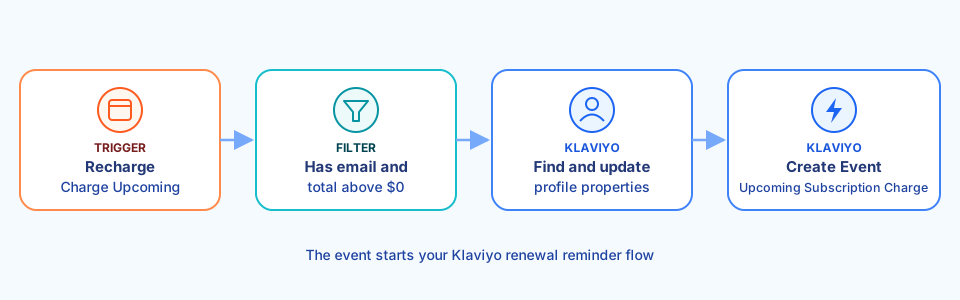
1. Recharge: Charge Upcoming
Start with Recharge's Charge Upcoming trigger. It runs on the same notice described above, so it follows whatever days-before setting your store uses. Change the setting in Recharge and the workflow moves with it.
2. Filter: keep charges worth reminding about
Add a Filter that continues only when the charge has a customer email and its total price is greater than 0. That keeps $0 prepaid shipments from producing a "you're about to be charged" email. This is also where you narrow the workflow, for example to charges whose line items include one product title or SKU.
3. Klaviyo: find and update the profile
Klaviyo's Update Profile action works on a profile ID, so first add Get List of Profiles, filtered to the charge's email. Then update that profile with three custom properties:
- Next Charge Date: the charge's
scheduled_at - Next Charge Total: the charge's
total_price - Next Charge Products: the line item titles, joined with commas
These are what make segmenting possible. A segment of profiles whose Next Charge Date is in the next 7 days is your "renewing soon" audience for any campaign.
4. Klaviyo: Create Event
Finish with Create Event. Use a metric name such as Upcoming Subscription Charge, identify the profile by the charge's email, and add the scheduled date, total, and each line item's title, quantity and price as event properties. Klaviyo's Create Event API requires a metric name, at least one profile identifier and a properties object, and it creates the profile if one doesn't exist yet, which covers a subscriber the previous step couldn't find.
Two settings worth getting right:
- Value: set it to the charge total so Klaviyo can report on the revenue tied to the flow.
- Unique ID: use the Recharge charge ID. Klaviyo records only the first event with the same unique ID for the same profile and metric, so a repeated notice for one charge won't send a second reminder.
Skip writing it from scratch with the template below: MESA's assistant builds the four steps for you, ready to connect to your accounts.
Build the renewal reminder flow in Klaviyo
Once the workflow has run for one real charge, the Upcoming Subscription Charge metric appears in Klaviyo and you can pick it as a flow trigger. A useful first version:
- Trigger: Upcoming Subscription Charge.
- Email, sent right away: the renewal date, the products and the total from the event's properties, plus clear links to the Recharge customer portal to skip, swap or update an address.
- Optional SMS: a one-line reminder the day before, if you collect SMS consent in Klaviyo.
Lead with the self-service actions. The customers who would otherwise email support after the charge, asking to skip or change an address, are the ones this email is for. Our guide to ecommerce subscriptions covers why a reminder before billing cuts that support load, alongside dunning and win-back flows.
If you send this from your own flow, turn off the duplicate reminder elsewhere: either Recharge's built-in upcoming charge email or the native integration's upcoming order flow.
Keep Recharge and Klaviyo data in step
A reminder is only as good as the data behind it. If customers update their shipping address in Shopify and Recharge still has the old one, the reminder shows the wrong destination. The fix is another small workflow: update the Recharge address whenever a Shopify customer changes theirs.
For more ways to feed Klaviyo the data its own Shopify sync doesn't cover, see 10 Klaviyo and Shopify automation workflows.
FAQs
How many days before a charge does Recharge send the upcoming notice?
Three days by default. You can change it in Recharge's notification settings for the upcoming order email, and a MESA workflow on the Charge Upcoming trigger follows the same setting.
Do I need MESA if I already use Recharge's Klaviyo integration?
Not for a basic reminder. Use the workflow when you want profile properties you can segment on, a custom event with your own fields, or a filter on which charges trigger a reminder.
Will a prepaid subscription trigger a payment reminder?
Not with the filter in step 2, which skips charges with a total of 0. Remove that condition if you want to remind prepaid subscribers that a box is on its way.
What happens if a customer skips the charge after the reminder?
The reminder has already gone out, which is the point: it gave them the chance to skip. If you keep the Next Charge Date property, add a second workflow on Recharge's Subscription Skipped trigger that clears or updates it, so your "renewing soon" segment stays accurate.