A restaurant operator came through the chat widget on this site twice in about a month — twenty messages the first time, eleven the second — and the two questions that actually mattered were each one line long. The first: "can each shopify collection have their own driver under direct account assigned." The second: "can you set all items to 0 in inventory ... since they can be hidden on the collection leaving colletion info open."
Underneath both is one store. Several menus, each one a Shopify collection. Zapiet Eats handling pickup and delivery scheduling at checkout. Uber Direct doing the actual driving. And a split-shift, Tuesday-to-Sunday service pattern, which means a menu has to switch itself on at open and off at close without anyone logging into the Shopify admin to do it.
Almost all of that is buildable today. One piece of it is not buildable the way it was asked, and it is worth being straight about which piece before you start wiring anything up.
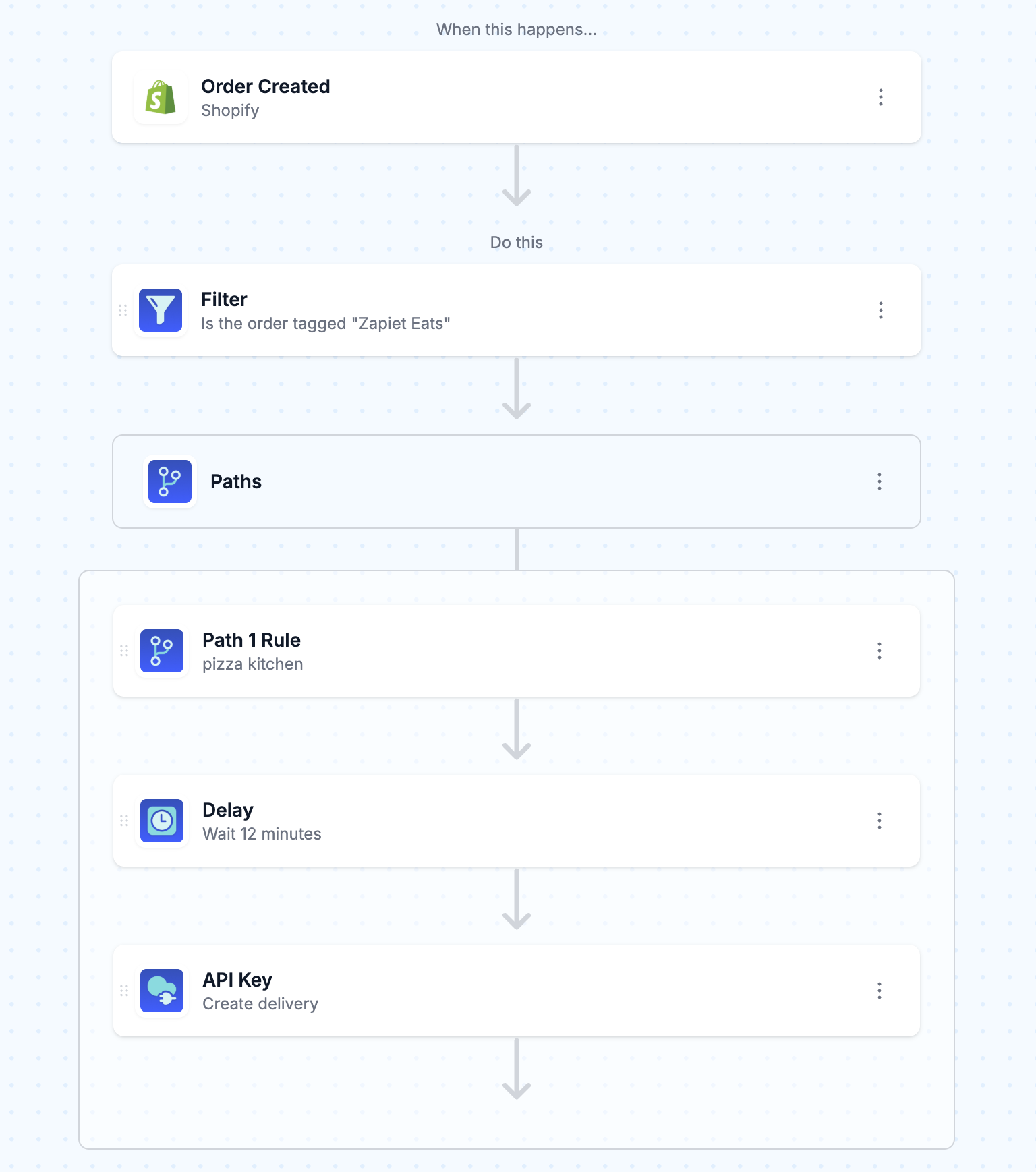
TL;DR: there's a template for that
The stack, and which part is MESA's job
Four things are in play, and they each own a different slice:
- Zapiet Eats owns the customer-facing part — delivery zones, time slots, and whether the restaurant accepts the order at all. It writes the result onto the Shopify order as tags.
- Shopify owns the order record, the products, the collections, and the inventory numbers.
- Uber Direct owns the courier network and the actual delivery.
- MESA owns the middle: reading the tag Zapiet Eats left behind, working out which menu the order belongs to, waiting for the kitchen, and calling Uber Direct.
MESA has no Zapiet Eats connector and no Uber Direct connector, and neither is a problem here. Zapiet Eats writes into Shopify, so you read its output through the Shopify connector you already have. Uber Direct is a plain REST API, so you reach it with the built-in API tool. Nothing about this build requires a native integration that does not exist.
The driver question, answered honestly
"Can each Shopify collection have their own driver under the Direct account assigned?" No — and not because of a MESA limitation. Uber Direct does not let a merchant hand-pick a courier at all:
"Once your application invokes Uber's Create Delivery endpoint, a dedicated Uber courier will be dispatched to collect the order from the store and deliver it to the customer."Uber Developers
Uber assigns the courier from its own network, per delivery. There is no field for "send Marco again."
What you can vary per collection is everything on your side of the request, and in practice that covers what the merchant was really after:
- A different pickup address. If the pizza menu comes out of one kitchen and the bakery menu out of a counter two blocks away, those are two different
pickup_addressvalues on two different delivery requests. - A different prep time. A twelve-minute pizza and a twenty-five-minute tasting box should not summon a courier at the same moment.
- A different set of pickup instructions and contact details.
pickup_name,pickup_phone_number, and the manifest all get set per branch. - A different Uber Direct customer account entirely, if the menus are billed separately — the account ID is part of the URL you call, so a branch can simply call a different one.
So the mental model to build against is a per-collection dispatch profile, not a per-collection driver. That is a smaller idea than the original question, and it turns out to solve the same operational problem.
Reading the Zapiet Eats tag off the order
Zapiet Eats stamps its orders on the way through. Its delivery settings include a tag field that applies to every delivery order, plus optional automatic tags carrying the delivery date, time, and day of week. One detail in its docs will cost you a debugging afternoon if you skim past it:
"Tags are case-sensitive. That means that 'Local Delivery' and 'local delivery' are different tags."Zapiet Eats Support
Copy the tag out of the Zapiet Eats settings screen rather than typing it from memory into your MESA Filter, and your first test order will behave.
The bigger design decision is when to dispatch. Zapiet Eats can accept orders automatically or hold them for a human to accept, delay, or reject, and a rejected order is refunded and cancelled in Shopify. If you are running manual acceptance and you dispatch on Order Created, you will occasionally pay for a courier to collect an order the kitchen just turned down. Two ways out: trigger on Order Updated and filter on whatever tag or attribute your acceptance step writes, or put MESA's Approval step in front of the dispatch so a person confirms before a courier is called. Either is better than discovering the problem on a Friday night.
Working out which collection the order belongs to
Here is the part nobody expects. A Shopify order tells you the products and variants that were bought. It does not tell you which collections those products sit in. So "route by collection" needs one extra hop.
The cheap, reliable version is to mirror the collection onto the product as a tag — kitchen-pizza, kitchen-bakery — and read that tag in the workflow with a Retrieve Product step on the order's first line item. Product tags travel with the product, they are visible in the admin when something misroutes, and they are trivially bulk-editable. If you already tag products for other reasons, our guide to Shopify tags at scale covers the bulk-apply and auto-tag mechanics.
The alternative is to pull the collection's membership with the Shopify Get List of Collection Products action and match the order's product IDs against it in a Custom Code step. That keeps the collection as the single source of truth, which is philosophically nicer, and it costs you an extra API call plus a code step on every single order. For a restaurant doing hundreds of orders a night, the tag mirror wins.
One caveat either way: an order can contain items from two menus. Decide up front whether that is one delivery from one kitchen or two deliveries from two, because the workflow behaves differently depending on the answer — see the next section.
Branching with Paths, and the two-kitchen order
MESA's Paths tool is what splits the workflow after the tag check: one path per menu, each with its own rule. Paths differ from Filter in a way that matters enormously here:
"If multiple Path conditions are true, the workflow follows each path."MESA Docs, Paths
An order with a pizza and a loaf of sourdough satisfies both path rules, so both branches run, and you get two Uber Direct deliveries billed to you for one order. For a genuinely two-kitchen operation that is correct — the food is in two buildings and one courier cannot collect from both. For a single-kitchen store with menus split only for merchandising reasons, it is a duplicate charge, and you want a Filter chain or a single path with an ordered priority rule instead of parallel paths.
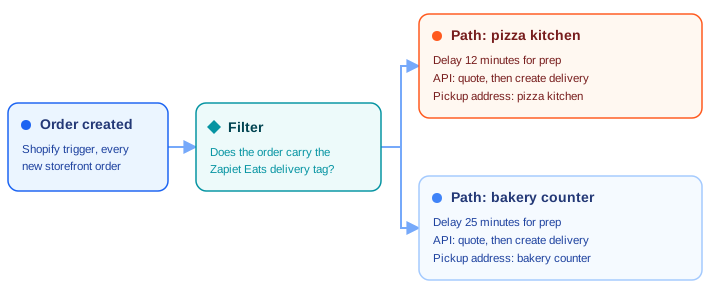
Rename each path in its settings menu — "Pizza kitchen," "Bakery counter" — before you build the second one. Two paths called Path 1 and Path 2 are readable today and unreadable in three months. If routing rules are new territory, Order Routing 101 walks through the same branching problem in a multi-vendor and 3PL context.
Calling Uber Direct from the API tool
Uber Direct is a two-call sequence: get a quote, then create the delivery against that quote. Before either, you need a token.
- Get an access token.
POST https://auth.uber.com/oauth/v2/tokenwithContent-Type: application/x-www-form-urlencoded, yourclient_idandclient_secret,grant_type=client_credentials, andscope=eats.deliveries. - Create a quote.
POST https://api.uber.com/v1/customers/<your_customer_id>/delivery_quoteswith the pickup and dropoff addresses. This is where you find out the fee and whether Uber will even take the job. - Create the delivery.
POST https://api.uber.com/v1/customers/<your_customer_id>/deliveries, passing the quote ID along withpickup_name,pickup_address,pickup_phone_number, the matchingdropoff_fields, andmanifest_itemsdescribing what the courier is carrying.
Your Customer ID, Client ID, and Client secret all come from the Developer tab in the Management section of the Uber Direct dashboard. Uber's getting-started guide has the exact request shapes.
In MESA, each of those is an API step. Set Method to POST and paste the URL, then open More Options for Content Type, Request Body, and Headers. The API tool ships four authentication modes — No Authentication, API Key, OAuth 2.0, and Basic Auth — and for Uber Direct the practical setup is a token step followed by steps that pass Authorization: Bearer plus the token variable as a header. Values from earlier steps drop into any field, and dot notation reaches nested response data, so the quote ID from step two lands in step three's body without a code step in between.
Turn on debug logging for the first few runs. The response bodies are how you learn which fields Uber is actually rejecting, and guessing at that from an error code is miserable.
Holding the dispatch back for kitchen prep
Calling a courier the instant an order is paid produces a driver standing in a restaurant watching a pizza. A Delay step in each path fixes it: a number and a unit — Minute(s), Hour(s), Day(s), Week(s), or Month(s) — sitting between the path rule and the API call.
Two constraints worth knowing before you pick a number. The minimum delay depends on your plan, starting at 15 minutes on Flex and dropping to 1 minute on higher plans, so a genuinely fast menu may need a plan that supports it. And the delay is measured from when the step runs, not from a clock time — you are saying "twelve minutes from now," not "at 6:40pm."
Separately, Zapiet Eats has its own estimate-delivery-time setting, defaulting to 20 minutes, which shifts the earliest slot a customer can choose at checkout. That is the customer-facing promise; the MESA Delay is the operational reality. Set them from the same conversation with the kitchen rather than tuning them independently.
Opening and closing a menu on a schedule
Now the second question: keeping a collection page live and readable while nothing on it can be bought. The merchant's instinct — set every item to 0 — is the right one, and it needs a place to remember what the numbers were.
Store each variant's normal count in a variant metafield, something like mesa.par_level. Then run two Schedule-triggered workflows per service window:
- Open. Read the metafield with Retrieve Product Variant Metafield, then Set Inventory Level by Variant back to that number.
- Close. Set Inventory Level by Variant to 0.
A Tuesday-to-Sunday split shift means four of these — open and close for the lunch window, open and close for the dinner window. Schedule triggers run as Recurring or One time, and the timezone comes from your Shopify store's own timezone setting, so a restaurant does not have to do UTC arithmetic to open at 10:45.
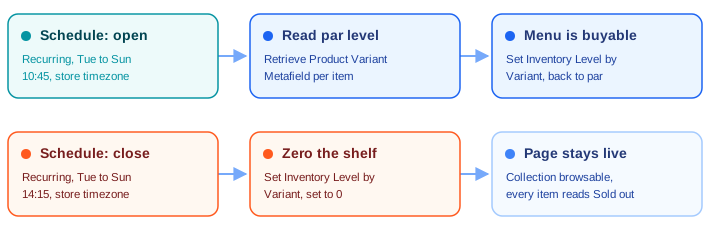
Metafield-driven scheduling is a broadly useful pattern beyond restaurant hours — scheduling collection updates with metafield dates uses the same idea for seasonal merchandising.
The setting that will quietly undo all of this
Shopify has a built-in way to hide out-of-stock products, and it does exactly the opposite of what this build wants:
"When you hide out of stock products, they're removed from your collections and won't be displayed to your customers."Shopify Help Center
That behavior comes from adding an Inventory stock is greater than 0 condition to an automated collection. If your menu collections carry that condition, zeroing inventory at close does not leave a browsable menu with sold-out items — it empties the collection page entirely. The whole point of the merchant's question was to keep the page readable.
So: use manual collections for menus, or automated collections without that condition. Check it explicitly, because it is a popular tip that gets pasted into stores years before anyone builds scheduled closing hours on top.
The other setting to check sits on the variants themselves. Continue selling when out of stock must be off, or a zeroed item stays purchasable and you have automated nothing. It also only behaves predictably when the location doing the fulfilling is the one you are zeroing, which matters if the restaurant runs more than one Shopify location.
Before you turn it on
Three things to settle while this is still in test mode:
- Run it against real addresses in Uber's test mode first. The quote call tells you whether an address is serviceable at all, and a delivery zone drawn in Zapiet Eats does not automatically match Uber Direct's coverage. Two different maps.
- Decide what happens when Uber refuses. An unserviceable address, a closed courier market, or a declined quote needs a path of its own — tag the order, ping the kitchen's Slack channel, and let a human deal with it. Silence is the worst failure mode.
- Count your tasks. Every action step that runs counts against your monthly task volume, and a dispatched order here is several steps: a product lookup, a token call, a quote, a delivery. Multiply by a busy Saturday and check that against your plan's included tasks before the first weekend, not after.
None of the pieces in this build are exotic. What makes it feel hard is that the interesting logic lives between four systems that each only know their own part — which is exactly the shape of problem worth automating, and exactly the shape nobody sells a one-click app for.
FAQs
Can I assign a specific Uber Direct driver to a Shopify collection?
No. Uber Direct dispatches a courier from its own network for each delivery, and there is no API field for requesting a named driver. What you can set per collection is the pickup address, the pickup contact details, the prep delay before dispatch, the manifest, and even a separate Uber Direct customer account — which covers most of the reasons merchants ask the question.
Does MESA have a native Uber Direct or Zapiet Eats connector?
Neither app has a dedicated connector, and neither needs one. Zapiet Eats writes tags and attributes onto the Shopify order, so you read its output through the Shopify connector. Uber Direct is a standard REST API reachable from MESA's built-in API tool, with OAuth 2.0 client-credentials auth.
How does MESA know which collection an order came from?
It doesn't, directly — a Shopify order payload carries products and variants, not collection membership. Mirror the collection onto the product as a tag and read it with a Retrieve Product step, or pull the collection's contents with Get List of Collection Products and match IDs in a Custom Code step. The tag mirror is cheaper per order and easier to debug in the admin.
What happens if one order contains items from two menus?
With a Paths step, both matching branches run, which means two Uber Direct deliveries for one order. That is correct if the menus really are two kitchens and wrong if they are one kitchen split for merchandising. If it's the latter, use a Filter chain or a single prioritized rule instead of parallel paths.
Will setting inventory to zero hide my collection page?
Only if the collection is an automated collection carrying the "Inventory stock is greater than 0" condition, which removes out-of-stock products from collections. Drop that condition — or use a manual collection — and the page stays live with every item reading Sold out, as long as "Continue selling when out of stock" is off on the variants.
