
If you sell prints, mockups, or anything else where the product stays the same and only the artwork changes, you already know this chore. You build one good Etsy listing — the title you tested, the description you rewrote four times, the tag list, the shipping profile — and then you rebuild it thirty more times, changing nothing but the photos.
A seller put it to our chat widget in exactly those terms: "I need you to create multiple listing using the same listing but change the photos only." That is a completely reasonable thing to want, and Etsy's own tooling gets you about a third of the way there. The rest is a MESA workflow: read the source listing, create a draft from its fields, push the new photo set onto that draft, then publish it. This post walks through that build, the order the steps have to run in, and the parts that quietly cost you money if you skip them.
TL;DR: there's a template for that
Where Etsy's Copy button stops being enough
Etsy has a copy function in Shop Manager, and for two or three duplicates it is the right tool — it opens a new listing form pre-filled from an existing one, you swap the photos, you publish. Nobody needs automation for that.
It stops working at volume for one boring reason: it is one listing, one browser tab, one human at a time. A print-on-demand shop launching a twenty-design drop is doing twenty rounds of the same clicking, and each round is a fresh chance to paste the wrong tag list or forget the shop section. The part that never gets faster is the photos — the one thing that is actually different each time still gets swapped in by hand, file by file.
There is also a real cost to getting it wrong, because every one of those duplicates is a paid listing. Etsy is blunt about the price:
"List your first item for just $0.20—you only pay transaction, payment processing, and offsite advertising fees when you make a sale."Etsy, Sell on Etsy
Twenty cents is nothing until it is thirty listings a week, each one renewing on its own clock — Etsy's API describes the auto-renew setting as one that "renews a listing for four months upon expiration." A workflow that accidentally publishes duplicates you did not want is a workflow that bills you for them.
The workflow at a glance
The build is five steps, and the order matters more than it looks. MESA's Etsy connector exposes each Etsy API operation as its own step, so this maps almost one-to-one onto Etsy's own listing endpoints.
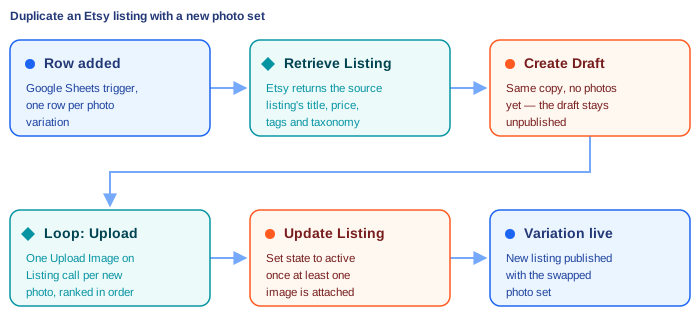
The trigger is a spreadsheet on purpose. One row per variation is the simplest interface a shop owner can hand to a VA or a designer: paste the source listing ID, paste the photo URLs, add whatever suffix belongs in the title. Add a row, get a listing. If you would rather drive it from something else, the last section covers two other triggers that fit the same five steps.
Building it step by step
1. Start from a row in a spreadsheet
Use the Google Sheets "Row Created" trigger and give the sheet one column per decision the workflow has to make. A workable minimum:
- source_listing_id — the Etsy listing you are cloning.
- title_suffix — what makes this variation distinct, e.g. the design or colorway name.
- photo_urls — a comma-separated list of direct image URLs, in the order you want them to appear.
- quantity and sku — anything that should not simply inherit from the source.
Those photo URLs have to be reachable by machine, not just by you. A Google Drive or Dropbox share link that renders a preview page is not an image file; a direct link to the file itself is. This is the single most common reason a first run fails.
2. Retrieve the source listing
Add Etsy's "Retrieve Listing" step and point it at the source_listing_id from the trigger. This is what saves you from re-typing anything: the response carries the title, description, price, tags, materials, taxonomy ID, shipping profile ID, and the who-made/when-made values that Etsy requires on every listing.
Read it once in a test run and look at what comes back before you build step three. If the source listing has variations, note that they live in a separate inventory record, not in this response — more on that below.
3. Create the draft listing
Etsy's "Create Draft Listing" step is where the clone actually happens. Etsy requires quantity, title, description, price, who_made, when_made and taxonomy_id on every draft, plus shipping_profile_id for physical listings — see the createDraftListing reference. Map every one of those from step two's output, then override only what changes:
- title — the source title plus the
title_suffixfrom the sheet. - tags — usually inherited as-is, though a variation-specific tag or two is worth adding.
- shop_section_id — inherit it, or set it per row if the drop lives in its own section.
Note what this step does not do: it creates a draft with no images. That is intentional, and it is why the photo step comes next rather than earlier.
4. Loop the new photos onto the draft
Add MESA's Loop tool over the photo URLs from the trigger row, and put Etsy's "Upload Image on Listing" step inside it. Each pass sends one image to the draft's listing ID.
Two fields on that step are worth setting deliberately. rank controls where the photo sits in the listing — rank 1 is the main image buyers see in search results, so pass the loop index rather than letting everything land in an arbitrary order. alt_text takes up to 500 characters and is a free accessibility and SEO win most sellers skip; if your sheet has a description column, feed it here. Etsy caps a listing at 20 images, so keep the photo set inside that.
One thing you cannot do is point Etsy at an existing photo on another live listing and have it copy across. The API's listing_image_id parameter looks like it should do that, but its scope is narrower:
"You can assign a previously deleted image to a listing using the deleted image's image ID in the listing_image_id parameter."Etsy Open API v3 reference
So if five of your six photos are shared across every variation — the size chart, the packaging shot, the studio scene — they get uploaded again on each new listing. Keep that shared set at stable URLs and include them in every row's photo_urls.
5. Publish the draft
Finish with Etsy's "Update Listing" step, setting state to active. This is the step that makes the listing real and charges the listing fee, and Etsy will refuse it if the draft is still empty:
"Setting a draft listing to active will also publish the listing on etsy.com and requires that the listing have an image set."Etsy Open API v3 reference
That sentence is the whole reason for the step order. Create, then upload, then activate — move activation earlier and every run fails.
It is worth adding a sixth step that nobody thinks of until the first messy run: a Google Sheets "Update Row" action writing the new listing ID and a "done" flag back to the row that started it. Now the spreadsheet is a record of what shipped, and a half-finished batch is obvious at a glance instead of being reconstructed from Etsy's listing list.
The parts that trip people up
Three things account for most of the support conversations about this build.
Variations do not come along for the ride. A draft listing created this way carries a single price and quantity. If your source listing has size or color variations, they live in Etsy's separate inventory record, and rebuilding them takes an "Update Listing Inventory" step after the draft exists. For a shop whose variants are the whole product, budget for that extra step rather than discovering it after twenty half-built listings.
Etsy's triggers poll; they do not fire instantly. If you swap the spreadsheet trigger for an Etsy one, MESA checks Etsy on a schedule rather than being pushed to. As MESA's Etsy docs put it, workflows with Etsy triggers "will run on a polling system," so a new listing may sit for the length of your polling interval before anything happens. Nothing is broken; it just is not instant.
Rate limits are per application, not per shop. A thirty-row batch fires several Etsy calls per row, and image uploads are the heaviest of them. Etsy publishes a per-second and per-day quota that you can look up for your own app in its rate limits documentation. If you are pasting in a hundred rows at once, add a short Delay step inside the loop rather than finding the ceiling the hard way.
And one judgment call that is not technical at all: thirty listings that differ only in photos will compete with each other in Etsy search. Automation makes it trivially easy to flood your own shop with near-identical listings, which mostly splits your own traffic. The variations worth publishing are ones a buyer would search for differently — a distinct design, a distinct colorway, a distinct occasion — with the title and tags to match. If the only difference is that you have another photo of the same thing, that photo belongs on the original listing.
Variations on the same build
The five steps do not change; only what starts them does.
Trigger from Etsy itself. Etsy's "Active Listing Created" trigger lets a new listing in your shop automatically spawn its variations — useful when a design series always ships in the same four colorways. Pair it with a filter on a tag like auto-variants so it only fires on the listings you meant it to.
Trigger from a form. MESA's built-in Form tool gives you a small internal page where a designer submits a source listing ID and photo links, which is friendlier than a spreadsheet for occasional one-offs.
Trigger on a schedule. A Schedule step plus Google Sheets' "Query Rows" action lets you queue a whole drop in a sheet and release it in controlled batches instead of all at once — which also keeps you well under those rate limits.
If this is your first build of this kind, it is worth reading through the broader set of Etsy workflows MESA can run first, since the listing steps here are the same ones behind most Etsy automations. And if the titles and descriptions for each variation are themselves a bottleneck, an AI step can draft them as part of the same workflow — we walk through that pattern in how to have AI write an Etsy listing.
FAQs
Can MESA duplicate an Etsy listing without changing anything?
Yes — skip the title suffix and pass the same photo URLs, and you get a straight copy. It is rarely what you want, though, since identical listings compete against each other in Etsy search. The useful version of this workflow changes at least the photos and the title.
Do the new photos have to be hosted somewhere public?
They have to be reachable at a direct URL that returns the image file itself. Google Drive, Dropbox, S3, or your own CDN all work as long as you use the direct file link rather than a share page. Files sitting only on your laptop cannot be used.
Will this copy the source listing's size and color variations?
No. Etsy's draft-creation step sets one price and one quantity. Variations live in a separate inventory record and need an "Update Listing Inventory" step after the draft is created.
How much does running this cost on Etsy's side?
Each listing the workflow publishes is a normal Etsy listing: $0.20 to list, and Etsy's auto-renew setting renews it for four months at a time when it expires. The automation does not change Etsy's fees — it just makes it much easier to create a lot of listings quickly, which is worth keeping in mind before you paste in a hundred spreadsheet rows.
Can the same workflow update an existing listing's photos instead?
Yes. Point "Upload Image on Listing" at an existing listing ID and set overwrite to true with the rank you want replaced, and skip the draft-creation step entirely. That variant is useful for seasonal refreshes where the listings already exist.
