🤖 ✨ May brought the future to MESA! We're thrilled to introduce MESA's new AI assistant, ready to transform how you build workflows. Plus, we've supercharged the entire platform with AI-powered suggestions and smarter automation tools that'll have you wondering how you ever worked without them.
Ready to see what's possible when AI meets automation? Let's dive in:
💬 Meet MESA's AI assistant
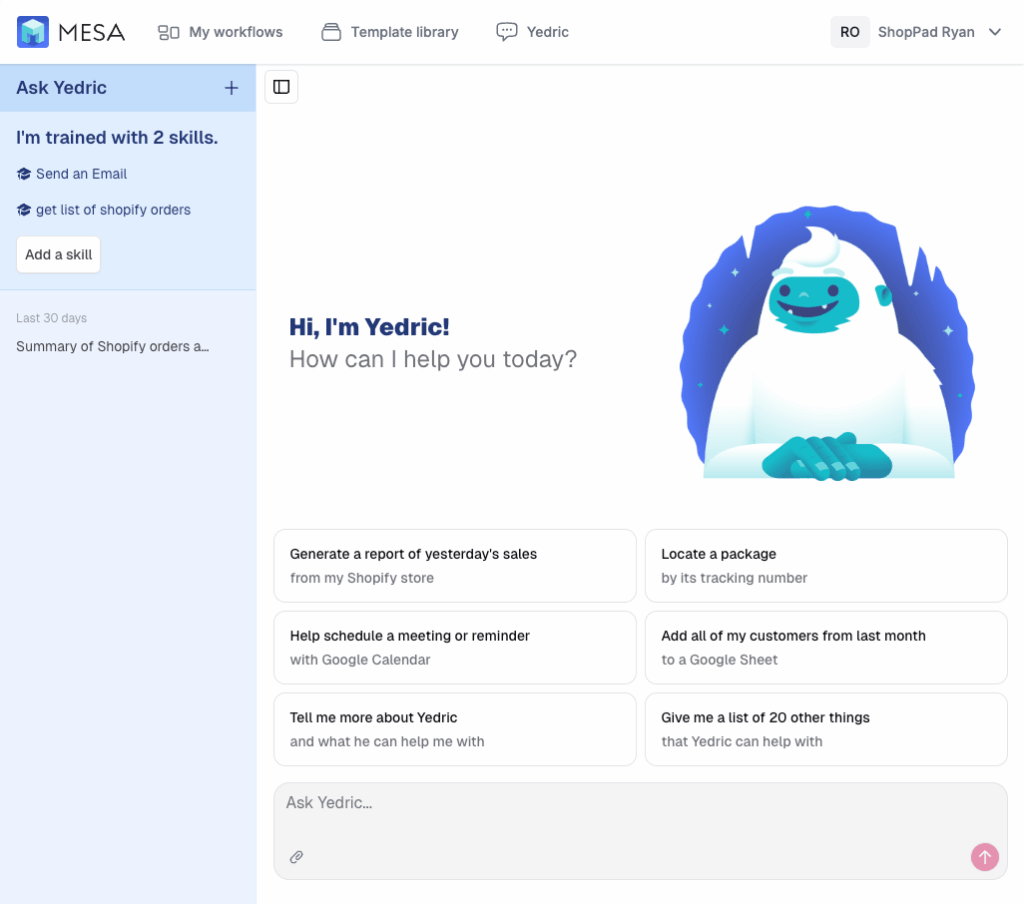
MESA's AI assistant is built to guide you with helpful prompts, recommend powerful MCP skills, and get you building faster by showing what’s possible.
Try these MCP skills:
Get Google Calendar EventsReceive context-aware insights about your schedule directly from your AI assistant. With a simple Google Calendar request, instantly access your availability, meetings, or conflicts without app-switching. This template swiftly retrieves events from any specified timeframe, ensuring you stay organized and informed. Enhance your productivity with quick, effortless access to your schedule, enabling smarter decision-making in real time.
Tag a Customer in MantleTag a customer in Mantle just by asking your AI assistant. When you make the request, it triggers MESA's MCP tool, which connects to Mantle and applies the tag to the customer using their Mantle ID. To find the right customer, use this template alongside the "Retrieve Mantle Customers" template and search by name or email.
Retrieve Mantle CustomersAutomatically retrieve Mantle customers when prompting an AI assistant. This template uses the MCP tool to fetch customer details from Mantle, giving the AI assistant access to the most recently created customers. Use this data to generate more intelligent responses, personalized recommendations, or targeted analysis.
Find Social Media Accounts for an Email AddressEnrich leads with social context using MESA’s MCP workflow. Just prompt your AI assistant with an email address, and it will fetch the associated social media accounts, unlocking valuable insight in seconds. Personalize outreach, qualify prospects faster and spot high-value opportunities that might go unnoticed.
Tag Shopify OrdersTag Shopify orders on demand by chatting with an AI assistant. This template lets an AI assistant trigger order tagging in Shopify based on your request. It's a fast way to manage your order data using natural, conversational commands.
Tag Shopify OrdersTag Shopify orders on demand by chatting with an AI assistant. This template lets an AI assistant trigger order tagging in Shopify based on your request. It's a fast way to manage your order data using natural, conversational commands.
Add Rows to Google Sheets SpreadsheetAdd rows to your Google Sheets spreadsheet just by messaging your AI assistant. No manual typing or tab-switching. Simply provide the name of the spreadsheet and the values you'd like to add. This prompt triggers this MCP template that sends each value to its corresponding column. It's perfect for fast, accurate logging of leads, tasks, contacts, orders, and more.
Retrieve Help Scout ConversationsEnable AI to retrieve Help Scout conversations in response to a prompt to gain instant, context-rich insights without manually searching past support threads. When a prompt triggers this MCP template, it automatically pulls the relevant Help Scout conversations and uses that data to craft a tailored, accurate response grounded in real customer history.
Retrieve Shopify CustomersAutomatically retrieve Shopify customers when an MCP workflow is triggered. This template starts with the MCP tool and pulls Shopify customer details, enabling you to query your data for accurate insights. Note the required parameters for this template: start_date, end_date.
Retrieve Shopify OrdersAutomatically retrieve Shopify orders when an MCP workflow is triggered. This template starts with the MCP tool and pulls Shopify order details, enabling you to query your data for accurate insights. Note the required parameters for this template: start_date, end_date.
Make your own skills for MESA's AI by building a workflow using the MCP trigger!
🧠 Add MESA's AI into any workflow
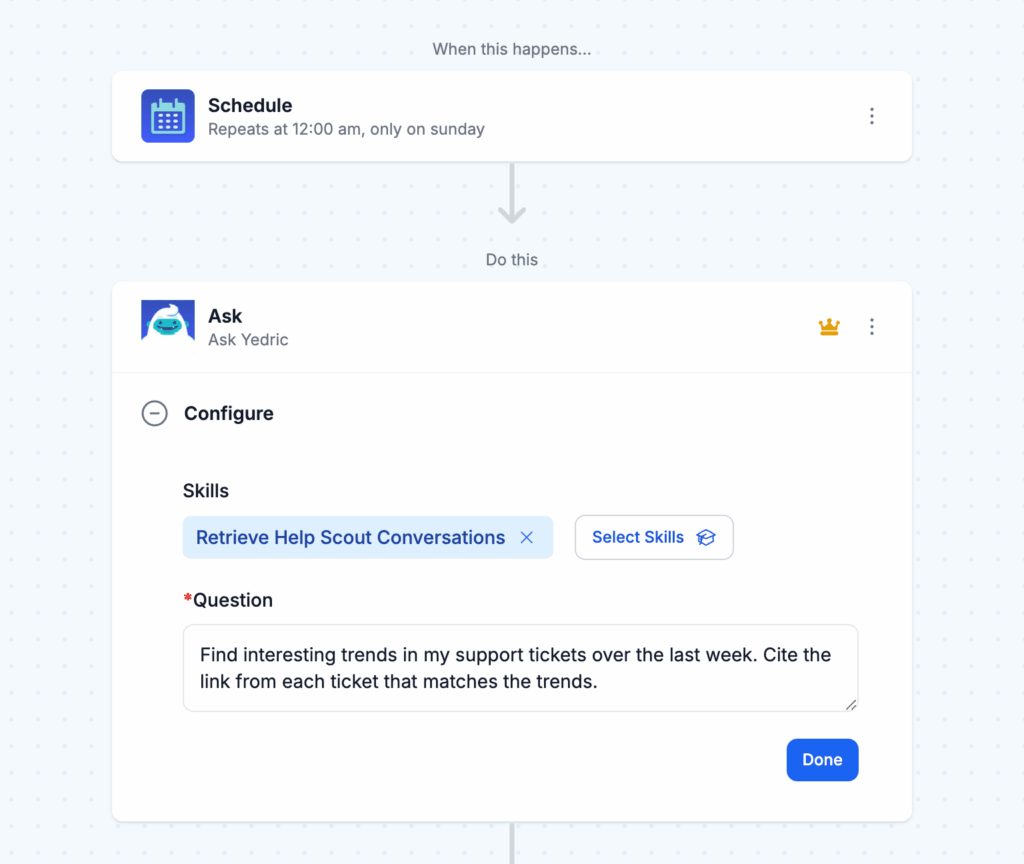
MESA's AI can also be added to any workflow using the Ask step. It’s a simple way to drop in, ask questions, and get a response mid-workflow. Use Ask for things like a weekly calendar summary or analyze support responses for reporting product issues.
Want to see an AI step doing real work in a workflow? This tutorial shows how to detect coupon code abuse with ChatGPT, flagging discount orders that look like repeat accounts or stacked codes.
🤖 Improvement: AI step suggestions
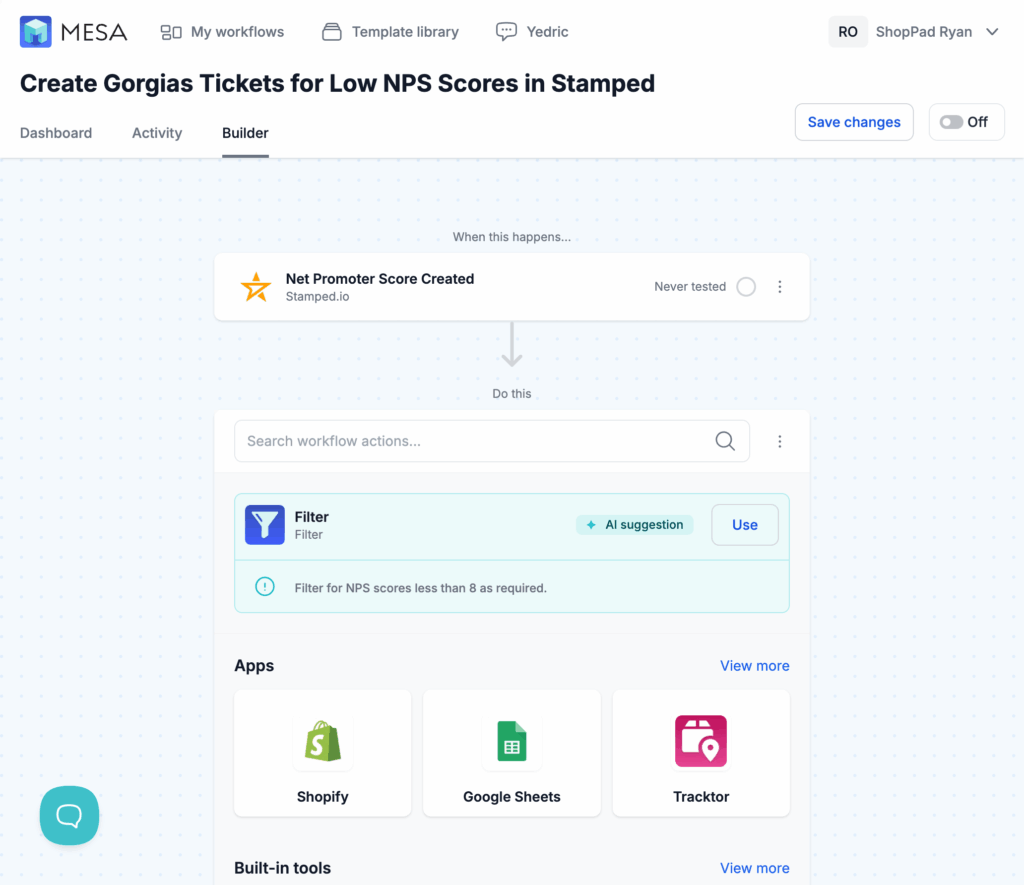
We added AI step suggestions in the workflow builder to help build faster and with less guesswork. When creating a new automation, you’ll now be asked to “Describe your workflow” so AI has more context to help suggest the next step of your workflow.
The AI help in the builder has kept growing since this release. By September 2026 the MESA AI assistant could create and edit Google Sheets while building a workflow; see what's new in Field Notes Vol. 9-2026.
🎵 Playlist: Fleming hot takes
Take a spin through the sonic sketchbook of our resident design wizard, Matthew Fleming. This playlist is packed with the tracks powering his creativity, from first sketch to final polish. Hit play and vibe out!
What to do next…
The fastest way to automate anything is to start with a single task.