Customer Experience Automation for Faster Growth
-
- •
- Jun. 19, 2026
- •
- 11 min read

If your team is still manually replying to the same order-status questions, updating tags one by one, fixing broken app handoffs, or chasing inventory mismatches across tools, you do not have a staffing problem as much as a systems problem. That is exactly where customer experience automation becomes valuable for Shopify brands.
In practical terms, customer experience automation means using software to automatically handle repeatable customer-facing tasks across the buying journey, from order confirmations and shipping updates to support triage, loyalty follow-up, returns communication, and internal alerts. For ecommerce teams, the goal is simple: faster response times, more consistent communication, fewer mistakes, and more time for humans to focus on high-value customer moments.
Done right, automation does not make your brand feel robotic. It removes the slow, repetitive work that causes delayed replies, inconsistent service, and costly operational drag. And for merchants using Shopify, that often means connecting store events to the rest of the stack so customer communication happens when it should, not when someone finally gets to it.
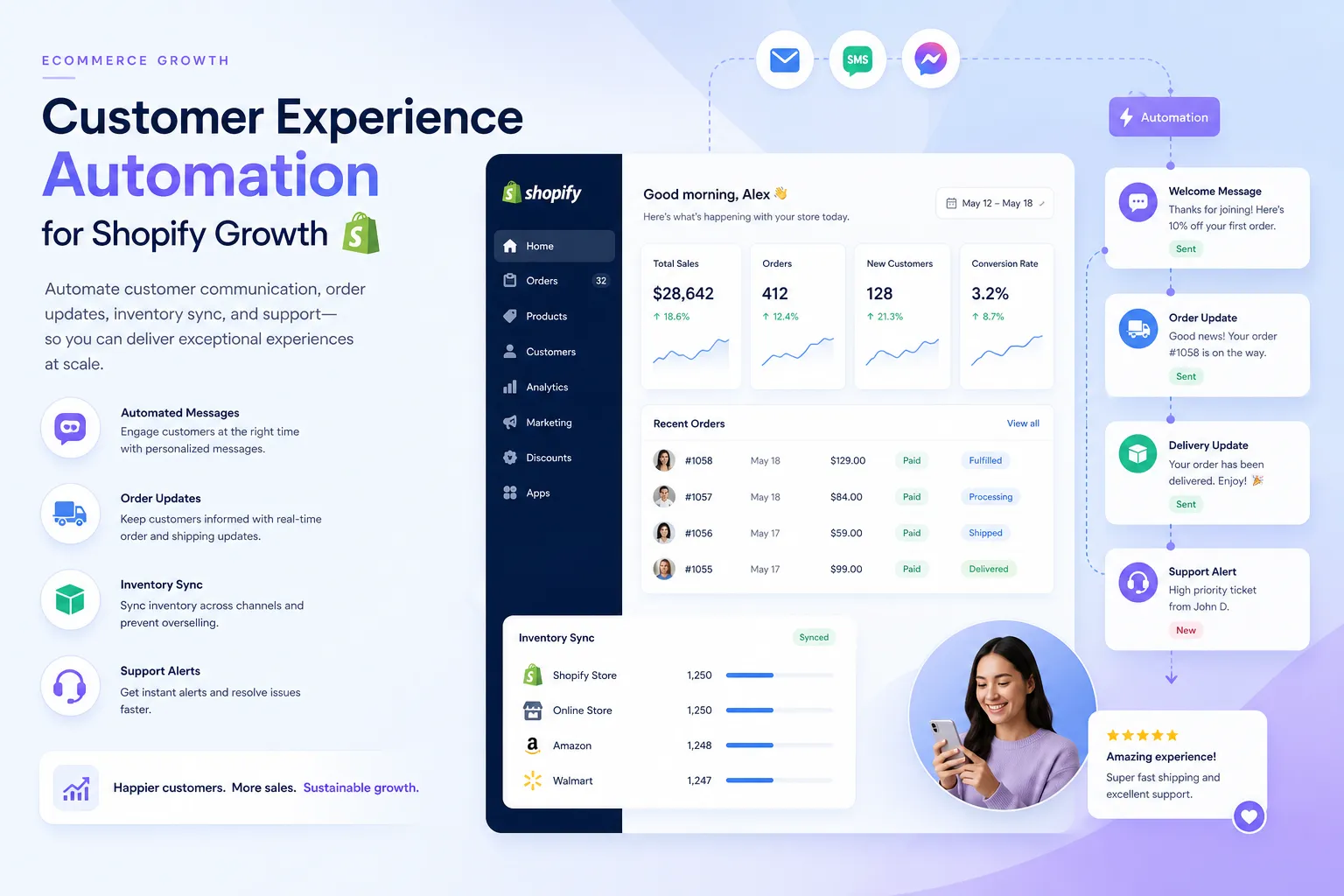
Table of Contents:
Why this matters more in ecommerce than most articles admit
Many articles define automation in broad contact-center language. That is useful, but it misses how customer experience breaks down in ecommerce operations.
For Shopify merchants, poor customer experience is often caused by operational friction behind the scenes:
-
orders not tagged correctly for routing
-
shipping delays not communicated proactively
-
support agents missing context from past orders
-
loyalty or subscription data not syncing across apps
-
inventory updates lagging between systems
-
post-purchase follow-up happening too late or not at all
These are not just CX issues. They are workflow issues that customers feel immediately.
According to Gartner’s 2025 customer service survey, more than half of customer service journeys now begin on third-party platforms.
“51% of customer service journeys now begin on third-party platforms such as Google, YouTube, and ChatGPT.” – Gartner
That means your brand is being judged on speed, clarity, and consistency before a support rep ever opens a ticket.
According to Qualtrics and ServiceNow customer experience research, poor service has a direct revenue cost.
“80% of customers have switched brands due to poor customer experience.” – Qualtrics and ServiceNow
For growing brands, faster growth usually means more orders, more exceptions, more app dependencies, and more customer conversations. If those workflows stay manual, service quality often drops exactly when the business needs it to improve.
What customer experience automation actually looks like in a Shopify store
A customer experience automation platform should not be thought of as just a chatbot or an email trigger. In ecommerce, it is better understood as the layer that helps your store respond intelligently to customer and operational events.
Common customer-facing moments that can be automated
Here are examples that matter to merchants and operators:
|
Customer moment |
Manual version |
Automated version |
|---|---|---|
|
Order confirmation |
Team checks for exceptions and sends follow-up manually |
Workflow detects order conditions, tags the order, alerts the team, and sends the right message |
|
Shipping delay |
Support hears about it after complaints arrive |
Workflow watches fulfillment or tracking events and proactively notifies customers |
|
VIP or repeat purchase |
Team exports data and segments later |
Workflow identifies the event instantly and triggers tailored follow-up |
|
Return or exchange request |
Agent looks up order history and past notes |
Workflow pulls context into the ticket or sends next-step instructions automatically |
|
Back-in-stock or low inventory |
Team discovers issue late |
Workflow syncs inventory and triggers alerts before overselling happens |
|
Support escalation |
Tickets get routed inconsistently |
Workflow routes based on order value, tags, subscription status, or fulfillment rules |
The key point is that automation is not only about replying faster. It is about making sure the right action happens at the right time with the right data.
The biggest benefits for growing ecommerce brands
Faster response times without growing headcount at the same pace
When common tasks are automated, your team spends less time on repetitive work like checking order status, adding tags, moving data between apps, or posting updates in Slack.
That means agents and operators can focus on exceptions, escalations, and revenue-impacting customer conversations.
Better personalization without manual list pulling
Personalization in ecommerce is often held back by ops complexity, not creativity. If customer data is scattered across Shopify, helpdesk tools, subscriptions, loyalty apps, and spreadsheets, teams cannot act in real time.
Automation lets you respond based on what actually happened:
-
first-time purchase
-
high-risk order
-
VIP reorder
-
delayed fulfillment
-
subscription issue
-
refund threshold reached
This is where a Shopify-first automation layer becomes more useful than generic tooling. It can react to real store events and push that context where your team needs it.
Fewer operational errors that customers end up seeing
Customers may never know your inventory sync failed or an internal alert never fired, but they absolutely notice overselling, delayed shipment communication, or inconsistent support.
Strong automation reduces:
-
broken data flows
-
missed internal handoffs
-
inconsistent post-purchase messaging
-
manual copy-paste mistakes
-
stock and fulfillment mismatches
More consistent service across channels and apps
A modern customer experience automation platform should help teams create continuity, not just isolated automations. If an order is flagged in Shopify, your support tool, Slack, spreadsheet, CRM, or ERP should not stay blind to that event.
That is one reason brands look for solutions built for customer experience automation use cases in ecommerce rather than trying to stitch everything together with one-off fixes.
What competitors get wrong
This is the gap in most high-ranking content: they explain the concept, but they rarely explain implementation in an ecommerce environment.
They over-focus on contact centers
A lot of automation content is written for enterprise service teams managing huge call volumes. That perspective matters, but it misses what ecommerce operators actually deal with every day:
-
Shopify order events
-
app-to-app data sync
-
fulfillment exceptions
-
returns workflows
-
product and inventory updates
-
support context pulled from commerce data
They treat automation as a single tool instead of a workflow layer
Chatbots, surveys, IVR, sentiment tools, and agent copilots all have value. But merchants often need something more practical: a way to describe what they need accomplished and have the workflow built quickly around their actual stack.
That could be:
-
when a high-value order is placed, tag it, notify Slack, update Google Sheets, and create a support note
-
when inventory drops below a threshold, sync downstream systems and alert the ops team
-
when a customer’s shipment stalls, send a proactive email and create a helpdesk task
-
when a loyalty VIP opens a ticket, enrich the interaction with order history before an agent replies
They underplay the setup burden
A lot of automation advice sounds easy until you try to implement it. Then you discover dependencies, app limitations, formatting issues, missing triggers, and edge cases.
That is where merchants outgrow simpler tools. They do not just need “an integration.” They need multi-step workflows, reliable app connectivity, templates that accelerate setup, and real humans who can help optimize the logic.
The core capabilities to look for in a customer experience automation platform
If you are evaluating options, focus less on marketing language and more on whether the platform can handle the messy reality of ecommerce operations.
1. Shopify-first event handling
The platform should understand the signals that matter most in ecommerce:
-
order created
-
order paid
-
order tagged
-
fulfillment updated
-
inventory changed
-
customer created
-
refund issued
-
subscription event triggered
2. Multi-step workflow logic
Basic automation is easy. Real-world automation usually involves branching logic, timing conditions, enrichment steps, filters, and multiple destinations.
For example, a workflow may need to:
-
detect a delayed shipment
-
check order value
-
check whether the customer is first-time or repeat
-
send a different message depending on status
-
alert a Slack channel
-
log the event for reporting
3. Broad app connectivity
Customer experience depends on your full ecosystem, not just Shopify. Look for support across helpdesk, shipping, CRM, spreadsheets, messaging, subscriptions, loyalty, and ERP tools.
This is one reason merchants prioritize automation platforms with broad data integration capabilities. The more context that can move between systems, the less customer experience depends on manual cleanup.
4. Fast setup through templates
Templates matter because teams do not have time to start from scratch every time. Prebuilt workflows for common use cases can dramatically shorten time to value.
5. AI-assisted workflow creation
For non-technical teams, the best experience is not dragging boxes around endlessly. It is being able to describe what needs to happen in plain English and getting a live workflow quickly.
6. Real support from people who understand ecommerce
Documentation helps. Human guidance closes the gap. Especially when you are dealing with edge cases, fulfillment exceptions, or store-specific business rules.
Where MESA fits for Shopify merchants
MESA is built for merchants who want to automate store operations without waiting on custom development. Instead of forcing teams into a developer-heavy build process, MESA lets you describe what you need accomplished and turn that into working Shopify automations quickly.
That matters when your team needs to move fast on use cases like:
-
tagging and routing orders based on risk, product type, or customer segment
-
sending alerts when inventory, fulfillment, or support thresholds are hit
-
syncing Shopify data to tools like Slack, Google Sheets, HubSpot, and other operational systems
-
automating post-purchase follow-up and internal notifications
-
reducing manual reporting work
-
preventing overselling through better inventory-aware workflows
MESA also supports complex, multi-step automations that growing brands often need once one-step tools stop being enough. And because the platform includes hundreds of ready-made templates plus human support, teams can launch useful workflows faster instead of sitting in backlog.
If your goal is to automate operational tasks tied to customer experience, MESA is especially strong when paired with broader Shopify automation workflows that connect customer events to fulfillment, reporting, and internal systems.
Practical automation use cases that drive faster growth
Proactive shipping and delay communication
Customers do not like uncertainty. When tracking stalls or fulfillment falls behind, a workflow can automatically detect the issue, notify the customer, and alert the internal team before tickets pile up.
Smarter post-purchase follow-up
Not every buyer should get the same follow-up. Automation can split flows by order value, product category, first-time versus repeat buyer, or VIP status.
Support context enrichment
When a customer reaches out, agents should not have to hunt through multiple systems. Automation can attach order history, fulfillment status, or loyalty details to the support workflow.
Inventory-aware customer messaging
If a popular item goes low in stock, teams can trigger internal alerts, pause certain promotions, or update downstream tools quickly to reduce overselling risk.
Exception management for high-risk or high-value orders
Automation can flag orders that need review, route them to the right team, and keep the customer communication sequence aligned with what is actually happening operationally.
Customer data syncing for better reporting and segmentation
When Shopify events automatically flow into spreadsheets, CRMs, or reporting tools, operators spend less time compiling reports and more time acting on them.
A simple framework for deciding what to automate first
If you are skeptical of automation projects, that is healthy. The answer is not to automate everything. It is to automate the right things first.
Use this framework:
|
Question |
If yes, prioritize it |
|---|---|
|
Does this happen frequently? |
High-volume repeat tasks are prime candidates |
|
Is it rule-based? |
Clear logic is easier to automate well |
|
Does it delay customer response or service quality? |
Prioritize direct CX impact |
|
Does it cause manual errors? |
Great candidate for automation |
|
Does it require multiple systems to stay in sync? |
High-value workflow opportunity |
|
Does it consume team time without adding much strategic value? |
Automate it early |
In most Shopify stores, the best starting points are:
-
order tagging and routing
-
internal Slack alerts
-
tracking and shipment follow-up
-
customer data syncing
-
exception reporting
-
low-stock and oversell prevention
-
repeat post-purchase messaging
How to implement without creating a bigger mess
The wrong way to approach automation is to build lots of isolated workflows with no owner, no naming convention, and no visibility into what depends on what.
The better approach:
Start with one painful workflow
Choose a process that is high-frequency, easy to define, and visibly costly when it fails.
Map the trigger, logic, and outcomes
Be clear on:
-
what starts the workflow
-
what data is needed
-
what conditions change the path
-
what action should happen
-
where humans need to step in
Build for reliability, not just speed
A good workflow should handle edge cases, not just happy paths.
Use templates where they fit
This reduces setup time and improves consistency.
Monitor and optimize
The best automations improve over time. Once you see where exceptions cluster, you can refine the logic.
Final verdict
Customer experience automation is not just a support trend. For Shopify merchants, it is a practical way to reduce manual work, improve response speed, keep data aligned across apps, and deliver a more consistent customer journey as order volume grows.
The best platforms do more than automate messages. They connect commerce events, operational workflows, and customer touchpoints so your team can scale service without scaling chaos.
If your brand has outgrown brittle one-step automations or manual workarounds, MESA is the logical next step. You can describe what you need accomplished, launch multi-step workflows quickly, and get help from real people who understand Shopify operations. Explore MESA’s automation templates for ecommerce workflows to find a fast starting point and turn CX improvements into repeatable systems.