Automating Business Processes for Smarter Growth
-
- •
- Jun. 28, 2026
- •
- 12 min read

If your Shopify team is still chasing order issues in Slack, updating spreadsheets by hand, fixing oversold inventory, or stitching together post-purchase follow-up across multiple apps, you do not have a people problem – you have a process problem. The fastest-growing ecommerce brands are not simply hiring more operators. They are automating business processes so routine work happens automatically, accurately, and on time.
Here is the short answer: business process automation is the practice of using software to handle repeatable operational work with minimal manual input. In ecommerce, that can mean auto-tagging risky orders, syncing inventory between systems, sending internal alerts, updating Google Sheets, or triggering customer follow-up after specific events. The goal is not to remove control – it is to remove repetitive work, delays, and avoidable errors.
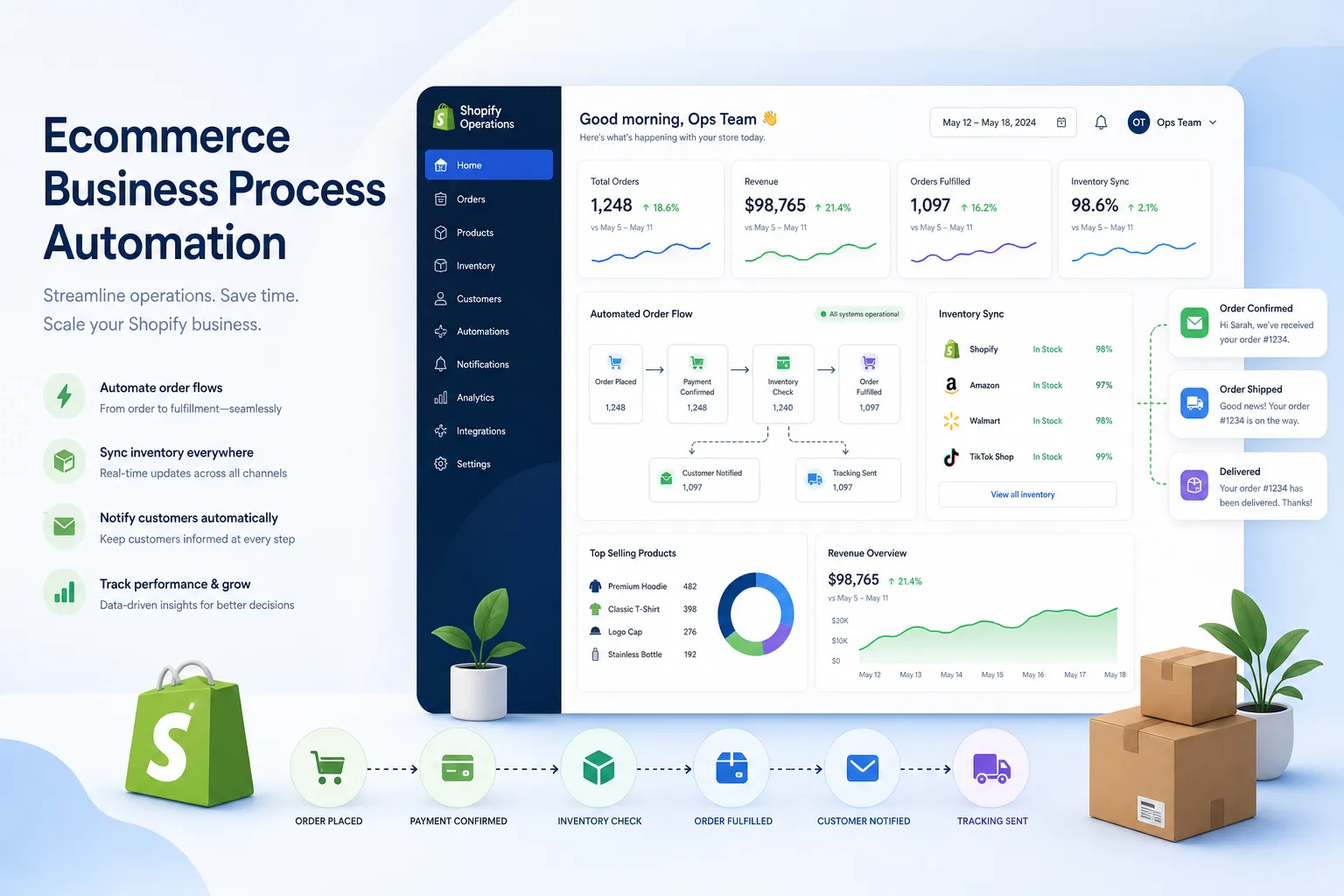
Table of Contents:
Why ecommerce teams feel the pain first
Most articles about automation stay generic. They talk about “efficiency” in broad terms, but skip the day-to-day reality of running a store. Ecommerce operators live in a different world: order spikes, app sprawl, customer expectations, fulfillment deadlines, and tiny mistakes that create expensive downstream problems.
A few common examples:
-
Orders need different tags based on SKU, shipping method, or risk level
-
Inventory must stay in sync between Shopify, warehouses, and external systems
-
VIP customers should trigger special treatment without someone watching every order
-
Failed payments, subscription events, or stock changes need immediate action
-
Internal teams need alerts when exceptions happen, not hours later
-
Reporting data needs to move into spreadsheets or BI tools without manual exports
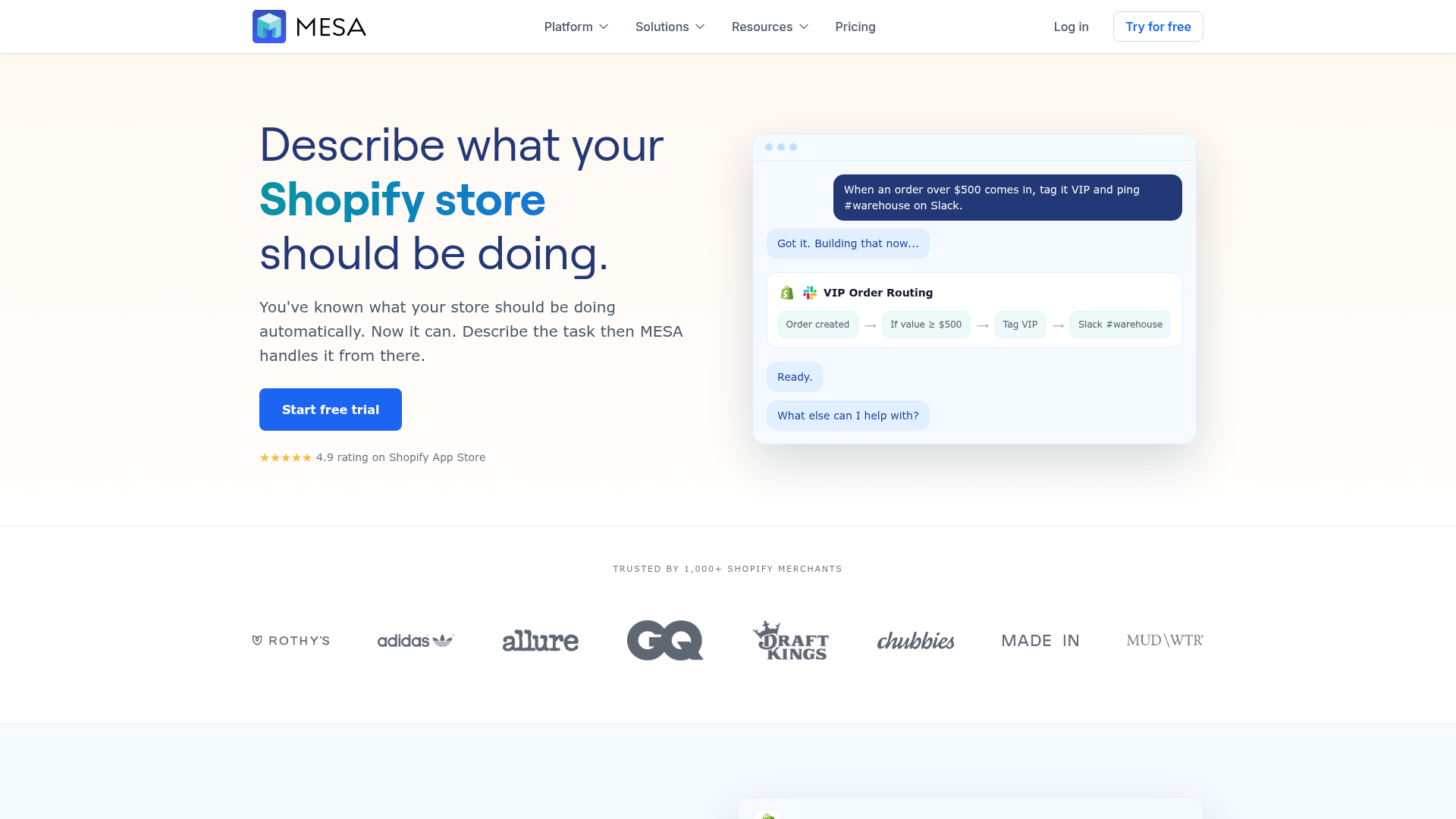
That is where a platform like MESA’s Shopify automation platform becomes useful. Instead of waiting on a developer or juggling brittle one-off tools, merchants can describe what they need accomplished and turn it into a live workflow quickly.
“Over 40% of workers spend at least a quarter of their workweek on manual, repetitive tasks.” – Smartsheet
For ecommerce teams, that lost time shows up as backlog, missed follow-up, delayed decisions, and preventable customer service issues.
What business process automation actually looks like in Shopify
When people hear “automation,” they often imagine simple one-step triggers. Real store operations are rarely that simple.
Effective automation for Shopify usually includes:
Event-based triggers
A workflow starts when something meaningful happens, such as:
-
a new order is created
-
inventory falls below a threshold
-
a customer is tagged
-
a return is initiated
-
a product is updated
-
a subscription payment fails
Decision logic
The workflow needs to evaluate conditions:
-
Is this order high value?
-
Is the destination international?
-
Does the order include preorder items?
-
Is inventory below safety stock?
-
Is the customer a repeat purchaser?
Multi-step actions
Then the workflow does the work:
-
tag the order
-
notify Slack
-
update Google Sheets
-
create a task in another app
-
email the team
-
pause fulfillment
-
sync data to ERP or CRM
-
send a customer message
This is why merchants eventually outgrow lightweight automation tools. They may work fine for simple notifications, but complex store operations need branching logic, dependable integrations, reusable templates, and support when workflows need refinement.
The biggest operational gains come from these workflow categories
Not every process should be automated first. The highest ROI usually comes from workflows that are high-volume, repetitive, error-prone, or time-sensitive.
Order handling and routing
Order operations often create the earliest automation wins.
Typical use cases:
-
Auto-tagging orders based on product type, destination, or margin
-
Routing wholesale or VIP orders differently
-
Holding high-risk orders for review
-
Sending internal alerts for special handling requirements
-
Splitting post-purchase actions by order characteristics
If this is your pain point, order automation for Shopify operations is usually the fastest place to start.
Inventory and catalog sync
Inventory mistakes damage both revenue and customer trust. Overselling, stale stock data, and manual product updates are common symptoms of disconnected systems.
Typical use cases:
-
Sync stock levels across systems
-
Alert teams when inventory drops below thresholds
-
Update product data automatically
-
Coordinate preorder and backorder handling
-
Prevent overselling from delayed updates
Customer experience and retention
Automation is not just for back-office operations. It can make customer experiences more responsive and consistent.
Typical use cases:
-
Trigger personalized follow-up after purchase
-
Flag high-value customers for concierge service
-
Send internal alerts when negative events occur
-
Launch support workflows based on tags or order status
-
Coordinate loyalty, subscription, or review-related actions
Reporting and internal visibility
Manual exports are one of the most common hidden drains on ecommerce teams.
Typical use cases:
-
Push order, customer, or fulfillment data into Google Sheets
-
Create exception logs automatically
-
Notify teams when metrics cross thresholds
-
Share operational updates in Slack
-
Feed BI or planning workflows with cleaner, timelier data
Fulfillment and exception management
Fulfillment teams benefit from automation when operational exceptions are frequent.
Typical use cases:
-
Flag delayed or partial shipments
-
Alert teams about address issues
-
Trigger warehouse-specific instructions
-
Coordinate shipping status with customer notifications
-
Handle edge cases without relying on inbox monitoring
What competitors get wrong about automating business processes
After reviewing competing content on this topic, a pattern shows up quickly: most articles explain why automation matters, but do not help merchants understand how to apply it in an ecommerce environment.
Here is where those articles often fall short:
|
What many competitors cover |
What they miss |
|---|---|
|
Generic benefits like efficiency and cost savings |
Concrete Shopify workflows like order tagging, inventory sync, and post-purchase automation |
|
Broad business examples from finance or manufacturing |
The realities of app sprawl, fulfillment exceptions, and ecommerce operations teams |
|
One-time automation setup advice |
Ongoing governance, workflow iteration, and scaling across teams |
|
Basic tool comparisons |
The difference between simple app connections and multi-step operational automation |
|
Abstract AI claims |
Practical AI-assisted workflow creation using plain-English requests |
The real gap is execution. Ecommerce teams do not need another motivational piece about productivity. They need a practical framework to automate business tasks without creating new technical debt.
A practical framework to automate your business process
If you want to automate your business process successfully, start with operations – not software. The best workflow is the one that removes real friction, not the one that looks impressive in a demo.
1. Find the repetitive work that slows your team down
Look for processes that happen frequently and require manual attention every time.
Good candidates include:
-
copy-pasting data between apps
-
sending the same internal alerts
-
checking conditions before tagging orders
-
exporting data for reports
-
watching for low inventory or failed payments
-
escalating customer issues manually
2. Map the trigger, decision, and outcome
Keep it simple:
-
Trigger: What event starts the workflow?
-
Decision: What conditions determine the path?
-
Outcome: What should happen automatically?
For example:
|
Workflow part |
Example |
|---|---|
|
Trigger |
New Shopify order created |
|
Decision |
Order value over $500 and contains fragile SKU |
|
Outcome |
Tag order, notify Slack, add note for fulfillment |
3. Start with one bottleneck, not ten
A common mistake is trying to automate everything at once. Start with one process where the benefit is obvious and measurable.
Best first projects often include:
-
order tagging
-
inventory alerts
-
Google Sheets reporting
-
customer follow-up triggers
-
fulfillment exception alerts
4. Choose a tool built for your operating environment
This matters more than most guides admit. A generic automation tool may require more maintenance, more workaround logic, and more technical support from your team.
MESA is designed specifically for Shopify merchants, which changes the experience in a few important ways:
-
you can describe what you need accomplished in plain English
-
workflows can become live quickly through AI-assisted setup
-
it supports complex multi-step automations
-
it integrates with 100+ ecommerce apps and systems
-
it includes 300+ templates for faster rollout
-
human support helps fine-tune workflows as operations evolve
If you want to explore prebuilt use cases, MESA’s automation templates library is a practical place to see what can be deployed quickly.
5. Test edge cases before scaling
Do not just test the happy path.
Check:
-
missing data
-
duplicate triggers
-
app downtime
-
unusual order combinations
-
fulfillment delays
-
inventory mismatches
The point of automation is reliability. Poorly planned workflows can create broken data flows just as easily as they can remove manual work.
6. Measure outcomes that operators care about
Track operational impact, such as:
-
time saved per week
-
fewer manual touches per order
-
reduced overselling incidents
-
faster response to exceptions
-
lower backlog in ops and support
-
fewer reporting delays
7. Expand from workflow wins to operational systems
Once one workflow works, build connected systems around it. That is when automation starts creating smarter growth instead of isolated efficiency gains.
The difference between simple automation and scalable automation
There is a major difference between “I can send an alert when an order arrives” and “my store can coordinate operations across multiple apps without constant manual oversight.”
Scalable automation usually includes:
-
branching logic
-
reusable workflows
-
exception handling
-
cross-app orchestration
-
operational reporting
-
support for changing business rules
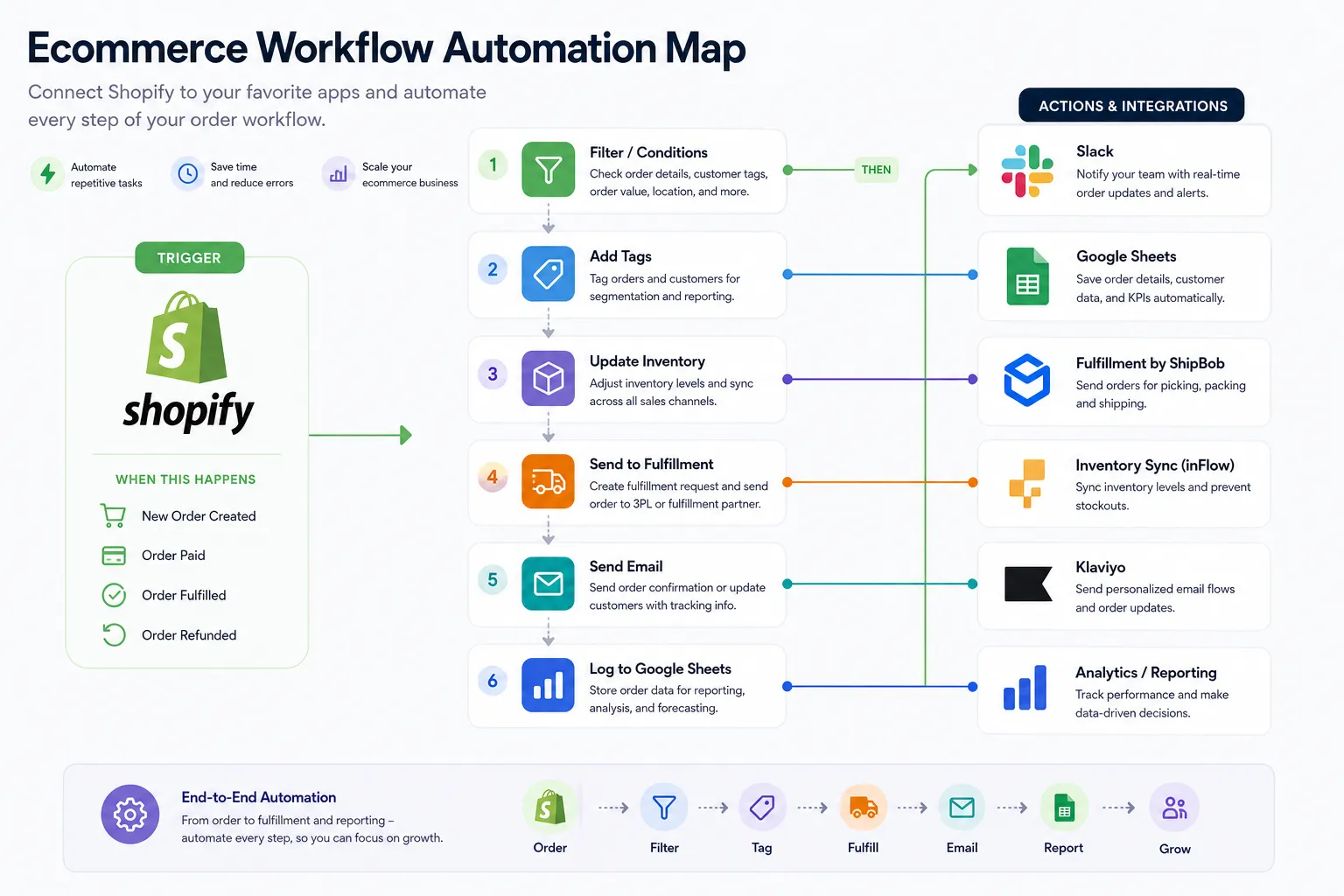
That is also why AI matters here – but only when it is practical. The useful version of AI in operations is not hype. It is the ability to describe what you need accomplished and have the platform translate that into a working, multi-step workflow. MESA’s AI assistant, Yedric, is built for exactly that kind of faster implementation.
Common business processes worth automating in ecommerce
Below is a quick prioritization table for merchants deciding where to begin.
|
Process |
Manual pain |
Automation opportunity |
Business impact |
|---|---|---|---|
|
Order tagging |
Staff reviews every order manually |
Auto-tag based on rules and conditions |
Faster ops, fewer misses |
|
Inventory monitoring |
Teams check stock manually |
Trigger alerts and sync updates |
Fewer stockouts and oversells |
|
Customer follow-up |
Inconsistent post-purchase communication |
Send targeted messages based on events |
Better retention and CX |
|
Internal alerts |
Teams rely on inboxes and memory |
Push real-time alerts to Slack or email |
Faster issue response |
|
Reporting exports |
Repeated copy-paste into sheets |
Auto-send structured data to reporting tools |
Better visibility, less admin work |
|
Fulfillment exceptions |
Delays noticed too late |
Escalate problems automatically |
Reduced service failures |
“50% of U.S. employees use artificial intelligence in their roles, with 65% feeling positive about its impact on productivity.” – Gallup data reported by Tom’s Hardware
The lesson is not that every workflow needs AI. It is that operators increasingly expect technology to reduce repetitive decision-making and help them move faster.
Signs your store has outgrown basic tools
A lot of merchants start with simple automations, and that is fine. But there are clear indicators that you need something more robust:
-
Your workflows regularly need multiple steps and conditions
-
You depend on several apps and data sources
-
Manual exception handling is consuming too much time
-
You need dependable inventory or order-related logic
-
Reporting requires repeated exports and cleanup
-
Small workflow errors have real revenue or customer consequences
-
Your team wants support, not just software
At that point, the goal is not to replace humans. It is to give them fewer repetitive tasks and more control over high-value work.
How MESA helps merchants scale without adding operational drag
MESA fits a specific need in the market: Shopify merchants who want advanced automation without hiring developers for every workflow.
Here is where it stands out naturally:
Plain-English workflow creation
Instead of forcing operators into technical integration-builder thinking, MESA lets teams describe what they need accomplished. That shortens the path from idea to execution.
Built for Shopify-first operations
General-purpose tools can work, but Shopify merchants usually benefit from a platform designed around store events, order logic, customer data, and ecommerce app ecosystems.
Supports real operational complexity
MESA handles more than simple notifications. It supports complex, multi-step automations that can coordinate actions across systems and teams.
Broad app ecosystem
With 100+ integrations and ecommerce-friendly connectors, MESA helps stores keep data moving between Shopify and the rest of the operational stack.
Template-driven speed
More than 300 ready-made templates help merchants launch faster instead of rebuilding common workflows from scratch.
Human support
This is often underestimated. Workflow strategy, testing, and optimization matter just as much as features. MESA offers real human support to help merchants build automations that actually hold up in daily operations.
Manual vs automated operations: what changes in practice
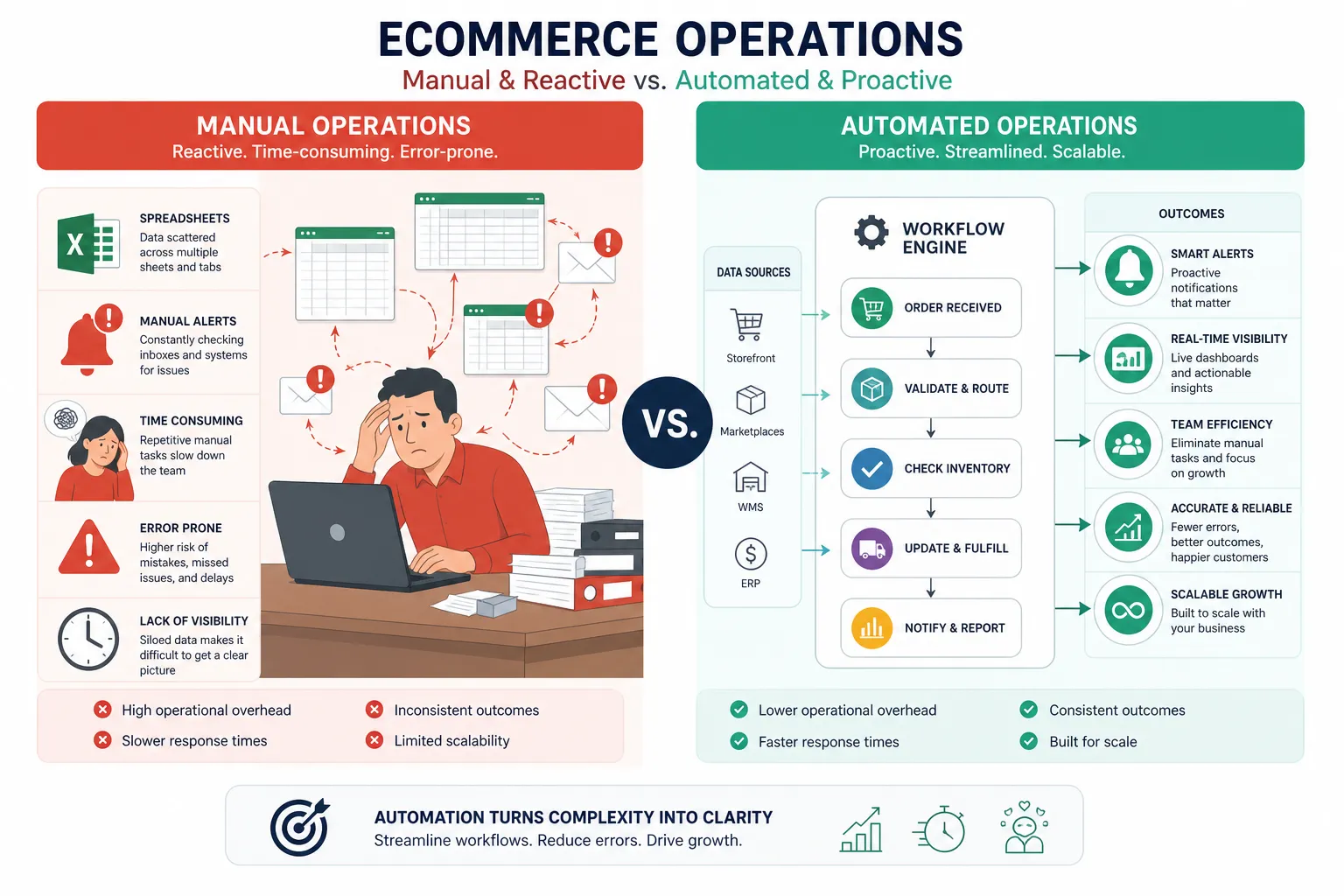
|
Manual approach |
Automated approach |
|---|---|
|
Staff checks orders one by one |
Orders are tagged and routed automatically |
|
Inventory issues discovered after the fact |
Alerts trigger when thresholds are hit |
|
Teams export data for weekly reporting |
Data flows into sheets or tools automatically |
|
Customer follow-up depends on memory |
Messages trigger from defined events |
|
Operators fix exceptions reactively |
Workflows surface issues in real time |
|
Growth creates more admin burden |
Growth is absorbed with better systems |
This is what smarter growth really means. It is not growth with more chaos. It is growth with better operating leverage.
Final verdict: automation is not optional once complexity shows up
If your store is growing, your processes will either become a competitive advantage or a source of constant friction. That is the real choice.
Automating business processes helps ecommerce teams reduce repetitive work, improve accuracy, respond faster, and scale with less operational drag. The strongest returns usually come from order handling, inventory management, post-purchase workflows, reporting, and exception management.
For Shopify merchants, MESA is the logical next step when simple tools no longer match operational complexity. It helps you describe what you need accomplished, launch workflows quickly, connect the apps you already use, and get human help when your processes need to evolve.
If you are ready to reduce manual work and build more reliable operations, explore MESA’s AI-powered ecommerce automation solutions and see how quickly a better workflow can go live.
FAQ
How to automate business processes?
Start by identifying repetitive, high-volume, error-prone tasks such as order tagging, inventory alerts, reporting exports, or post-purchase follow-up. Then map the trigger, decision logic, and outcome, and use a platform like MESA to turn that process into a live workflow without needing custom development.
What is intelligent automation in business processes?
Intelligent automation combines workflow automation with AI assistance so teams can create and refine automations faster and with less technical effort. In ecommerce, that can mean describing what needs to happen in plain English and having the system generate a multi-step workflow for Shopify operations.
What are the 4 stages of process automation?
A practical four-stage model is identify, design, automate, and optimize. First find the manual bottleneck, then map the logic, launch the workflow, and keep improving it as store operations and edge cases evolve.
What are the 4 stages of process automation?
The same four stages apply across most ecommerce workflows: spot the problem, define the rules, implement the automation, and measure the results. This keeps automation tied to operational outcomes rather than turning into disconnected technical projects.
What is the 40 40 20 rule in marketing?
The 40/40/20 rule usually refers to direct marketing, where 40% of results come from the audience, 40% from the offer, and 20% from the creative. It is not a process automation framework, but the lesson is similar: results depend most on choosing the right target problem and the right operational solution.