Tagging is the #1 thing Shopify merchants automate: 1 in 4 asked for it in Q1 2026
-
- •
- Last updated: Jun. 9, 2026
- •
- 6 min read

When 140 Shopify merchants described what they wanted to automate in their own words in Q1 2026, about 1 in 4 asked for some form of tagging. Tagging also ranked first in what merchants actually built: 14.4% of the 897 workflows assembled in the quarter were some flavor of automated tagging, ahead of Google Sheets exports (13.7%) and fulfillment (10.1%).
No other automation type topped both lists. Tagging is the one thing every cohort of Shopify merchants agrees they want to do.
About this analysis. Based on workflows built in MESA, Shopify's leading no-code automation platform, between January 1 and March 31, 2026: 1,374 workflows created, 897 built, 455 shipped (enabled in production), across 324 merchant stores. We supplement this with natural-language automation requests merchants submitted to MESA's DIY builder during the same period, from 140 unique shops. For the full picture, see our Q1 2026 Shopify automation benchmark.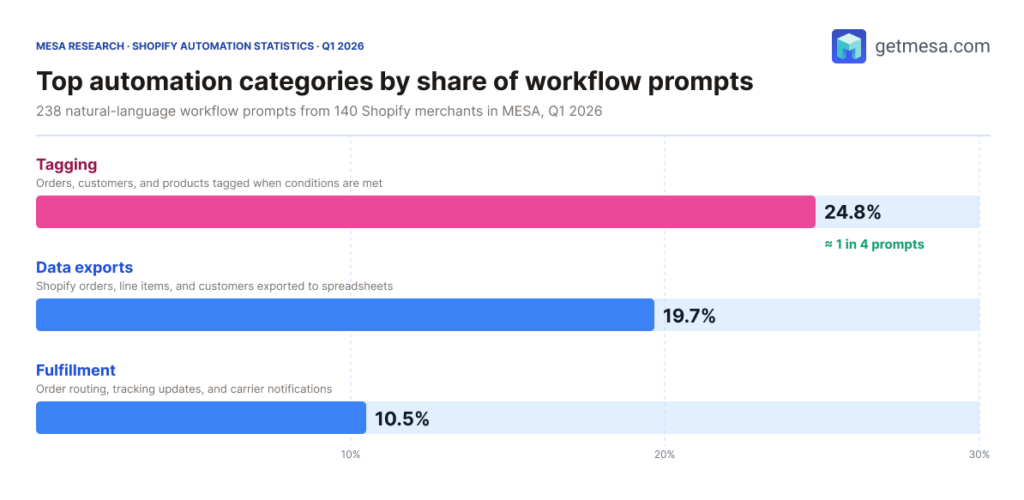
Table of Contents:
Why Shopify merchants tag more than anything else
Shopify’s native tag field is the lowest-friction data structure in the platform. Adding a tag to an order, product, or customer requires no schema design, no third-party app, and no developer. You decide what the tag means, you write it when something happens, and you use it later to filter, segment, or trigger something else. A merchant who wants to separate wholesale orders from retail orders doesn’t need to reconfigure their store. They just tag wholesale when the right order comes in, and every downstream tool (reports, fulfillment queues, email lists) can filter on that tag from day one.
That’s why “tag this when that happens” is the automation form that solves the widest range of problems with the least setup. Tags are also additive: you can apply wholesale, high-value, and net30 to the same order in three separate steps without any of them conflicting. You end up with a multi-attribute filter built from plain text, no schema required.
Once a merchant automates their first tag, they tend to automate more. Customer management workflows (most of which include at least one tagging step) accounted for 22% of everything built in Q1, the largest single category by share.
Tagging is what 1 in 4 merchants asked for and what 1 in 7 merchants actually built in Q1 2026: the clearest demand signal in the dataset.
Four tagging patterns Shopify merchants build
The Q1 data splits into four patterns that account for most of what merchants built and asked for.
Tagging orders by attribute. The most common flavor. A new order comes in and the workflow reads something about it (fulfillment location, sales channel, discount code used, line-item count) and writes a tag back to the order record. One merchant put it plainly: “Tag orders in shopify based on fulfilment location.” Another wanted a tag applied when a specific discount code was used, so those orders could be routed to a separate fulfillment queue. Variations on this pattern account for the single largest cluster of built workflows in Q1.
Tagging customers by behavior. The second pattern is about segmenting the customer record over time. Merchants tag customers when they hit a certain order count, buy a specific product, or live within a geographic radius of a retail location. One merchant in Q1 built a flow that fires when a product goes out of stock and adds a matching variant tag to every customer who’d purchased that item, so they could send a targeted restock notification later. Here’s how they described it: “Trigger when the order is manually tagged with ‘Royal Blue S OOS — Feb 26’ and add a customer tag ‘OOS_RoyalBlue_S’.” One event, one condition, one tag, one downstream use already planned.
Tagging products by inventory state. A smaller but notable cluster: workflows that watch inventory and tag (or remove the tag from) products based on what’s in stock. The most sophisticated version in Q1 was an hourly cleanup workflow that rescanned inventory for each product and retagged or detagged based on the current count. This powers conditional merchandising: hide a product from a collection when it hits zero, show it again when it’s restocked. The merchant ran it every hour. It shipped.
Tag as a manual trigger. The fourth pattern flips the direction. Instead of automation writing a tag, the merchant adds a tag by hand to start an automation. One merchant asked for exactly this: “When I add the Tag ‘todo’ in shopify, set up a task in Todoist.” The tag is a signal from a human to a machine: a lightweight way to dispatch work without logging into a separate tool.
The four tagging patterns in Q1: order attribute, customer behavior, product inventory state, and tag-as-manual-trigger.
Why tagging shows up across every other Shopify automation
Tags function as a shared language between automations. A fulfillment workflow writes a shipped tag when it hands off an order. An AI classification workflow writes a wholesale-lead tag when it reads a customer record. A low-stock workflow writes an oos tag to hide a product from a collection. A separate workflow, triggered by that oos tag, fires a Slack alert to the buying team. None of those automations need to know about each other; they just read and write the same tags.
That’s why tagging demand persists across every merchant segment in the data. It’s not one use case. It’s the layer underneath other use cases. And it’s the cleanest first automation for a merchant who’s new to workflow building: pick one event, write one tag, build the rest later.
For merchants deciding where to start, the data is consistent: a single tagging workflow is almost always the foundation everything else gets built on. The merchants in Q1 who built the most and shipped the most reliably tended to have tagging automations running before they built anything else.
The full Q1 2026 benchmark covers five other findings from the same dataset: why AI-powered workflows shipped at 70.3%, what merchants asked for that didn’t exist yet, and what the workflows that actually shipped had in common.