
By now, AI has touched nearly every corner of ecommerce. The market for AI-powered ecommerce tools is on track to reach nearly $17 billion by 2030, and 77% of ecommerce professionals already use AI tools daily — up from 69% just a year before.
But most Shopify merchants aren't asking big market questions. They're asking a much smaller, more urgent one: what should I actually do with AI right now?
This guide answers that. Not with a history of machine learning or a list of enterprise software you'll never use — but with a practical breakdown of how AI is being used in real Shopify stores today, which tools are worth your attention, and where MESA's AI assistant fits into all of it.
TL;DR: there's a template for that
What "AI for ecommerce" actually means in 2026
"AI for ecommerce" is a broad term that covers a lot of ground. It helps to break it into three categories, because they work differently and serve different purposes.
Generative AI creates content from a prompt. Think product descriptions, email subject lines, ad copy, customer support replies. Tools like Shopify Magic and ChatGPT fall here. This is the most visible category — it's what most merchants encounter first.
Predictive AI uses historical data to forecast future outcomes. Demand forecasting, customer churn modeling, personalized product recommendations — these are all predictive. Amazon's recommendation engine, which drives an estimated 35% of the company's annual sales, is the most famous example of this category in ecommerce.
Agentic AI is the newest and most operationally powerful category. Rather than generating content or producing a forecast, agentic AI takes action. It monitors conditions, makes decisions, and executes multi-step workflows — often without any human involvement. According to IBM, agentic AI systems can "reason, plan and act across multiple systems and AI platforms," distinguishing them from simpler rule-based bots.
For Shopify merchants, all three matter. But agentic AI is where the biggest operational leverage lives, because it's the only category that actually does work on your behalf.
The AI tools Shopify merchants already have access to
Before adding anything new to your stack, it's worth understanding what you may already be sitting on.
Shopify Sidekick
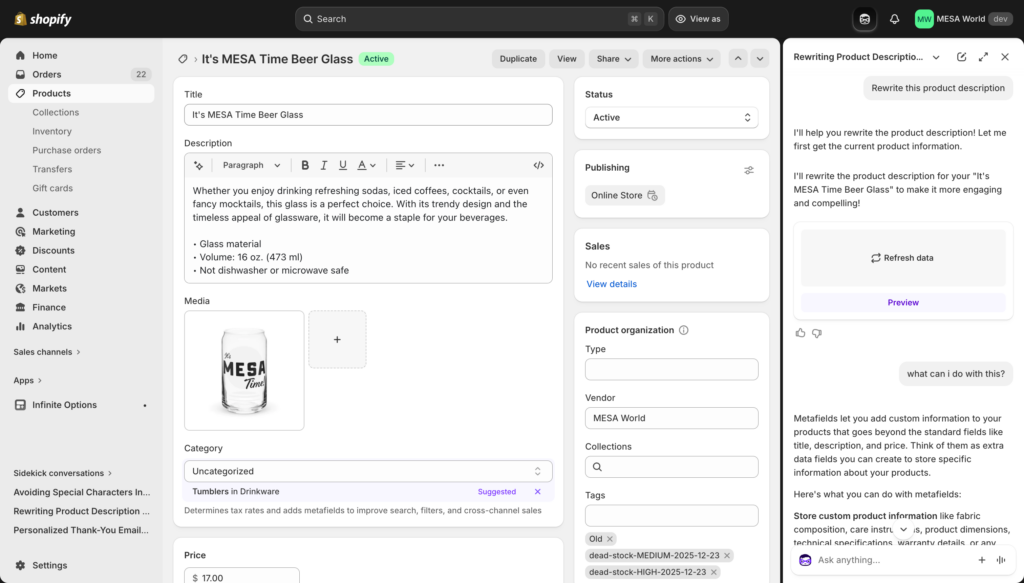
Sidekick is Shopify's built-in AI assistant, available to all merchants as part of their plan. Powered by Shopify Magic, it lives inside your admin and can generate content, build reports, suggest marketing campaigns, and — since Shopify's Winter '26 update — proactively surface insights about your store without being asked.
Sidekick is genuinely useful for in-admin tasks. It knows your store data, understands Shopify workflows, and can take action (with your approval) across products, discounts, and settings. The Winter '26 update also let merchants describe a workflow in plain language and have Sidekick build the corresponding Shopify Flow automation.
Where Sidekick hits its limits: Its knowledge and actions are bounded by what's inside your Shopify admin. It can't connect to your helpdesk, your 3PL, your email platform, or your spreadsheets. If a task involves more than one tool, Sidekick can't complete it.
Klaviyo AI
Klaviyo's built-in AI features include predictive send times, subject line suggestions, and churn prediction modeling based on customer purchase history. If you're already on Klaviyo, these features are available and worth using. They're limited to email and SMS, but within that lane, they're well-developed.
Gorgias
Gorgias uses AI to auto-respond to common customer support tickets, tag conversations, and route issues. It handles volume well and reduces response time on routine inquiries. It's scoped to your helpdesk — it doesn't connect back to your Shopify store or other tools.
ChatGPT and other general-purpose AI
Tools like ChatGPT, Claude, and Gemini are useful for copywriting, brainstorming, SOPs, and content. Their limitation in an ecommerce context is that they have no access to your store data. You can describe your situation, but they can't see your orders, customers, or inventory.
The gap none of these tools fill
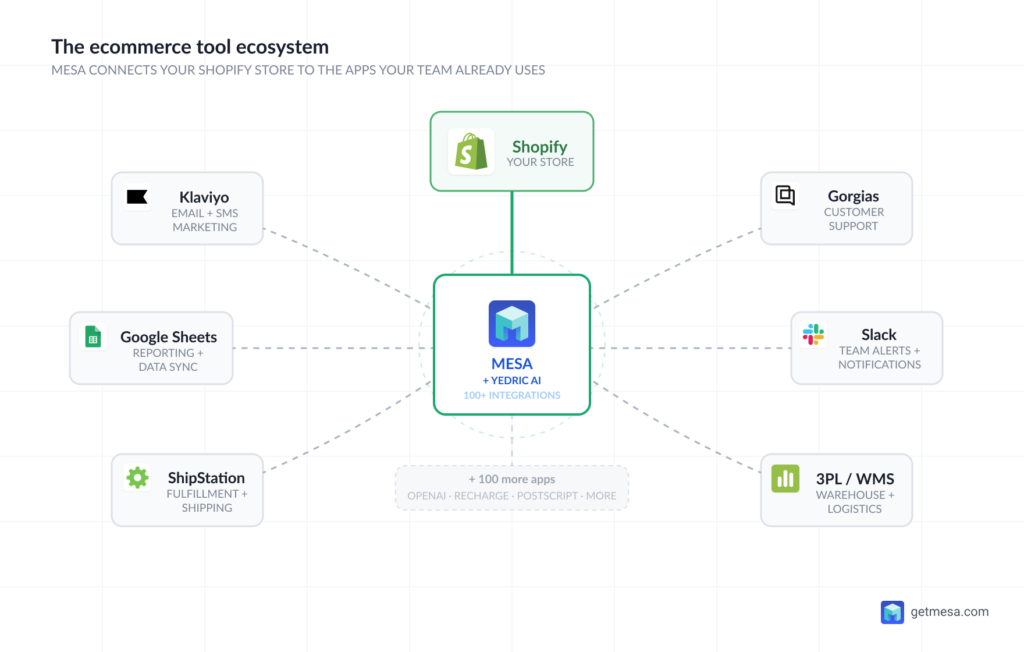
Here's the problem: every tool above is excellent within its own domain. Sidekick handles your Shopify admin. Klaviyo handles email. Gorgias handles support. ChatGPT handles copywriting. But your store's actual operations don't happen in one tool — they happen across all of them simultaneously.
When an order comes in, data flows between Shopify, your 3PL, your email platform, your support desk, and possibly a spreadsheet someone on your team is maintaining. When any of those tools doesn't automatically talk to another, someone fills the gap manually.
That's exactly what automation platforms like MESA are built to solve — and where MESA's AI assistant takes it further.
What MESA's AI does
MESA is a Shopify automation platform that connects your store to the other tools in your stack — over 100 integrations including Google Sheets, Slack, Klaviyo, ShipStation, and more. Workflows in MESA run automatically based on triggers you define: a new order, a tag being applied, inventory hitting a threshold, a customer placing their third purchase.
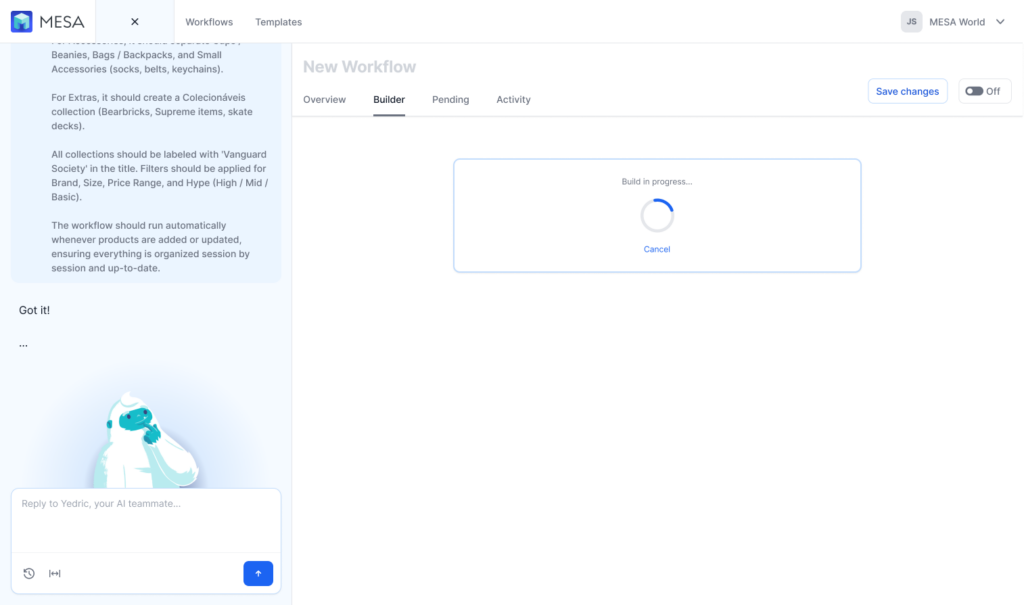
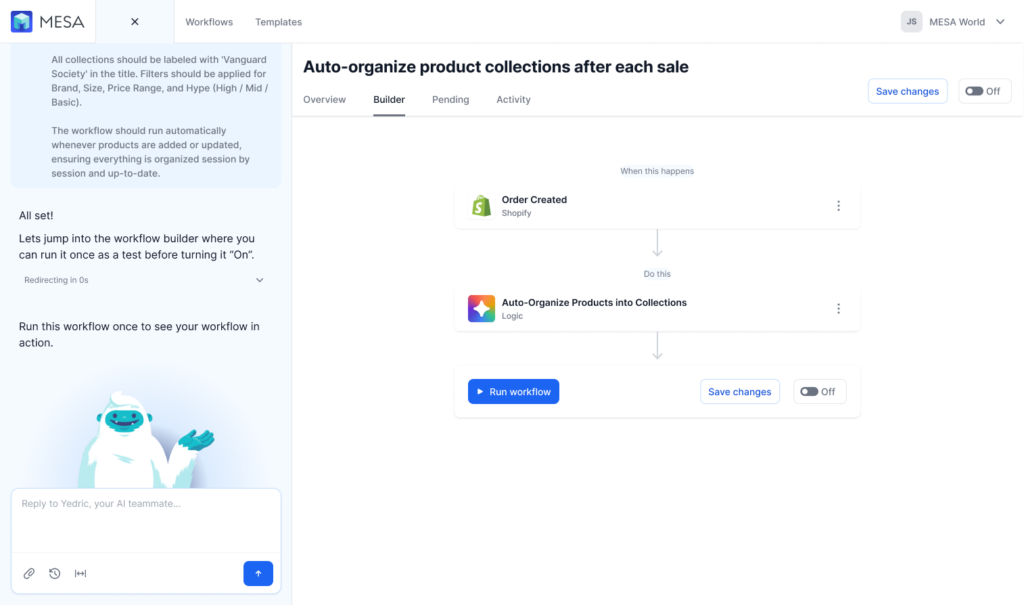
MESA's AI assistant works differently. Instead of configuring a workflow step by step, you describe what you want to accomplish in plain language, and it interprets your intent and builds the workflow for you.
For example: "When a customer places their second order, send them a Slack notification to our fulfillment team and tag the order as 'repeat buyer' in Shopify."
MESA's AI reads that, identifies the trigger (second order), the conditions, and the two resulting actions, and assembles the workflow — no manual step configuration required.
What separates this from Shopify Sidekick's workflow-building feature is scope. Sidekick builds Shopify Flow automations, which are native to the Shopify admin. MESA workflows connect Shopify to external apps, apply AI logic mid-workflow (like analyzing order content or classifying customer behavior), and can execute actions across your entire stack in a single automated sequence.
How Shopify merchants are using AI automation right now
The following use cases are drawn from real workflow patterns among MESA merchants. They're organized by operational area to make it easier to identify where AI automation might fit your store first.
Orders and fulfillment
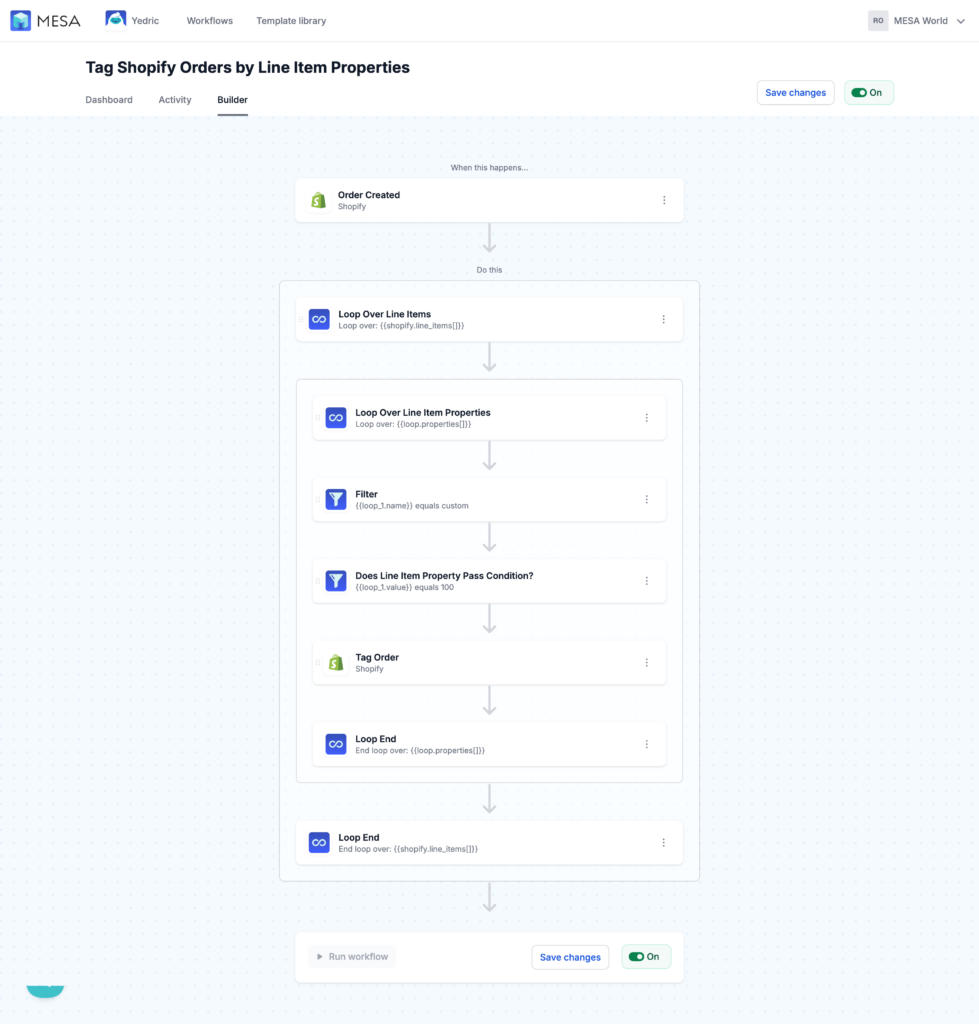
- Auto-tag orders by product type, sales channel, order value, or customer segment — so fulfillment teams can prioritize without manually reviewing every order
- Route high-value orders to a priority fulfillment queue and send a Slack alert to the warehouse team
- Flag potentially fraudulent orders based on conditions like mismatched billing/shipping addresses, unusual order quantities, or new accounts with high-value purchases
- Trigger 3PL notifications automatically when specific SKUs are included in an order
Inventory and operations
- Alert your buying team when a bestselling SKU drops below a reorder threshold
- Sync inventory data to Google Sheets for custom reporting or team visibility (Google Sheets is the top integration destination among MESA merchants)
- Update product availability across channels when stock hits zero — preventing oversells without manual intervention
- Generate purchase order drafts when inventory conditions are met, ready for human review
Customer experience
- Send post-purchase sequences based on what was ordered, not just that an order was placed — a customer who bought a coffee grinder can receive a different follow-up than one who bought decaf beans
- Escalate support tickets based on keywords, order value, or customer lifetime spend
- Trigger a win-back campaign in Klaviyo when a high-value customer hasn't ordered in 60 days
- Apply loyalty tags after a customer reaches a purchase milestone, which can then unlock Shopify discount codes or email sequences
Data and reporting
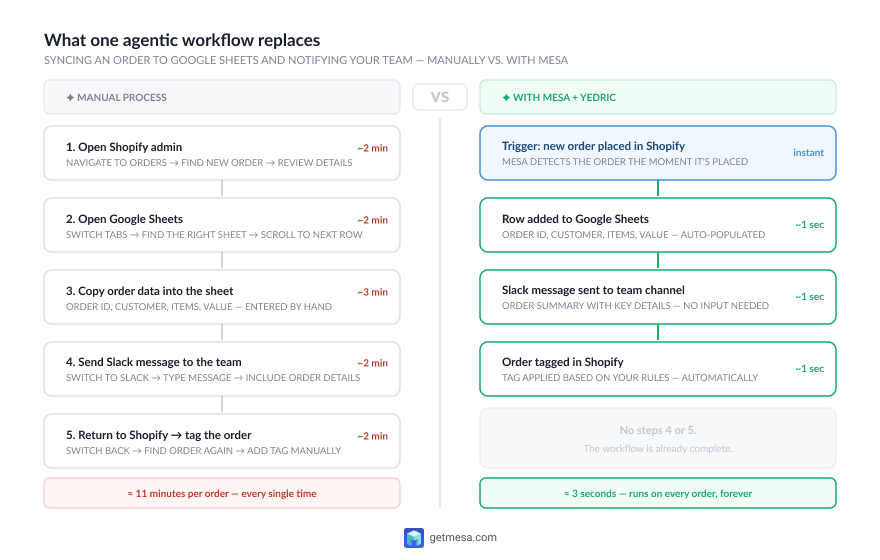
- Push daily order summaries to Slack — revenue, order count, top-selling SKU — without anyone pulling a report
- Sync Shopify data to Google Sheets on a schedule for custom dashboards, reforecasting, or team review
- Log order anomalies (sudden return spikes, unusual refund rates) to a tracking sheet and notify a team member
How MESA's AI is different from other AI assistants
A few things distinguish MESA's AI from other AI tools merchants might already be using:
It understands ecommerce context. MESA's AI is trained on Shopify data structures, ecommerce workflows, and MESA's integration library. When you describe a goal, it doesn't need you to explain what an order tag is or how Klaviyo lists work — it already knows.
It executes, not just suggests. Most AI tools produce output you then have to act on. The assistant produces a working workflow. You can review and adjust it, but the default result is something that runs.
It works across your entire stack. Unlike Sidekick (Shopify-only) or a general-purpose AI assistant (no store access), it operates across the full set of apps MESA integrates with. A workflow it builds can touch Shopify, Google Sheets, Slack, your email platform, and your 3PL in a single automated sequence.
How to get started: a practical first step
The merchants who see the most from AI automation usually start with one workflow, not a full operational overhaul. Here's a simple framework for identifying yours:
1. Find your highest-volume repetitive task. What does someone on your team do manually, every day or every week, because no tool does it automatically?
2. Check how many apps are involved. If the task lives entirely inside Shopify, Sidekick or Shopify Flow may be all you need. If it touches more than one app, you need an automation platform.
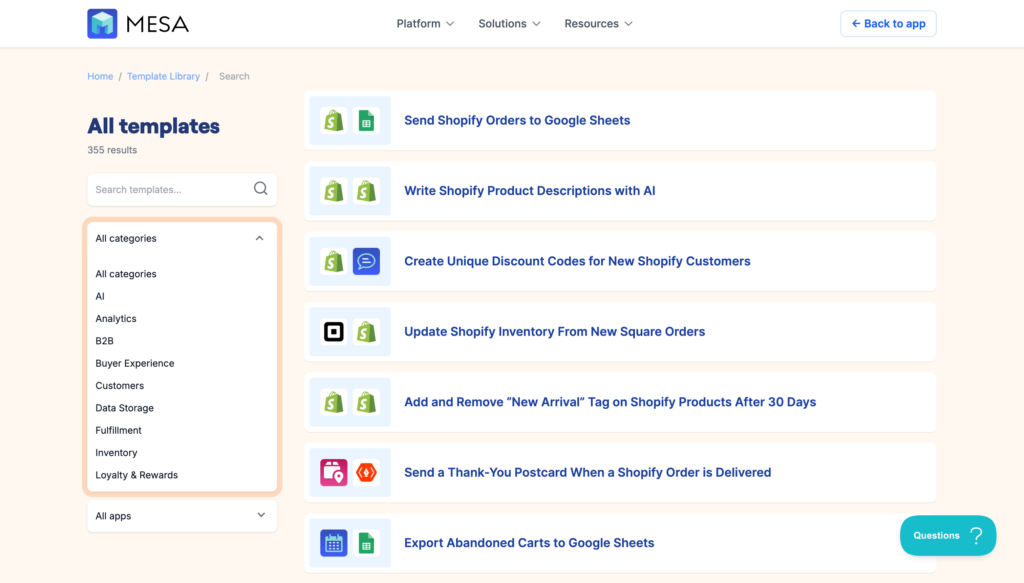
3. Start with a MESA template. The MESA template library includes pre-built workflows for the most common Shopify automation tasks. Most can be installed and running in under ten minutes.
4. Describe what you want to MESA's AI. If a template doesn't cover your specific case, describe your goal in plain language. It will build a custom workflow from your description.
5. Measure the time saved, then expand. Once one workflow is running cleanly, you'll have a clear view of where the next one should go.
Frequently asked questions
What is AI for ecommerce?
AI for ecommerce refers to artificial intelligence tools applied to automate, personalize, or optimize the operations of an online store. This includes generative AI for content creation, predictive AI for demand forecasting and recommendations, and agentic AI for automated workflow execution across multiple apps.
What AI tools do Shopify merchants use?
The most commonly used AI tools among Shopify merchants are Shopify Sidekick (built into the admin), Klaviyo AI (email and SMS optimization), Gorgias (customer support automation), and general-purpose tools like ChatGPT for content. For cross-platform workflow automation, merchants use MESA with its built-in AI assistant.
What is an AI ecommerce agent?
An AI ecommerce agent is software that takes action on behalf of a merchant based on store conditions, without manual input. Unlike a chatbot that responds to questions, an agent monitors data, makes decisions, and executes tasks. MESA's AI assistant is an example: it interprets a merchant's goal and builds the automation workflow to accomplish it.
How is MESA different from Shopify Flow?
Shopify Flow automates tasks within the Shopify admin — tagging orders, sending emails through Shopify, creating discount codes. MESA connects Shopify to external apps (Google Sheets, Slack, Klaviyo, ShipStation, and 100+ others) and can apply AI logic mid-workflow. They're complementary: Flow handles internal Shopify tasks; MESA handles the cross-platform work that Flow can't reach. See our full MESA vs. Shopify Flow comparison.
How is MESA different from Zapier or Make?
Zapier and Make are general-purpose automation platforms built for any industry. MESA is built specifically for Shopify merchants, which means it understands ecommerce data structures natively, and MESA's AI can interpret merchant intent without requiring technical configuration. For Shopify stores, that specificity translates to faster setup and fewer edge cases. See our full MESA vs. Zapier comparison and MESA vs. Make comparison.
Can small Shopify stores benefit from AI automation?
Yes. MESA's template library and AI assistant are designed specifically for merchants without technical teams. Gartner estimates that fewer than 1% of ecommerce businesses use agentic AI today — but 33% are projected to by 2028. The merchants who build these capabilities early will have a significant operational advantage as that shift accelerates.
Do I need to know how to code?
No. MESA workflows are built visually, and MESA's AI lets you describe what you want in plain language. No code is required for the vast majority of automation use cases.