Your customer support team just received a ticket asking about compliance requirements for a specific industry regulation you've never encountered. The customer needs an accurate answer fast, but researching unfamiliar topics while maintaining your usual response quality feels impossible with your current workload.
This scenario plays out daily across support teams worldwide. Complex tickets requiring specialized research often sit in queues longer than simple ones, creating bottlenecks that frustrate both customers and agents. Meanwhile, support representatives find themselves torn between providing quick responses and ensuring accuracy for questions outside their expertise.
The solution isn't hiring more researchers or extending response times. Smart support teams now use AI-powered research automation to handle complex tickets efficiently while maintaining the personalized touch customers expect. You can transform how your team tackles challenging inquiries by connecting your Help Scout workspace with research tools that work behind the scenes.
TL;DR: Skip the manual setup.
Get this workflow running in minutes with our pre-built template.
Step-by-step guide: How to turn complex Help Scout tickets into research-backed customer responses
Time needed: 10 minutes.
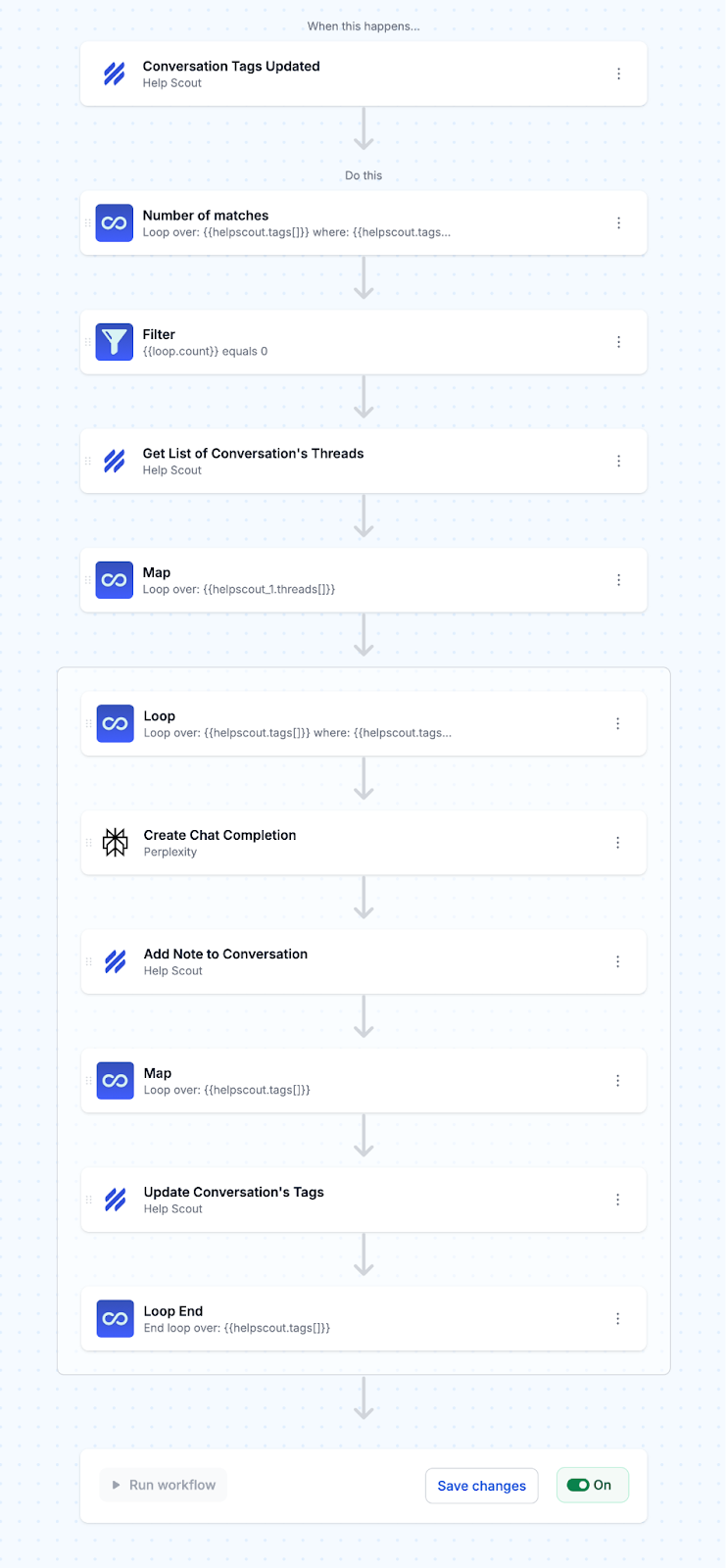
This workflow detects Help Scout tickets tagged as "research needed," sends them to Perplexity's AI research engine for comprehensive analysis, and adds detailed draft responses as notes in your tickets for agent review.
- Set up the Help Scout trigger
Configure MESA to monitor your Help Scout conversations for tag updates. The workflow triggers whenever conversation tags are modified, specifically watching for tickets tagged with "research needed."

- Filter for first-time processing
Add a filter to prevent duplicate research on the same ticket. The workflow checks if the ticket has an "updated by mesa" tag, ensuring research only runs once per ticket.

- Collect conversation context
Retrieve all conversation threads from the Help Scout ticket to provide complete context to the research AI.
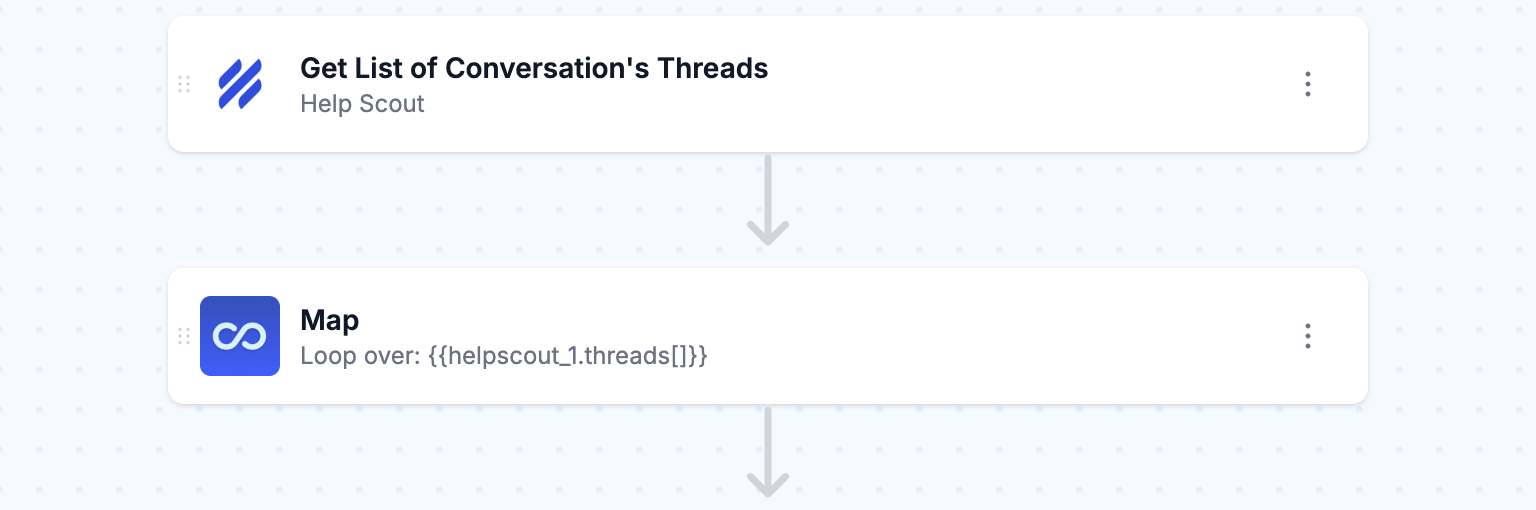
- Process research-tagged tickets
Loop through tickets tagged as "research needed" to handle multiple qualifying conversations simultaneously.

- Generate AI-powered research
Send the conversation context to Perplexity's AI research engine with a detailed prompt that instructs it to act as your research assistant. The AI searches current web sources for product specifications, troubleshooting protocols, competitive benchmarks, and industry standards, then formats findings into a structured draft response ready for agent review.

- Add research note to ticket
Automatically insert Perplexity's research findings as an internal note in the original Help Scout conversation. This provides your support agents with comprehensive background information, suggested solutions, and relevant sources without leaving their Help Scout interface.

- Update ticket tags
Add an "updated by mesa" tag to the ticket alongside existing tags. This prevents the workflow from reprocessing the same ticket while maintaining a clear audit trail of which conversations have AI research assistance.
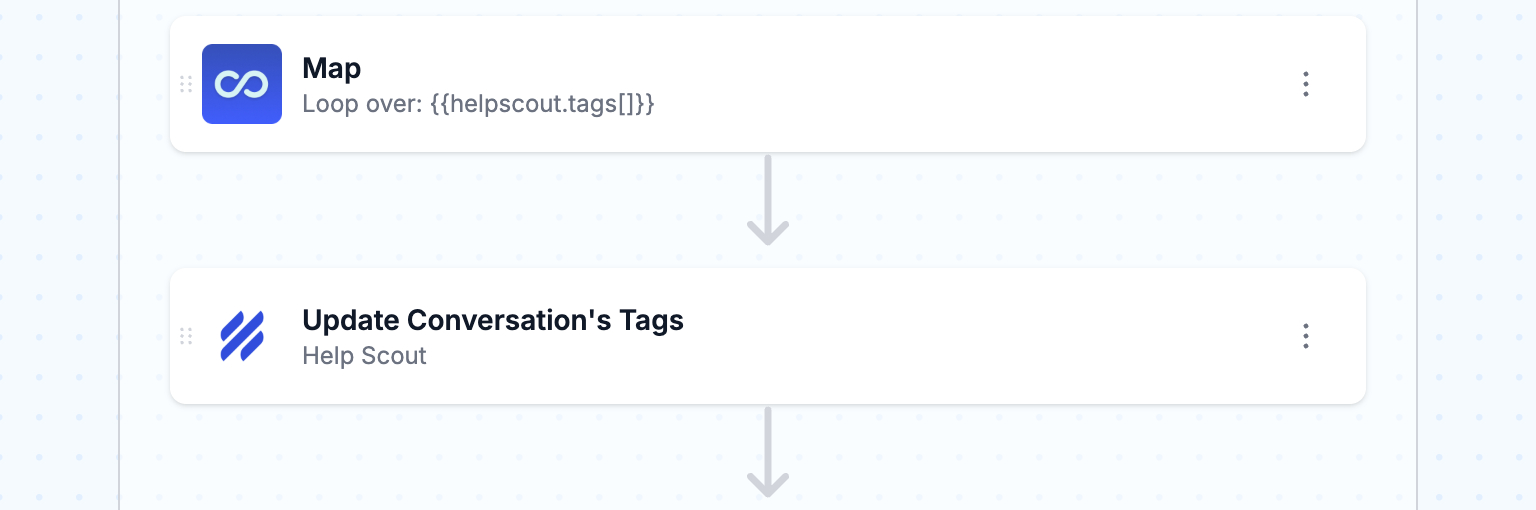
- Activate and test your workflow
Turn the workflow On in MESA and manually add the "research needed" tag to a test Help Scout conversation to verify everything works correctly. Check that the research note appears in your ticket and contains relevant, actionable information before letting it run automatically at scale.
Ready to supercharge your support team with AI research?
Grab the template and start automating complex ticket responses today.
Tips on maximizing research quality and response effectiveness
1. Create detailed research prompts that mirror your support team's expertise
Your automated research is only as good as the questions you ask. Instead of generic prompts like "research this customer question," craft specific instructions that capture how your best support agents would approach the problem. For example, if a customer asks about integration compatibility, your prompt should specify: "Research compatibility between [mentioned tools], focusing on common setup, required technical specifications, and any known limitations. Include recent updates or changes that might affect integration."
2. Use ticket tags and customer context to personalize research scope
Not every complex ticket needs the same depth of research. An enterprise customer asking about API limitations requires different information than a small business owner asking about basic features. Set up your automation to adjust research parameters based on customer tier, product usage, or ticket tags. This ensures your AI pulls relevant, appropriately detailed information that matches the customer's technical level and business needs.
Long threads are easier to research once they are condensed. See how to summarize Help Scout conversations with AI to give agents and the research step a quick overview first.
3. Structure research outputs to support response styles
Your support team likely has different agents with varying communication styles and expertise levels. Configure your research automation to organize findings into clear sections: quick summary for experienced agents, detailed technical information for complex responses, and suggested next steps or follow-up questions. This structure helps any team member craft an appropriate response quickly, regardless of their familiarity with the specific topic.
Related workflow templates:
Reasons to automate research for complex Help Scout tickets
Turn your support team into subject matter experts overnight
When customers ask technical questions outside your team's expertise, automated research gives your agents instant access to credible, up-to-date information. Your support reps can confidently handle complex queries about regulations, industry standards, or technical specifications without becoming experts themselves.
Maintain consistent response quality during staff turnover
Support teams face high turnover rates, and losing experienced agents means losing institutional knowledge. Automated research ensures new hires can deliver the same thorough, well-researched responses as seasoned veterans from day one. The research quality stays consistent regardless of who's handling the ticket.
Handle edge cases without escalation delays
Complex tickets often sit in queues waiting for senior agents or subject matter experts to review them. Automated research lets junior agents tackle unusual scenarios immediately, pulling relevant information from authoritative sources instead of waiting hours or days for internal expertise.
Personalize responses with customer-specific context
Generic FAQ responses feel robotic, but researching each customer's specific situation takes too long manually. Automated research can pull information tailored to the customer's industry, company size, or use case, making responses feel personally crafted even when they're systematically generated.
Convert recurring complex questions into knowledge base opportunities
When complex questions appear repeatedly, automated research identifies these patterns and documents the sources used. This creates a foundation for turning one-off research into permanent knowledge base articles, gradually reducing the need for manual research on similar future tickets.
If complex questions arrive through web forms, bring them into your queue automatically. Here is how to turn Google Form submissions into Help Scout conversations.
Frequently asked questions
How do you automate research for complex Help Scout tickets?
You automate research for complex Help Scout tickets by setting up a workflow that detects when tickets contain specific keywords or are tagged with "research needed," then automatically sends the ticket content to Perplexity AI for research. The AI searches relevant sources and returns comprehensive findings that get attached to the ticket or sent directly to your team. This eliminates the manual step of researching each complex inquiry while ensuring your responses are backed by current, accurate information.
What AI tools integrate with Help Scout for customer support research?
Perplexity AI is the most effective research tool that integrates with Help Scout through automation platforms like MESA. Unlike basic chatbots, Perplexity searches real-time web sources and academic databases to provide cited, factual responses. You can also integrate Claude or ChatGPT for analysis and response drafting, but Perplexity excels specifically at research tasks because it pulls from current sources and provides citations you can verify.
How to tag and route Help Scout tickets for automated research?
Create custom tags in Help Scout like "needs-research," "technical-inquiry," or "compliance-question" that trigger your automation workflow. Set up rules in Help Scout to automatically apply these tags based on keywords in the ticket content, or train your team to manually tag tickets that require deeper investigation. The automation then routes tagged tickets to your research workflow while standard tickets continue through normal support channels.
Can you automate fact-checking in customer support responses?
Yes, you can automate fact-checking by sending your drafted responses through Perplexity AI before they go to customers. The AI cross-references your response content against current sources and flags any potential inaccuracies or outdated information. This creates a verification layer that catches errors before they reach customers, especially valuable for regulated industries or technical products where accuracy is critical.
What's the best way to personalize automated research responses?
Pull customer data from your Help Scout ticket (like their plan type or previous interactions) and include this context when sending research requests to AI tools. The AI can then tailor its research and response suggestions to match the customer's specific situation. You can also set up different research workflows for different customer segments, so enterprise clients get more comprehensive research while basic plan users receive focused, practical answers.